1. Introduction
This manual provides instructions for the VINABTY replacement remote control, designed for use with SANSUI LED TV model ES24Z1. This remote control offers direct functionality without the need for programming, ensuring a straightforward user experience.
2. Product Overview
The VINABTY replacement remote control is a dedicated device for controlling your SANSUI LED TV ES24Z1. It features an ergonomic design for comfortable handling and clearly labeled buttons for intuitive operation.
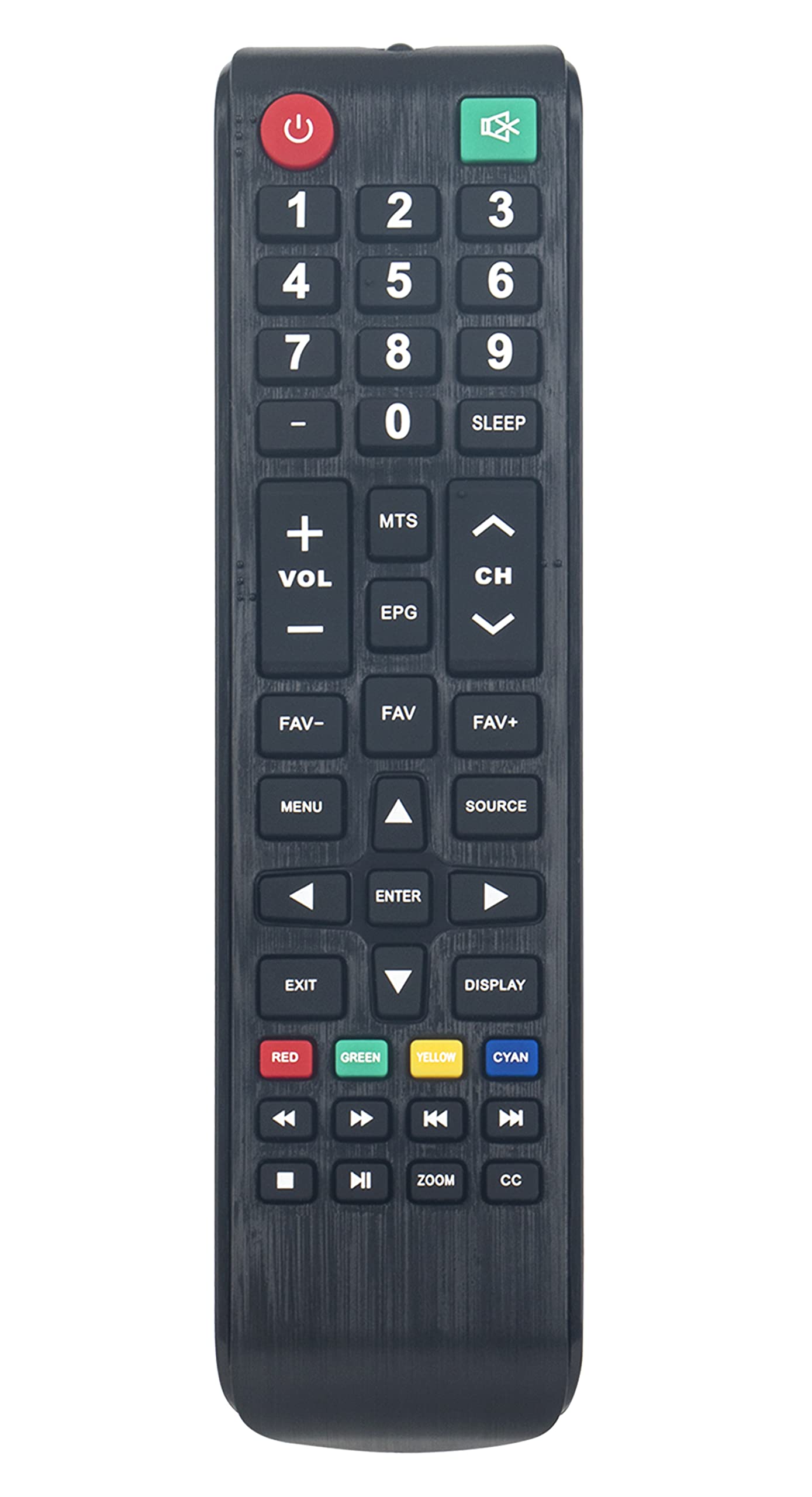
Image 2.1: Front view of the VINABTY remote control, highlighting its button layout.
3. Setup
3.1. Battery Installation
To begin using your remote control, you must install two AAA batteries. Follow these steps:
- Locate the battery compartment cover on the back of the remote control.
- Press down on the tab and slide the cover downwards to open the compartment.
- Insert two new AAA batteries, ensuring the positive (+) and negative (-) terminals align correctly with the markings inside the compartment.
- Slide the battery compartment cover back into place until it clicks securely.

Image 3.1: Back view of the remote control, indicating the battery compartment.
3.2. Initial Use
This remote control requires no programming. Once batteries are installed, it is ready for immediate use with your SANSUI LED TV ES24Z1. Point the remote control directly at your television and press the desired function button.
4. Operating Instructions
Familiarize yourself with the primary functions of the remote control:
- Power Button (⏻): Turns the TV on or off.
- Number Buttons (0-9): Directly select TV channels.
- VOL +/-: Adjusts the volume level.
- CH +/-: Changes the TV channel up or down.
- MUTE: Mutes or unmutes the TV audio.
- MENU: Accesses the TV's main menu.
- SOURCE: Selects input sources (e.g., HDMI, AV).
- EPG: Displays the Electronic Program Guide.
- SLEEP: Sets a timer for the TV to turn off automatically.
- Navigation Buttons (Up, Down, Left, Right, ENTER): Navigate through menus and confirm selections.
- EXIT: Exits the current menu or function.
- DISPLAY: Shows current channel information.
- Color Buttons (RED, GREEN, YELLOW, CYAN): Access specific functions within certain TV menus or applications, as indicated on your TV screen.
- Media Control Buttons (Play, Pause, Stop, Rewind, Fast Forward, Previous, Next): Control media playback if supported by your TV and content.
- ZOOM: Adjusts the screen zoom level.
- CC: Activates or deactivates Closed Captions.
5. Maintenance
5.1. Cleaning
To maintain the remote control's appearance and functionality, clean it regularly:
- Use a soft, dry cloth to wipe the surface.
- For stubborn dirt, slightly dampen the cloth with water or a mild, non-abrasive cleaner.
- Avoid using harsh chemicals, solvents, or abrasive materials, as these can damage the remote's finish or internal components.
5.2. Battery Replacement
Replace batteries when the remote control's response becomes sluggish or stops working. Always replace both batteries at the same time with new AAA batteries. Do not mix old and new batteries, or different types of batteries.
5.3. Storage
If the remote control will not be used for an extended period, remove the batteries to prevent leakage and potential damage to the device. Store the remote in a cool, dry place away from direct sunlight and extreme temperatures.
6. Troubleshooting
If you encounter issues with your remote control, refer to the following common solutions:
- Remote Not Responding:
- Check if the batteries are correctly installed with the correct polarity (+/-).
- Replace the batteries with new ones.
- Ensure there are no obstructions between the remote control and the TV's infrared sensor.
- Confirm you are pointing the remote directly at the TV.
- Buttons Not Working:
- Clean the remote control surface and buttons to remove any dirt or debris that might be obstructing button presses.
- If only specific buttons are not working, it might indicate internal damage; consider replacing the remote.
- TV Not Responding to All Commands:
- Verify that the remote control is indeed compatible with your specific SANSUI LED TV model ES24Z1.
- Some advanced TV functions might require the original TV remote or specific TV menu navigation.
7. Specifications
| Brand | VINABTY |
| Model Number | ES24Z1 |
| Compatible Devices | SANSUI LED TV ES24Z1 |
| Connectivity Technology | Infrared (IR) |
| Power Source | 2 x AAA Batteries (not included) |
| Product Dimensions | 7.5 x 2 x 0.7 inches |
| Item Weight | 2.3 ounces |
| Special Feature | Ergonomic |
8. Warranty and Support
For information regarding warranty coverage or technical support, please refer to the documentation provided with your purchase or contact the retailer. Keep your purchase receipt as proof of purchase.
