1. Introduction
Thank you for choosing the MINISFORUM EliteMini TH80 Mini PC. This compact desktop computer is designed for various applications, from business and education to multimedia and everyday use. Featuring an 11th Gen Intel Core i7-11800H processor, 32GB RAM, and a 512GB NVMe SSD, it offers robust performance in a small form factor. This manual provides essential information for setting up, operating, maintaining, and troubleshooting your device.

Figure 1: MINISFORUM EliteMini TH80 Mini PC key features overview.
2. Safety Information
- Always use the provided power adapter. Using an incompatible adapter may damage the device and void the warranty.
- Do not expose the device to water, moisture, or extreme temperatures.
- Avoid dropping or subjecting the device to severe impacts.
- Do not attempt to open or repair the device yourself. Refer to qualified service personnel.
- Ensure proper ventilation around the device to prevent overheating.
3. Package Contents
Verify that all items are present in the package:
- 1x MINISFORUM TH80 Mini PC
- 1x HDMI Cable
- 1x US Power Adapter
- 1x VESA Bracket
- 1x User Manual
4. Product Overview
4.1 External Ports and Connectors
The MINISFORUM EliteMini TH80 features a variety of ports for connectivity. Familiarize yourself with the port layout for proper setup.
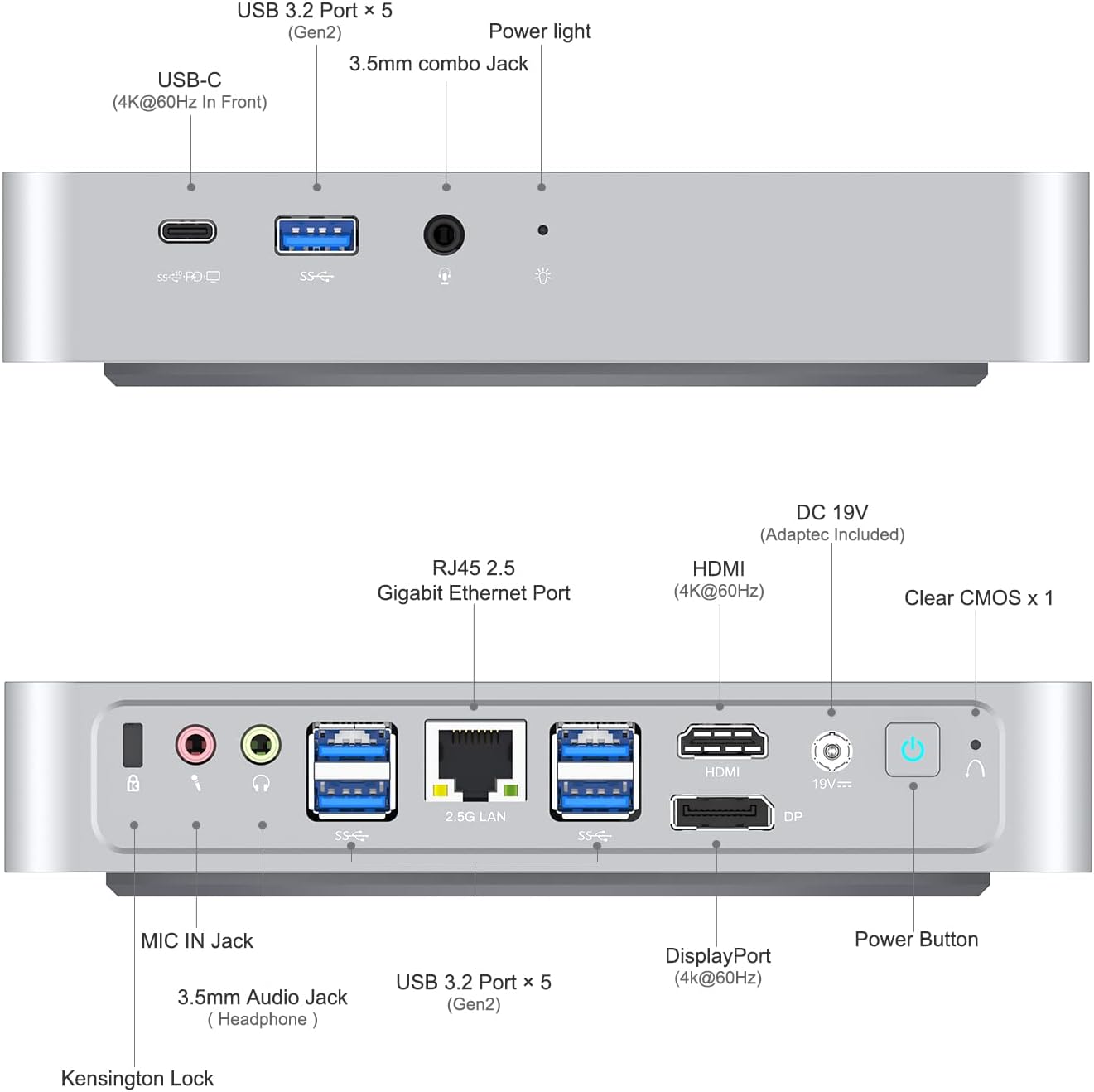
Figure 2: Front and Rear Port Layout.
- Front Ports: USB 3.2 Gen2 Type-A (x5), USB-C (4K@60Hz), 3.5mm Combo Jack, Power Light.
- Rear Ports: HDMI (4K@60Hz), DisplayPort (4K@60Hz), RJ45 2.5G Ethernet Port, 3.5mm MIC Jack, 3.5mm Headphone Jack, MIC IN Jack, Clear CMOS button, DC 19V Power Input, Power Button, Kensington Lock.
4.2 Internal Components (Upgradeability)
The TH80 Mini PC allows for memory and storage upgrades. It comes with 32GB DDR4 RAM (16GBx2) and a 512GB M.2 2280 NVMe PCIe3.0 SSD. It supports up to 64GB RAM and additional storage.
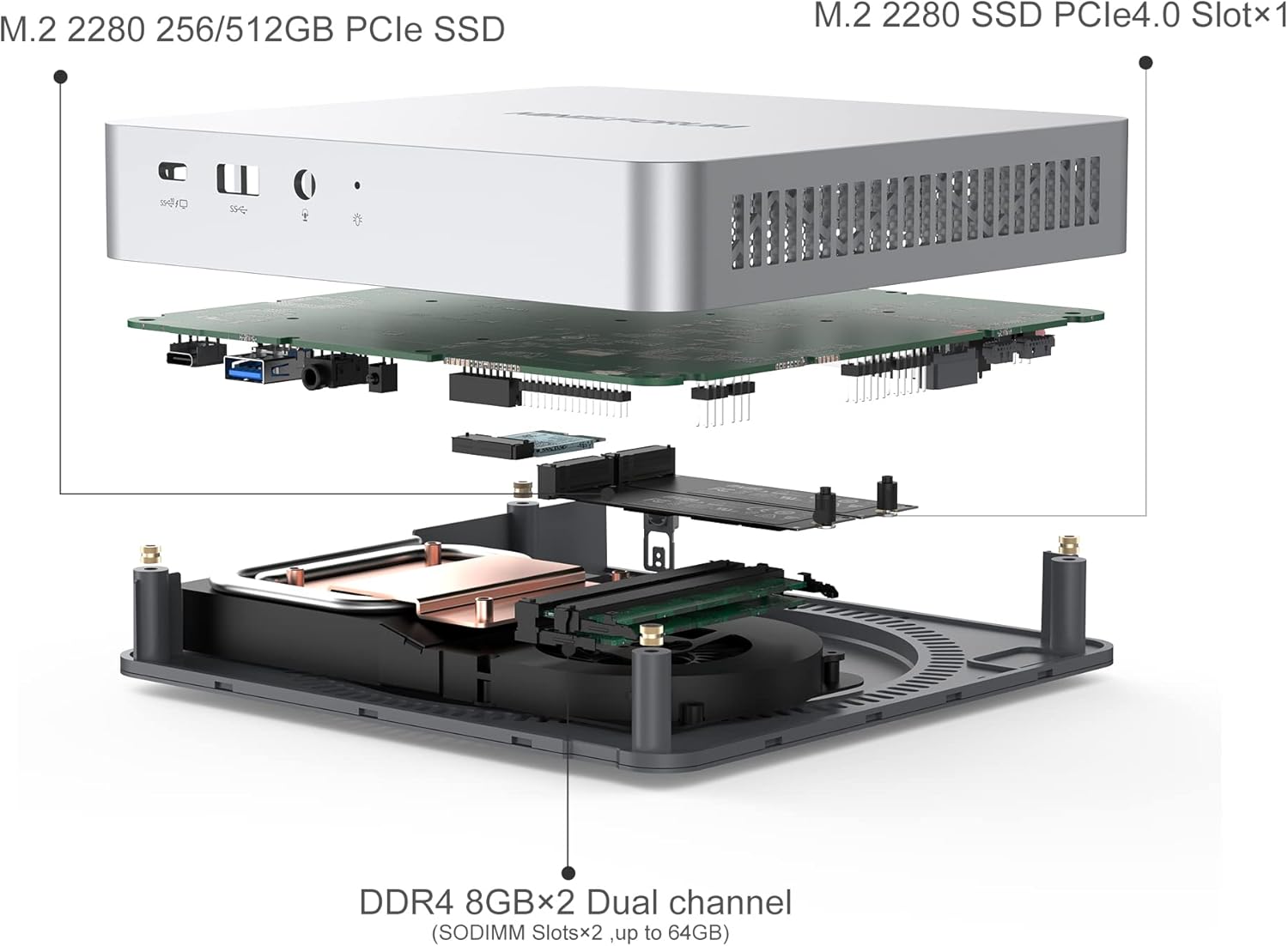
Figure 3: Internal Component Layout for Upgrades.
- RAM: Two SODIMM slots, supporting up to 64GB DDR4 RAM.
- Storage: One M.2 2280 PCIe3.0 SSD slot (512GB pre-installed, upgradable to 2TB) and one M.2 2280 NVMe PCIe4.0 SSD slot (upgradable to 2TB).
5. Setup
5.1 Connecting Peripherals
- Connect your monitor(s) to the HDMI, DisplayPort, or USB-C video outputs. The device supports up to three 4K@60Hz displays simultaneously.
- Connect your keyboard and mouse to the available USB 3.2 Type-A ports.
- For wired network access, connect an Ethernet cable to the 2.5G RJ45 port.
- If using external speakers or a microphone, connect them to the respective 3.5mm audio jacks.
5.2 Powering On
- Connect the provided DC 19V power adapter to the power input port on the rear of the Mini PC.
- Plug the power adapter into a wall outlet.
- Press the Power Button on the rear of the device to turn it on. The power light will illuminate.
5.3 VESA Mounting
The included VESA bracket allows you to mount the Mini PC to the back of a compatible monitor or to a wall, saving desk space.

Figure 4: VESA Mounting Bracket Installation.
- Attach the VESA bracket to the Mini PC using the provided screws.
- Secure the Mini PC with the attached bracket to the VESA mounting holes on your monitor or wall.
6. Operating Instructions
6.1 Initial Boot and Windows 11 Pro Setup
Upon first power-on, the system will guide you through the initial setup of Windows 11 Pro. Follow the on-screen prompts to configure your language, region, network, and user account.
6.2 Multi-Monitor Configuration
The TH80 supports connecting up to three displays simultaneously via HDMI, DisplayPort, and USB-C. To configure multiple monitors:
- Connect all desired monitors to the Mini PC.
- Right-click on the desktop and select "Display settings."
- In the Display settings, you can detect, arrange, and extend or duplicate your displays.

Figure 5: Triple Screen 4K Output Configuration.
Note: When connecting a second or third monitor via an adapter, ensure the adapter is an active version for optimal performance.
6.3 Network Connectivity
The Mini PC supports both wired (2.5G RJ45 Ethernet) and wireless (Dual-Band Wi-Fi) network connections.

Figure 6: 2.5Gbps Ethernet Port Performance.
- Wired: Connect an Ethernet cable to the RJ45 port. The system will automatically detect the connection.
- Wireless: Access Wi-Fi settings in Windows 11 to connect to your preferred wireless network.
7. Maintenance
- Cleaning: Use a soft, dry cloth to clean the exterior of the Mini PC. Do not use liquid cleaners or aerosols.
- Ventilation: Ensure that the ventilation openings are not blocked to maintain proper airflow and prevent overheating.
- Software Updates: Regularly update your Windows operating system and drivers to ensure optimal performance and security.
8. Troubleshooting
- System Crash/Unresponsive: If the operating system crashes or becomes unresponsive, do not unplug the power adapter directly. Instead, press the "Clear CMOS" button (located on the rear panel) for 30 seconds. The device will restart automatically.
- No Display: Ensure all display cables are securely connected and that the monitor is powered on and set to the correct input source. If using an adapter for a second/third monitor, confirm it is an active adapter.
- No Power: Verify that the power adapter is correctly connected to both the Mini PC and a working power outlet.
- Network Issues: For wired connections, check the Ethernet cable and router. For Wi-Fi, ensure the Wi-Fi adapter is enabled and you are connected to the correct network with the correct password.
9. Specifications
| Feature | Specification |
|---|---|
| Product Model | TH80 |
| Operating System | Windows 11 Pro |
| Processor | Intel Core i7-11800H (8 Cores/16 Threads, up to 4.6GHz) |
| Processor Graphics | Intel UHD Graphics for 11th Gen Intel Processors (1.45GHz) |
| RAM | 32GB DDR4 (2xSODIMM slots, upgradable to 64GB) |
| Storage | 512GB M.2 2280 PCIe3.0 SSD (upgradable to 2TB) 1x M.2 2280 NVMe PCIe4.0 SSD Slot (upgradable to 2TB) |
| Ethernet | 2.5G RJ45 LAN |
| Wireless Connectivity | M.2 2230 Wi-Fi Support (Dual-Band Wi-Fi, Bluetooth) |
| Video Outputs | 1x HDMI Port (4K@60Hz) 1x DisplayPort (4K@60Hz) 1x USB-C Port (4K@60Hz) |
| USB Ports | 5x USB 3.2 Gen2 Type-A Ports 1x USB-C Port |
| Audio Ports | 1x 3.5mm MIC Jack 1x Headphone Jack 1x MIC IN Jack |
| Other Ports | 1x Clear CMOS Button |
| Power Input | DC 19V |
| Dimensions | 7.87 x 7.87 x 4.72 inches (Package) |
| Weight | 3.69 pounds |
10. Warranty and Support
MINISFORUM products typically come with a standard manufacturer's warranty. Please refer to the warranty card included in your package or visit the official MINISFORUM website for detailed warranty terms and conditions.
For technical support, troubleshooting assistance, or service inquiries, please contact MINISFORUM customer support through their official website or the contact information provided with your purchase.
Official Website: www.minisforum.com (Please check for the most current contact information)


