
Product Overview
The DELLA 8000 BTU Smart Window Air Conditioner is designed to provide efficient and quiet cooling for your living space. Featuring Wi-Fi connectivity, it allows for convenient control via a smartphone app, remote, or the intuitive on-unit display. This Energy Star certified unit is ideal for cooling rooms approximately 300-350 square feet.

Front view of the DELLA 8000 BTU Smart Window Air Conditioner, showcasing its compact design, digital display, and the included remote control and smartphone app interface for convenient operation.
Key Features:
- High Performance: 8000 BTU cooling capacity, 690W, 115V/60Hz, Energy Star rated with 11.5 EER, suitable for 300-350 sq. ft.
- Silent Operation: Fan speeds ranging from 53 dB(A) to 58 dB(A) for quiet cooling.
- Smart Control: Wi-Fi enabled for control via the DELLA application on iOS or Android devices.
- Multiple Settings: Variable temperature (61℉-88℉), Sleep Mode, Fan Speed selection, 24-hour Timer, ECO Mode, Automatic Mode, and Fan-only mode.
- Easy Maintenance: Washable and reusable air filter for optimal performance.
- Simple Installation: Compact size (18.58 x 15.59 x 13.31 inches) and lightweight (45.4 lbs) with included installation kit for windows 23-36 inches wide and minimum 14.5 inches high.
Important Safety Information
Please read all safety instructions carefully before operating your air conditioner to prevent injury or damage. Keep this manual for future reference.
- Always plug the unit into a grounded 3-prong outlet. Do not remove the grounding prong.
- Do not use an adapter or extension cord.
- Ensure the power cord is not pinched or damaged.
- Do not operate the air conditioner with a damaged power cord or plug.
- Unplug the unit before cleaning or servicing.
- Do not block air vents.
- Keep flammable materials away from the unit.
- This appliance is not intended for use by persons (including children) with reduced physical, sensory or mental capabilities, or lack of experience and knowledge, unless they have been given supervision or instruction concerning use of the appliance by a person responsible for their safety.
Installation Guide
The DELLA 8000 BTU Smart Window Air Conditioner is designed for easy installation in standard double-hung windows. Ensure your window meets the following requirements:
- Window Width: 23 to 36 inches (58.4 to 91.4 cm)
- Minimum Window Opening Height: 14.5 inches (36.8 cm)

This diagram illustrates the recommended window dimensions for installation: suitable for windows 23 to 36 inches wide with a minimum height of 14.5 inches. Product dimensions are also shown: 18.58 inches depth, 15.59 inches width, and 13.31 inches height.
Installation Kit Contents:
The air conditioner comes with a complete installation kit to facilitate setup and ensure a secure fit, minimizing air leaks and noise.

The complete installation kit includes all necessary components for easy assembly and effective reduction of air leaks and outside noise: Filler Panels, Insulation Strips, Lock Frame & Sash Lock, Screws, Window Sash Seal, and Top Mounting Rail.
Basic Installation Steps:
- Prepare the window by cleaning the sill and frame.
- Attach the top mounting rail to the air conditioner.
- Place the unit into the window opening, ensuring it is securely seated on the window sill.
- Extend the side filler panels to fill the window opening.
- Secure the unit and filler panels using the provided screws and sash lock.
- Apply the window sash seal to prevent air leakage.
- Plug the unit into a grounded electrical outlet.
For detailed step-by-step instructions, refer to the full user manual PDF available for download.
Operating Your Air Conditioner
Control Panel and Remote:
The air conditioner can be operated using the control panel on the unit or the included remote control. The LED digital display shows the current temperature and settings.

A detailed diagram of the air conditioner's intuitive control panel, showing buttons for temperature adjustment, fan speed selection (High, Med, Low, Auto), operating modes (Cool, Dry, Fan, Auto), Sleep mode, 24-hour Timer, and a Filter reminder.
- POWER Button: Turns the unit ON or OFF.
- MODE Button: Cycles through operating modes: Cool, Dry, Fan, Auto.
- FAN SPEED Button: Adjusts fan speed: High, Medium, Low, Auto Speed.
- Temperature Control Buttons (▲/▼): Adjusts desired temperature (61℉-88℉).
- TIMER Button: Sets the 24-hour ON/OFF timer.
- SLEEP Button: Activates Sleep Mode, which adjusts temperature and fan speed for quiet operation.
- ECO Button: Activates ECO mode for energy-saving operation.
- FILTER Button: Indicates when the air filter needs cleaning.
Operating Modes:
- Cool Mode: Provides cooling to the set temperature.
- Dry Mode: Dehumidifies the room without significant cooling.
- Fan Mode: Circulates air without cooling.
- Auto Mode: Automatically selects cooling or fan-only operation based on room temperature.
- Sleep Mode: Gradually increases the set temperature and reduces fan speed for quiet, comfortable sleep.
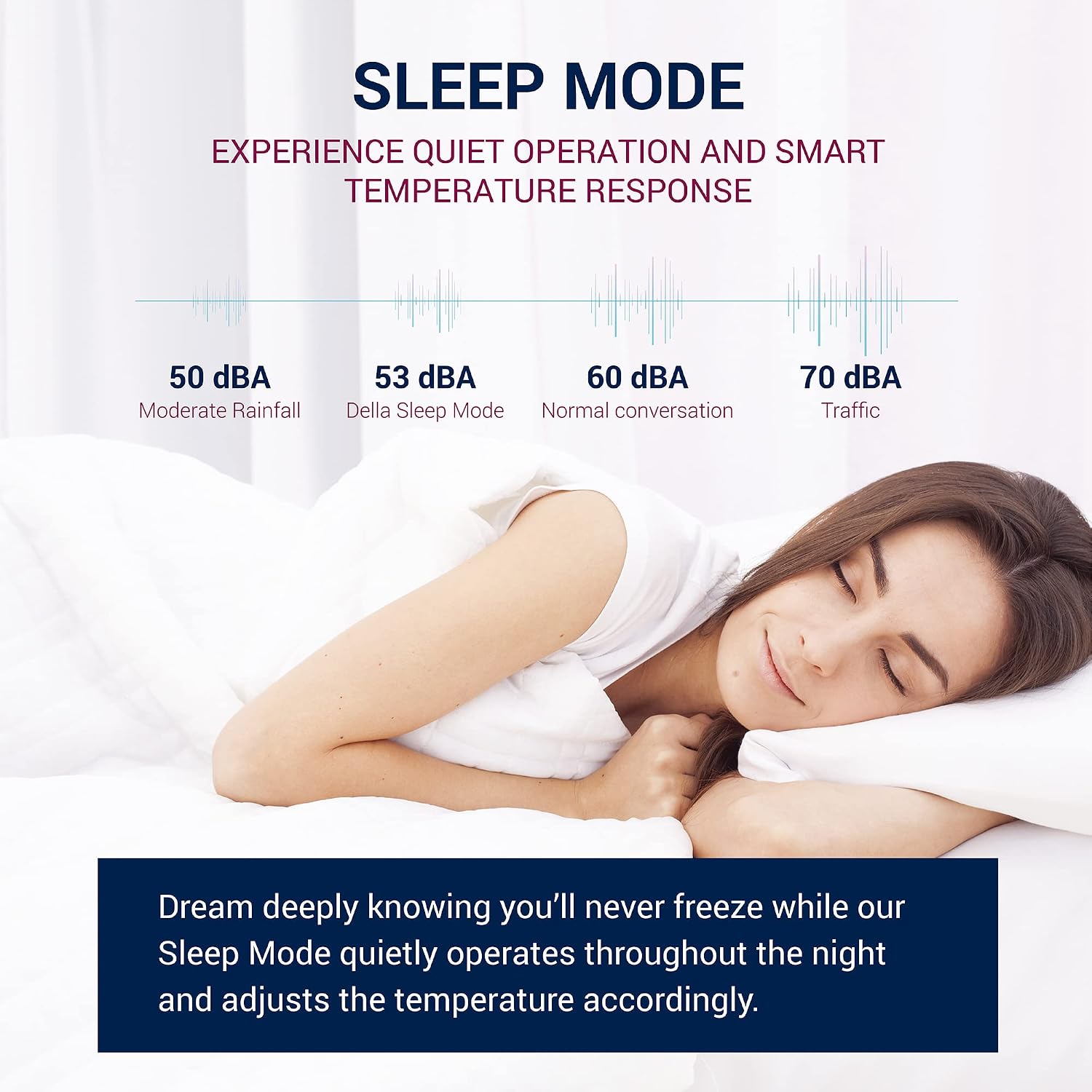
The Sleep Mode provides quiet operation and smart temperature response, gradually adjusting the temperature throughout the night to ensure comfortable sleep without excessive noise. The graphic compares its 53 dBA noise level to moderate rainfall and normal conversation.
Smart Features (Wi-Fi & App Control):
The DELLA Smart Window Air Conditioner is equipped with Wi-Fi connectivity, allowing you to control it remotely using the DELLA+ app on your smartphone or tablet.

The DELLA air conditioner is Wi-Fi enabled, allowing control from anywhere using the free DELLA+ application available for iOS and Android devices. This image shows a user interacting with the app.
- App Download: Download the free DELLA+ app from the App Store (iOS) or Google Play Store (Android).
- Pairing: Follow the in-app instructions to pair your air conditioner with your Wi-Fi network.
- Remote Control: Adjust temperature, change modes, set fan speed, and manage timers from anywhere with an internet connection.
- Smart Location (Geo-fencing): Utilize the geo-fencing feature to automatically turn the AC ON when you are approaching home and OFF when you leave, saving energy and ensuring comfort upon arrival.

The Smart Location feature utilizes geo-fencing technology to automatically turn the air conditioner ON as you approach home and OFF when you leave, optimizing energy usage and comfort.
Maintenance and Care
Regular maintenance ensures optimal performance and extends the lifespan of your air conditioner.
Air Filter Cleaning:
The air filter should be cleaned regularly, typically every two weeks or when the 'Filter' indicator light illuminates, to maintain cooling efficiency and air quality.

The air conditioner features convenient and durable reusable filters that can be easily removed, washed with warm water and dish soap, or vacuumed, and reinstalled for optimal performance and cleaner air.
- Turn off and unplug the air conditioner.
- Open the front panel and carefully slide out the air filter.
- Clean the filter using warm water and mild dish soap, or vacuum it to remove dust and debris.
- Rinse thoroughly and allow the filter to air dry completely before reinserting.
- Once the filter is reinstalled, plug in the unit and press the 'Filter' button to reset the indicator.
General Cleaning:
- Wipe the exterior of the unit with a soft, damp cloth. Do not use harsh chemicals or abrasive cleaners.
- Ensure the drainage area is clear of obstructions.
- For long-term storage, clean the unit thoroughly, allow it to dry, and cover it to protect from dust.
Troubleshooting Guide
Before contacting customer support, please refer to the following table for common issues and their solutions.
| Problem | Possible Cause | Solution |
|---|---|---|
| Air conditioner does not turn on. | No power supply; Power cord not plugged in; Circuit breaker tripped. | Check power connection; Ensure outlet is functional; Reset circuit breaker. |
| Unit blows warm air. | Air filter is dirty; Temperature setting is too high; Room size exceeds capacity. | Clean air filter; Lower temperature setting; Ensure unit is appropriate for room size. |
| Unit is noisy. | Loose installation; Fan obstruction; Normal operating sounds. | Check installation for secure fit; Remove any obstructions; Some noise is normal during operation. |
| Water dripping outside. | Normal condensation. | This is normal during high humidity operation. Ensure proper drainage. |
| Remote control not working. | Batteries are dead; Obstruction between remote and unit; Remote sensor is dirty. | Replace batteries; Remove obstructions; Clean remote sensor. |
| Wi-Fi connection issues. | Incorrect Wi-Fi password; Router too far; App not updated. | Verify Wi-Fi password; Move unit closer to router or use extender; Update DELLA+ app. |
Product Specifications
Detailed technical specifications for the DELLA 8000 BTU Smart Window Air Conditioner.
| Specification | Value |
|---|---|
| Manufacturer | Della |
| Model Number | 048-TL-WAC8K32 |
| Cooling Power | 8000 British Thermal Units (BTU) |
| Item Weight | 45.4 pounds |
| Product Dimensions (D x W x H) | 15.59 x 18.58 x 13.31 inches |
| Color | White |
| Power Source | Corded Electric |
| Voltage | 115 Volts |
| Wattage | 690 watts |
| Installation Method | Window |
| Sound Level | 56 dB (average) |
| Special Features | WiFi Enabled |
| Included Components | Window Air Conditioner, Installation Kit |
| Energy Efficiency Ratio (EER) | 11.5 |
| BEE Star Rating | Yes (Energy Star Certified) |
| Recommended Cooling Area | 300-350 Square Feet |

The official EnergyGuide label for the DELLA 8000 BTU Window Air Conditioner, indicating an estimated yearly energy cost of $68 and a Combined Energy Efficiency Ratio (CEER) of 11.4, highlighting its energy efficiency.

A guide to choosing the appropriate BTU rating based on room size. For example, an 8,000 BTU unit is recommended for areas up to 350 square feet, while larger units are suitable for up to 700 square feet.

Factors to consider when calculating your room's final BTU requirements, including location (hot climate), sunlight exposure, heat-generating appliances, ceiling height, insulation quality, and the number of occupants.
Warranty and Customer Support
For warranty information and customer support, please refer to the documentation included with your product or visit the Della official website. You can also find a detailed User Manual (PDF) for this product via the following link: DELLA 8000 BTU Smart Window Air Conditioner User Manual PDF.
If you encounter issues not covered in this manual or require further assistance, please contact Della customer support through their official channels.


