
Hasselblad X2D 100C
Hasselblad X2D 100C 100MP Medium Format Mirrorless Camera User Manual
Model: X2D 100C
Introduction
Welcome to the user manual for your Hasselblad X2D 100C Medium Format Mirrorless Camera. This document provides essential information for setting up, operating, maintaining, and troubleshooting your camera. The X2D 100C is engineered for professional photographers, featuring a 100MP BSI CMOS sensor, 5-axis in-body image stabilization (IBIS), and a 1TB built-in SSD, delivering exceptional image quality and performance. Please read this manual thoroughly to ensure optimal use and longevity of your camera.
Setup
1. Unboxing and Initial Inspection
Upon opening the package, verify that all components are present and undamaged. The standard package typically includes:
- Hasselblad X2D 100C Camera Body
- Battery
- Battery Charger
- USB-C Cable
- Shoulder Strap
- Lens (if purchased as a kit)

Figure 1: Front view of the Hasselblad X2D 100C camera body, showcasing the lens mount and grip.
2. Battery Installation and Charging
- Locate the battery compartment on the bottom of the camera.
- Insert the battery, ensuring the contacts align correctly, until it clicks into place.
- To charge, connect the battery charger to a power outlet and insert the battery. The charging indicator light will show the charging status. A full charge is recommended before first use.
3. Memory Storage
The X2D 100C features a 1TB built-in SSD for internal storage. For additional storage or faster transfer, the camera also supports CFexpress Type B cards.
- Built-in SSD: The camera's internal 1TB SSD is ready for immediate use.
- CFexpress Card: To install a CFexpress Type B card, open the card slot cover, insert the card with the label facing the correct direction until it clicks. Close the cover securely.
4. Lens Attachment
To attach a Hasselblad XCD lens:
- Remove the body cap from the camera and the rear cap from the lens.
- Align the white dot on the lens with the white dot on the camera's lens mount.
- Gently insert the lens into the mount and rotate it clockwise until it locks into place with a click.
To detach, press the lens release button on the camera body and rotate the lens counter-clockwise until it detaches.
5. Initial Power On and Basic Settings
Press the power button to turn on the camera. The first time you power on, you will be guided through initial setup steps:
- Language Selection: Choose your preferred language.
- Date and Time: Set the current date and time.
- Time Zone: Select your local time zone.
Operating the Camera
1. Controls Overview
The Hasselblad X2D 100C features intuitive controls designed for efficient operation.

Figure 2: Rear view of the Hasselblad X2D 100C, showing the main display, electronic viewfinder, and control buttons.
- Main Display: A large, high-resolution touchscreen for menu navigation, live view, and image playback.
- Electronic Viewfinder (EVF): Provides a clear view of your scene with real-time exposure information.
- Top Display: A small monochrome display on the top plate shows key shooting parameters at a glance.
- Control Dials: Located on the front and rear for adjusting exposure settings like aperture, shutter speed, and ISO.
- Function Buttons: Customizable buttons for quick access to frequently used features.
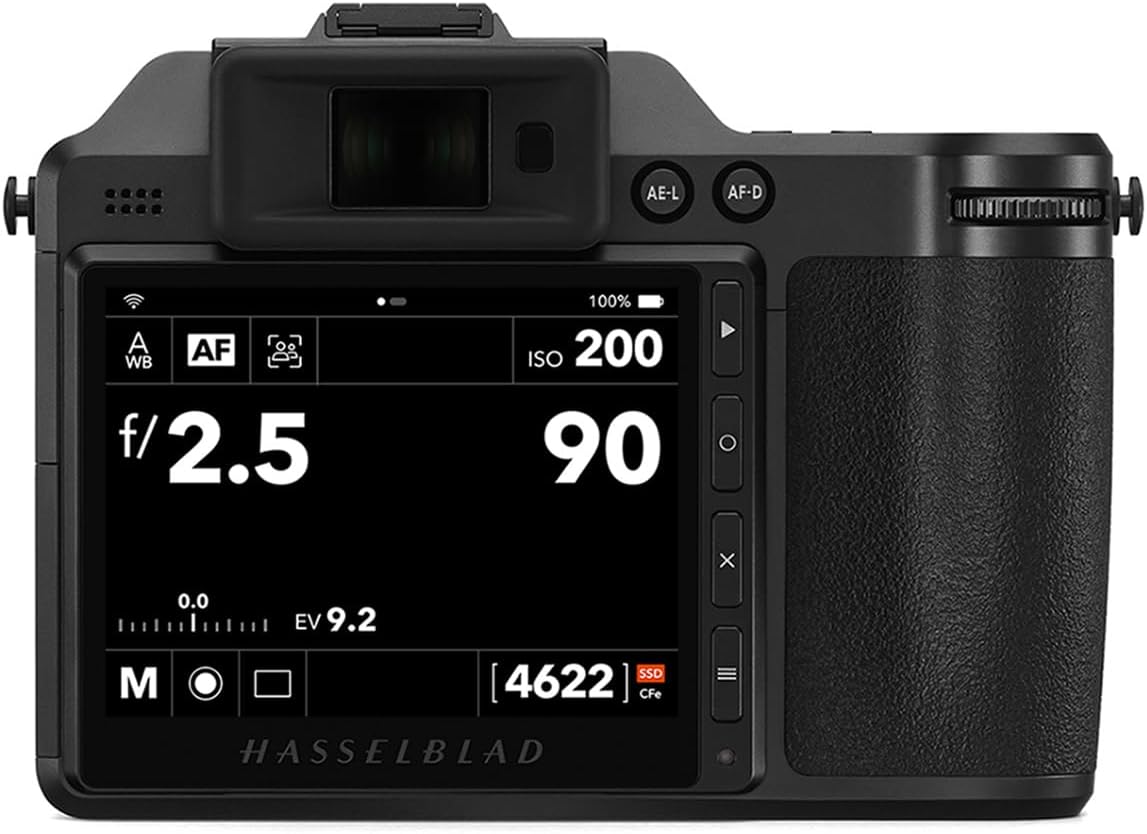
Figure 3: Rear display of the Hasselblad X2D 100C showing typical shooting information, including ISO, aperture, and remaining shots.
2. Basic Photography Modes
- Exposure Modes:
- Manual (M): Full control over aperture and shutter speed.
- Aperture Priority (A): Set aperture, camera selects shutter speed.
- Shutter Priority (S): Set shutter speed, camera selects aperture.
- Program (P): Camera sets both aperture and shutter speed for balanced exposure.
- Focusing: The camera utilizes Phase Detection Autofocus (PDAF) for fast and accurate focusing. Select your desired AF mode (Single-shot AF, Continuous AF) and AF area mode via the menu.
- Metering: The default metering mode is Evaluative, which assesses the entire scene for balanced exposure. Other modes like Spot and Center-weighted are available in the menu.
- ISO Sensitivity: Adjust ISO to control the camera's sensitivity to light. The expanded ISO minimum is 100, providing excellent low-noise performance.
- Image Stabilization: The 5-Axis 7-Stop In-Body Image Stabilisation (IBIS) system effectively compensates for camera shake, allowing for sharper images, especially in low light or with longer shutter speeds.

Figure 4: Live view on the Hasselblad X2D 100C display, demonstrating focus point selection and composition.
3. Advanced Features
- 100MP Medium Format BSI CMOS Sensor: This high-resolution sensor captures incredible detail and color depth, ideal for large prints and demanding professional work.
- 15-Stop Dynamic Range: The wide dynamic range allows the camera to capture detail in both highlights and shadows, providing greater flexibility in post-processing.
- RAW File Format: For maximum image quality and post-processing flexibility, shoot in RAW format. The camera also supports JPEG for immediate use.
- Aspect Ratio: The native aspect ratio is 3:2, providing a classic photographic composition.
4. Image Playback and Review
To review your captured images, press the Playback button. You can navigate through images using the control dials or by swiping on the touchscreen. Pinch-to-zoom allows for detailed inspection of images.
Maintenance
1. Cleaning the Camera and Lens
- Camera Body: Use a soft, lint-free cloth to wipe the camera body. For stubborn dirt, a slightly dampened cloth can be used, but avoid excessive moisture.
- Lens Elements: Use a lens blower to remove dust, followed by a soft lens brush. For smudges, use a specialized lens cleaning solution and a microfiber cloth.
- Sensor: Sensor cleaning should be performed with extreme care. If dust spots appear on your images, use a sensor blower. For persistent dust, it is recommended to have the sensor professionally cleaned by an authorized service center.
2. Battery Care
- Store batteries in a cool, dry place when not in use.
- Avoid fully discharging batteries regularly, as this can reduce their lifespan.
- Do not expose batteries to extreme temperatures.
3. Storage
When storing the camera for extended periods, remove the battery and store the camera in a dry, dust-free environment, preferably in a camera bag or dry cabinet.
4. Firmware Updates
Periodically check the Hasselblad official website for firmware updates. Firmware updates can improve camera performance, add new features, and fix bugs. Follow the instructions provided by Hasselblad carefully when performing an update.
Troubleshooting
This section addresses common issues you might encounter with your Hasselblad X2D 100C.
| Problem | Possible Cause | Solution |
|---|---|---|
| Camera does not power on. | Battery is depleted or incorrectly inserted. | Charge the battery fully. Reinsert the battery correctly. |
| Images are blurry. | Incorrect focus, camera shake, or dirty lens. | Ensure proper focus. Use a faster shutter speed or tripod. Clean the lens. Verify IBIS is enabled if needed. |
| Images are too dark or too bright. | Incorrect exposure settings (aperture, shutter speed, ISO). | Adjust exposure settings. Use exposure compensation. Check metering mode. |
| Memory card error. | Card is full, corrupted, or incompatible. | Delete unnecessary files or use a new card. Format the card (this will erase all data). Ensure card is CFexpress Type B. |
| Camera freezes or becomes unresponsive. | Software glitch or temporary error. | Remove and reinsert the battery to restart the camera. If persistent, perform a factory reset (refer to menu). |
If you encounter issues not listed here, or if the suggested solutions do not resolve the problem, please contact Hasselblad customer support.
Specifications
Key technical specifications for the Hasselblad X2D 100C:
| Feature | Detail |
|---|---|
| Model Name | X2D 100C |
| Brand | Hasselblad |
| Photo Sensor Technology | CMOS (100MP Medium Format BSI CMOS Sensor) |
| Image Stabilization | 5-Axis (7-Stop In-Body Image Stabilisation) |
| Supported File Format | RAW |
| Aspect Ratio | 3:2 |
| Expanded ISO Minimum | 100 |
| Metering Description | Evaluative |
| Compatible Mountings | Hasselblad X-Mount |
| Internal Storage | 1TB Built-In SSD |
| Dynamic Range | 15-Stop |
| Autofocus System | Phase Detection Autofocus (PDAF) |
Note: The "Compatible Mountings" specification provided in the source data as "Micro Four Thirds" is incorrect for the Hasselblad X2D 100C. This camera uses the Hasselblad X-Mount for XCD lenses. The table above has been updated to reflect the correct mount type.
Warranty and Support
1. Warranty Information
Your Hasselblad X2D 100C camera comes with a limited manufacturer's warranty. The duration and terms of the warranty may vary by region. Please refer to the warranty card included with your product or visit the official Hasselblad website for detailed warranty information specific to your purchase. Keep your proof of purchase for warranty claims.
2. Customer Support
For technical assistance, service, or any inquiries regarding your Hasselblad X2D 100C, please contact Hasselblad customer support.
- Official Website: Visit www.hasselblad.com for support resources, FAQs, and contact details.
- Service Centers: Information on authorized service centers can be found on the Hasselblad website.
Related documentsX2D 100C


Ask a question about this manual
Ask about setup, troubleshooting, compatibility, parts, safety, or missing instructions. Manuals+ will review the question and use this page’s manual context to help answer it.