
1. Introduction
Welcome to your new ONN 24-Inch 720p HD Smart TV. This television offers a clear and detailed picture with 720p resolution and integrates smart features for an enhanced entertainment experience. Its sleek design fits well in various settings, and its compatibility with Alexa and Google Assistant provides convenient voice control options. This manual provides essential information for setting up, operating, maintaining, and troubleshooting your TV.

Image 1.1: Front view of the ONN 24-inch Smart TV, showcasing its display and the "onn. Roku TV" branding. The screen displays a vibrant image with a pair of wireless earbuds and their charging case on a pedestal.
2. What's in the Box
Before you begin, please ensure all components are present and in good condition.
- ONN 24-Inch 720p HD Smart TV
- TV Stand (2 pieces)
- Remote Control (with batteries)
- Power Cord
- Quick Start Guide
- Screws for Stand Assembly
3. Setup Guide
3.1 Attaching the TV Stand
Carefully place the TV screen-down on a soft, clean surface to prevent scratches. Align the stand pieces with the mounting holes on the bottom of the TV. Secure the stand using the provided screws.

Image 3.1: Angled view of the ONN 24-inch Smart TV, showing the attached stand. The screen displays a vibrant abstract pattern.
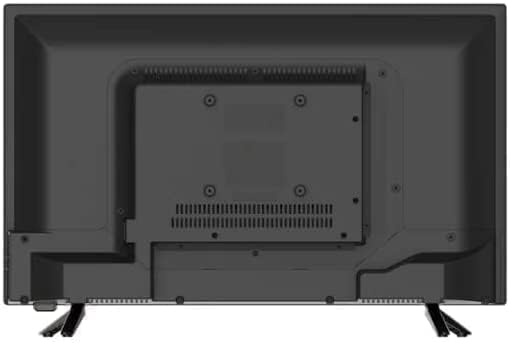
Image 3.2: Rear view of the ONN 24-inch Smart TV, highlighting the VESA mounting points and ventilation grilles. The stand attachment points are visible at the bottom.
3.2 Connecting Power and Devices
Connect the power cord to the TV's power input and then to a wall outlet. For external devices like gaming consoles or Blu-ray players, use the HDMI ports. USB devices can be connected to the USB port.
- HDMI Ports: For high-definition audio and video input.
- USB Port: For connecting USB drives for media playback.
- Antenna/Cable Input: For connecting an antenna or cable TV.
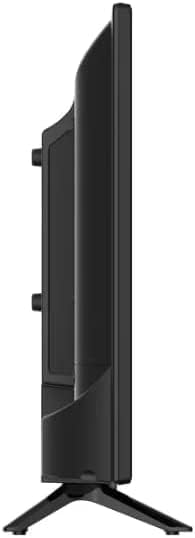
Image 3.3: Side profile of the ONN 24-inch Smart TV, illustrating its slim design and the location of some side-mounted ports.
3.3 Initial Setup (Roku TV)
Upon first power-on, the TV will guide you through the Roku TV setup process. This includes:
- Language Selection: Choose your preferred language.
- Network Connection: Connect to your home Wi-Fi network.
- Roku Account Setup: Create a new Roku account or sign in to an existing one. This is required to access streaming channels and features.
- Channel Scan: If using an antenna, the TV will scan for available over-the-air channels.
4. Operating Your TV
4.1 Remote Control Functions
The included remote control provides full access to your TV's features.
- Power Button: Turns the TV on or off.
- Directional Pad (D-Pad): Navigates menus and selects items.
- OK Button: Confirms selections.
- Home Button: Returns to the Roku Home screen.
- Back Button: Goes back to the previous screen.
- Volume Up/Down: Adjusts the volume.
- Mute Button: Mutes or unmutes the sound.
- Channel Buttons: Changes channels (for antenna/cable).
- Dedicated App Buttons: Quick access to popular streaming services like Netflix and YouTube.

Image 4.1: Side view of the ONN 24-inch Smart TV, showing a hand interacting with a small device in front of the screen. The screen displays a vibrant abstract pattern.
4.2 Smart TV Features
Your ONN Smart TV, powered by Roku, provides access to thousands of streaming channels.
- Streaming Channels: Browse and add channels from the Roku Channel Store.
- Voice Control: Compatible with Alexa and Google Assistant. You can use a compatible voice assistant device (sold separately) to control your TV with voice commands.
- Mobile App: Download the Roku mobile app for iOS or Android to use your smartphone as a remote, cast content, and use private listening.
Image 4.2: A promotional image for ONN, highlighting "720P HD" and the slogan "A TV for all your entertainment needs."
5. Maintenance
Proper care ensures the longevity and optimal performance of your TV.
- Cleaning the Screen: Use a soft, lint-free cloth specifically designed for electronics. Do not use abrasive cleaners or sprays directly on the screen.
- Cleaning the Cabinet: Wipe the TV cabinet with a soft, dry cloth.
- Software Updates: Your Roku TV will automatically check for and install software updates when connected to the internet. Ensure your TV remains connected to receive the latest features and security patches.
- Ventilation: Ensure adequate airflow around the TV. Do not block ventilation openings.
6. Troubleshooting
If you encounter issues with your TV, refer to the following common problems and solutions.
| Problem | Possible Cause | Solution |
|---|---|---|
| No Power | Power cord disconnected; outlet not working. | Check power cord connection; try a different outlet. |
| No Picture, but Sound is Present | Incorrect input source selected; external device issue. | Press the Input button on the remote to cycle through inputs; check external device connections. |
| No Sound, but Picture is Present | Volume muted or too low; external audio system issue. | Unmute or increase volume; check audio cables to external sound systems. |
| Cannot Connect to Wi-Fi | Incorrect password; router issue; TV too far from router. | Double-check Wi-Fi password; restart router; move TV closer to router or use a Wi-Fi extender. |
| Remote Control Not Working | Dead batteries; obstruction between remote and TV. | Replace batteries; remove any obstructions. |
7. Specifications
Detailed technical specifications for your ONN 24-Inch 720p HD Smart TV.
| Feature | Detail |
|---|---|
| Brand | ONN |
| Model Number | 100012590 |
| Screen Size | 24 Inches (61 cm visible diagonal) |
| Display Technology | LED |
| Resolution | 720p HD |
| Refresh Rate | 60 Hz |
| Aspect Ratio | 16:9 |
| Connectivity Technology | USB, HDMI |
| Supported Internet Services | Netflix, YouTube (and other Roku channels) |
| Speaker Type | Built-In |
| Color | Black |
| Item Weight | 4.83 pounds |
| Product Dimensions (L x W x H) | 3.15 x 22.05 x 13.39 inches |

Image 7.1: Diagram illustrating the dimensions of the ONN 24-inch Smart TV, showing approximate measurements of 13.1 inches height, 3 inches depth, and 21.9 inches width.
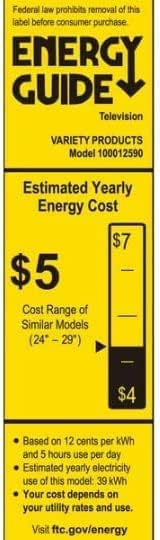
Image 7.2: Energy Guide label for the ONN TV Model 100012590, indicating an estimated yearly energy cost of $5 based on 12 cents per kWh and 5 hours use per day.
8. Warranty and Support
This product is sold as a renewed item. Please refer to the specific warranty terms provided by the seller at the time of purchase. For technical support or further assistance, please contact the retailer or the Amazon Renewed support team.
For general information about Roku TV, visit the official Roku support website: support.roku.com