1. Introduction
Thank you for choosing the Cecotec EnergySilence PureTech 5500 Evaporative Air Cooler. This appliance is designed to provide a comfortable environment through its 3-in-1 functions: cooling, ventilation, and ionization. Please read this manual carefully before using the product to ensure proper operation, maintenance, and safety.
2. Important Safety Instructions
Always follow basic safety precautions when using electrical appliances to reduce the risk of fire, electric shock, and injury.
- Read all instructions before use.
- Ensure the power supply voltage matches the appliance's rating.
- Do not immerse the appliance, cord, or plug in water or other liquids.
- Unplug from the outlet when not in use, before cleaning, or before moving.
- Do not operate any appliance with a damaged cord or plug, or after the appliance malfunctions or has been damaged in any manner.
- Keep the appliance out of reach of children.
- Do not block air inlets or outlets.
- Place the appliance on a stable, flat surface.
- Do not use the appliance outdoors.
- Only use clean water in the water tank.
3. Product Overview
Familiarize yourself with the main components of your Cecotec EnergySilence PureTech 5500.

Figure 3.1: Front view of the Cecotec EnergySilence PureTech 5500 Evaporative Air Cooler, showing the main unit with its sleek design and air outlet.

Figure 3.2: Close-up of the top control panel with LCD display, indicating various settings and modes.
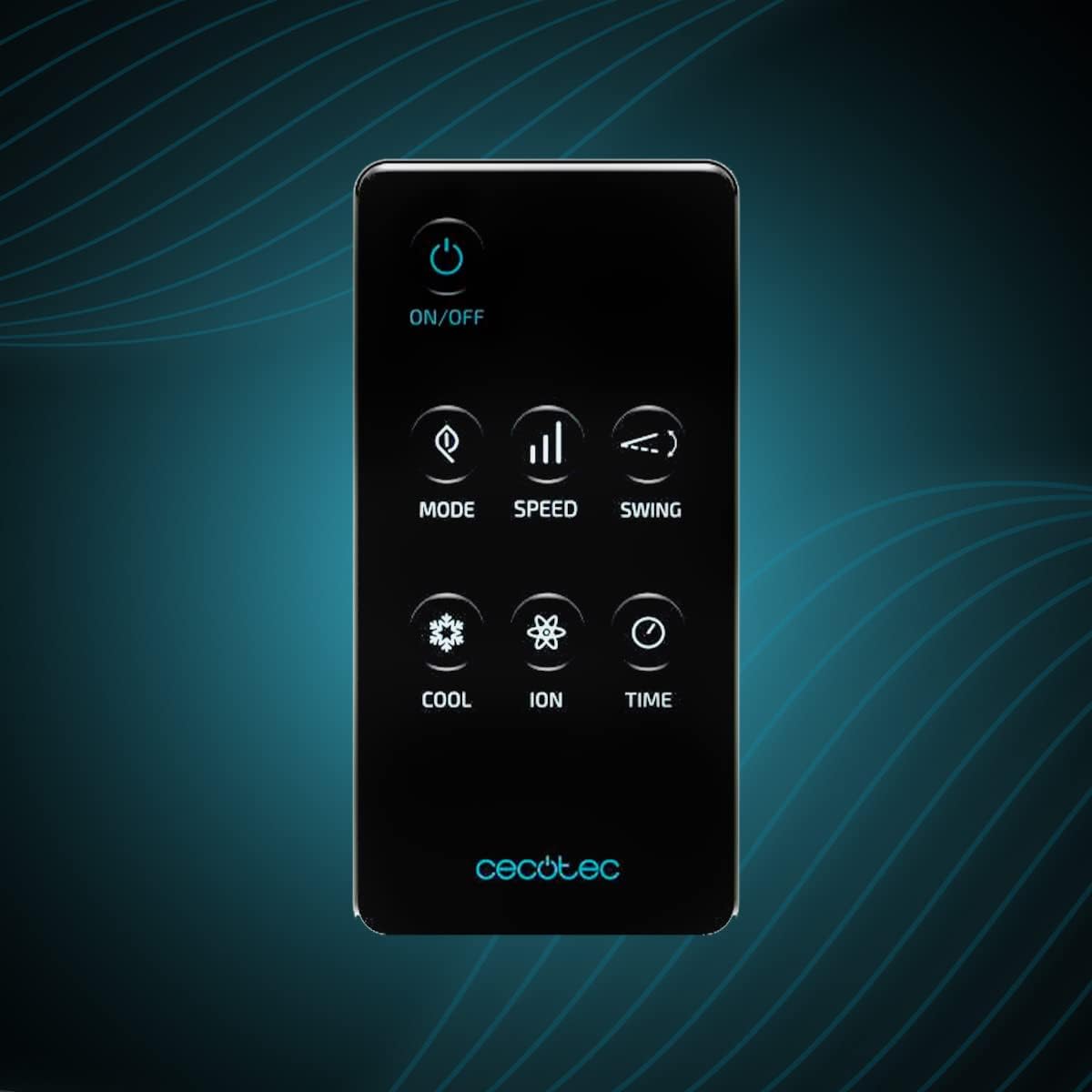
Figure 3.3: The remote control unit, featuring buttons for power, mode, speed, swing, cool, ion, and timer functions.

Figure 3.4: Side view showing the large 12-liter water tank, designed for extended operation without frequent refills.
Components List:
- Main Evaporative Air Cooler Unit
- Remote Control
- Instruction Manual (this document)
- Water Tank (integrated)
- Air Filter (pre-installed)
4. Setup
4.1 Unpacking
- Carefully remove the appliance from its packaging.
- Check for any damage during transit. If damaged, do not use and contact customer support.
- Remove all packing materials, including any protective films or tapes.
4.2 Filling the Water Tank
- Ensure the appliance is unplugged from the power outlet.
- Locate the water tank at the bottom of the unit.
- Pull out the water tank gently.
- Fill the tank with clean, cool water. Do not exceed the "MAX" fill line. For enhanced cooling, you may add ice packs or ice cubes to the water tank.
- Carefully push the water tank back into its position until it clicks securely.
4.3 Placement
Place the air cooler on a firm, level surface in a well-ventilated area. Ensure there is sufficient space around the unit for proper airflow (at least 20 cm from walls or furniture).
5. Operating Instructions
5.1 Power On/Off
- Plug the power cord into a suitable electrical outlet.
- Press the ON/OFF button on the control panel or remote control to turn the unit on or off.
5.2 Mode Selection
Press the MODE button to cycle through the available modes:
- Cooling Mode: Activates the evaporative cooling function. Water is pumped from the tank to cool the air.
- Fan Mode: Operates as a standard fan, circulating air without cooling.
- Ionization Mode: Releases negative ions to purify the air and reduce odors. This can be used independently or in conjunction with other modes.
5.3 Speed Adjustment
Press the SPEED button to select from 3 fan speeds: Low, Medium, and High.
5.4 Swing Function
Press the SWING button to activate or deactivate the oscillation function, which distributes air more widely across the room.
5.5 Timer Function
Press the TIME button to set the operating timer. Each press increases the timer setting, allowing you to program the unit to turn off automatically after a set period.
6. Maintenance
Regular maintenance ensures optimal performance and extends the lifespan of your air cooler. Always unplug the unit before performing any maintenance.
6.1 Cleaning the Water Tank
- Empty the water tank regularly, especially if the unit will not be used for an extended period.
- Clean the tank with a soft cloth and mild detergent. Rinse thoroughly with clean water.
- Allow the tank to air dry completely before reinserting.
6.2 Cleaning the Air Filter
- The air filter should be cleaned every two weeks or more frequently depending on usage and air quality.
- Remove the filter from the back of the unit.
- Wash the filter with clean water and a soft brush. For stubborn dirt, use a mild detergent.
- Ensure the filter is completely dry before placing it back into the unit.
6.3 Exterior Cleaning
Wipe the exterior of the unit with a soft, damp cloth. Do not use abrasive cleaners or solvents.
6.4 Storage
If storing the unit for a long period, ensure the water tank is empty and clean, and the filter is dry. Store the appliance in a cool, dry place, preferably in its original packaging.
7. Troubleshooting
Before contacting customer support, please refer to the following table for common issues and their solutions.
| Problem | Possible Cause | Solution |
|---|---|---|
| Unit does not turn on. | No power supply; power cord not properly connected. | Check if the unit is plugged in correctly and the power outlet is working. |
| No cooling effect. | Water tank empty; cooling mode not activated; filter dirty. | Fill the water tank; ensure cooling mode is selected; clean the air filter. |
| Weak airflow. | Air inlet/outlet blocked; filter dirty. | Clear any obstructions; clean the air filter. |
| Unusual noise. | Unit not on a level surface; water pump issue; foreign object inside. | Place on a flat surface; check water level; if noise persists, contact support. |
| Odor from unit. | Stagnant water in tank; dirty filter. | Empty and clean the water tank thoroughly; clean the air filter. |
8. Specifications
| Feature | Detail |
|---|---|
| Brand | Cecotec |
| Model Name | EnergySilence PureTech 5500 |
| Model Number | 05876 |
| Functions | 3-in-1: Cooling, Ventilation, Ionization |
| Airflow Capacity | 500 m³/h |
| Water Tank Capacity | 12 Liters |
| Number of Speeds | 3 |
| Noise Level | 65 dB |
| Control Type | Remote Control, Control Panel |
| Special Features | Timer, Oscillation (Swing) |
| Dimensions (L x W x H) | 43 x 39 x 83 cm |
| Weight | 6.5 kg |
9. Warranty and Support
This product comes with a standard manufacturer's warranty. For detailed warranty terms and conditions, please refer to the warranty card included with your purchase or visit the official Cecotec website. For technical support, spare parts, or any inquiries not covered in this manual, please contact Cecotec customer service through their official channels.
Official Cecotec Website: www.cecotec.com


