
1. Introduction
This manual provides detailed instructions for the installation, operation, and maintenance of your XTRONS 12.3" IPS Touch Screen Car Stereo. Please read this manual thoroughly before using the product to ensure proper functionality and safety.
1.1 Applicable Models & Years
- For BMW 3 Series E90/E91/E92/E93 (2008-2012) – Specifically for Left Driving Vehicles with No Original Display.
Note: This unit is designed for BMW vehicles that come with NO original display. For other configurations, please refer to XTRONS product compatibility guides.
2. Product Features
The XTRONS 12.3" IPS Touch Screen Car Stereo is equipped with advanced features to enhance your in-car entertainment and navigation experience.
2.1 Display and Visuals
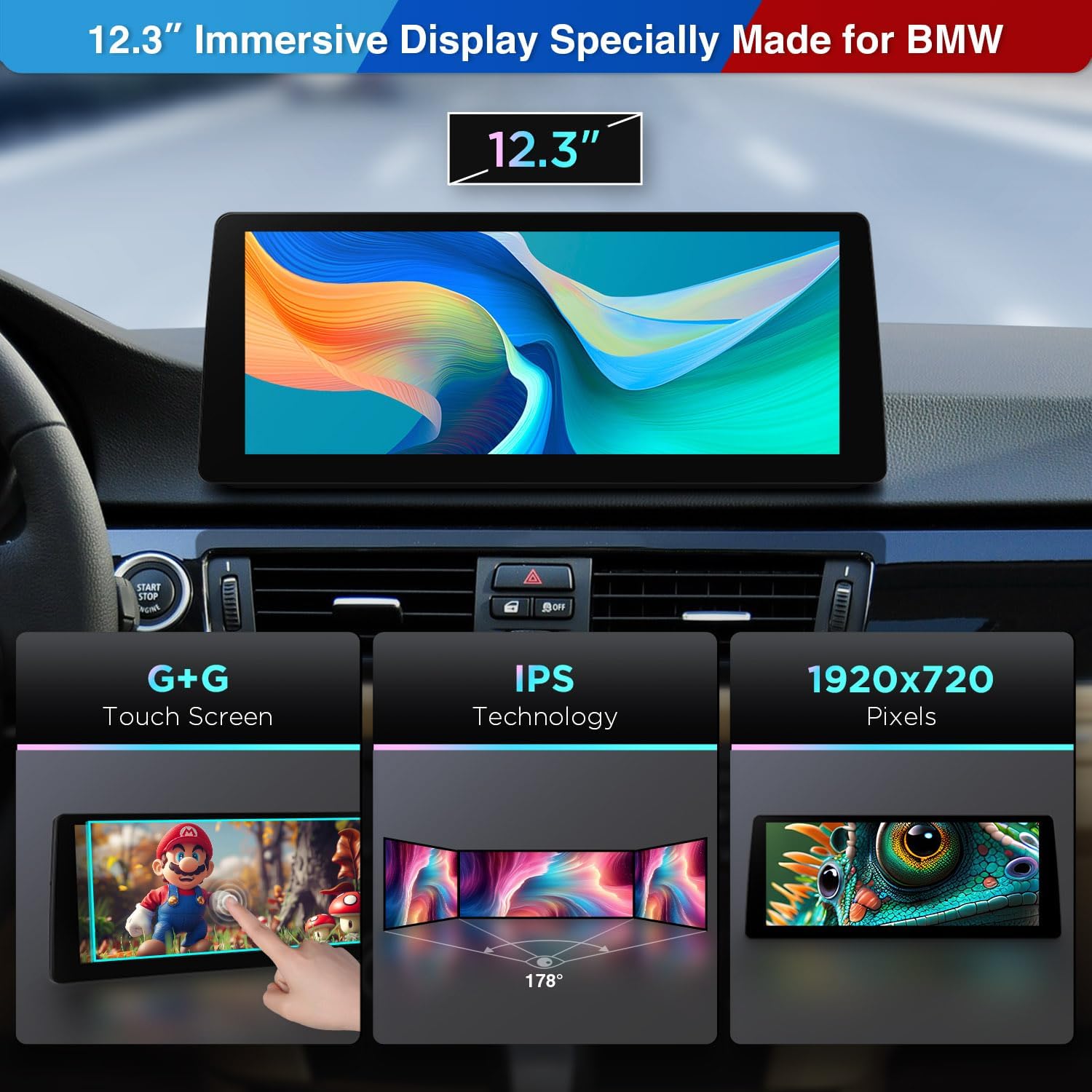
Image: Detailed view of the 12.3-inch IPS Touch Screen highlighting G+G Touch, IPS Technology, and 1920x720 pixel resolution. The image shows a hand interacting with the screen, demonstrating its touch capabilities and wide 178-degree viewing angle.
- 12.3" IPS Touch Screen: Large, high-fidelity IPS display with 1920x720 resolution and a 24:9 aspect ratio for wide viewing angles. Features a fully-laminated, anti-glare, ultra-slim design with a tailor-made bezel.
- G+G Touch Screen: Provides precise and responsive touch control.
- 178° Viewing Angle: Ensures clear visibility from various seating positions without eye fatigue.
2.2 Performance

Image: Diagram illustrating the Qualcomm Snapdragon 680 Octa-Core processor, highlighting its Kyro 265 CPU, up to 2.4GHz processor speed, and 6nm process technology. It also shows the 8GB LPDDR4 RAM and 128GB UFS ROM, indicating enhanced operating performance and reduced energy consumption.
- Android 13 Operating System: A stable and mature version for responsive operation.
- Qualcomm Snapdragon 680: Octa-core processor with Kyro 265 CPU, up to 2.4GHz speed, and 6nm process technology for enhanced power efficiency and robust processing.
- 8GB LPDDR4 RAM: Ensures fast and responsive multitasking.
- 128GB Solid State ROM: Provides ample storage for applications and media.
2.3 Connectivity and Integration

Image: Visual representation of the unit's smartphone integration capabilities, including Wireless CarPlay, Wireless/Wired Android Auto, Wireless Screen Mirroring, and Bluetooth 5.1. It shows the car stereo displaying interfaces for these features and a smartphone connected via Bluetooth.
- Wireless CarPlay & Wireless/Wired Android Auto: Seamlessly displays compatible smartphone apps for navigation, calls, and music, with access to Siri/Google Assistant.
- Bluetooth 5.1: Offers stable connections and high-quality transmission for hands-free calls and music streaming.
- Dual Wi-Fi Band: Supports 2.4GHz and 5GHz bands for flexible and faster internet connectivity.
- Screen Mirroring: Wirelessly mirror your smartphone screen to the unit.
2.4 User Interface and Experience
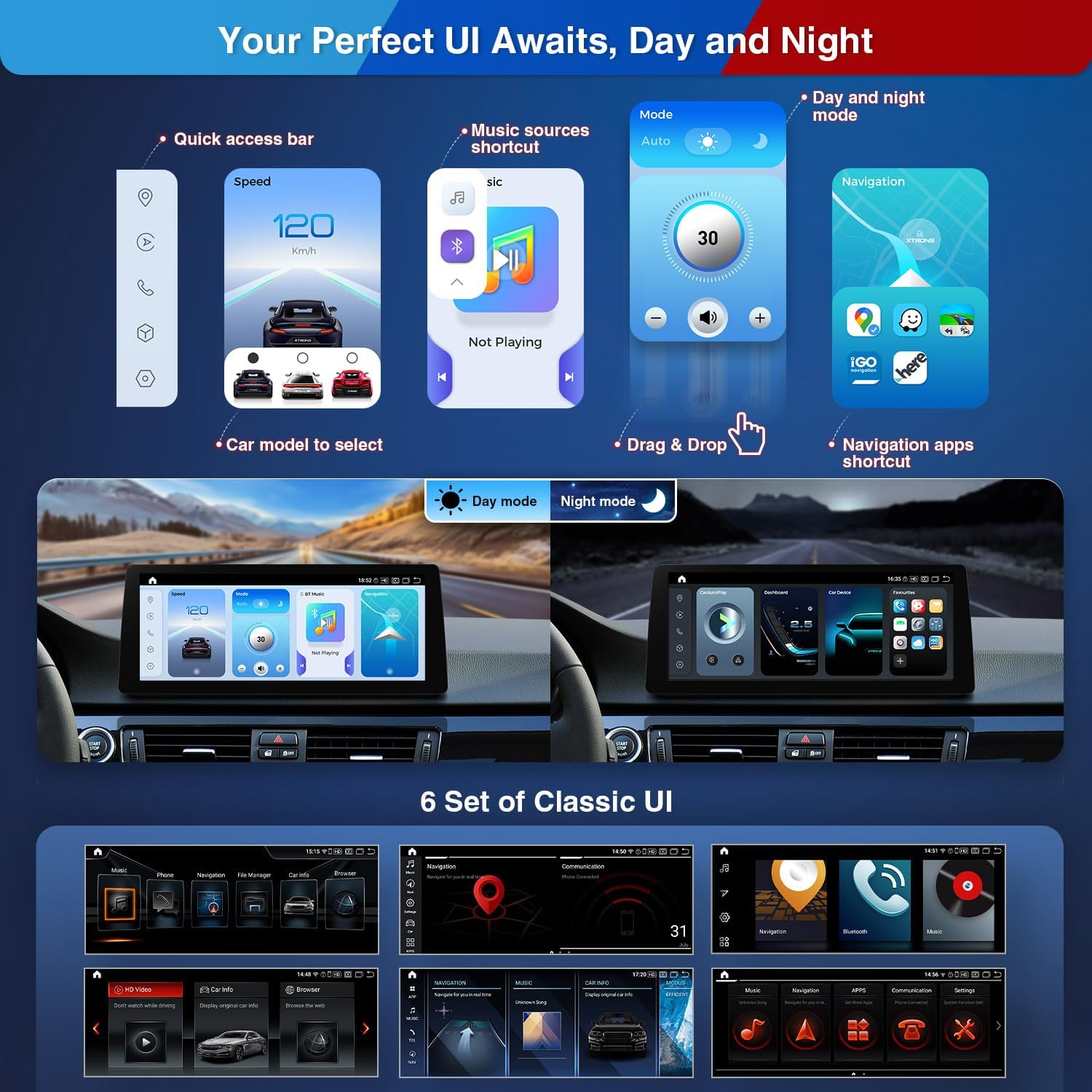
Image: Demonstrates the customizable user interface, showing a quick access bar, music sources shortcut, drag & drop functionality, and navigation app shortcuts. It highlights the Day mode and Night mode UI, along with six different classic UI sets available for selection.
- Multi-task Display: Run two applications simultaneously, such as music and navigation, on the 12.3" IPS screen.
- PIP (Picture-in-Picture): Allows viewing videos while switching to other applications.
- Customizable UI: Features 1 Day/Night switch mode UI and 6 sets of classic UI designs.
3. Package Contents
Please verify that all items listed below are included in your package.
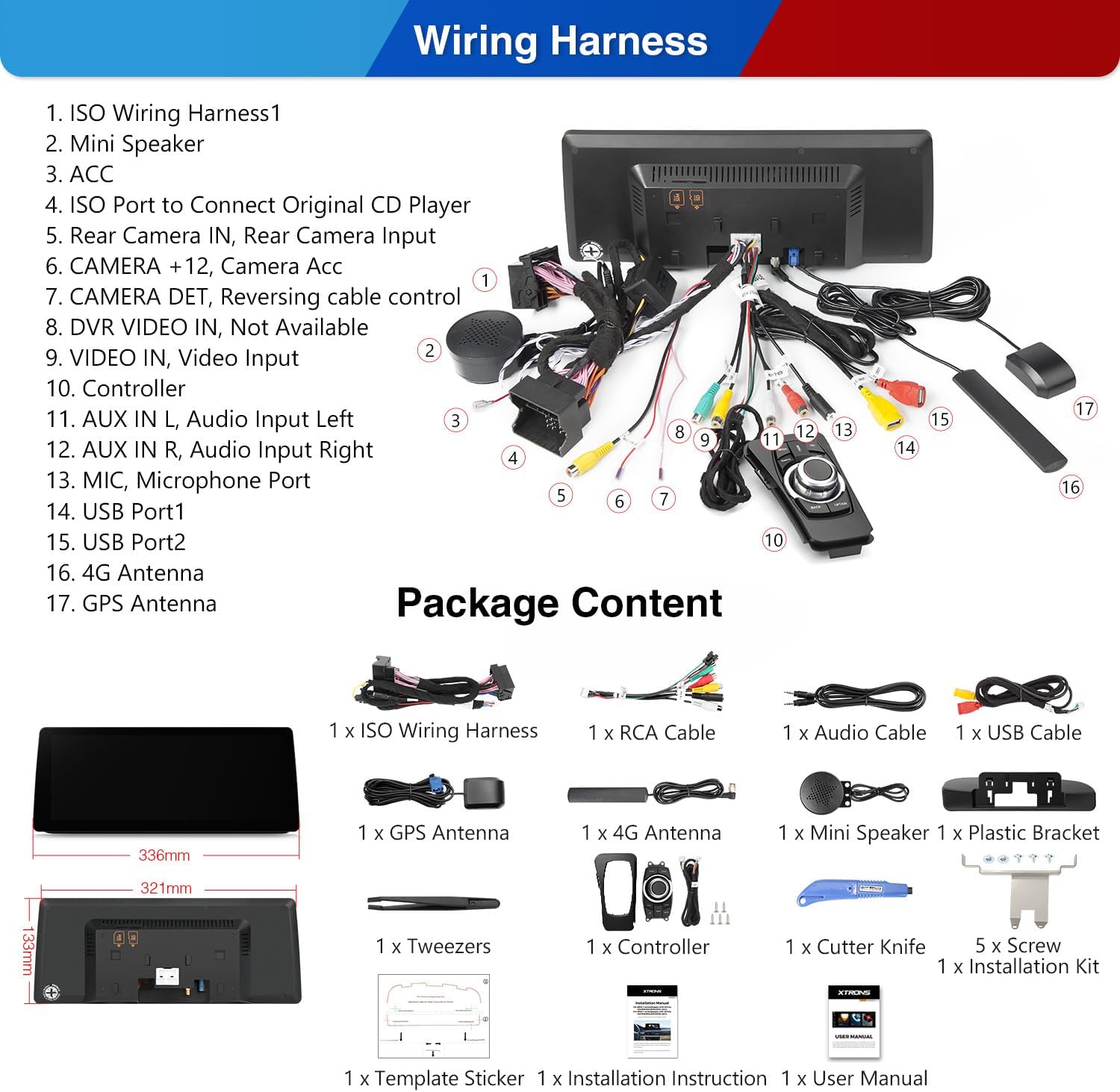
Image: A detailed diagram showing the various ports and connections on the back of the car stereo unit, labeled with numbers corresponding to the wiring harness components. Below, a visual inventory of all included accessories is displayed, such as cables, antennas, and installation tools.
- 1 x ISO Wiring Harness
- 1 x Audio Cable
- 1 x RCA Cable
- 1 x GPS Antenna
- 1 x USB Cable
- 1 x 4G Antenna
- 1 x Tweezers
- 1 x Controller
- 1 x Mini Speaker
- 1 x Plastic Bracket
- 5 x Screws
- 1 x Installation Kit
- 1 x User Manual (this document)
- 1 x Installation Instruction
- 1 x Cutter Knife
4. Setup and Installation
Proper installation is crucial for the optimal performance of your car stereo. It is highly recommended to consult the dedicated Installation Instruction document provided in the package or seek professional assistance.
4.1 Compatibility Notes
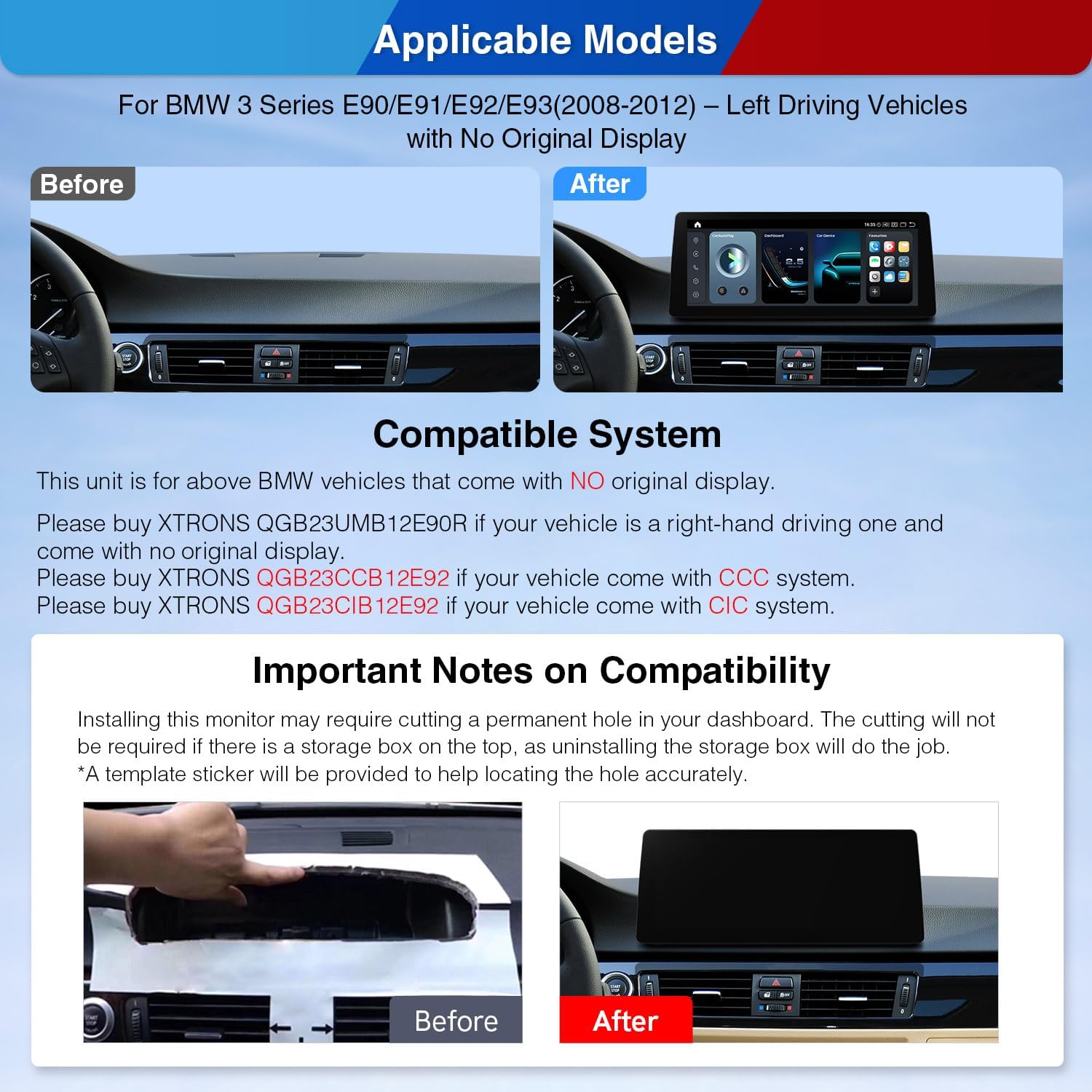
Image: A comparison showing the car dashboard before and after the installation of the XTRONS car stereo. It also includes important notes on compatibility, specifying that the unit is for BMW vehicles without an original display and mentioning alternative models for right-hand drive or vehicles with CCC/CIC systems.
- This unit is specifically designed for BMW 3 Series E90/E91/E92/E93 (2008-2012) Left Driving Vehicles with No Original Display.
- For right-hand driving vehicles with no original display, please use XTRONS QGB23UMB12E90R.
- For vehicles with a CCC system, please use XTRONS QGB23CCB12E92.
- For vehicles with a CIC system, please use XTRONS QGB23CIB12E92.
4.2 Installation Process Overview
Installing this monitor may require cutting a permanent hole in your dashboard. This cutting will not be required if there is a storage box on the top, as uninstalling the storage box will suffice. A template sticker is provided to help locate the hole accurately if cutting is necessary.
Refer to the dedicated Installation Instruction document for step-by-step guidance, including wiring diagrams and mounting procedures.

Image: Illustrates the seamless integration of the Android OS with the vehicle's original systems. It highlights that the iDrive system control is retained, the amplifier system is supported, and the original radio and CD functions are kept. A DIY Retrofit Kit is also shown as included.
The unit is designed to retain original vehicle functions, including iDrive system control, amplifier system, and original radio/CD functionality. A DIY Retrofit Kit is included to facilitate this integration.
5. Operation
This section outlines the basic operation of your XTRONS car stereo.
5.1 Basic Navigation
The 12.3" IPS touch screen allows for intuitive control. Navigate through menus and applications by tapping, swiping, and dragging. The system supports multi-tasking, allowing you to run two applications simultaneously, such as navigation and music playback.
5.2 Smartphone Integration (CarPlay & Android Auto)
Connect your iPhone wirelessly via Bluetooth for Wireless CarPlay. For Android phones, connect wirelessly via Bluetooth or using a USB cable for Wireless/Wired Android Auto. This allows access to GPS, calls, music, and voice assistants (Siri/Google Assistant) directly from the head unit.
5.3 Bluetooth Functionality
Utilize Bluetooth 5.1 for hands-free calling and high-quality audio streaming from your mobile device. Pair your device through the Bluetooth settings menu on the stereo.
5.4 Wi-Fi Connectivity
Connect the unit to a Wi-Fi network (2.4GHz or 5GHz) to access online features, download apps, and stream content. Configure Wi-Fi settings in the system's network menu.
5.5 Optional Accessories
The unit supports various optional accessories to expand its functionality:
- OBD Function: Requires an OBD dongle (e.g., B09D3DVZVR / B015MU8UN6 / B07X9JXV28 / B08HQ9LQ9X) for vehicle diagnostics.
- TPMS Function: Requires a TPMS device (e.g., B07WQFKV5G / B07DKB4GD2) for tire pressure monitoring.
- External DVR: Compatible with external DVRs (e.g., B07MBYCG4C) for recording driving footage.
- Reversing AHD Camera: Supports AHD cameras (e.g., B00GY3BVT6) for enhanced rear visibility.
6. Maintenance
To ensure the longevity and optimal performance of your XTRONS car stereo, follow these maintenance guidelines:
- Screen Cleaning: Use a soft, lint-free cloth slightly dampened with water or a screen cleaner specifically designed for electronic displays. Avoid abrasive materials or harsh chemicals.
- General Cleaning: Wipe the exterior of the unit with a soft, dry cloth. Do not use excessive moisture.
- Temperature Control: Avoid exposing the unit to extreme temperatures, both hot and cold, for extended periods.
- Software Updates: Periodically check for and install software updates provided by XTRONS to ensure the system runs efficiently and has the latest features.
7. Troubleshooting
This section addresses common issues you might encounter. For more complex problems, please contact XTRONS customer support.
- No Power: Ensure all power cables are securely connected. Check the vehicle's fuse box for any blown fuses related to the stereo system.
- No Sound: Verify that the volume is not muted or set too low. Check speaker connections. Ensure the correct audio output source is selected.
- Touch Screen Unresponsive: Try restarting the unit. If the issue persists, a factory reset might be necessary (note: this will erase user data).
- GPS Signal Loss: Ensure the GPS antenna is properly installed and has a clear line of sight to the sky. Move the vehicle to an open area if in a covered location.
- Bluetooth Pairing Issues: Ensure Bluetooth is enabled on both the stereo and your mobile device. Delete previous pairings and try re-pairing.
- CarPlay/Android Auto Not Connecting: Check USB cable connection (if wired). Ensure the phone's operating system is up to date. Verify that CarPlay/Android Auto is enabled in the stereo's settings.
8. Specifications
Key technical specifications for the XTRONS 12.3" IPS Touch Screen Car Stereo.
| Feature | Specification |
|---|---|
| Display Size | 12.3 Inches |
| Screen Resolution | 1920x720 |
| Operating System | Android 13 |
| Processor | Qualcomm Snapdragon 680 Octa-Core (Kyro 265 CPU, up to 2.4GHz) |
| RAM | 8GB LPDDR4 |
| ROM | 128GB Solid State |
| Connectivity Technology | Bluetooth 5.1, Cellular (4G Antenna included), USB, Dual-Band Wi-Fi (2.4GHz/5GHz) |
| Special Feature | Touchscreen, Built-in Wireless CarPlay, Wireless/Wired Android Auto, Multi-task Display, PIP |
| Audio Output Mode | Stereo |
| Mounting Type | Dashboard Mount |
| Vehicle Service Type | Car (BMW 3 Series E90/E91/E92/E93) |
| Map Type | No Pre-installed Map (Supports various navigation apps) |
9. Warranty and Support
XTRONS provides a warranty for this product to ensure customer satisfaction.
- Warranty Period: 1 year from the date of purchase.
- Manufacturer: XTRONS
For technical support, warranty claims, or further inquiries, please contact XTRONS customer service through their official website or the retailer where the product was purchased.