
MESTEK WM710
Contents
MESTEK WM710 Pinless Wood Moisture Meter Instruction Manual
Brand: MESTEK | Model: WM710
1. Introduction
The MESTEK WM710 Pinless Wood Moisture Meter is a professional-grade, non-destructive induction hygrometer designed for accurate moisture detection in a wide range of materials. Utilizing high-frequency electromagnetic wave signals, it provides precise readings without causing damage to the surface. This manual provides detailed instructions for the proper use, maintenance, and troubleshooting of your device.

Figure 1.1: MESTEK WM710 Pinless Wood Moisture Meter and included accessories.
2. Key Features
The MESTEK WM710 is equipped with advanced features for reliable and user-friendly operation:
- 100% Non-destructive Measurement: Measures moisture content without piercing the surface, ideal for finished materials. Maximum measuring depth of 0.78 inches (20 mm).
- High-Precision and Responsiveness: Adopts a high-precision alloy probe and high-performance processing chip for accurate readings (0.0-100.0 range, 4% accuracy).
- 3-inch HD Color LCD Screen: Features a vibrant display with three color analog bars (Green: DRY, Yellow: RISK, Red: WET) for intuitive moisture status indication. Easy to read in various lighting conditions.
- Wide Range of Applications: Suitable for testing moisture in wood (softwood, hardwood), drywall, masonry (concrete, plaster, tiles, slate), and other building materials.
- User-Friendly Functions: Includes HOLD button for data retention, auto power-off, out-of-range alarm, low battery indicator, MIN/MAX value display, and Celsius/Fahrenheit temperature conversion.
- Ergonomic Design: Embedded with soft rubber on the sides for a comfortable grip. Comes with a carrying bag for portability and storage.

Figure 2.1: Overview of MESTEK WM710 features and display elements.

Figure 2.2: The 2.7-inch high-definition color display for easy readability.
3. Setup
3.1. What's in the Box
- MESTEK WM710 Pinless Wood Moisture Meter
- Carrying Bag
- 3 x AAA Alkaline Batteries
- Small Phillips Screwdriver (for battery compartment)
- User Manual

Figure 3.1: Package contents of the MESTEK WM710.
3.2. Battery Installation
- Locate the battery compartment on the back of the device.
- Use the provided Phillips screwdriver to open the battery cover.
- Insert 3 AAA alkaline batteries, ensuring correct polarity (+/-).
- Replace the battery cover and secure it with the screw.
3.3. Device Overview

Figure 3.2: Front and back view of the MESTEK WM710 with labeled components.
4. Operating Instructions
4.1. Power On/Off
Press the Power button to turn the device on or off. The device will automatically power off after a period of inactivity to conserve battery life.
4.2. Selecting Material Mode
The MESTEK WM710 supports four material modes: Drywall, Masonry, Softwood, and Hardwood. To select the appropriate mode:
- Turn on the device.
- Press the SEL button repeatedly to cycle through the modes. The selected mode will be displayed on the screen.

Figure 4.1: Material selection options on the display.
4.3. Taking a Measurement
To take a non-destructive moisture measurement:
- Ensure the correct material mode is selected.
- Place the back sensor of the meter flat against the surface of the material you wish to measure. Ensure full contact for accurate readings.
- The moisture content will be displayed on the screen. The maximum measuring depth is 20 mm (0.78 inches).
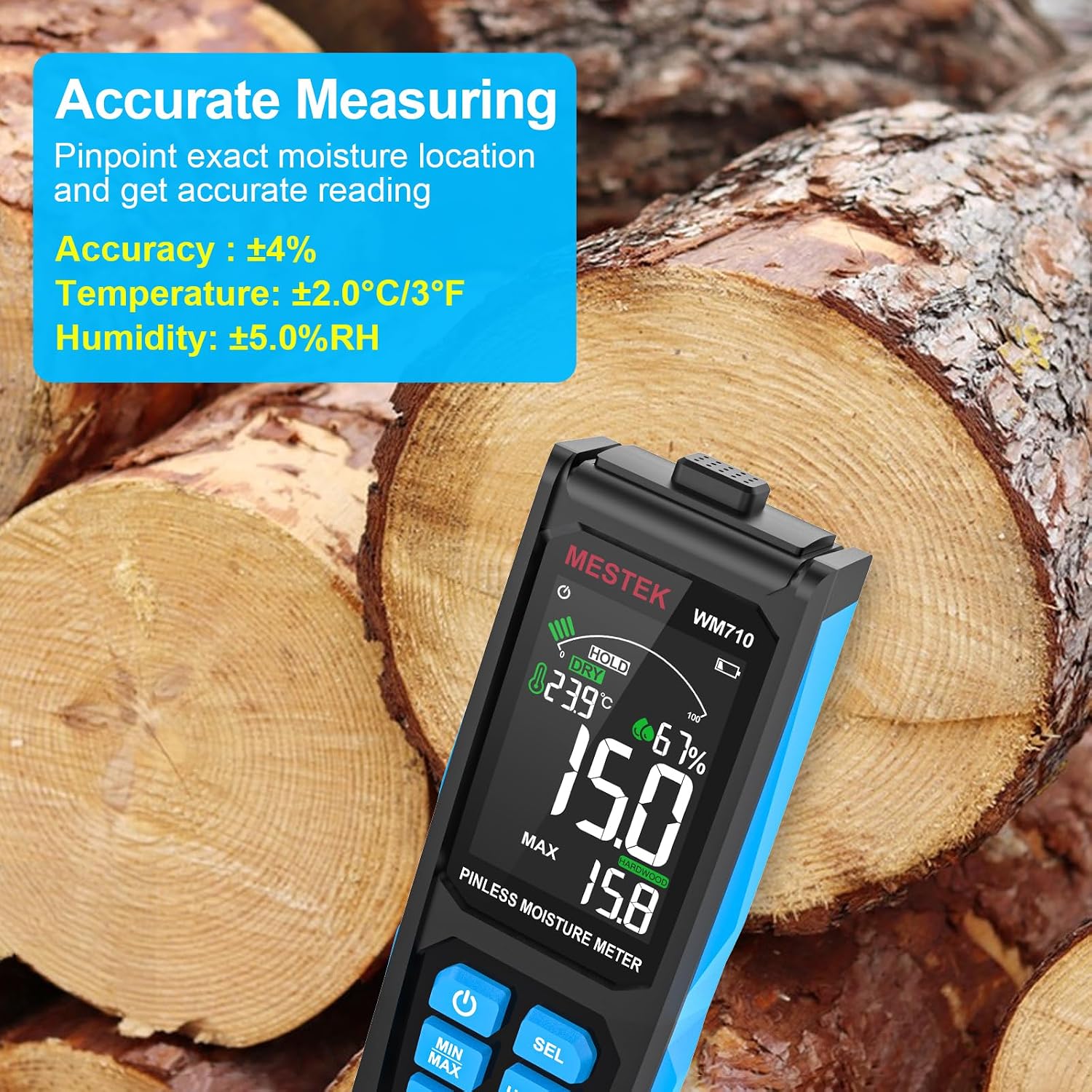
Figure 4.2: Measuring moisture content on wood.
4.4. Interpreting Readings and Alarms
The 3-inch HD color screen provides visual and auditory indicators for moisture levels:
- Green Analog Bar / "DRY": Indicates low moisture content, typically safe.
- Yellow Analog Bar / "RISK": Indicates moderate moisture content, suggesting potential risk or need for further investigation.
- Red Analog Bar / "WET": Indicates high moisture content, signifying a wet condition that may require immediate attention.
The device also features a sound and light alarm that activates when moisture levels exceed the 'DRY' threshold, changing color and emitting an audible alert based on the 'RISK' or 'WET' status.

Figure 4.3: Humidity alarm comparison table for different materials.
4.5. Additional Functions
- HOLD Button: Press the HOLD button to freeze the current reading on the display. Press again to release.
- MIN/MAX Button: Press the MIN/MAX button to view the minimum or maximum moisture readings recorded during a measurement session.
- °C/°F Conversion: Press the °C/°F button to switch between Celsius and Fahrenheit for ambient temperature display.
- ZERO Function: Press the ZERO button to calibrate the meter to a 0.0 reading in the air before measurement, ensuring accuracy.
4.6. Application Examples

Figure 4.4: The MESTEK WM710 is versatile for various material types.
4.7. Official Product Video
Video 4.1: Demonstration of the MESTEK Pinless Wood Moisture Meter's features and usage on various materials.
5. Maintenance
5.1. Cleaning
To clean the device, wipe it with a soft, dry cloth. Do not use abrasive cleaners or solvents, as these may damage the casing or screen.
5.2. Storage
When not in use, store the moisture meter in its provided carrying bag in a cool, dry place, away from direct sunlight and extreme temperatures. Remove batteries if the device will not be used for an extended period to prevent leakage.
5.3. Battery Replacement
When the low battery indicator appears on the screen, replace the batteries as described in Section 3.2. Battery Installation.
6. Troubleshooting
| Problem | Possible Cause | Solution |
|---|---|---|
| Device does not power on. | Low or dead batteries; incorrect battery installation. | Replace batteries with new AAA alkaline batteries; ensure correct polarity. |
| Inaccurate or inconsistent readings. | Improper contact with surface; incorrect material mode selected; sensor obstruction. | Ensure the sensor is flat against the surface; select the correct material mode (Drywall, Masonry, Softwood, Hardwood); clean the sensor area. Perform ZERO calibration before use. |
| Alarm constantly sounds or displays "WET" when material is dry. | Incorrect material mode; environmental interference; sensor issue. | Verify the selected material mode matches the material being tested. Try re-zeroing the device in the air. If the issue persists, contact customer support. |
| Display is dim or flickering. | Low battery. | Replace batteries. |
7. Specifications
| Feature | Detail |
|---|---|
| Brand | MESTEK |
| Model Number | WM710 |
| Measurement Principle | Non-destructive Induction |
| Measuring Depth | Max 0.78 inches (20 mm) |
| Measurement Range | 0.0 - 100.0 (Material dependent) |
| Measurement Accuracy | ±4% |
| Display | 3-inch HD Color LCD with Analog Bar |
| Power Source | Battery Powered |
| Battery Type | 3 x AAA Alkaline Batteries |
| Item Weight | 5.8 ounces |
| Product Dimensions | 6.5 x 2.48 x 1.26 inches |
| Included Components | Carrying bag |
| Country of Origin | China |
8. Warranty and Support
8.1. Warranty Information
The MESTEK WM710 Pinless Wood Moisture Meter comes with a 3-year replacement warranty. If the product fails due to manufacturing defects within this period, it will be replaced without questions asked.
8.2. Customer Support
For any questions, technical assistance, or warranty claims, please contact MESTEK customer support through the retailer's platform or the official MESTEK website. Please have your product model number and purchase details ready when contacting support.
Ask a question about this manual
Ask about setup, troubleshooting, compatibility, parts, safety, or missing instructions. Manuals+ will review the question and use this page’s manual context to help answer it.