
Introduction
This manual provides detailed instructions for the setup, operation, and maintenance of your ZERFUN MU-898 Rechargeable 4-Channel Wireless Microphone System. Please read this manual thoroughly before using the product to ensure proper function and to maximize its lifespan.

Figure 1: ZERFUN MU-898 4-Channel Wireless Microphone System
Package Contents
Verify that all items listed below are included in your package:
- ZERFUN Rechargeable Wireless Microphone x 4
- Receiver Box x 1
- Power Adapter x 1
- 6.35mm to 6.35mm Cable x 1
- 3.5mm to 3.5mm Cable x 1
- Audio Cable (RCA to 3.5mm) x 1
- Microphone Charging Cable x 2
- Microphone Windscreen x 4
- Antiskid Ring x 4
- User Manual x 1

Figure 2: Included Package Contents
Product Overview
Receiver Box (MU-898)
The receiver box is the central unit for managing the wireless microphones and audio output. It features independent volume controls for each microphone, an echo function, and Bluetooth connectivity.

Figure 3: Receiver Front Panel Controls
- Mic Input (Wired): 1/4" jack for connecting a wired microphone.
- Mic Vol Control (Wired): Adjusts the volume of the wired microphone.
- Mic A/B/C/D Independent Volume Control: Adjusts the volume for each wireless microphone.
- ECHO Control: Adjusts the echo effect for all microphones.
- Bluetooth VOL Control: Adjusts the volume of audio played via Bluetooth.
- RF Signal Indicator: Lights up when a wireless microphone is connected and transmitting.
- AF Signal Indicator: Lights up when audio is being received from a wireless microphone.
Wireless Microphones
The system includes four rechargeable metal handheld cardioid microphones. Each microphone features an LED light ring, a clear display, and a micro USB charging port.

Figure 4: Wireless Microphone Features
- Cardioid Pickup Pattern: Designed to pick up sound primarily from the front, reducing background noise.
- LED Light Ring: Illuminates when the microphone is active.
- Digital Display: Shows battery level and frequency channel.
- Micro USB Charging Port: Located at the bottom for convenient charging.
Setup Instructions
- Unpack Components: Carefully remove all items from the packaging.
- Connect Antennas: Screw the four antennas into their respective ports (ANT A, ANT B, ANT C, ANT D) on the rear of the receiver box.
- Power the Receiver: Connect the provided power adapter to the DC12V POWER input on the receiver and plug it into a power outlet.
- Connect to Audio System:
- Use the 1/8" (3.5mm) Audio Output or 1/4" (6.35mm) Audio Output to connect the receiver to an amplifier, audio mixer, or speaker.
- Alternatively, use the provided Audio Cable (RCA to 3.5mm) for RCA input on your audio device.
- Power On Microphones: Press and hold the power button on each wireless microphone until the display illuminates.
- Pairing: The microphones and receiver should automatically pair. If not, refer to the Frequency Adjustment section.

Figure 5: Receiver Rear Panel Connections
Operating Instructions
- Power On: Ensure the receiver is powered on and connected to your audio system. Turn on each wireless microphone.
- Adjust Volume: Use the individual volume control knobs (Mic A, Mic B, Mic C, Mic D) on the receiver to set the desired volume level for each microphone.
- Echo Function: Adjust the ECHO knob on the receiver to add or remove echo effect.
- Wired Microphone (Optional): If using a wired microphone, connect it to the 1/4" Mic Input and adjust its volume using the Mic Vol Control knob.
Bluetooth Connection
The receiver can function as a Bluetooth receiver to play background music from your smart device.
- Ensure the receiver is powered on.
- On your smartphone, tablet, laptop, or TV, enable Bluetooth.
- Search for Bluetooth devices and select "X168" from the list.
- Once connected, you can play audio from your device through the receiver.
- Adjust the Bluetooth audio volume using the Bluetooth VOL Control knob on the receiver.

Figure 6: Bluetooth Connection Diagram
Frequency Adjustment
The ZERFUN MU-898 system supports 50 compatible frequencies on each of its 4 channels (4 x 50 frequencies) for interference-free reception. The system features auto-scan and transmit setup for easy synchronization.
- In case of interference or if a microphone loses connection, the system can automatically scan for and switch to an available frequency.
- Refer to the specific instructions on the microphone or receiver for manual frequency adjustment if needed.
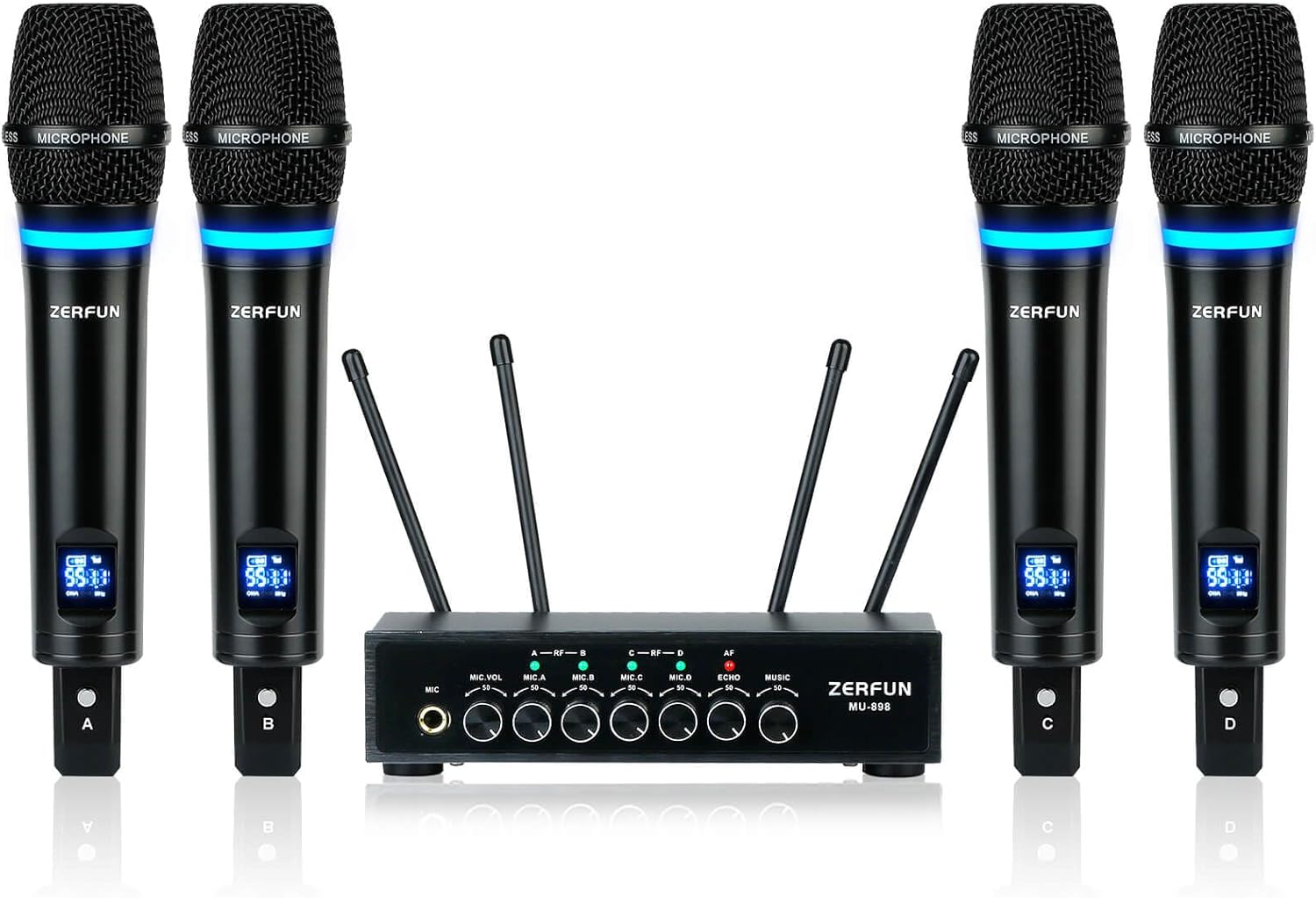
Figure 7: Wireless Range and Frequency Information
Battery Information & Charging
Each wireless microphone is equipped with a built-in rechargeable battery.
- Working Time: Approximately 10-12 hours on a full charge.
- Charging Time: Approximately 3-4 hours for a full charge.
- Charging: Use the provided Microphone Charging Cables to connect the micro USB port on the bottom of each microphone to a DC 5V power source (e.g., USB wall adapter, computer USB port).
- The microphone display will indicate the battery level.
Maintenance
- Keep the receiver and microphones away from water, excessive heat, and direct sunlight.
- Clean the devices with a soft, dry cloth. Do not use abrasive cleaners or solvents.
- Store the system in a dry, cool place when not in use.
- Ensure microphones are fully charged before extended storage to preserve battery health.
Troubleshooting
| Problem | Possible Cause | Solution |
|---|---|---|
| No sound from microphones. |
|
|
| Poor sound quality or dropouts. |
|
|
| Bluetooth not connecting. |
|
|
Specifications
| Brand | ZERFUN |
| Model Name | MU-898 |
| Connectivity Technology | UHF |
| Number of Channels | 4 (4x50 adjustable frequencies) |
| Frequency Range | 500 - 599 MHz (FCC compliant) |
| Wireless Range | Up to 200 feet |
| Bluetooth Range | About 32 feet |
| Microphone Form Factor | Handheld |
| Polar Pattern | Unidirectional (Cardioid) |
| Microphone Battery Life | 10-12 Hours (fully charged) |
| Microphone Charging Time | 3-4 Hours |
| Enclosure Material | Metal |
| Compatible Devices | Amplifier, Audio Mixer, Karaoke Machine, Speaker |
| Item Dimensions | 11.8 x 15.7 x 3.2 inches |
| Item Weight | 4.7 Pounds |
Warranty and Support
Genuine ZERFUN Wireless Microphone products come with supportive 24-Hours After-Sales Customer Service, 30-Day Free-Replacement Service, and a 12-month Manufacturer Assurance.
For troubleshooting or assistance, please contact ZERFUN US customer service. You can typically find contact information by clicking "Sold by ZERFUN US" on the product's purchase page.


