
1. Introduction
The DOOGEE S100 Pro is a robust 5G rugged smartphone designed for durability and extended use in challenging environments. Featuring an exceptionally large 22000mAh battery, a versatile 108MP camera system, and a smooth 120Hz display, it is built to withstand drops, water, and dust while providing reliable performance. This manual provides essential information for setting up, operating, maintaining, and troubleshooting your device.
2. Package Contents
Upon opening your DOOGEE S100 Pro package, you should find the following items:
- DOOGEE S100 PRO Rugged Smartphone x1
- Type-C Cable x1
- Charger Block (33W) x1
- Anti-explosion film (pre-applied) x1
- Anti-explosion film x1
Video: Unboxing DOOGEE S100 PRO 22000mAh 4G Rugged Smartphone. This video provides an unboxing experience for the DOOGEE S100 Pro, showing the phone and its included accessories, and demonstrating initial setup steps like SIM card insertion.
3. Features Overview
The DOOGEE S100 Pro is packed with features designed for performance and resilience:
3.1. Ultra-Long Lasting Battery
Equipped with an impressive 22000mAh battery, the DOOGEE S100 Pro offers unparalleled power for extended usage, providing up to 2350 hours of standby time. It also supports 33W fast charging and OTG reverse charging, allowing it to function as a power bank for other devices.
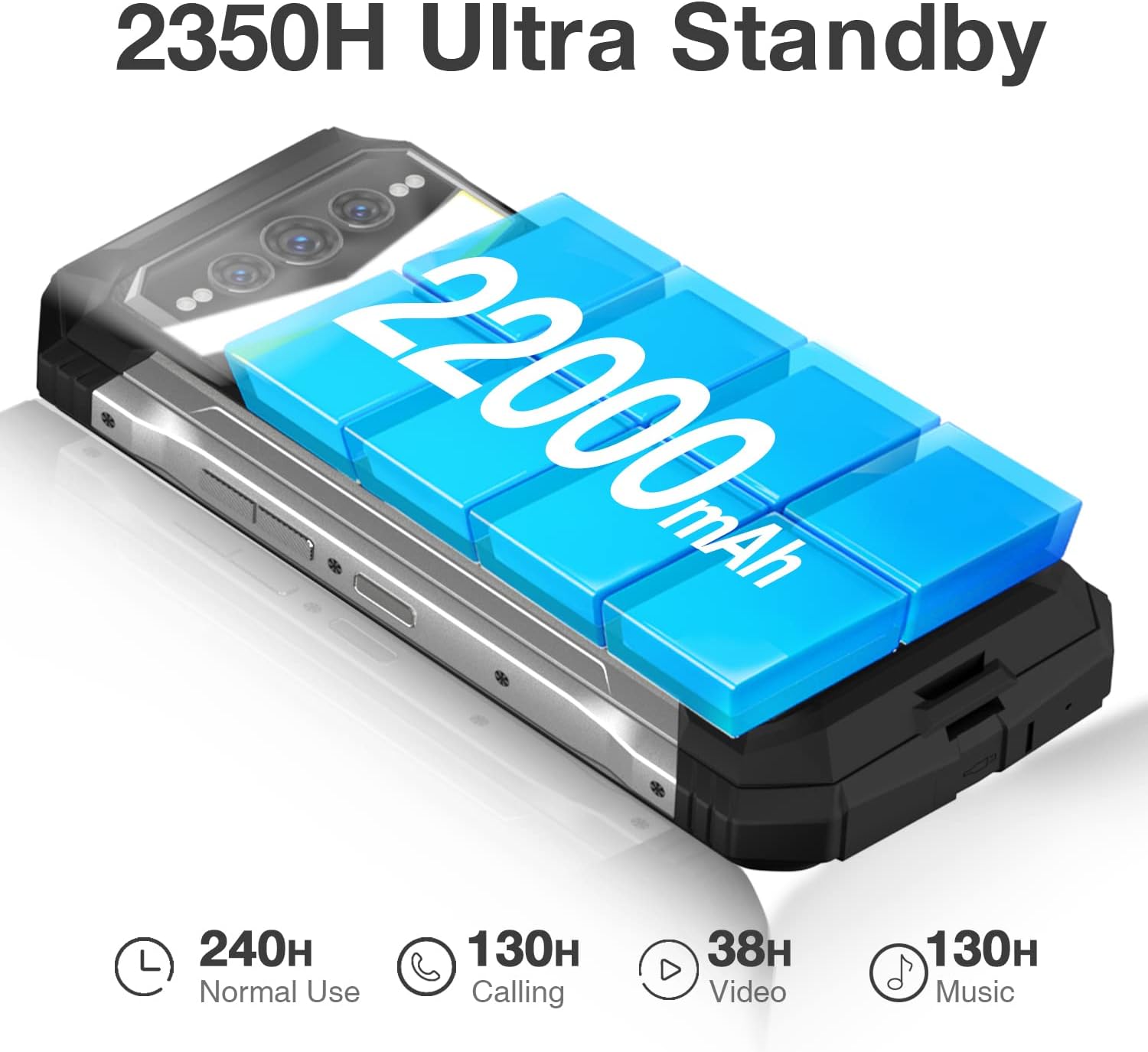
Image: Close-up of the DOOGEE S100 Pro's side, emphasizing the massive 22000mAh battery and its ultra-long standby time, with icons for normal use, calling, video, and music playback hours.

Image: Illustration of the DOOGEE S100 Pro being charged via USB-C, highlighting its 22000mAh ultra-long lasting battery with 33W fast charging and OTG reverse charging capabilities.

Image: The DOOGEE S100 Pro acting as a power bank, charging another device, with icons showing compatibility with earphones, mobile phones, smartwatches, digital cameras, USB fans, and speakers.
Video: DOOGEE S100PRO 22000mAh Ultra Battery Smartphone. This video demonstrates the impressive 22000mAh battery capacity of the DOOGEE S100 Pro smartphone, showcasing its long-lasting power.
3.2. Integrated Camping Light
The S100 Pro features a built-in camping light that radiates a stunning brightness of 130 lumens, illuminating up to 25 meters away for up to 18 hours. It offers five versatile modes: SOS, Explosion Flash, Slightly Bright, Full Light, and Half Light.

Image: The rear of the DOOGEE S100 Pro with its powerful camping light illuminated, showing various light modes like SOS, Explosion Flash, Slightly Bright, Full Light, and Half Light, with a tent in the background.

Image: Diagram illustrating the camping light's specifications: Max Output 130 Lumens, Max Runtime 18 Hours, Beam Distance 25M, and Ruggedness IP68/IP69K/MIL-STD-810H.

Image: The DOOGEE S100 Pro's camping light illuminating a forest at night, with an overlay showing the various multi-light modes: SOS, Explosion Flash, Slightly Bright, Full Light, and Half Light.

Image: The DOOGEE S100 Pro hanging from a tent, demonstrating its use as a camping light in an outdoor setting.
Video: 22000mAh Ultra Battery with 130LM Camping Light Rugged Phone. This video highlights the DOOGEE S100 Pro's powerful 22000mAh battery and its integrated 130LM camping light, demonstrating its utility for outdoor activities.
3.3. Advanced Camera System
The S100 Pro features an upgraded 108MP main camera for remarkable clarity, a 32MP front-facing camera for stunning selfies, a 20MP night vision camera for low-light photography, and an 8MP wide-angle and macro camera for versatile shots. It also supports 2K video capture.

Image: The rear camera module of the DOOGEE S100 Pro, detailing its 20MP Night Vision Camera, 108MP Main Camera, and 16MP Wide Angle & Macro Camera, with a group of friends taking a selfie using the 32MP Front Camera.

Image: A person taking a selfie with the DOOGEE S100 Pro, showcasing the 32MP front-facing camera.

Image: The DOOGEE S100 Pro displaying various camera modes: HDR, Pro Mode, Portrait, and Night Mode, with example scenes.

Image: The DOOGEE S100 Pro being used to photograph a sea turtle underwater, demonstrating its waterproof capabilities and camera quality.

Image: The DOOGEE S100 Pro displaying a video recording interface, highlighting its 2K video capture capability.
3.4. Immersive Display & Audio
Experience a visual feast on the 6.58'' Full HD+ waterdrop screen with a 120Hz refresh rate, 2408*1080 resolution, and 401 PPI. Dual Hi-Res speakers deliver superior audio quality for an immersive experience.

Image: The DOOGEE S100 Pro's 6.58" 120Hz Waterdrop Screen displaying a vibrant landscape, with icons indicating Corning Gorilla Glass 5, 120Hz Refresh Rate, 2408*1080 Resolution, and 20:9 Aspect Ratio.

Image: The DOOGEE S100 Pro's 6.58" FHD+ DotDisplay, showing its 2408*1080 Resolution, 16.7 Million Colors, 480 nits Brightness, and 20:9 Aspect Ratio.

Image: An illustration of the DOOGEE S100 Pro's 120Hz refresh rate for smooth visuals.

Image: Illustration of the DOOGEE S100 Pro's powerful dual Hi-Res speakers emitting sound waves.
3.5. Robust Performance
Powered by the MediaTek G99 6nm processor, the S100 Pro delivers efficient and smooth performance. It comes with 12GB of RAM (expandable up to 20GB with virtual RAM) and 256GB of internal storage (expandable up to 2TB via microSD card).

Image: Diagram illustrating the MediaTek Helio G99 processor with 6nm Advanced Tech, Octa-Core Processor, and 2.2 GHz High Frequency.

Image: Diagram detailing the MediaTek Helio G99 processor with 6nm Advanced Processor, 2.2GHz High Frequency CPU, and 40% Upgraded Energy Efficiency.

Image: Illustration of the DOOGEE S100 Pro's memory: 12GB RAM (up to 8GB expandable) and 256GB ROM (up to 2TB expandable), with a memory expansion slider.
3.6. Extreme Durability
Engineered to thrive in rugged conditions, the S100 Pro is IP68/IP69K and MIL-STD-810H compliant, offering protection against drops from heights up to 6FT, submersion in 4FT of water for 30 minutes, and complete protection in dusty or sandy environments.

Image: The DOOGEE S100 Pro rugged smartphone in a rainy outdoor environment, emphasizing its IP68/IP69K and MIL-STD-810H compliance for toughness.

Image: The DOOGEE S100 Pro rugged smartphone in a rainy outdoor environment, emphasizing its IP68/IP69K and MIL-STD-810H compliance for toughness.
3.7. Connectivity & Security
The device supports NFC for convenient mobile payments, Wifi 6 for faster wireless connections, and Dual 4G network standby. For security, it features both Face ID and a fingerprint scanner with a rapid 0.19s response speed.

Image: Close-up of the DOOGEE S100 Pro's SIM card tray, showing slots for Nano-SIM1 and Nano-SIM2/TF card, along with icons for Wifi 6 and Dual 4G Network Standby.

Image: A hand holding the DOOGEE S100 Pro making a contactless payment, indicating NFC functionality.

Image: A person using the DOOGEE S100 Pro for navigation in an outdoor setting, highlighting its L1+L5 Dual Band Precise Navigation.

Image: Illustration of the DOOGEE S100 Pro's Face ID and Fingerprint unlock features, with a 0.19s response speed.
3.8. Android 12 Operating System
The DOOGEE S100 Pro runs on Android 12.0, offering a user-friendly interface and access to a wide range of applications.

Image: Screenshots of the DOOGEE S100 Pro's Android 12 interface, showing the home screen, quick settings, and pedometer app.
4. Setup
4.1. SIM Card and MicroSD Card Installation
To install your Nano-SIM cards and/or a MicroSD card (up to 2TB), locate the SIM tray on the side of the device. Use the provided SIM ejector tool to open the tray. Carefully place the SIM cards and MicroSD card into their respective slots, ensuring correct orientation. Close the tray securely to maintain the device's waterproof and dustproof integrity.
4.2. Initial Power On and Setup
Press and hold the power button (located on the right side) until the DOOGEE logo appears. Follow the on-screen prompts to complete the initial setup, including language selection, Wi-Fi connection, Google account sign-in, and security settings (fingerprint/Face ID).
5. Operating Instructions
5.1. Basic Navigation
Navigate the Android 12 interface using gestures or on-screen navigation buttons. Swipe up from the bottom to access the app drawer, swipe down from the top for quick settings and notifications.
5.2. Using the Camera
Open the Camera app from your home screen or app drawer. Select from various modes like Photo, Video, Night Vision, Wide Angle, Macro, Portrait, HDR, and Pro Mode. Tap the shutter button to capture photos or start/stop video recording. Utilize the 32MP front camera for high-quality selfies.
5.3. Activating the Camping Light
Access the 'Camping Lights' application from your app drawer. Within the app, you can select from different modes such as SOS, Explosion Flash, Slightly Bright, Full Light, and Half Light to suit your needs. The camping light can be used for illumination in outdoor or low-light conditions.
5.4. Security Features
Set up your preferred security method in the 'Settings' menu under 'Security'. You can choose between fingerprint unlock (using the side-mounted sensor) and Face ID for quick and secure access to your device.
6. Maintenance
To ensure the longevity and optimal performance of your DOOGEE S100 Pro, follow these maintenance guidelines:
- Cleaning: Wipe the device with a soft, damp cloth. Avoid harsh chemicals or abrasive materials.
- Water and Dust Resistance: Ensure all port covers (USB-C, SIM tray) are securely closed to maintain IP68/IP69K water and dust resistance. Do not intentionally submerge the device beyond specified limits.
- Temperature: Avoid exposing the device to extreme temperatures (hot or cold) for prolonged periods.
- Charging: Use only the provided charger and cable to prevent damage to the battery and device.
- Software Updates: Regularly check for and install software updates to ensure optimal performance, security, and new features.
7. Troubleshooting
If you encounter issues with your DOOGEE S100 Pro, try the following solutions:
- Device Not Turning On: Ensure the battery is charged. Connect the charger and wait a few minutes before attempting to power on again.
- Poor Battery Life: Close unused apps running in the background. Reduce screen brightness. Disable unnecessary features like Wi-Fi, Bluetooth, or GPS when not in use.
- Connectivity Issues (Wi-Fi/Mobile Data): Toggle Wi-Fi/Mobile Data off and on. Restart the device. Check router settings or contact your network provider.
- Apps Crashing/Freezing: Clear the cache and data of the problematic app in 'Settings > Apps'. If the issue persists, uninstall and reinstall the app.
- Slow Performance: Close background apps. Clear unnecessary files and cache. Consider a factory reset if performance remains poor (back up your data first).
- Camping Light Not Working: Ensure the 'Camping Lights' app is open and the desired mode is selected. Check if the battery level is critically low.
8. Specifications
Detailed technical specifications for the DOOGEE S100 Pro:
| Feature | Specification |
|---|---|
| Brand | DOOGEE |
| Model Name | DOOGEE S100 PRO |
| Operating System | Android 12.0 |
| RAM | 12 GB |
| Memory Storage Capacity | 256 GB |
| Screen Size | 6.58 Inches |
| Resolution | 2408*1080 |
| Refresh Rate | 120 Hz |
| CPU Speed | 2.2 GHz |
| Battery Power Rating | 22000 mAh |
| Phone Talk Time | 130 Hours |
| Phone Standby Time (with data) | 2350 hours |
| Special Features | Dual Hi-res Stereo Speakers, 22000mAh Huge Battery, 108MP Tri Camera, MediaTek G99 6nm 2.2GHz, 130LM Camping Light |
| Other Camera Features | 108MP Main Camera/20MP Night Vision / 16MP Wide Angle & Marco, 32MP Front-facing Camera |
| Wireless Communication Technologies | NFC |
| GPS | True |
| Item Weight | 1.19 pounds |
| Color | Black |
9. Warranty and Support
As a valued DOOGEE customer, you are entitled to a 2-year free warranty and 30 days of money back without reason. A professional support team is available 24/7 to assist you with any problems or inquiries.
For further assistance, please refer to the contact information provided in your product packaging or visit the official DOOGEE support website.