
1. Introduction
The ViATOM CheckmeO2 Max is a portable wrist pulse oximeter designed for continuous monitoring of blood oxygen saturation (SpO2) and pulse rate. It features a comfortable design, long battery life, and integrates with a professional application for detailed data analysis and reporting. This manual provides essential information for the safe and effective use of your device.

Image: A woman comfortably using the ViATOM CheckmeO2 Max Wrist Pulse Oximeter while relaxing in bed, demonstrating its portable and user-friendly nature for continuous monitoring.
2. Package Contents
Please check the package contents upon unboxing to ensure all items are present:
- Main Unit (Oximeter) x 1
- Ring Sensor x 1
- Charging Cable x 1
- User Manual x 1
3. Product Overview
The ViATOM CheckmeO2 Max is an intelligent wearable sleep monitor designed for comfort and accuracy. Key features include:
- Vibration Alarm: Alerts you to low oxygen levels.
- Rechargeable Battery: Provides extended usage time.
- Bluetooth Connectivity: For seamless data transfer to the app.
- Sleep Monitor: Tracks your oxygen and pulse during sleep.
- Customizable Reminders: Set thresholds for alarms.
- APP & PC Compatibility: View and manage data on your smartphone or computer.

Image: The ViATOM CheckmeO2 Max device shown with icons representing its main features: Vibration, Rechargeable, Bluetooth, Sleep Monitor, Reminders, and APP & PC connectivity.
4. Setup
4.1 Charging the Device
Before first use, fully charge the device. A full charge takes approximately 2.5 hours and provides up to 72 hours of continuous operation.

Image: The ViATOM CheckmeO2 Max device highlighting its 72-hour battery life after 2.5 hours of charging, and its comfortable, soft ring sensor for long-term wear.
4.2 Wearing the Device
Place the main unit on your wrist and attach the soft silicone ring sensor to your finger. Ensure the sensor is snug but comfortable, allowing for accurate readings. The device is designed for comfortable, long-term wear, especially during sleep.

Image: An elderly man wearing the ViATOM CheckmeO2 Max on his wrist with the finger sensor attached, demonstrating comfortable usage for health monitoring.
4.3 App Download and Connection
Download the Vihealth APP from your smartphone's app store. Follow these steps to connect your device:
- Download the Vihealth APP.
- Create a user profile within the app.
- Connect the device via Bluetooth.
- Start monitoring.
- Export reports as needed.

Image: A visual guide showing the five steps to set up the ViATOM CheckmeO2 Max, including app download, user creation, Bluetooth connection, monitoring, and report export.
5. Operating Instructions
5.1 Continuous Monitoring
Once connected and worn, the device automatically begins continuous monitoring. Data is collected at 0.5-second intervals, providing detailed insights into your SpO2 and pulse rate.
5.2 Sleep Monitoring
The CheckmeO2 Max is optimized for overnight use, providing continuous monitoring during sleep. This allows for comprehensive analysis of your blood oxygen levels and heart rate throughout the night.
5.3 Alarms and Customization
The device features both audible and vibratory alarms. You can customize the thresholds for each alarm indicator (SpO2 and pulse rate) via the Vihealth app to suit your personal needs. The vibration alarm can function independently even without a continuous phone connection.
6. Vihealth App Usage
The Vihealth app is an integral part of your monitoring experience, offering advanced data analysis and management features.
6.1 Data Analysis
The app analyzes collected data to provide a clear overview of your blood oxygen status and pulse rate trends. It displays detailed graphs and statistics, allowing you to track changes over time.

Image: A smartphone screen displaying the ViATOM CheckmeO2 Max app interface, showing detailed graphs of oxygen level and pulse rate over time, with average values highlighted.
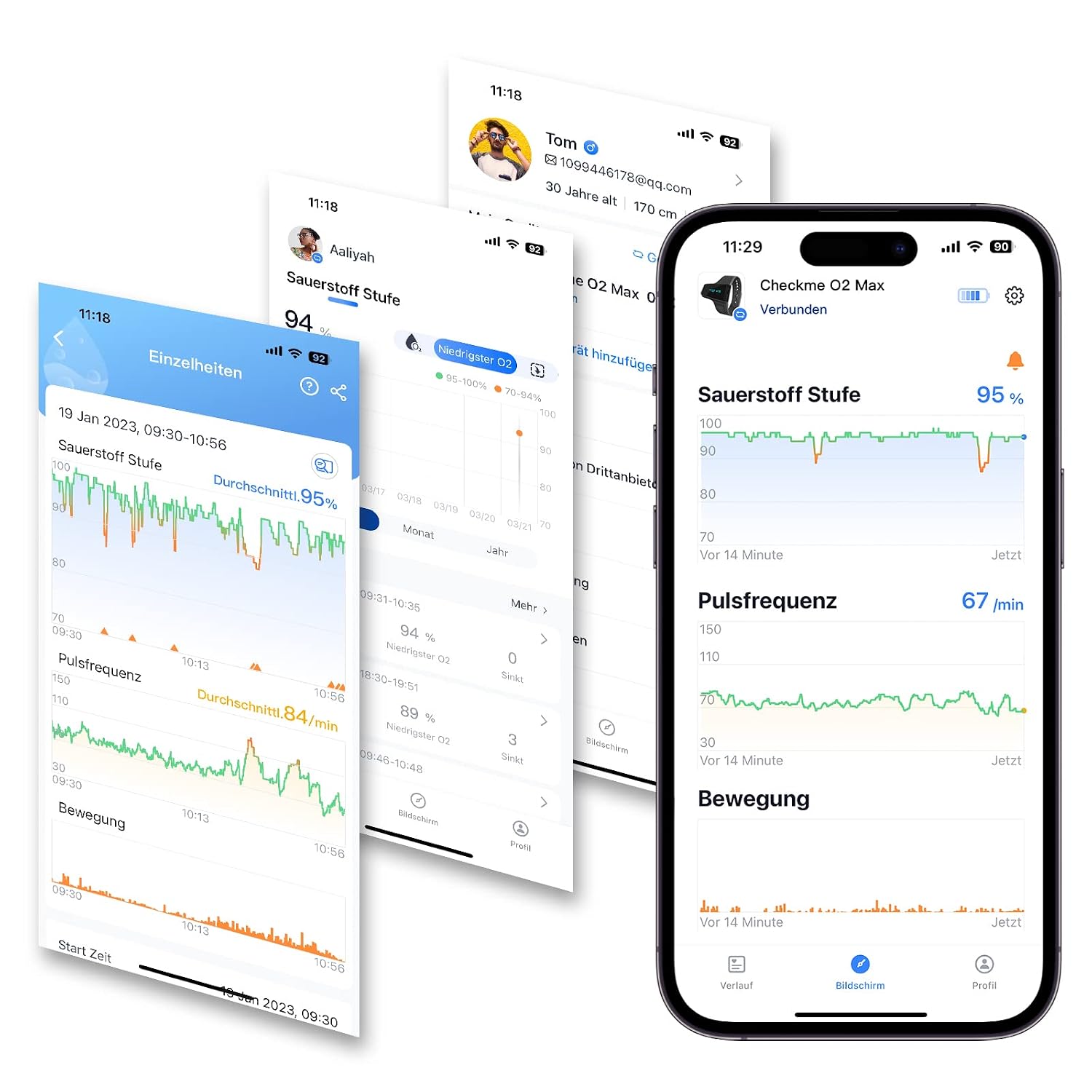
Image: A collage of multiple smartphone screens showcasing various views and detailed data within the ViATOM CheckmeO2 Max application, including oxygen levels, pulse frequency, and motion tracking.
6.2 Report Export and Sharing
Monitoring reports can be easily exported in various formats (PDF, CSV, Binary) and shared with healthcare professionals or family members. This feature facilitates informed discussions about your health data.

Image: A smartphone screen displaying the Vihealth app's sharing options, allowing users to export blood oxygen records in PDF, CSV, or Binary formats.

Image: An elderly couple sharing health data on a smartphone, illustrating the ease of sharing monitoring reports with family members or caregivers.
6.3 Unlimited Users
The Vihealth app allows you to create unlimited user profiles, making it suitable for monitoring multiple family members or friends from a single account.

Image: A family portrait with individual O2 scores displayed above each person, demonstrating the Vihealth app's feature for managing unlimited user profiles.
7. Maintenance
To ensure the longevity and accuracy of your ViATOM CheckmeO2 Max, follow these maintenance guidelines:
- Cleaning: Wipe the device and sensor with a soft, dry cloth. Do not use abrasive cleaners or immerse the device in water.
- Storage: Store the device in a cool, dry place away from direct sunlight and extreme temperatures.
- Battery Care: Recharge the device regularly, even if not in frequent use, to maintain battery health.
- Sensor Inspection: Periodically check the ring sensor for any signs of wear or damage. Replace if necessary to ensure accurate readings.
8. Troubleshooting
If you encounter issues with your ViATOM CheckmeO2 Max, refer to the following common problems and solutions:
- Device Not Turning On:
Ensure the device is fully charged. Connect it to the charging cable and allow it to charge for at least 30 minutes before attempting to power it on again. - Inaccurate Readings:
Check that the ring sensor is properly positioned on your finger and is not too loose or too tight. Ensure your hand is still during measurement. Avoid strong light sources directly on the sensor. - Bluetooth Connection Issues:
Make sure Bluetooth is enabled on your smartphone and the device is within range. Restart both the device and the app. If the issue persists, try unpairing and re-pairing the device in your phone's Bluetooth settings. - "Error 4" Displayed:
This error often indicates a problem with the finger sensor. Try repositioning the sensor or cleaning it. If the error persists, the sensor may be faulty and require replacement. Contact customer support for assistance. - App Not Displaying Data:
Ensure the device is connected via Bluetooth and data synchronization is enabled in the app. Check your phone's internet connection if you are trying to upload or share data. - Short Battery Life:
Ensure the device is fully charged before each use. Battery performance can degrade over time; if you notice a significant and persistent reduction in battery life, contact customer support.
For further assistance, please refer to the official ViATOM support resources or contact customer service.
9. Specifications
| Brand | ViATOM |
| Model Name | CheckmeO2 Max |
| Model Number | checkme o2 max-003 |
| Color | Grey |
| Measurement Range | SpO2: 70% - 100%, Pulse rate: 30 - 250 bpm |
| Battery Type | 1 Lithium-polymer (included) |
| Battery Life | 72 hours (continuous operation) |
| Item Weight | 300 Grams |
| Country of Origin | China |
10. Warranty and Support
ViATOM products are designed for reliability and performance. For warranty information, technical support, or service inquiries, please refer to the warranty card included in your package or visit the official ViATOM website. Keep your purchase receipt as proof of purchase for warranty claims.


