
Voxelab Aquila S3
Voxelab Aquila S3 3D Printer User Manual
Comprehensive guide for setup, operation, and maintenance of your Voxelab Aquila S3 3D Printer.
1. Introduction
The Voxelab Aquila S3 is an advanced 3D printer designed for both beginners and experienced users, featuring intelligent auto-leveling, a high-temperature direct extruder, and multi-material printing capabilities. This manual provides essential information to help you set up, operate, and maintain your printer for optimal performance.
2. What's in the Box
Upon unboxing your Voxelab Aquila S3 3D Printer, please verify that all components listed below are present:
- Voxelab Aquila S3 3D Printer (self-assembled)
- Nozzle bundles (0.3/0.4/0.6/0.8mm, 0.4mm pre-installed)
- User Manual
- Wrenches and screwdrivers
- Filament (sample)
- Remove tool (spatula)
- Cable tie
- Needle (for nozzle cleaning)
- M6 Pneumatic joint * 2
- Power cable
- Storage card and card reader
- Screw kit

Image: Overview of the Voxelab Aquila S3 3D Printer and its various accessories included in the package.
3. Setup Guide
The Voxelab Aquila S3 requires some assembly. Follow these general steps for initial setup. Refer to the included user manual for detailed, step-by-step instructions specific to your model.
- Unpacking and Inspection: Carefully remove all components from the packaging. Inspect for any visible damage during transit.
- Frame Assembly: Assemble the main frame components according to the provided diagrams. Ensure all screws are securely fastened.
- Extruder and Hotend Installation: Mount the all-metal dual-gear direct drive extruder and high-temperature hotend. Connect the necessary wiring.
- Build Plate Installation: Place the removable magnetic PEI platform onto the heated bed.
- Filament Holder: Install the filament spool holder. Consider its placement to avoid interference with Z-axis movement, as noted by some users.
- Wiring Connections: Connect all cables as indicated in the manual, including power, motor, and sensor cables.
- Initial Power On: Connect the power cable and turn on the printer.
- 25-Point Intelligent Auto Leveling: Utilize the 25-point auto-leveling function. This feature simplifies the bed leveling process significantly.
- Z-axis Offset Adjustment: After auto-leveling, fine-tune the Z-axis offset for optimal first layer adhesion. This step is crucial for successful prints.
- Software Installation: Install the recommended slicing software (e.g., VoxelMaker, Cura, Simplify3D) on your computer.
- First Print: Load filament and attempt a test print to verify proper functionality.

Image: The Voxelab Aquila S3 3D Printer fully assembled, ready for operation.
4. Operating Instructions
4.1. Intelligent 25-Point Auto Leveling
The Aquila S3 features an intelligent 25-point auto-leveling system. This function automates the bed leveling process, significantly reducing the time and effort required compared to manual leveling. Simply initiate the auto-leveling process through the printer's interface, and the printer will probe 25 points on the build plate to create a mesh for accurate printing.

Image: The 3D printer's print head probing the build plate at multiple points for automatic bed leveling.
4.2. High-Temperature Direct Extruder
Equipped with an all-metal dual-gear direct drive extruder and a brass nozzle capable of reaching 300°C, the Aquila S3 supports a wide range of filaments including TPUP5A, ABS, PLA, PETG, and allows for expansion to carbon fiber materials. The direct drive system provides strong extrusion force for smoother filament feeding and better control over flexible filaments.

Image: Detailed view of the high-temperature hotend, illustrating its ability to reach 300°C for diverse filament compatibility.

Image: Illustration of the all-metal dual-gear direct extruder, highlighting its robust design for consistent filament feeding.
4.3. Multi-Material Printing
The Aquila S3's high-temperature capabilities and robust extruder enable printing with various materials, including PLA, ABS, PETG, PETG-CF, PLA-CF, PET-CF, PA12-CF, PA, PC, and TPU. This versatility allows for a broad range of applications, from standard prototypes to more durable or flexible parts.

Image: A display of various 3D printed objects, each demonstrating the printer's capability with different filament types.
4.4. Resume Printing Function
The printer is equipped with a resume printing function, which allows it to continue a print job from the last recorded extruder position after an unexpected power outage or interruption. This feature helps prevent print failures and saves material.

Image: A visual representation of the printer's ability to resume a print job from where it left off after an interruption.
4.5. Removable Magnetic Platform
The innovative printing platform combines a PC coating, spring steel sheet, and magnetic stickers. This design ensures excellent adhesion during printing and allows for easy removal of printed models by simply bending the flexible steel sheet.
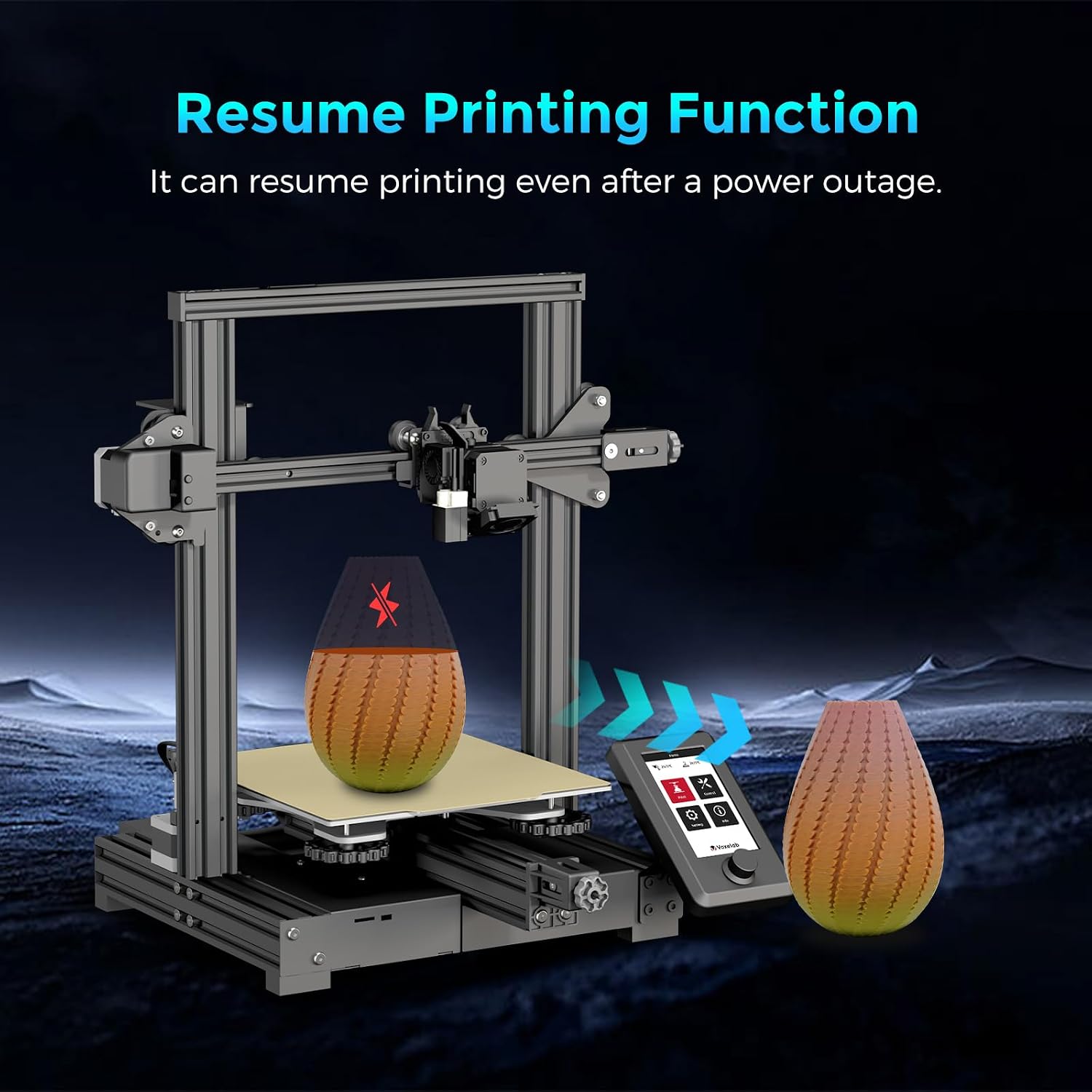
Image: A close-up view of the flexible, magnetic build plate, showing its texture and ease of removal.
4.6. High-Speed Printing
The Aquila S3 is capable of high-speed printing, reaching up to 200mm/s, which is approximately twice as fast as many standard 3D printers, while maintaining print quality. This allows for quicker completion of projects without significant compromise on detail.
Image: An astronaut model being printed at high speed on the Aquila S3, illustrating its rapid printing capabilities.
5. Maintenance
Regular maintenance is crucial for the longevity and consistent performance of your 3D printer. Perform these tasks periodically:
- Clean the Build Plate: After each print, clean the build plate with isopropyl alcohol to ensure optimal adhesion for subsequent prints.
- Nozzle Cleaning: Use the included needle to clear any clogs from the nozzle. If clogs persist, consider replacing the nozzle.
- Lubricate Moving Parts: Periodically apply a small amount of lubricant to the Z-axis lead screw and other linear rails to ensure smooth movement.
- Check Belt Tension: Ensure that the X and Y-axis belts are properly tensioned. Loose belts can lead to print quality issues.
- Firmware Updates: Check the Voxelab website for any available firmware updates to ensure your printer has the latest features and bug fixes.
6. Troubleshooting
This section addresses common issues you might encounter with your Voxelab Aquila S3 3D Printer. For more complex problems, refer to the official Voxelab support resources.
| Problem | Possible Cause | Solution |
|---|---|---|
| Poor First Layer Adhesion | Incorrect Z-axis offset, dirty build plate, improper bed temperature. | Re-adjust Z-axis offset, clean the build plate thoroughly, ensure correct bed temperature for your filament. |
| Extruder Jamming/Clogging | Nozzle clog, heat creep, incorrect printing temperature, worn out nozzle. | Clear nozzle with needle, check for proper cooling, verify filament temperature settings, replace nozzle if worn. |
| Print Quality Issues (e.g., Layer Shifting) | Loose belts, unstable printer, print speed too high. | Check and tighten X/Y axis belts, ensure printer is on a stable surface, reduce print speed. |
| Screen Freezes or Malfunctions | Loose cable connection, software glitch, hardware fault. | Check all display cable connections. Restart the printer. If issue persists, contact customer service. |
| Filament Spool Interference | Spool holder position obstructs Z-axis movement. | Adjust the filament spool holder position to prevent interference with moving parts. |
7. Specifications
| Feature | Detail |
|---|---|
| Brand | Voxelab |
| Model | Aquila S3 |
| Product Dimensions | 21 x 15 x 21 inches (533.4 x 381 x 533.4 mm) |
| Item Weight | 20.6 pounds (9.34 kg) |
| Material | Metal |
| Nozzle Quantity | 1 (with bundle of 0.3/0.4/0.6/0.8mm) |
| Nozzle Diameter | 0.4 mm (pre-installed) |
| Print Volume | 220×220×240mm |
| Input Voltage | AC 115/230V 50/60HZ |
| Output Voltage | DC 24V |
| Total Power | 350 watts |
| Compatible Slicing Software | Cura/Simplify3D/Voxelmaker |
| Filament Diameter | Φ1.75 mm PLA |
| Hotbed Temperature | ≤100°C |
| Nozzle Temperature | ≤300°C |
| Print Speed | ≤200 mm/s (80-100 mm/s normal) |
| Supported Filaments | PLA, ABS, PLA-CF, PETG, PETG-CF, PET-CF, PA12-CF, PA, PC, TPU |
| Layer Thickness | 0.1-0.4 mm |
| Connectivity | USB/Memory card offline printing |
| Resume Printing Function | Yes |
| Supported OS | Windows 7/10 / Mac OS |

Image: Diagram showing the physical dimensions of the Voxelab Aquila S3 3D Printer.
8. Warranty and Support
Voxelab provides a one-year warranty and lifetime professional technical support for the Aquila S3 3D printer. For any assistance, troubleshooting, or warranty claims, please feel free to connect with Voxelab customer service.
For further support, visit the official Voxelab website or contact their customer service channels as provided in your product packaging or on their website.
Related documentsAquila S3

Ask a question about this manual
Ask about setup, troubleshooting, compatibility, parts, safety, or missing instructions. Manuals+ will review the question and use this page’s manual context to help answer it.