
Accutime SNC40094AZ
Accutime Sonic The Hedgehog's Walkie Talkie Kid's Watches Instruction Manual
Brand: Accutime | Model: SNC40094AZ
Introduction
Welcome to the world of Sonic The Hedgehog with your new Walkie Talkie Wristwatch Set! This manual provides essential information for setting up, operating, and maintaining your watches to ensure a fun and interactive experience. Designed for durability and adventure, these watches combine a digital display with walkie-talkie functionality, a built-in compass, and a flashlight, perfect for young explorers.

Figure 1: Front view of the Sonic The Hedgehog Walkie Talkie Watches.
Product Features
- 2-Way Radio Communication: Stay connected with a long range of up to 200 meters.
- Digital Time Display: Clear and easy-to-read digital clock.
- Built-in Compass: Navigate your adventures with the integrated compass.
- Integrated Flashlight: Provides illumination in low-light conditions.
- Durable Design: Built to withstand active play and outdoor adventures.
- Rechargeable Battery: Equipped with a 3.7V Lithium Polymer rechargeable battery for long-lasting use.
- Officially Licensed Sonic The Hedgehog Design: Features iconic Sonic character art.
Setup
1. Initial Charging
Your Sonic Walkie Talkie Watches come with built-in rechargeable batteries. Before first use, it is recommended to fully charge both watches.
- Locate the charging port on the side of each watch.
- Connect the provided charging cable to the watch and a compatible USB power source (e.g., computer USB port, USB wall adapter).
- A charging indicator light will illuminate. Allow approximately 2-3 hours for a full charge. The light may change or turn off when fully charged (refer to specific indicator behavior if detailed in packaging).
- Disconnect the charging cable once charging is complete.
2. Power On/Off
To power on the watch, locate the ON/OFF switch, typically on the side or back of the watch. Slide the switch to the "ON" position. To power off, slide the switch to the "OFF" position.
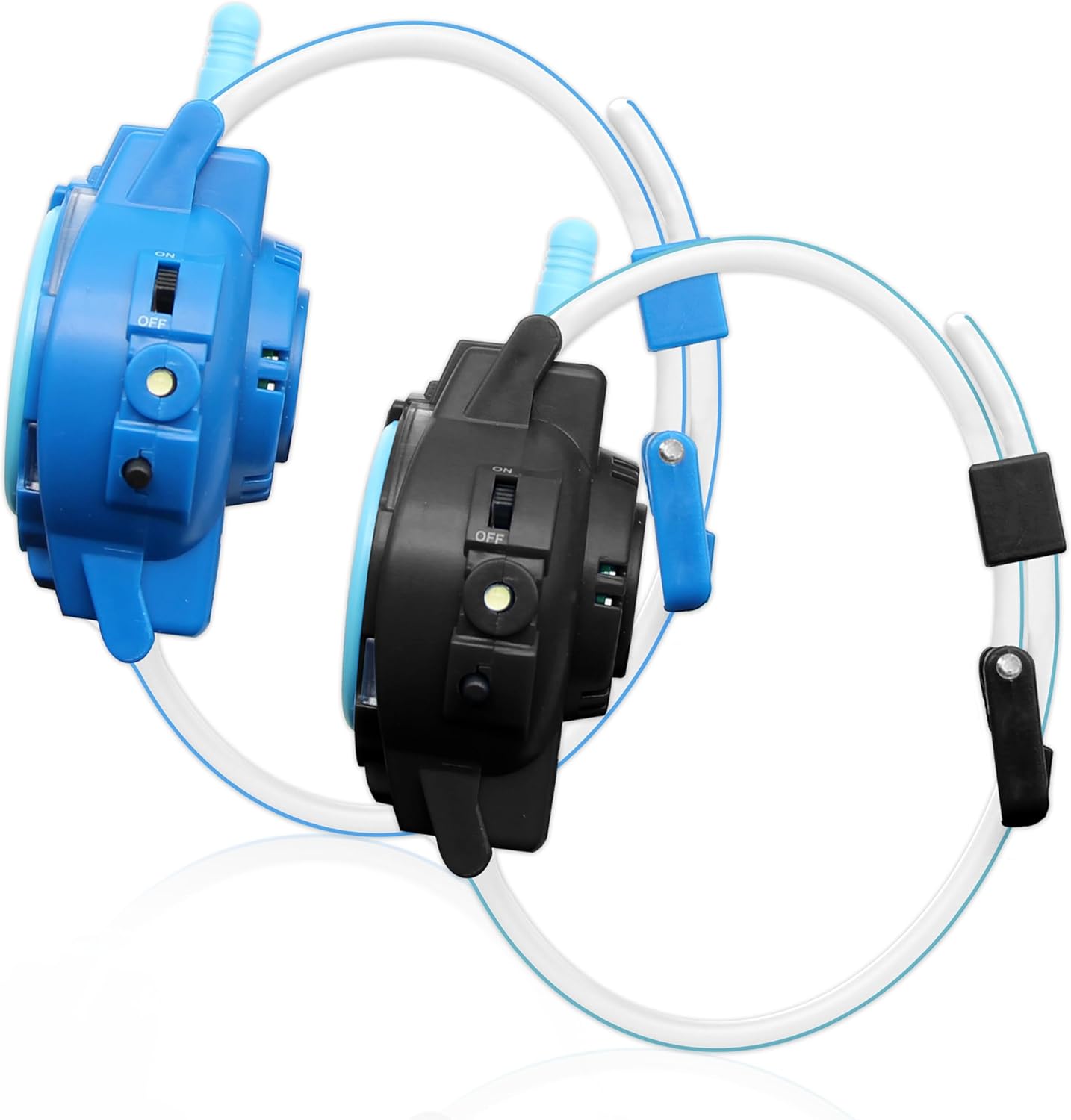
Figure 2: Side view illustrating the ON/OFF switch and charging port.
Operating Instructions
1. Setting the Time
The watch features a digital time display. To set the time:
- Press the "MODE" button (usually located on the side) until the time display starts flashing.
- Use the "SET" or "ADJUST" button (often another side button) to change the hours.
- Press "MODE" again to move to minutes, then use "SET" or "ADJUST" to change the minutes.
- Continue pressing "MODE" to cycle through other settings like date or alarm if available, adjusting with "SET" or "ADJUST" as needed.
- Press "MODE" one last time to confirm and exit the setting mode.
2. Using the Walkie-Talkie Function
These watches allow for two-way communication with another compatible Sonic Walkie Talkie Watch within range (up to 200 meters).
- Ensure both watches are powered on and within range of each other.
- To transmit your voice, press and hold the "TALK" button (typically on the side of the watch, near the antenna).
- Speak clearly into the microphone (labeled "MIC" on the watch face).
- Release the "TALK" button when you are finished speaking to allow the other person to respond.
- When the other person is speaking, you will hear their voice through the watch's speaker. Do not press the "TALK" button while listening.

Figure 3: Side view highlighting the "TALK" button and antenna for communication.
3. Using the Built-in Compass
A functional compass is integrated into the watch for basic directional guidance.
- Hold the watch flat and steady in your hand, away from metal objects or strong magnetic fields that could interfere with its accuracy.
- Allow the compass needle to settle. The red end of the needle typically points North.
- Use the compass for general directional awareness during outdoor play. Note that this is a basic compass and may not be suitable for precise navigation.
4. Activating the Flashlight
The watch includes a small flashlight for convenience.
- Locate the flashlight button or switch (often near the compass or on the side).
- Press or slide the button to turn the flashlight ON.
- Press or slide it again to turn the flashlight OFF.
Maintenance
Cleaning
To keep your watches in good condition:
- Wipe the watch surface with a soft, dry cloth.
- Do not use harsh chemicals, cleaning solvents, or strong detergents.
- Avoid submerging the watch in water, as it is not waterproof.
Storage
When not in use, store the watches in a cool, dry place away from direct sunlight and extreme temperatures. Ensure they are fully charged before long-term storage to preserve battery life.
Troubleshooting
| Problem | Possible Cause | Solution |
|---|---|---|
| Watch does not power on. | Battery is depleted. | Charge the watch fully using the provided cable. |
| Walkie-talkie communication is unclear or not working. | Out of range; low battery; interference. | Ensure both watches are within 200m range. Charge batteries. Move away from sources of electronic interference. |
| Watch is making a continuous ringing sound. | Possible software glitch or low battery. | Try turning the watch off and then on again. Ensure the watch is fully charged. If the issue persists, contact customer support. |
| Digital display is dim or not visible. | Low battery. | Charge the watch. |
Specifications
- Product Dimensions: 10.24 x 2.76 x 1.57 inches
- Item Weight: 4.27 ounces
- Model Number: SNC40094AZ
- Battery: 1 Lithium Polymer battery (included)
- Manufacturer: Accutime Watch Corp.
- Communication Range: Up to 200 meters
Warranty and Support
Accutime products are designed for quality and durability. For information regarding warranty coverage, please refer to the warranty card included with your product packaging or visit the official Accutime website. If you encounter any issues or require technical assistance, please contact Accutime customer support through their official channels. Keep your purchase receipt as proof of purchase for warranty claims.
For further assistance, you may visit the Accutime Store on Amazon.
Related documentsSNC40094AZ

Ask a question about this manual
Ask about setup, troubleshooting, compatibility, parts, safety, or missing instructions. Manuals+ will review the question and use this page’s manual context to help answer it.