
STIGA 547e Kit
STIGA Multiclip 547e Kit Cordless Lawn Mower User Manual
1. Safety Instructions
Always read and understand all safety warnings and instructions before operating the lawn mower. Failure to follow the warnings and instructions may result in electric shock, fire, and/or serious injury.
General Safety
- Keep all parts of the body away from the cutting blade. Do not remove material from the cutting deck when the mower is running.
- Wear appropriate personal protective equipment (PPE), including safety glasses, hearing protection, and sturdy footwear.
- Do not operate the mower in wet conditions or rain.
- Ensure the area is clear of debris, stones, and other objects that could be thrown by the blade.
- Never allow children or people unfamiliar with these instructions to operate the lawn mower.
Battery Safety
- Use only the specified battery pack and charger for this product.
- Do not expose battery packs to fire or high temperatures.
- Store battery packs indoors in a dry place when not in use.
- If the battery pack is damaged, do not use it. Contact STIGA customer service.
2. Product Overview
The STIGA Multiclip 547e Kit is a powerful 48V cordless lawn mower designed for efficient mulching. It features a robust construction, a 45 cm cutting width, and an adjustable handle for user comfort. The mulching system finely chops grass clippings, returning nutrients to your lawn.

Figure 2.1: Overall view of the STIGA Multiclip 547e Kit Cordless Lawn Mower.
Components
- Lawn Mower Unit
- Upper Handle Assembly
- 48V (4Ah) Battery Pack
- Battery Charger
- Mulching Plug (pre-installed)
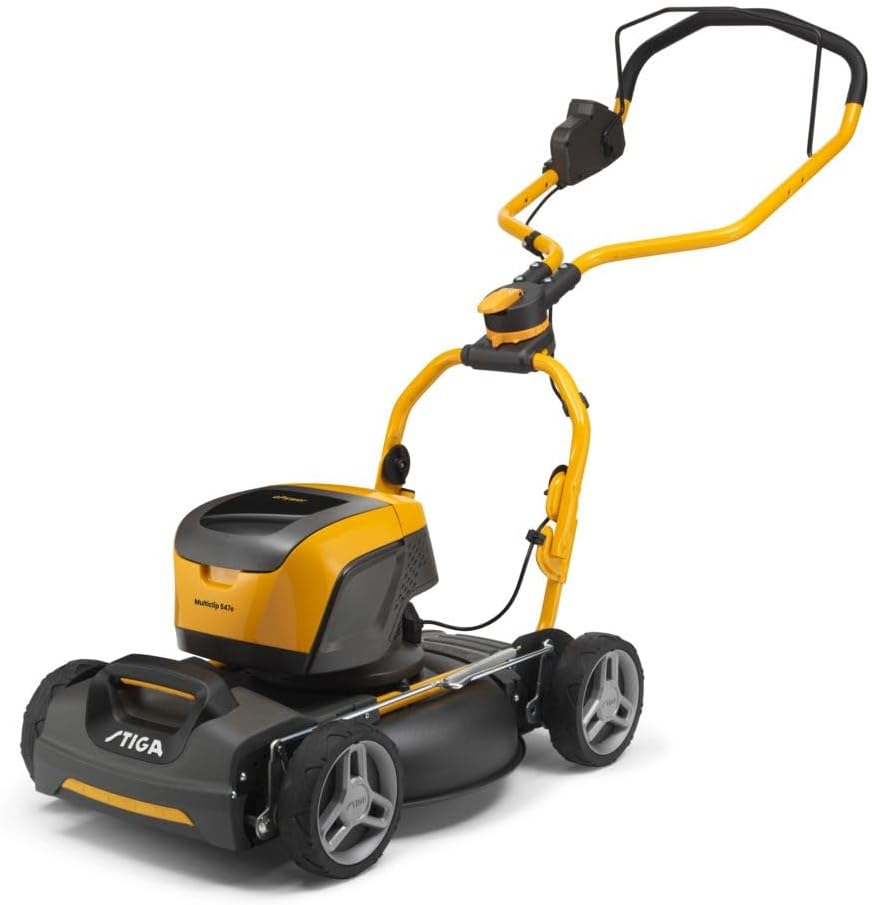
Figure 2.2: Side view of the lawn mower, highlighting its compact design.

Figure 2.3: Close-up view of the battery compartment, showing where the 48V battery is inserted.
3. Setup
3.1 Handle Assembly
- Unfold the lower handle from the transport position.
- Attach the upper handle to the lower handle using the provided knobs and bolts. Ensure the cables are not pinched.
- Adjust the handle height to one of the two available positions for comfortable operation. Secure the adjustment points.

Figure 3.1: The lawn mower with its handle extended and ready for use.

Figure 3.2: Detail of the handle adjustment mechanism, allowing for two height settings.
3.2 Battery Charging
Before first use, fully charge the 48V (4Ah) battery pack. Connect the charger to a suitable power outlet and insert the battery pack into the charger. The indicator lights on the charger will show the charging status. A full charge typically takes approximately 90 minutes.
3.3 Battery Installation
- Open the battery compartment cover on the top of the mower.
- Slide the fully charged battery pack into the compartment until it clicks securely into place.
- Close the battery compartment cover firmly.
4. Operating the Lawn Mower
4.1 Starting the Mower
- Ensure the battery is correctly installed and the compartment cover is closed.
- Press and hold the safety button on the handle.
- While holding the safety button, pull the bail lever towards the handle. The motor will start.
- Release the safety button once the motor is running.

Figure 4.1: Top view of the handle, showing the safety button and bail lever for starting the mower.
4.2 Mowing Techniques
- For best mulching results, mow frequently and remove no more than one-third of the grass height at a time.
- Overlap each mowing pass slightly to ensure even coverage.
- The Multiclip system is designed to finely cut grass clippings, distributing them back onto the lawn as natural fertilizer.
4.3 Adjusting Cutting Height
The cutting height can be adjusted to suit your lawn conditions. Locate the height adjustment lever on the mower deck. Move the lever to select one of the available cutting height positions. Refer to the markings on the mower for specific height settings.
5. Maintenance
Regular maintenance ensures optimal performance and extends the life of your STIGA lawn mower. Always disconnect the battery pack before performing any maintenance or cleaning.
5.1 Cleaning
- After each use, clean the underside of the mower deck to prevent grass buildup. Use a brush or scraper; do not use water directly on electrical components.
- Wipe down the exterior of the mower with a damp cloth.
5.2 Blade Care
- Regularly inspect the blade for sharpness and damage. A dull or damaged blade can lead to poor cutting performance.
- If the blade needs sharpening or replacement, contact an authorized STIGA service center.
5.3 Storage
- For compact storage, the handle can be folded forward.
- Store the lawn mower in a clean, dry place, away from direct sunlight and extreme temperatures.
- Remove the battery pack from the mower before long-term storage.

Figure 5.1: The lawn mower with its handle folded forward, demonstrating its compact storage capability.
6. Troubleshooting
| Problem | Possible Cause | Solution |
|---|---|---|
| Mower does not start | Battery not charged or not inserted correctly; Safety button/bail lever not engaged. | Charge battery and reinsert; Ensure safety button is pressed before pulling bail lever. |
| Poor cutting performance | Dull or damaged blade; Mowing too much grass at once; Wet grass. | Sharpen/replace blade; Mow more frequently; Avoid mowing wet grass. |
| Short battery run time | Battery not fully charged; Battery nearing end of life; Mowing very thick/tall grass. | Fully charge battery; Consider battery replacement; Mow in smaller sections. |
7. Specifications
| Feature | Specification |
|---|---|
| Model Number | 547e Kit |
| Part Number | 298471058/ST2 |
| Power Source | Battery-powered |
| Battery Voltage | 48V (4Ah) |
| Motor Power | 1.3 kW |
| Cutting Width | 45 cm |
| Recommended Lawn Area | Up to 500 m² |
| Product Dimensions (L x W x H) | 140 x 48.5 x 113 cm |
| Weight | 25 kg |
| Material | Metal |
| Handle Height Positions | 2 |
8. Warranty and Support
STIGA products are manufactured to high quality standards and are guaranteed against manufacturing defects. Please refer to the warranty card included with your product for specific terms and conditions, including warranty period and coverage.
For technical assistance, spare parts, or service, please contact your local authorized STIGA dealer or visit the official STIGA website for customer support information.
Online Resources: www.stiga.com
Related documents547e Kit


Ask a question about this manual
Ask about setup, troubleshooting, compatibility, parts, safety, or missing instructions. Manuals+ will review the question and use this page’s manual context to help answer it.