
1. Introduction
This manual provides instructions for the proper use and care of NIIMBOT Cable Labels, specifically the 1'' x 3'' (25x78mm) size. These thermal labels are designed for use with compatible NIIMBOT label printers, including models B1, B21, B2, B3S, and K3. The labels are engineered for durability, featuring waterproof, oil-proof, tear-proof, and abrasion-resistant properties, making them suitable for organizing and identifying various cables in home or professional environments.

Image: NIIMBOT Cable Labels are compatible with various NIIMBOT label printers, including the B1, B21, and B3S models shown.
2. Setup: Loading Labels into Your Printer
To ensure optimal printing results, correctly load the NIIMBOT Cable Label roll into your compatible NIIMBOT label printer.
- Open the Printer Cover: Locate the release latch or button on your NIIMBOT label printer and open the top cover to access the label compartment.
- Insert the Label Roll: Place the NIIMBOT Cable Label roll into the compartment. Ensure the labels feed from the bottom of the roll and the leading edge of the label strip is positioned correctly for the printer's sensor. The printable side of the label should face upwards.
- Adjust Guides (if applicable): Some printer models have adjustable guides. Ensure these guides are snug against the label roll to prevent misalignment during printing.
- Close the Printer Cover: Gently close the printer cover until it clicks securely into place.
- Calibrate (if necessary): After loading, some printers may require a calibration step. Refer to your specific NIIMBOT printer's manual for calibration instructions.
Note: Always use genuine NIIMBOT labels for the best performance and to avoid potential damage to your label printer.
3. Operation: Printing and Applying Cable Labels
Once the labels are loaded, you can begin printing and applying them to your cables.
3.1 Printing Labels
- Connect to App: Ensure your NIIMBOT label printer is connected to the NIIMBOT app on your smartphone or tablet via Bluetooth.
- Select Label Template: In the NIIMBOT app, select the appropriate label template for cable labels (e.g., 25x78mm cable label).
- Design Your Label: Enter the text, symbols, or other information you wish to print on your label. Utilize the app's features for font, size, and alignment adjustments.
- Print: Confirm your design and send the print command to your label printer. The printer will automatically feed and print the labels.
3.2 Applying Cable Labels
The unique design of NIIMBOT Cable Labels allows for easy and secure application around cables.
- Peel the Label: Carefully peel a printed cable label from its backing.
- Position on Cable: Place the non-adhesive portion of the label (the wider, rectangular part) against the cable, ensuring the text is readable.
- Wrap Around: Wrap the adhesive "tail" portion of the label around the cable and secure it to the back of the non-adhesive part. Ensure it is wrapped tightly but without excessive tension that could damage the cable.
- Smooth Down: Press firmly along the entire label to ensure good adhesion and remove any air bubbles.

Image: Step-by-step guide demonstrating how to apply a NIIMBOT cable label to a cable for clear identification.

Image: Example of NIIMBOT cable labels used to organize and identify cables connected to a power strip, such as for a phone, pad, and iMac.

Image: A collage showing diverse applications of NIIMBOT cable labels, including organizing network cables in server racks and identifying fiber optic connections.
4. Maintenance
Proper storage and handling will extend the life and effectiveness of your NIIMBOT Cable Labels.
- Storage: Store unused label rolls in a cool, dry place away from direct sunlight and extreme temperatures. Keep them in their original packaging to protect them from dust and moisture.
- Handling: Avoid touching the adhesive side of the labels to maintain optimal stickiness. Handle labels by their edges.
- Cleaning: Once applied, the labels are waterproof and oil-proof. If they become dirty, gently wipe them with a damp cloth. Avoid harsh chemical cleaners that could degrade the label material or print.
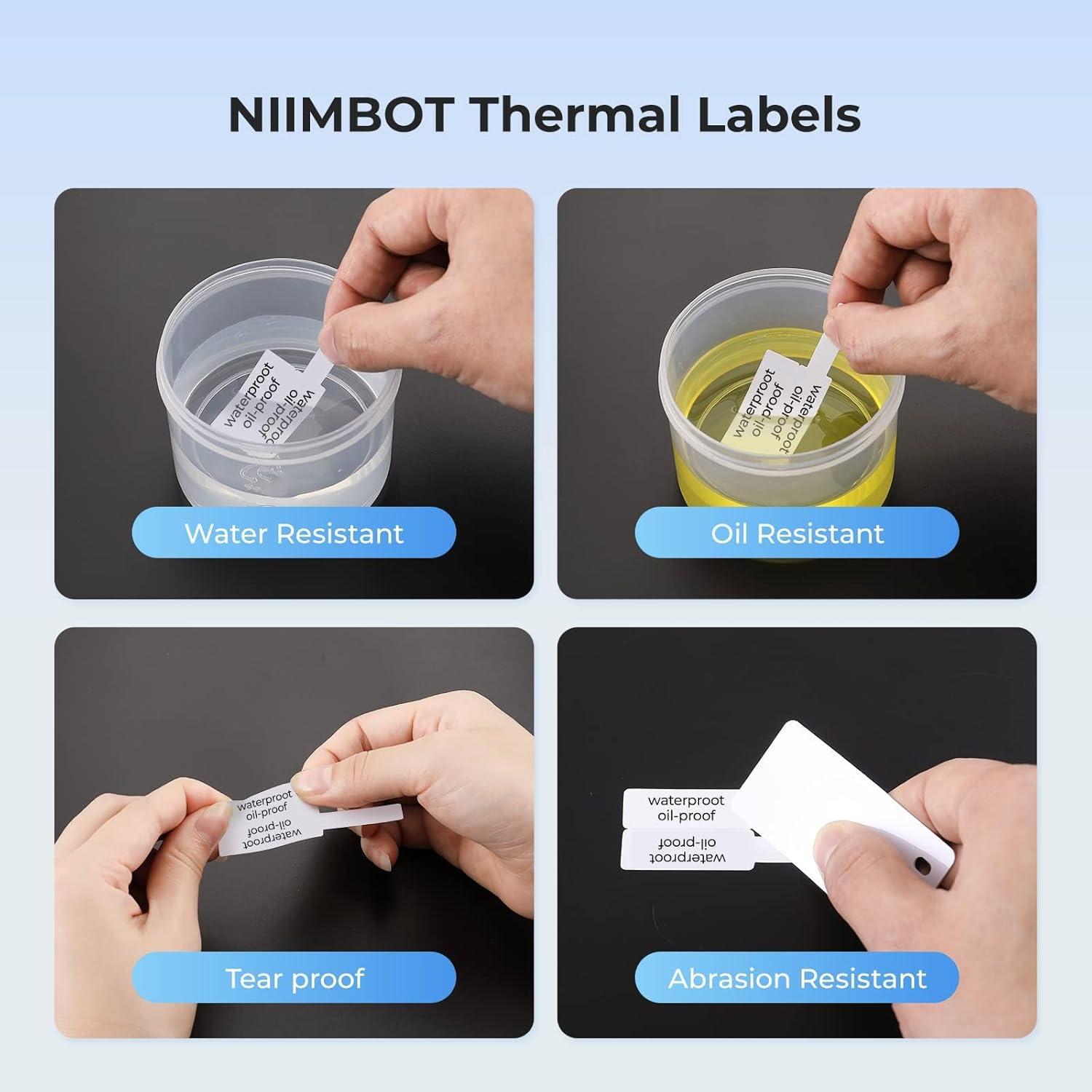
Image: Visual representation of the durability features of NIIMBOT thermal labels, highlighting their resistance to water, oil, tearing, and abrasion.
5. Troubleshooting
If you encounter issues with your NIIMBOT Cable Labels, consider the following common solutions:
- Poor Print Quality:
- Ensure the label roll is inserted correctly and the printable side is facing the print head.
- Check if the print head of your NIIMBOT printer is clean. Refer to your printer's manual for cleaning instructions.
- Verify that you have selected the correct label template in the NIIMBOT app.
- Ensure the label roll is not old or damaged.
- Labels Not Feeding Correctly:
- Re-insert the label roll, ensuring it is properly seated and aligned with any guides.
- Check for any obstructions in the label path.
- Ensure the printer cover is fully closed.
- Labels Not Sticking:
- Ensure the cable surface is clean, dry, and free of dust, oil, or grease before application.
- Avoid touching the adhesive side of the label during application.
- Apply firm pressure across the entire label after wrapping it around the cable.
- Verify the labels are stored correctly and have not expired.
- Compatibility Issues:
- Confirm that your label printer model (e.g., B1, B21, B2, B3S, K3) is compatible with these specific NIIMBOT Cable Labels.
- Ensure your NIIMBOT app is updated to the latest version.
6. Specifications
| Feature | Detail |
|---|---|
| Label Type | Thermal Cable Labels |
| Label Dimensions | 25mm x 78mm (1'' x 3'') |
| Labels per Roll | 100 labels |
| Color | White |
| Material | Paper (Coated) |
| Adhesive Type | Peel-and-stick |
| Durability Features | Waterproof, Oil-proof, Tear-proof, Abrasion-resistant, BPA-free, Degradable |
| Printing Technology | Direct Thermal (No ink or toner required) |
| Compatible Printers | NIIMBOT B1, B21, B2, B3S, K3 Label Printers |

Image: A roll of NIIMBOT Cable Labels, illustrating the label dimensions of 25x78mm (1 inch x 3 inches) and the quantity of 100 labels per roll.
7. Warranty & Support
7.1 Warranty Information
NIIMBOT products are manufactured to high-quality standards. For specific warranty details regarding your NIIMBOT Cable Labels or compatible label printer, please refer to the documentation included with your label printer or visit the official NIIMBOT website. Warranty coverage typically addresses manufacturing defects.
7.2 Customer Support
Should you require assistance with your NIIMBOT Cable Labels or have questions regarding their use, please contact NIIMBOT customer support. You can usually find contact information on the product packaging, the official NIIMBOT website, or through the retailer where you purchased the product.
For additional resources and frequently asked questions, please visit the NIIMBOT Store on Amazon.
