
1. Safety Instructions
Please read and understand these original operating instructions prior to first use to ensure safe implementation and for future reference.
- This product is designed for indoor use only. Avoid installation in wet or damp environments.
- The LED strip lights operate at a safe DC 12V low voltage. Ensure the power adapter is correctly connected.
- Do not open any electrical parts or insert any objects into them. This kit is an electronic product.
- Do not expose the product to high temperatures or moisture.
- This product is not a toy and should not be played with children.
- Do not cut the LED light bars unless specified, as improper cutting can damage the product.
2. Package Contents
The WOBANE Under Cabinet LED Lighting Kit includes the following components:
- 8 x LED Strip Light Bars (1.64 ft / 20 inch each)
- 1 x RF Wireless Remote Control (17-Key)
- 1 x RF Controller/Receiver
- 1 x DC 12V 2A Power Adapter (ETL Listed)
- 2 x 20 inch Straight Connectors
- 4 x 6.7 inch Straight Connectors
- 2 x 'U' Style Connectors
- 4 x Cross Connectors
- 4 x 90-degree Connectors
- Adhesive Tape for connectors
- Cable Holders
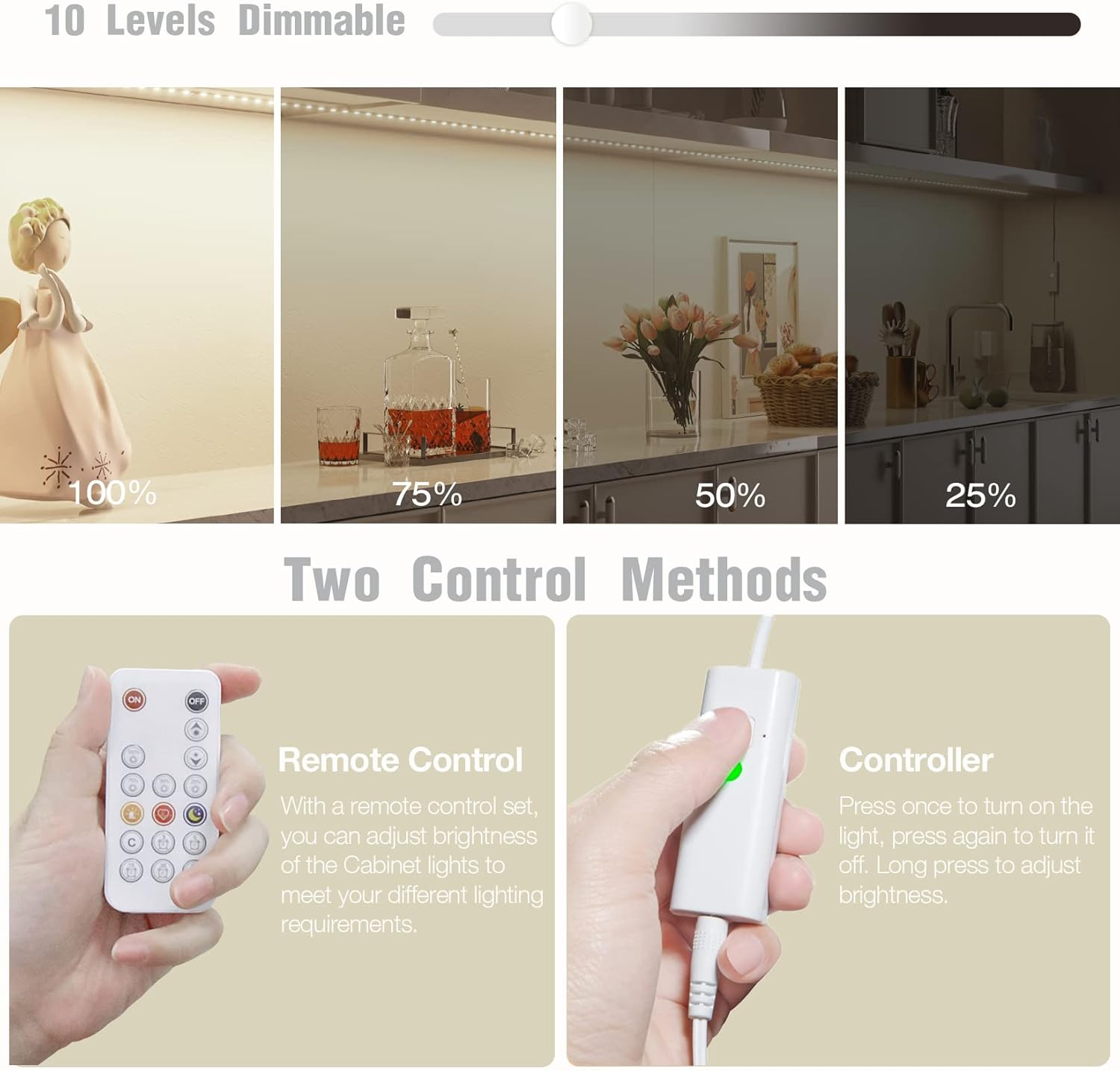
Image: All components included in the WOBANE LED Lighting Kit.
3. Product Features
- DIY LED Light Strip: 8 pre-cut strips, totaling 13 ft, offering various connection options for cabinets, closets, desks, TV backs, bookshelves, beds, wardrobes, and display cases.
- Versatile Connectivity: Includes extra 2 x 20 inch and 4 x 6.7 inch straight connectors for connecting long-distance cabinets, passing through microwaves, windows, etc.
- Super Bright & Dimmable: Delivers a total of 1900 lumens. Comes with an RF dimmer to adjust brightness from 10% to 100%.
- RF Wireless Remote Control: The 17-Key RF remote features timing off (3/5/15/30/60 minutes), dimming, hot buttons, rematch function, and a 60-foot control distance.
- Reliable Kit: High-quality adapter and strip lights. Operates at DC 12V, ensuring extremely low voltage and heat.

Image: Illustration of 10 dimmable levels for the LED lights.
4. Setup & Installation
4.1 Surface Preparation
Ensure the installation surface is clean, dry, and smooth. Wipe the area with rubbing alcohol if necessary to remove dust, oil, or moisture for optimal adhesive performance.
4.2 Connecting and Mounting the LED Strips
- Plan Your Layout: Determine the desired path for your LED strips. Use the included connectors (straight, U-style, cross, 90-degree) to navigate corners or gaps between cabinets.
- Connect Strips: Each LED strip bar has connectors at both ends. Simply plug the male end of one strip into the female end of another. For longer gaps, use the provided straight connectors.
- Apply Adhesive: Peel off the protective backing from the 3M adhesive tape on the back of each LED strip.
- Mount Strips: Carefully press the adhesive side of the LED strip onto the cleaned surface under your cabinet or shelf. Apply firm, even pressure along the entire length of the strip to ensure a secure bond.
- Secure Wires: Use the provided cable holders to neatly secure any loose wires, especially near the power plug, for a clean and organized look.

Image: Visual guide for cleaning surface, peeling adhesive, pasting, and cutting LED strips.
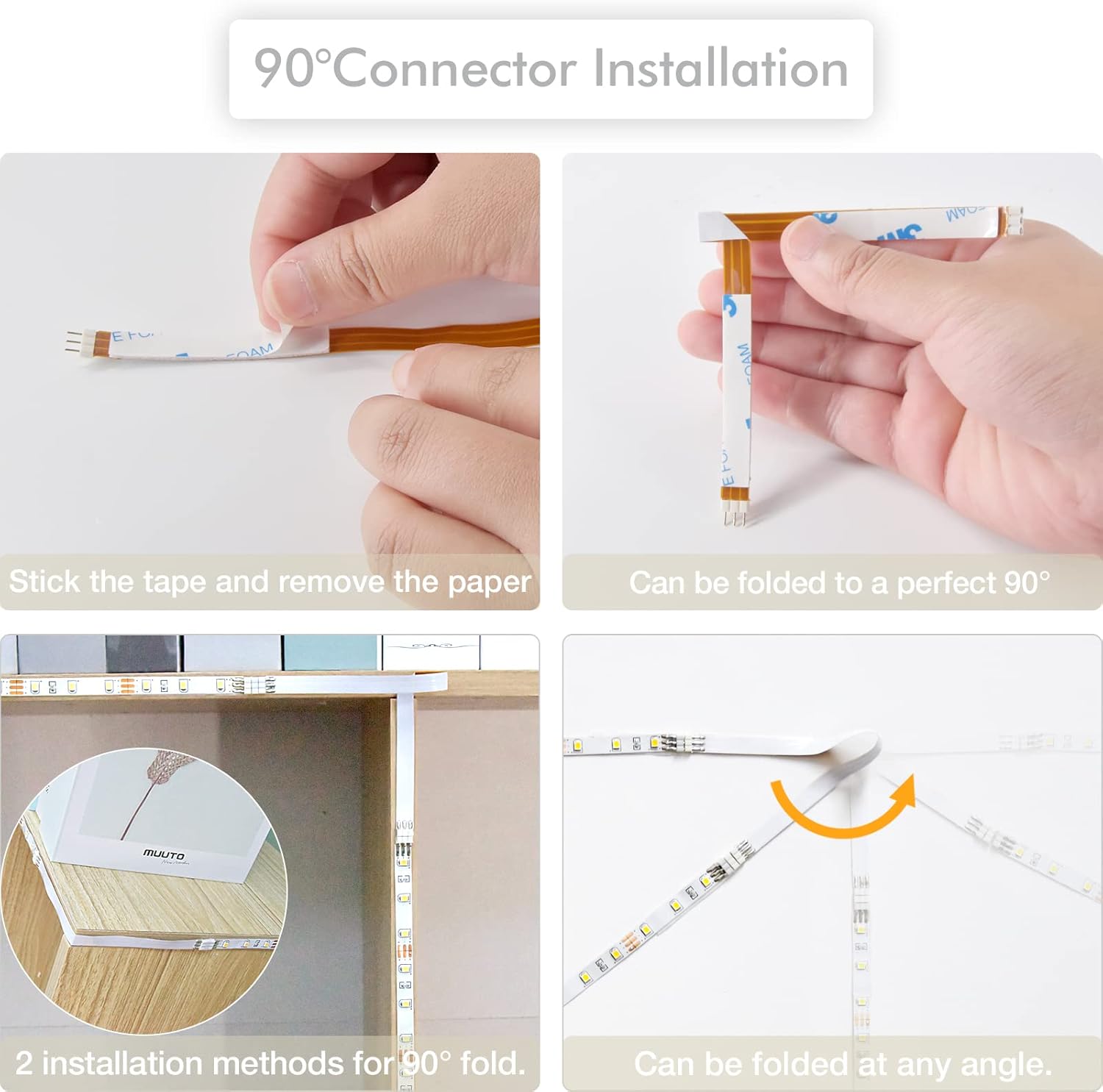
Image: Example of using 90-degree connectors for corner installations.
4.3 Power Connection
- Connect the LED strip to the RF controller/receiver.
- Plug the DC 12V 2A power adapter into the RF controller/receiver.
- Plug the power adapter into a standard wall outlet.
Video: A seller demonstrates the installation process of the WOBANE LED Cabinet Light CS8, showing how to connect the strips and power adapter, and how to use the remote control for brightness adjustment.
Video: A seller showcases the installation of the WOBANE LED strip lights in a kitchen, highlighting the ease of setup and the aesthetic improvement they provide.
5. Operating Instructions
The WOBANE LED Lighting Kit can be operated using the included 17-Key RF Wireless Remote Control or the manual button on the RF controller.
5.1 Remote Control Functions
- ON/OFF: Press the red 'ON' button to turn the lights on, and the black 'OFF' button to turn them off.
- Brightness Adjustment: Use the up/down arrow buttons to gradually increase or decrease brightness.
- Quick Dimming: Use the 100%, 75%, 50%, 25% buttons for quick brightness presets.
- Timing Off: Set the lights to automatically turn off after 3, 5, 15, 30, or 60 minutes using the timer buttons.
- Dynamic Modes: Explore various dynamic lighting modes (e.g., pulsing, breathing) using the dedicated buttons (e.g., heart, siren, sleep mode).
- Rematch Function: If the remote loses connection or you wish to control multiple kits with one remote, long press the 'C' button on the remote until the light flashes to enter rematch status. Then press the 'ON' key on the desired dimmer to match.

Image: Instructions for using the remote control's rematch function to control multiple light kits.
5.2 Manual Control
- Turn On/Off: Click the button on the RF controller to turn the light on or off.
- Adjust Brightness: When the light is on, long press the button to adjust the brightness.
6. Maintenance
- Keep the LED strips and controller clean and dry. Wipe with a soft, dry cloth.
- Regularly check connections to ensure they are secure.
- Avoid using harsh chemicals or abrasive materials for cleaning.
7. Troubleshooting
| Problem | Possible Cause | Solution |
|---|---|---|
| Lights do not turn on. | Power adapter not plugged in or faulty connection. | Check all power connections. Ensure the adapter is securely plugged into the outlet and the controller. |
| Remote control not working. | Remote battery is dead or remote is not paired. | Replace the CR2032 battery in the remote. Perform the rematch function (see Operating Instructions). |
| Lights are flickering. | Loose connection or insufficient power. | Check all connections between strips and to the power adapter. Ensure the power adapter is sufficient for the total length of strips. |
| Adhesive not sticking well. | Surface not clean or too rough. | Clean the surface thoroughly before applying. For rough surfaces, consider using additional mounting clips or stronger adhesive. |
8. Specifications
| Feature | Detail |
|---|---|
| Brand | WOBANE |
| Model Number | WBE020 |
| Color | Natural White |
| Color Temperature | 4000 Kelvin |
| Luminous Flux | 1900 Lumens |
| Wattage | 24 watts |
| Voltage | 12 Volts (DC) |
| Item Length | 13 Feet (total for 8 strips) |
| Number of Items | 8 LED Strip Lights |
| Control Method | Remote Control |
| Indoor/Outdoor Usage | Indoor |
| Power Source | Corded Electric |
| Material | Plastic |
| Batteries Required | 1 CR2032 (included for remote) |
9. Warranty & Support
For warranty information, technical support, or any product-related inquiries, please contact WOBANE customer service directly through your purchase platform or the manufacturer's official website. Keep your purchase receipt for any warranty claims.