1. Introduction
Thank you for choosing the GEYGUY GPSK-4 Pro PA System. This portable, all-in-one sound system is designed to deliver clear and powerful audio for various applications, including karaoke, public speaking, and musical performances. Featuring Bluetooth connectivity, USB/FM playback, DSP digital recording, and a compact design, the GPSK-4 offers versatility and convenience. Please read this manual thoroughly to understand the product's features and ensure proper operation and maintenance.
2. Package Contents
Carefully unpack your GEYGUY GPSK-4 system and ensure all items are present. If any items are missing or damaged, please contact your retailer.
- GEYGUY GPSK-4 PA Speaker Unit
- 2 x UHF Wireless Microphones
- Remote Control
- USB-C Charging Cable
- RCA Audio Cable
- Power Adapter
- User Manual (this document)
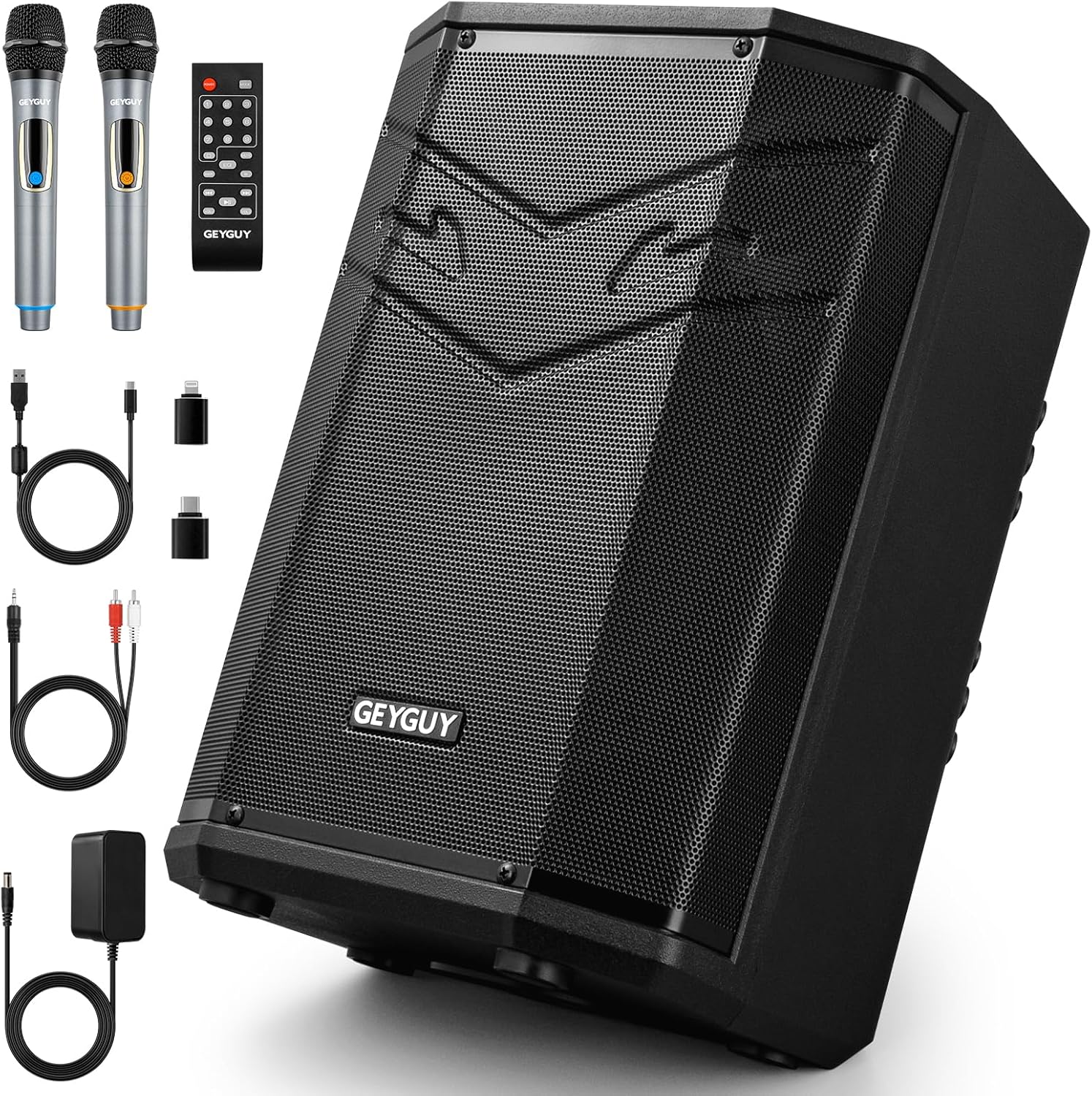
Image 2.1: The GEYGUY GPSK-4 PA System shown with its complete set of accessories, including the main speaker unit, two wireless microphones, a remote control, various cables, and a power adapter.
3. Product Overview
Familiarize yourself with the main components and controls of your GPSK-4 PA system.
3.1 Front and Side View

Image 3.1: An exploded view of the GPSK-4 speaker highlighting its internal components such as the 8-inch subwoofer, horn tweeter, and acoustic ventilation hole. It also shows the ergonomic handle for portability and the protective metal dust cover.
- 8-inch Subwoofer: Provides powerful, uncompressed bass.
- Horn Tweeter: Delivers clear high-frequency sounds.
- Acoustic Ventilation Hole: Optimizes sound output and airflow.
- Ergonomic Handle: Designed for comfortable and easy portability.
- Metal Dust Cover: Protects internal components from dust and physical impact.
3.2 Control Panel and Ports

Image 3.2: The rear control panel of the GPSK-4, illustrating the various knobs, buttons, and ports. Key features include sound adjustment controls, volume controls for microphones and speakers, instrument inputs, and digital recording ports.
- ECHO/TREBLE/BASS Controls: Adjust the sound effects for echo, high frequencies, and low frequencies.
- MIC/Speaker Volume Independent Controls: Separate volume adjustments for microphones and the main speaker output.
- Guitar/Electronic Instruments Input: Port for connecting musical instruments.
- Microphone Expand: Additional microphone input.
- Pro FM Antenna: Extendable antenna for enhanced FM signal reception.
- Pro USB Devices Input: USB-A port for playing audio files from USB drives and emergency phone charging.
- Digital USB-C Port for DSP Recording: USB-C port for digital audio recording to compatible devices.
4. Setup
4.1 Initial Charging
Before first use, fully charge the GPSK-4 PA system. Connect the power adapter to the DC 15V input on the speaker and plug it into a power outlet. The charging indicator will illuminate. A full charge typically takes several hours. The integrated lithium battery provides 3 to 6 hours of playtime depending on usage and volume levels.
4.2 Powering On/Off
Locate the power switch on the control panel. Press and hold to turn the unit ON or OFF.
4.3 Microphone Setup
The system includes two UHF wireless microphones. Ensure the microphones have fresh batteries installed. Turn on each microphone using its power switch. The microphones should automatically pair with the PA system. If not, refer to the troubleshooting section.
5. Operating Instructions
5.1 Bluetooth Pairing
The GPSK-4 features Bluetooth 5.0 for wireless audio streaming.
- Turn on the GPSK-4 PA system.
- Activate Bluetooth on your smartphone, tablet, or other compatible device.
- Search for available Bluetooth devices and select "GPSK-4" from the list.
- Once paired, the system will indicate a successful connection, and you can begin streaming audio.

Image 5.1: Visual guide for connecting the GPSK-4 via Bluetooth to mobile devices and computers, and via RCA cables to external audio equipment such as subwoofers or active speakers.
5.2 USB Playback
Insert a USB flash drive (up to 512GB) into the Pro USB Devices Input (USB-A port). The system supports high-definition audio formats including WAVE, MP3, WMA, APE, and FLAC. The system will automatically detect and begin playing audio files. Use the remote control or control panel buttons to navigate tracks and adjust volume.
5.3 FM Radio
Extend the Pro FM Antenna for optimal reception. Press the 'MODE' button on the control panel or remote to switch to FM radio mode. Use the scan function to automatically search and save available radio stations. Use the navigation buttons to switch between saved stations.
5.4 Digital Recording (DSP)
The GPSK-4 features a DSP digital recording function via its USB-C port.
- Connect your computer, tablet, laptop, or smartphone to the Digital USB-C Port using a compatible USB-C cable.
- Ensure your device is running iOS 7+, Mac OS 7+, Android 7+, or Windows 7+ for plug-and-play compatibility.
- The system will act as an audio input device. Use your device's recording software to capture audio from the microphones or other inputs connected to the GPSK-4.
5.5 Microphone and Instrument Use
Connect the wireless microphones or external instruments (e.g., guitar) to their respective input ports. Adjust the independent volume controls for microphones and instruments as needed. Use the ECHO, TREBLE, and BASS controls to fine-tune the sound output.
5.6 Remote Control
The included remote control provides convenient access to various functions from a distance, including power, mode selection, volume, track navigation, and EQ adjustments. Some control access is exclusively available via the remote.
6. Placement and Portability
The GPSK-4's multi-position enclosure allows for flexible placement to suit different environments and sound projection needs.
- Upright: For general sound projection.
- Tilted Back: Ideal for stage monitoring or directing sound upwards.
- Mounted: A fixed hole allows mounting on a standard speaker bracket for elevated sound coverage.

Image 6.1: Demonstrates the versatile placement options for the GPSK-4, including floor monitoring, upright positioning, and stand mounting. The image also highlights the wide sound coverage angle and battery endurance.
The ergonomic handle and lightweight design (approximately 3.6 kg / 7.9 lbs) make the GPSK-4 easy to transport for various activities such as picnics, travel, live performances, and street performances.

Image 6.2: A visual representation of the GPSK-4's versatility, showcasing its use in outdoor settings like picnics, during travel, for professional live music events, and for casual street performances.
7. Maintenance
- Cleaning: Use a soft, dry cloth to clean the exterior of the speaker. Do not use abrasive cleaners or solvents.
- Storage: Store the unit in a cool, dry place away from direct sunlight and extreme temperatures.
- Battery Care: To prolong battery life, avoid fully discharging the battery frequently. Recharge the unit regularly, even if not in use for extended periods.
- Dust Protection: The metal dust cover provides protection, but avoid exposing the unit to excessive dust or moisture.
8. Troubleshooting
| Problem | Possible Cause | Solution |
|---|---|---|
| No power | Battery discharged; Power switch off; Power adapter not connected. | Charge the unit; Turn on the power switch; Ensure power adapter is securely connected. |
| No sound from speaker | Volume too low; Incorrect input mode; Device not paired (Bluetooth); USB drive empty/corrupt. | Increase volume; Select correct input mode (Bluetooth, USB, FM); Re-pair Bluetooth device; Check USB drive content. |
| Microphone not working | Microphone off; Batteries low/dead; Microphone volume low; Out of range. | Turn on microphone; Replace batteries; Increase microphone volume; Ensure microphone is within operating range. |
| Bluetooth pairing failed | GPSK-4 not in pairing mode; Device too far; Interference. | Ensure GPSK-4 is discoverable; Move device closer; Reduce interference from other wireless devices. |
| Poor FM reception | Antenna not extended; Weak signal area. | Fully extend the FM antenna; Try repositioning the unit. |
9. Specifications
Detailed technical specifications for the GEYGUY GPSK-4 PA System:

Image 9.1: A summary of the GPSK-4's technical data, including audio performance metrics, physical dimensions, and weight.
- Model Number: GPSK-4
- Brand: GEYGUY
- Dimensions (L x W x H): 27.9 x 24.5 x 35 cm (11 x 9.64 x 13.77 inches)
- Weight: Approximately 3.6 kg (7.9 lbs)
- Material: Metal
- Speaker Size: 8-inch Subwoofer
- Frequency Response: 60Hz - 16000Hz
- Maximum Sound Pressure Level (SPL): 85dB
- Speaker Impedance: 4 Ohm
- Signal-to-Noise Ratio (SNR): 73dBA
- Coverage Range: 400 sq.ft.
- Coverage Angle: 100° x 60°
- Connectivity Technology: Bluetooth 5.0, USB
- Total USB Ports: 1 (USB-A for playback/charging) + 1 (USB-C for digital recording)
- Compatible Devices: Laptop, Smartphone, Tablet, PC
- Power Source: Battery Powered (1 Lithium-ion battery included) / AC Adapter
- Rechargeable Battery: Yes
- Battery Life: 3-6 hours (up to 5 hours as per image) depending on usage
- Audio Input: Dynamic Microphone, Electronic Instrument
- Mounting Type: Table Mount, Speaker Stand Mount
10. Safety Information
- Do not expose the unit to rain or moisture to prevent fire or electric shock.
- Do not open the casing. There are no user-serviceable parts inside. Refer all servicing to qualified personnel.
- Avoid placing the unit near heat sources such as radiators, heat registers, stoves, or other apparatus (including amplifiers) that produce heat.
- Protect the power cord from being walked on or pinched, particularly at plugs, convenience receptacles, and the point where they exit from the apparatus.
- Unplug this apparatus during lightning storms or when unused for long periods of time.
- Do not block any ventilation openings. Install in accordance with the manufacturer’s instructions.
- Use only attachments/accessories specified by the manufacturer.
11. Warranty and Support
Specific warranty information for the GEYGUY GPSK-4 PA System is not provided in the product details. For warranty claims, technical support, or service inquiries, please contact your original retailer or the manufacturer directly through their official support channels. Please retain your proof of purchase for any warranty-related requests.


