
1. Introduction
This manual provides detailed instructions for the installation, operation, and maintenance of your TEKXDD Smart Door Lock, Model TY190. Please read this guide thoroughly before installation and use to ensure proper function and security. This smart lock offers multiple unlocking methods for enhanced convenience and safety.
2. Product Overview
The TEKXDD Smart Door Lock TY190 is a versatile locking solution designed for various environments, including homes, offices, and apartments. It integrates multiple access methods into a single, sleek handle design.
2.1 Unlocking Methods
- Fingerprint: Semiconductor biometric identification for quick and secure access.
- Numeric Password: Keypad entry for code-based access.
- Mobile Application (BLE): Unlock directly via a Bluetooth-enabled mobile app.
- IC Card: Contactless card access (if included with your model).
- Emergency Key: Traditional mechanical key for backup access.
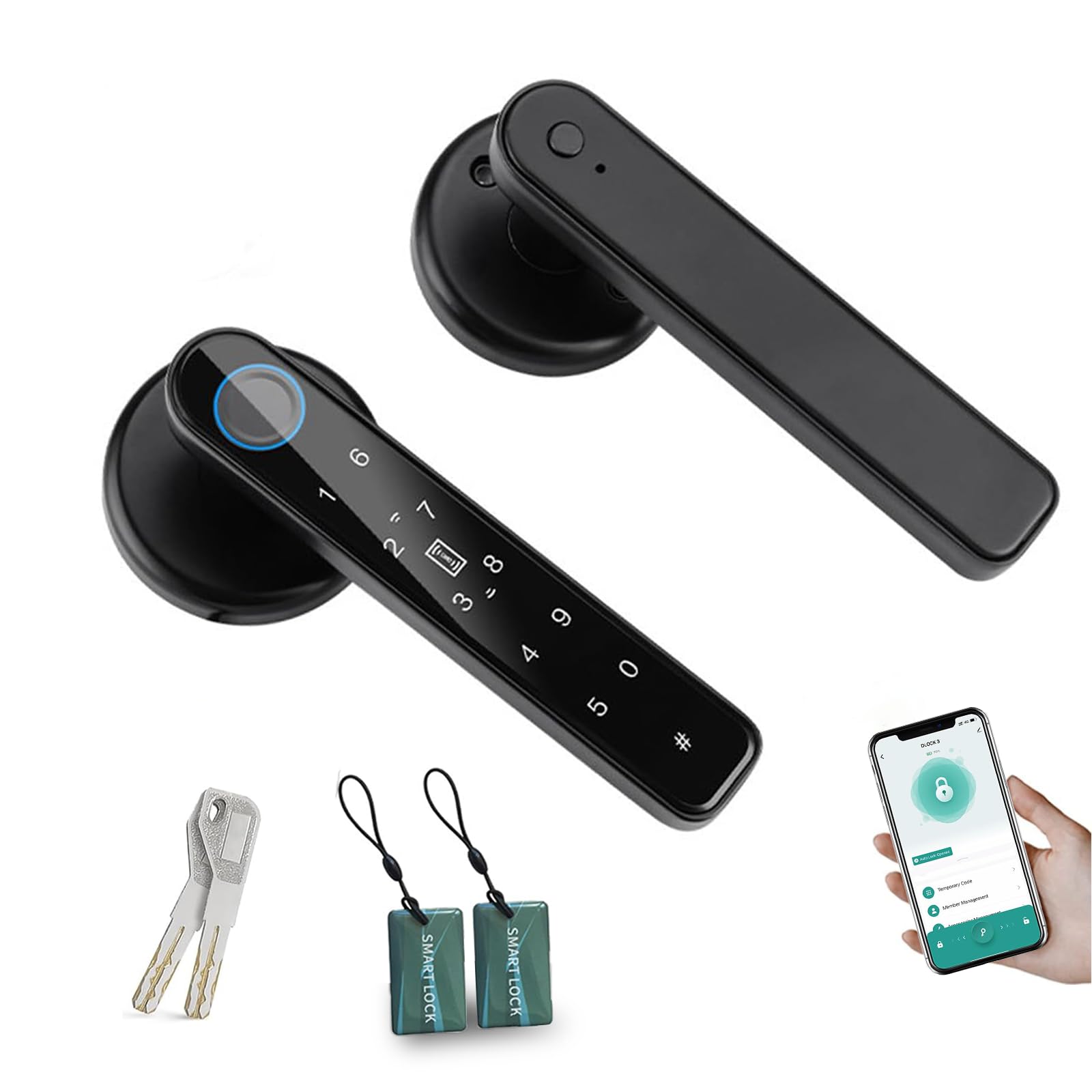
Image 2.1: Overview of the 5-in-1 unlocking methods.
2.2 Components
The package includes the smart door handle, latch bolt, strike plate, mechanical keys, mounting screws, and a user manual.

Image 2.2: Included components for installation.
3. Installation and Setup
The TEKXDD Smart Door Lock is designed for straightforward installation, compatible with most standard lever lock preparations. No hard wiring is required.
3.1 Pre-Installation Checks
- Door Thickness: Ensure your door thickness is between 35 mm and 55 mm.
- Latch Adjustment: The latch is adjustable to either 60 mm or 70 mm backset. Adjust as needed for your door.
- Door Handing: Determine the direction of your door's opening (left or right) as the handle direction can be adjusted.

Image 3.1: Product dimensions for compatibility check.

Image 3.2: Adjusting handle direction for door handing.
3.2 Installation Steps
- Install the latch bolt into the door edge.
- Mount the exterior handle assembly, ensuring the spindle passes through the latch.
- Connect the interior handle assembly, routing any necessary cables.
- Secure both handle assemblies with the provided screws.
- Install the strike plate on the door frame.
3.3 Initial Setup and Programming
After physical installation, proceed with programming the lock:
- Mobile App Connection: Download the recommended mobile application (e.g., Tuya Smart app). Follow the in-app instructions to pair your lock via Bluetooth.
- Fingerprint Registration: Use the app or the lock's interface to register administrator and user fingerprints.
- Password Setup: Create a master password and additional user passwords.
- IC Card Enrollment: Register any IC cards for access (if applicable).

Image 3.3: Connecting the smart lock with the mobile application.
4. Operation
Your TEKXDD Smart Door Lock offers multiple convenient ways to secure and access your property.
4.1 Unlocking the Door
- Fingerprint: Place your registered finger on the fingerprint sensor. The lock will unlock if the fingerprint is recognized.
- Numeric Password: Enter your programmed password on the keypad, followed by the '#' key.
- Mobile App: Open the connected mobile application and tap the unlock icon.
- IC Card: Present the registered IC card to the designated sensor area.
- Emergency Key: Insert the mechanical key into the keyhole and turn to unlock.

Image 4.1: Fingerprint quick unlock in action.
4.2 Locking the Door
The lock typically engages automatically after the door closes. Verify the door is securely locked after closing.
4.3 User Management and Access Sharing
Through the mobile application, you can manage users, add or delete fingerprints and passwords, and share temporary or scheduled access codes with family or guests.
5. Maintenance
Regular maintenance ensures the longevity and optimal performance of your smart door lock.
5.1 Battery Replacement
The lock is powered by 4 AAA batteries (not included). When the battery level is low, the lock will provide an alert. Replace all four batteries simultaneously for best performance.

Image 5.1: Location of the battery compartment.
5.2 Emergency Power
In case of complete battery depletion, the lock features a micro-USB port for emergency power. Connect a power bank to this port to temporarily power the lock and gain access.

Image 5.2: Emergency keyhole and USB power port.
5.3 Cleaning
Wipe the lock's surface with a soft, dry cloth. Avoid using abrasive cleaners or solvents that could damage the finish or electronic components.
6. Troubleshooting
If you encounter issues with your TEKXDD Smart Door Lock, refer to the following common problems and solutions:
- Lock not responding: Check battery levels. If low, replace batteries or use emergency power.
- Fingerprint not recognized: Ensure your finger is clean and dry. Re-register your fingerprint if the issue persists.
- Password not working: Verify the correct password is being entered. Ensure the keypad is clean.
- App connectivity issues: Ensure Bluetooth is enabled on your phone and the lock is within range. Restart the app or re-pair the device if necessary.
- Trial and Error Alarm: The lock features an alarm that activates after multiple incorrect access attempts (e.g., wrong fingerprint or password). Wait for the alarm to clear before attempting access again.

Image 6.1: Trial and error alarm indicator.
7. Specifications
| Feature | Specification |
|---|---|
| Model Number | TY190 |
| Brand | TEKXDD |
| Lock Type | Biometric Smart Lock |
| Unlocking Methods | Fingerprint, Password, Mobile App (BLE), IC Card, Mechanical Key |
| Door Thickness Compatibility | 35 mm - 55 mm |
| Adjustable Latch Backset | 60 mm or 70 mm |
| Product Dimensions (L x W x H) | 21 x 18 x 7 cm |
| Product Weight | 960 grams |
| Power Supply | 4 x AAA Batteries (not included) |
| Emergency Power | Micro-USB Port |
8. Support
For any questions regarding the installation or use of your TEKXDD Smart Door Lock, please do not hesitate to contact our customer support. Refer to your product packaging or purchase documentation for contact details.