
1. Introduction
This manual provides detailed instructions for the setup, operation, and maintenance of your BolyGuard BG310-M 4G Wireless Trail Camera. This device is designed for wildlife monitoring and outdoor surveillance, featuring 4G cellular connectivity for remote access to images and videos.
Package Contents
Before beginning, please verify that all items listed below are present in your package:
- BolyGuard BG310-M Trail Camera
- Antenna
- USB Cable
- Mounting Strap
- User Manual
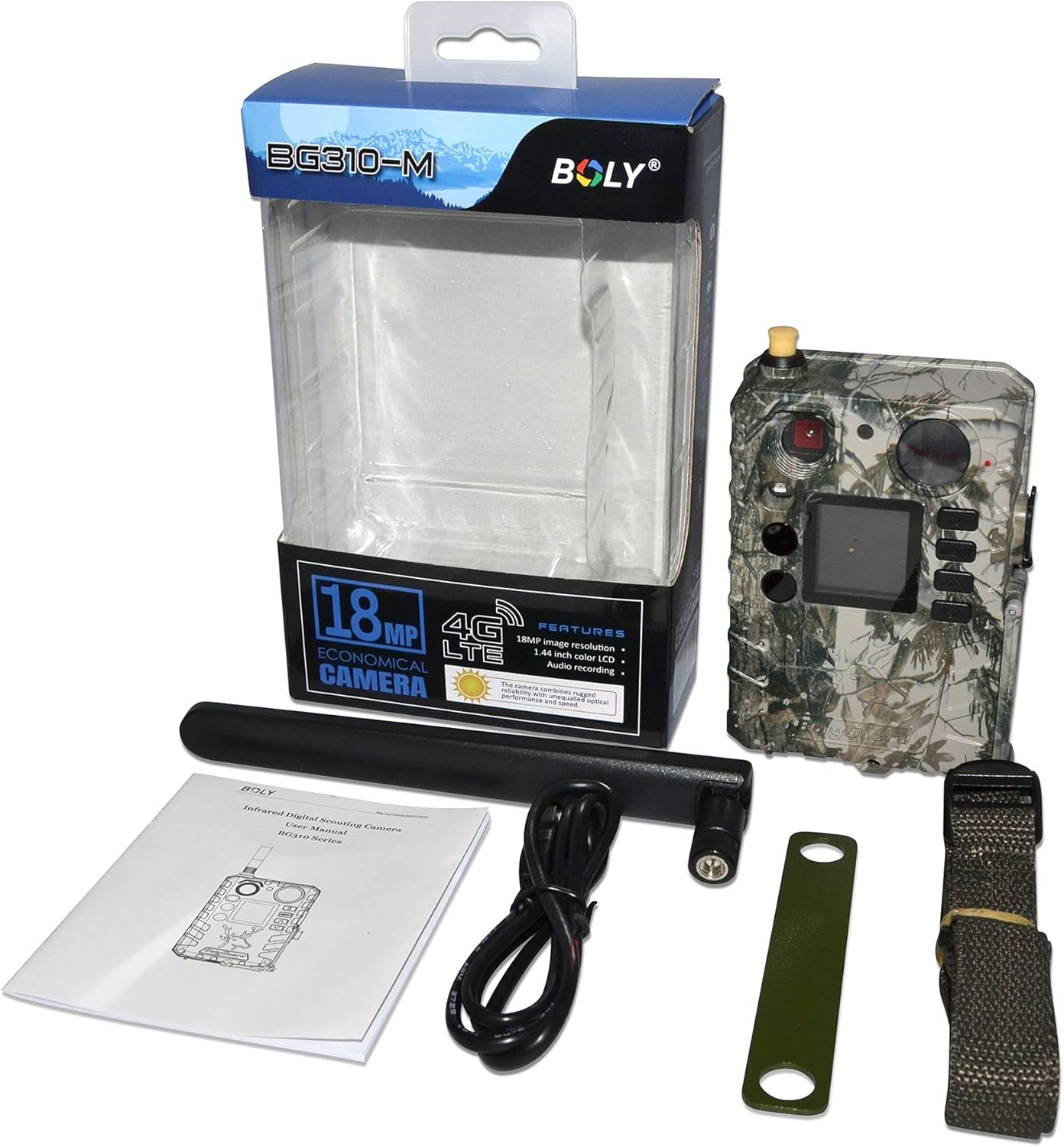
Figure 1.1: Package Contents. Displays all items included in the product package, ensuring users can verify they have received everything necessary for setup.
2. Safety Information
Please read and understand all safety precautions before using this product. Failure to follow these instructions may result in injury or damage to the device.
- Do not immerse the camera in water beyond its IP65 rating.
- Use only recommended batteries and power sources.
- Keep the camera away from extreme temperatures and direct sunlight for prolonged periods.
- Do not attempt to disassemble or modify the camera.
- Dispose of batteries properly according to local regulations.
3. Product Components
Familiarize yourself with the various parts of your BolyGuard BG310-M camera:
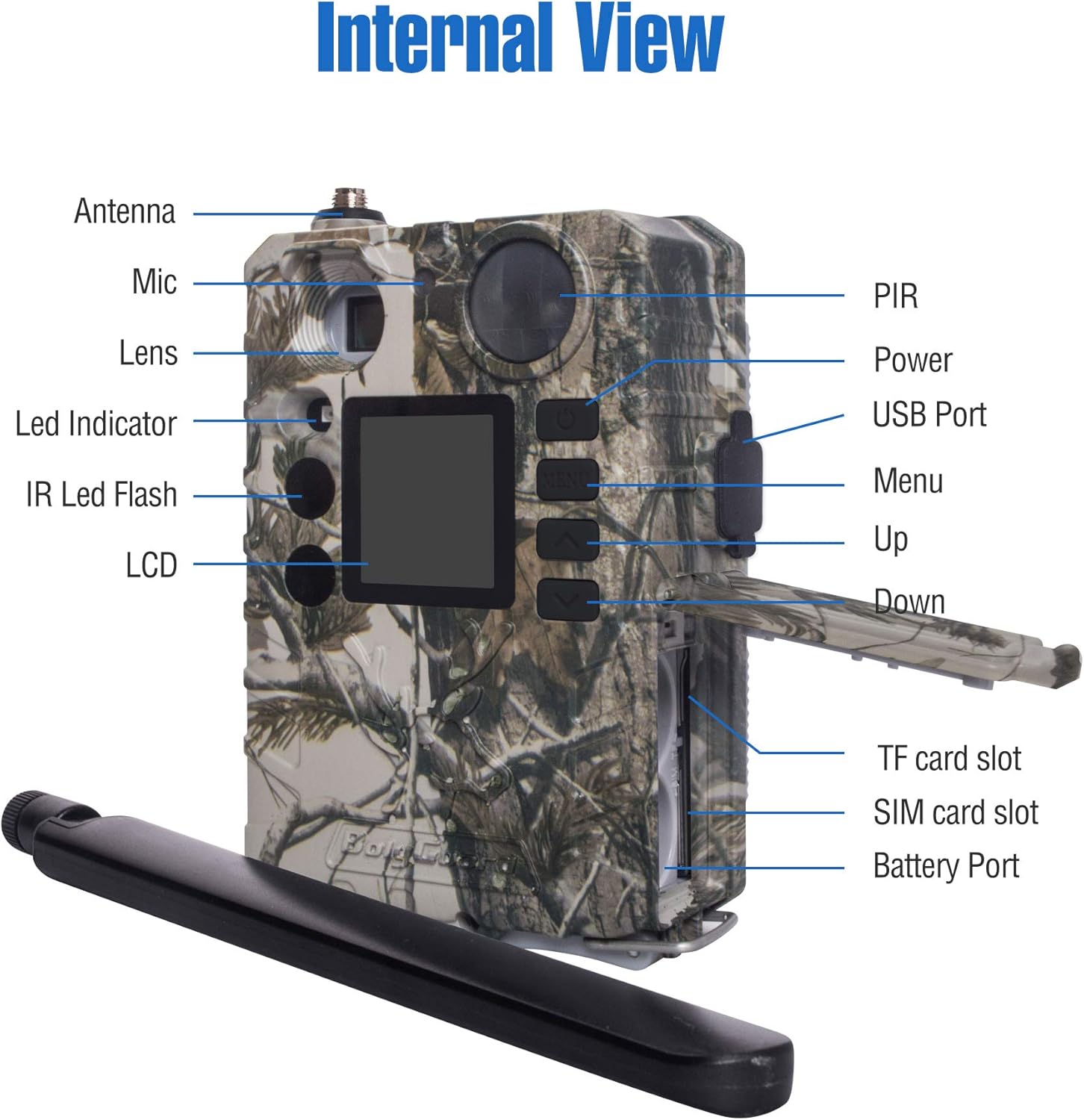
Figure 3.1: Internal and External View. A detailed diagram identifying the key components and ports of the BG310-M camera, essential for setup and operation.
- Antenna: For 4G cellular communication.
- Lens: Captures images and videos.
- PIR Sensor: Passive Infrared sensor for motion detection.
- IR LED Flash: 940nm no-glow infrared LEDs for night vision.
- LCD Display: 1.44-inch TFT screen for menu navigation and viewing media.
- Control Buttons: Menu, Up, Down, OK buttons for navigation.
- USB Port: For connecting to a computer.
- TF Card Slot: For inserting a MicroSD card (storage).
- SIM Card Slot: For inserting a 4G SIM card (cellular data).
- Battery Port: For battery installation.
4. Setup Guide
Follow these steps to prepare your camera for use:
4.1. Install Batteries
- Open the battery compartment.
- Insert the required number of AA batteries, ensuring correct polarity.
- Close the battery compartment securely.
4.2. Insert TF Card
- Locate the TF card slot.
- Insert a formatted MicroSD card (up to 32GB, Class 10 or higher recommended) into the slot until it clicks.
4.3. Insert SIM Card
The BG310-M supports 4G LTE connectivity. A compatible SIM card (e.g., AT&T or Verizon) is required for cellular functions.
- Locate the SIM card slot.
- Insert an activated 4G SIM card into the slot.
4.4. Attach Antenna
- Screw the provided antenna onto the antenna port at the top of the camera.
- Ensure it is securely fastened but do not overtighten.

Figure 4.1: Camera with Antenna. Front view of the BolyGuard BG310-M 4G Wireless Trail Camera, showcasing its camouflage casing and attached antenna.
4.5. Initial Power On & Network Configuration
- Switch the camera to 'SETUP' mode.
- The camera will power on and display the main menu.
- Navigate to the 'Network' settings to configure your cellular connection. This may involve selecting your carrier and setting up APN details if not automatically detected.
- Download the Molnus Cloud App on your smartphone or access the web portal to link your camera for remote control and viewing.
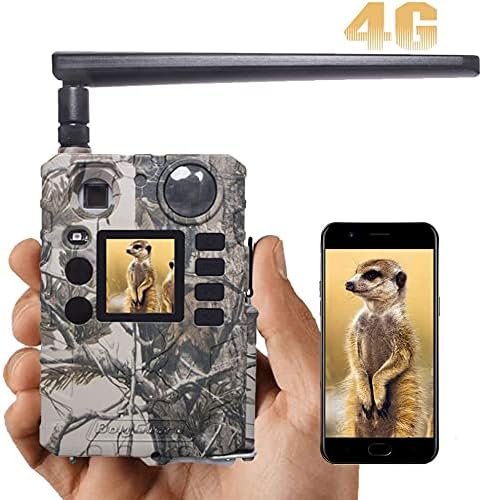
Figure 4.2: App Connectivity. This image illustrates the camera's cellular capability, showing a captured image on both the camera's screen and a connected smartphone via the Molnus app.
5. Operating Instructions
5.1. Camera Modes
The BG310-M typically operates in three modes:
- OFF: Camera is powered off.
- SETUP: Allows access to menu settings, viewing photos/videos, and manual testing.
- ON: Camera is active and will capture photos/videos based on its settings and motion detection.
5.2. Menu Navigation
Use the control buttons (MENU, UP, DOWN, OK) to navigate through the camera's settings. Common settings include:
- Mode: Select Photo, Video, or Photo+Video.
- Image Size: Set photo resolution (e.g., 18MP, 12MP).
- Video Size: Set video resolution (e.g., 720P).
- Trigger Interval: Time delay between detections.
- Sensitivity: Adjust PIR sensor sensitivity.
- Time Lapse: Enable time-lapse photography.

Figure 5.1: Image Resolution. Demonstrates the superior clarity of 18MP images compared to 12MP, highlighting the camera's high-resolution capture capability.
5.3. Capturing Images and Videos
Once configured and switched to 'ON' mode, the camera will automatically capture images or videos when motion is detected within its 100ft detection range. The 0.7-second trigger speed ensures minimal delay.

Figure 5.2: Fast Trigger Speed. This image emphasizes the camera's fast 0.7-second trigger speed, capable of capturing quick movements.
5.4. Night Vision
The camera utilizes 940nm no-glow IR LEDs for discreet night vision, allowing it to capture clear images and videos in low-light conditions without disturbing wildlife.

Figure 5.3: 940nm No-Glow IR. Illustrates the effectiveness of 940nm no-glow infrared LEDs for discreet night vision, showing clear images of wildlife in both day and night conditions.
Video 5.1: Clear Night Video. This video showcases the BolyGuard BG310-M trail camera's night vision performance, capturing clear footage of a skunk in a backyard setting during nighttime.
5.5. Remote Monitoring (Molnus App/Web Portal)
Utilize the Molnus Cloud App or web portal to remotely view captured media, change camera settings, and receive real-time alerts. Ensure your camera has a strong 4G signal for optimal performance.
6. Maintenance
Proper maintenance ensures the longevity and optimal performance of your trail camera.
- Cleaning: Gently wipe the lens and PIR sensor with a soft, dry cloth to remove dirt or smudges. Do not use abrasive cleaners.
- Battery Replacement: Replace batteries when the low battery indicator appears or when performance degrades. Always replace all batteries at once with new ones of the same type.
- TF Card Management: Regularly format the TF card to prevent data corruption and ensure sufficient storage space. Back up important files before formatting.
- Weather Protection: While the camera is IP65 waterproof, ensure all compartments (battery, SIM/TF card) are securely closed to maintain its water resistance, especially in harsh weather conditions.

Figure 6.1: IP65 Waterproofing. Shows the camera's IP65 waterproof design, ensuring reliable operation in various weather conditions like rain and snow.
7. Troubleshooting
If you encounter issues with your camera, refer to the following common problems and solutions:
| Problem | Possible Cause | Solution |
|---|---|---|
| Camera not powering on | Low or dead batteries; incorrect battery polarity. | Replace batteries with fresh ones, ensuring correct orientation. |
| No images/videos captured | TF card full or not inserted correctly; PIR sensor blocked; camera in 'OFF' or 'SETUP' mode. | Check TF card, ensure it's formatted; clear sensor path; switch to 'ON' mode. |
| Poor image/video quality | Dirty lens; low light conditions; incorrect resolution settings. | Clean the lens; ensure adequate lighting or proper night vision settings; adjust resolution. |
| No cellular connection | SIM card not activated or incorrectly inserted; poor signal strength; incorrect APN settings. | Verify SIM card activation; reinsert SIM; check signal; configure APN settings manually if needed. |
| Camera not responding to app | No cellular connection; camera not linked to Molnus account; app issues. | Ensure cellular connection; verify camera is linked in Molnus; restart app/camera. |
8. Technical Specifications
| Feature | Specification |
|---|---|
| Model | BG310-M |
| Image Resolution | 18 MP (Effective Still Resolution) |
| Video Resolution | 720p, 1080p (Video Capture Resolution) |
| Connectivity | 4G LTE Cellular, Wi-Fi (Wireless Communication Technology) |
| Night Vision | 940nm No-Glow IR LEDs, 100 Feet Range |
| Trigger Speed | Less than 0.7 seconds |
| Detection Range | 100 feet |
| Field of View | 57 degrees |
| Display | 1.44" TFT display |
| Waterproof Rating | IP65 (International Protection Rating) |
| Power Source | Battery Powered (Batteries Required: Yes) |
| Dimensions (L x W x H) | 4.99 x 2 x 2 inches |
| Item Weight | 1 pound |
| Recommended Use | Game & Trail, Outdoor |
9. Warranty & Support
9.1. Product Warranty
BolyGuard offers a 2-Year Hassle-Free Guarantee for this product, exceeding the standard 1-year market warranty. This includes support and potential free replacements for manufacturing defects.
9.2. Customer Support
For technical assistance, troubleshooting, or warranty claims, please contact BolyGuard customer service. Refer to the contact information provided on the product packaging or the official BolyGuard website for the most up-to-date support details.


