
Introduction
The K&F Concept 67mm Black Diffusion 1/8 Mist Filter is designed to enhance photographic and videographic output by creating a soft, cinematic effect. This filter helps to soften highlights, reduce overall contrast, and smooth skin tones, resulting in a more delicate and dreamlike image. It is constructed with high-quality optical glass and features a durable, slim frame for optimal performance.
Product Overview

Image: The K&F Concept 67mm Black Diffusion 1/8 Mist Filter, showcasing its design and build quality.

Image: Close-up view of the filter's ultra-slim frame and CNC non-slip design for easy handling.
Key Features:
- Soft Focus Effect: Designed to soften facial skin imperfections like wrinkles and pores, creating a delicate and smooth appearance. It also helps achieve a dreamy, cinematic mist effect.
- Reduced Contrast and Highlight Flares: Effectively lowers overall image contrast and diffuses bright light sources, producing soft highlight flares for a more artistic look.
- High-Quality Optical Glass: Made from imported Japanese AGC optical glass, ensuring 87% light transmittance and accurate color rendition without color cast.
- Multi-Layer Coatings: Features 24 nanometer coatings on both sides of the glass, which are waterproof and provide protection for the filter and lens.
- Ultra-Slim Frame: The aviation aluminum frame measures only 3.3mm in width, preventing vignetting (dark corners) on wide-angle and telephoto lenses.
- CNC Non-Slip Design: The frame features a CNC-machined non-slip pattern for efficient and secure installation and removal.
- Compatibility: Compatible with all camera lenses that have a 67mm filter thread size.
Setup
-
Verify Lens Thread Size:
Before attaching the filter, confirm your camera lens's thread size. This number is typically printed on the front of your lens barrel or on the inside of your lens cap, often preceded by a "ø" (diameter) symbol. Ensure it matches the 67mm size of this filter.
-
Attaching the Filter:
Gently align the filter's threads with the threads on the front of your camera lens. Rotate the filter clockwise until it is securely fastened. Do not overtighten, as this can make removal difficult. The CNC non-slip design on the frame assists with a firm grip.
Operating Instructions
The K&F Concept Black Diffusion 1/8 Mist Filter is designed for creative effects rather than technical correction. Experimentation is key to achieving desired results.
General Use:
- Cinematic Look: Use the filter to add a subtle, dreamy quality to your videos and photographs, mimicking the aesthetic of classic film.
- Portrait Photography: Apply the filter to soften skin textures and reduce harshness, creating a more flattering and ethereal look for subjects.
- Night Photography: The filter can effectively bloom light sources like streetlights and neon signs, adding a unique atmospheric glow to urban night scenes.
- Highlight Management: In scenes with strong highlights, the filter will gently diffuse them, preventing harsh clipping and creating a softer transition.

Image: Demonstrates the filter's ability to create a soft skin 'pastel' delicate effect, smoothing facial features.
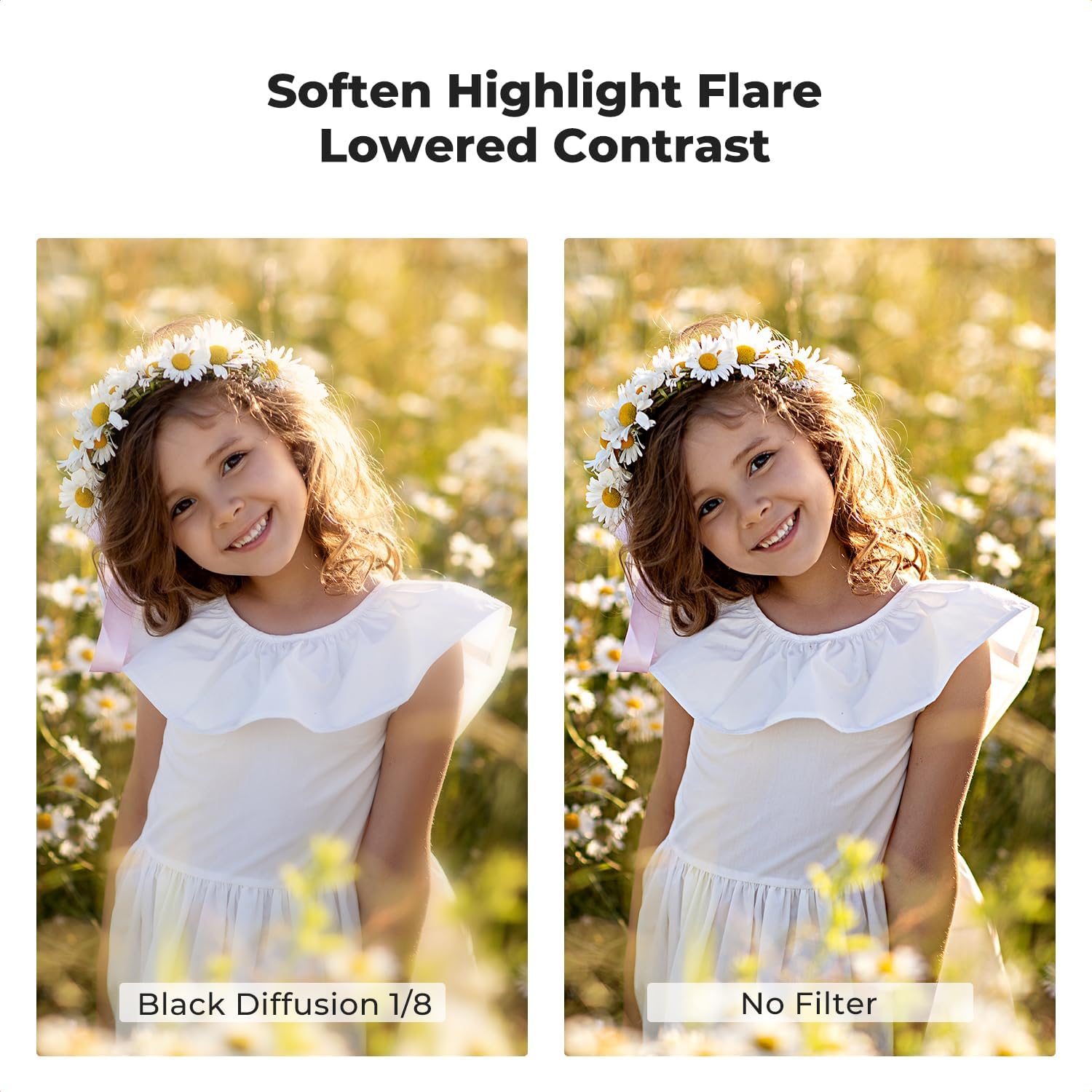
Image: Illustrates how the filter softens highlight flares and lowers contrast for a more pleasing visual.
Understanding 1/8 Strength:
The 1/8 strength indicates a subtle diffusion effect. The impact of the filter will vary depending on the light source, its intensity, and the overall scene. For a more pronounced effect, a stronger diffusion filter (e.g., 1/4) might be required. It is recommended to test the filter in various lighting conditions to understand its full potential.
Maintenance
Cleaning the Filter:
- Use a soft, clean microfiber cloth specifically designed for optical lenses.
- For stubborn smudges or fingerprints, apply a small amount of lens cleaning solution to the cloth (not directly to the filter) and gently wipe in a circular motion.
- Avoid using abrasive materials or harsh chemicals, as these can damage the multi-layer coatings.
- While the coatings are waterproof, the filter itself is not rated as fully water-resistant for immersion. Avoid prolonged exposure to heavy water.
Storage:
- Store the filter in its protective case when not in use to prevent scratches and dust accumulation.
- Keep the filter in a cool, dry place away from direct sunlight and extreme temperatures.

Image: The filter and its protective packaging, illustrating proper storage.
Troubleshooting
Common Issues and Solutions:
- Filter not attaching to lens: Ensure the lens thread size is 67mm. Do not force the filter; re-align carefully.
- Vignetting (dark corners) in images: While the ultra-slim frame is designed to minimize this, some extreme wide-angle lenses might still show slight vignetting. Ensure the filter is fully seated.
- Effect is too subtle or not visible: The 1/8 strength is subtle. The effect is most noticeable with strong light sources or in high-contrast scenes. Test in different conditions. For a stronger effect, consider a higher strength diffusion filter.
- Image appears blurry or out of focus: Ensure the filter is clean and free of smudges. The filter itself does not affect focus, but a dirty filter can degrade image quality.
Specifications
| Attribute | Detail |
|---|---|
| Brand | K&F CONCEPT |
| Model Number | KF01.2203 |
| Filter Type | Black Diffusion 1/8 Mist Filter |
| Filter Thread Size | 67 Millimetres |
| Material | Aluminum (frame), Optical Glass (filter) |
| Coating | 24 Waterproof Multi-Layer Coatings |
| Frame Thickness | 3.3mm (Ultra-Slim) |
| Product Dimensions | 6.7L x 6.7W centimetres |
| Special Effect | Soft Focus, Lowered Contrast, Highlight Diffusion |
Warranty and Support
For information regarding warranty coverage, technical support, or service inquiries, please refer to the official K&F Concept website or contact their customer service directly. Keep your purchase receipt as proof of purchase.