
1. Introduction
This manual provides detailed instructions for the installation, operation, and maintenance of your ORICO M.2 SSD Heatsink (Model M2HS1). This heatsink is designed to improve the thermal performance of M.2 NVME/NGFF SSDs, specifically supporting the 2280 size for both single and double-sided modules. Proper installation ensures optimal heat dissipation, contributing to the longevity and stable performance of your SSD.
2. Package Contents
Please verify that all items listed below are included in your package:
- 1 x ORICO M.2 SSD Heatsink
- 1 x Stainless Steel Tray (Fixator)
- 1 x Instruction Book
- 3 x Thermal Pads

Image: Contents of the ORICO M.2 SSD Heatsink package, including the heatsink, fixator, instruction book, and three thermal pads.
3. Product Overview
The ORICO M.2 SSD Heatsink is engineered to provide efficient cooling for high-performance M.2 SSDs. It features a combination of copper fins and an aluminum body to maximize heat dissipation. The design supports both single and double-sided M.2 2280 NVME/NGFF SSDs, making it versatile for various applications including desktop computers and gaming consoles like the PS5.
Key Features:
- Enhanced Cooling: Copper and aluminum alloy construction with innovative fins for a large surface area, reducing the risk of hardware failure due to overheating.
- Thermal Pads: Includes three silicon grease thermal pads (thermal conductivity 1.8 W/mK) for effective heat transfer and compatibility with uneven SSD surfaces.
- Tool-Free Installation: Snap-on design allows for easy and secure installation without the need for tools.
- Wide Compatibility: Supports M.2 2280 NVME/NGFF SSDs, including popular models from Samsung, WD Black, and XPG.

Image: Overview of ORICO M.2 SSD Heatsink features, highlighting cooling groove, copper heat coil, wide applications, and single/double-sided compatibility.

Image: Diagram illustrating compatibility with M.2 SATA and M.2 NVME protocols, and supported 2280 SSD size.
4. Setup and Installation
Follow these steps to properly install the ORICO M.2 SSD Heatsink onto your M.2 SSD.
4.1 Components Overview

Image: Exploded diagram showing the heat sink, thermal pads, M.2 SSD, and fixator (stainless steel tray) components.
4.2 Installation Steps
- Prepare Components: Unpack the heatsink, fixator, and thermal pads. Ensure your M.2 SSD is clean and free of dust.
- Apply Thermal Pads:
- For single-sided SSDs: Place one thermal pad on the fixator (stainless steel tray) and another on the top surface of the SSD.
- For double-sided SSDs: Place one thermal pad on the fixator, one on the bottom surface of the SSD, and one on the top surface of the SSD. Use the thinner grey thermal pads for double-sided SSDs if provided, to ensure proper fit.
Video: This video demonstrates the unboxing of the ORICO M.2 SSD Heatsink and the step-by-step process of applying thermal pads and assembling the heatsink with an M.2 SSD.
- Position SSD: Carefully place your M.2 SSD onto the thermal pad on the fixator.
- Attach Heatsink: Align the heatsink with the SSD and the fixator. Gently press down until the snap-on clips engage, securing the assembly. Do not slide the fixator, as this may damage the thermal pad.
- Install into Device: Insert the assembled M.2 SSD with the heatsink into the appropriate M.2 slot on your motherboard or device (e.g., PS5). Ensure it is securely fastened according to your device's instructions.

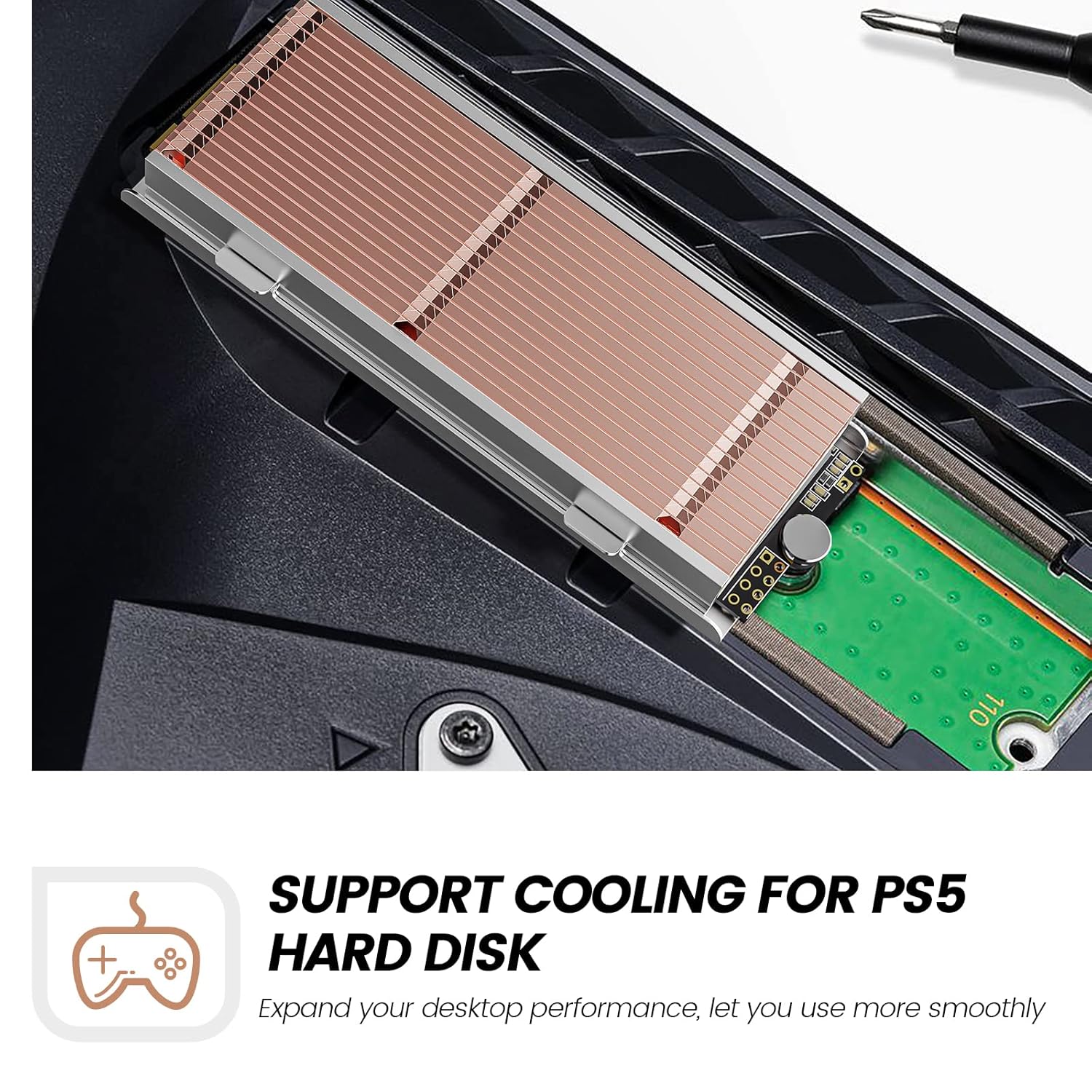
Image: The ORICO M.2 SSD Heatsink installed within a PS5 console, demonstrating its compatibility and fit.

Image: The ORICO M.2 SSD Heatsink installed on a computer motherboard, showcasing its application in various devices.
5. Operating Principles
The ORICO M.2 SSD Heatsink operates on the principle of passive cooling. Heat generated by the M.2 SSD is transferred through the thermal pads to the copper heat pipes and aluminum fins of the heatsink. The increased surface area of the fins allows for more efficient heat dissipation into the surrounding air, thereby lowering the SSD's operating temperature. This passive design requires no external power and operates silently.

Image: Diagram illustrating how the 4mm copper heat pipes are flat machined to touch the SSD evenly and conduct heat rapidly.

Image: Visual representation of heat flow and dissipation through the heatsink's structure.

Image: Graph showing temperature reduction on an SSD with the ORICO heatsink compared to without, demonstrating cooling effectiveness.
6. Maintenance
To ensure continued optimal performance of your ORICO M.2 SSD Heatsink, periodic maintenance is recommended:
- Dust Removal: Over time, dust can accumulate between the fins, reducing cooling efficiency. Gently clean the heatsink fins with compressed air or a soft brush every 6-12 months, or as needed, depending on your environment.
- Thermal Pad Inspection: If you ever remove the heatsink, inspect the thermal pads for wear or damage. If they appear degraded or lose their adhesion, replace them with new thermal pads to maintain effective heat transfer.
- Avoid Obstructions: Ensure that the heatsink is not obstructed by other components or cables within your system, as this can impede airflow and reduce cooling performance.
7. Troubleshooting
If you encounter issues with your ORICO M.2 SSD Heatsink, consider the following:
- Heatsink Not Fitting:
- Ensure your M.2 SSD is the 2280 size. This heatsink is not compatible with 2230, 2242, or 2260 sizes.
- Verify you are using the correct thermal pad thickness for your SSD (single-sided vs. double-sided). Thinner pads may be required for double-sided SSDs to allow the clips to engage properly.
- Check for any motherboard components or other hardware obstructions that might prevent the heatsink from seating correctly.
- Poor Cooling Performance:
- Confirm that the thermal pads are correctly applied and making full contact with both the SSD and the heatsink.
- Ensure the heatsink is securely clipped onto the SSD and fixator, providing adequate pressure for heat transfer.
- Check for dust accumulation on the heatsink fins and clean if necessary.
- Verify that there is sufficient airflow within your computer case or device to carry away heat from the heatsink.
- Damage to Thermal Pad During Installation:
- Avoid sliding the fixator or heatsink once thermal pads are in place. If a thermal pad is damaged, replace it to ensure proper heat transfer.
8. Specifications
| Feature | Detail |
|---|---|
| Brand | ORICO |
| Model Number | M2HS1 |
| Cooler Heatsink Material | Copper, Aluminum Alloy |
| Mounting Type | Panel Mount (Snap-on) |
| Compatible SSD Size | M.2 2280 NVME/NGFF SSDs (Single/Double-sided) |
| Dimensions | 70 x 27.9 x 10.9 mm (approx.) |
| Item Weight | 2.39 ounces |
| Thermal Pad Material | Silicon Grease |
| Thermal Conductivity | 1.8 W/mK (Thermal Pads) |
9. Warranty and Support
For warranty information and technical support, please refer to the official ORICO website or contact your retailer. Keep your purchase receipt for warranty claims.
You can also visit the ORICO Store on Amazon for more product information and customer service.