
1. Product Overview
The TESSAN Surge Protector Wall Outlet Extender (Model TS-1611-C) is designed to expand your power options from a single wall outlet. It provides multiple AC outlets and USB charging ports, along with surge protection, in a compact and space-saving design. This manual provides essential information for safe and effective use of your device.

Figure 1: TESSAN Surge Protector Wall Outlet Extender (Model TS-1611-C)
2. Key Features
- 7-in-1 Power Expansion: Converts a single wall outlet into 4 AC outlets, 2 USB-A ports, and 1 USB-C port, allowing simultaneous charging of up to 7 devices.
- USB-C Charging: Features a dedicated USB-C port with up to 15W output for fast charging compatible phones, tablets, and other devices.
- USB-A Charging: Includes 2 USB-A ports, each providing up to 2.4A output, suitable for a wide range of USB-powered devices.
- Surge Protection: Integrated surge protection safeguards connected electronics from power surges and voltage spikes, ensuring a secure charging environment.
- Compact and Space-Saving Design: With dimensions of 2.32 x 3.15 x 1.5 inches and a weight of 5.43 ounces, its compact, 3-sided design prevents blocking adjacent outlets and is ideal for use in various settings like bedrooms, offices, and dorms.
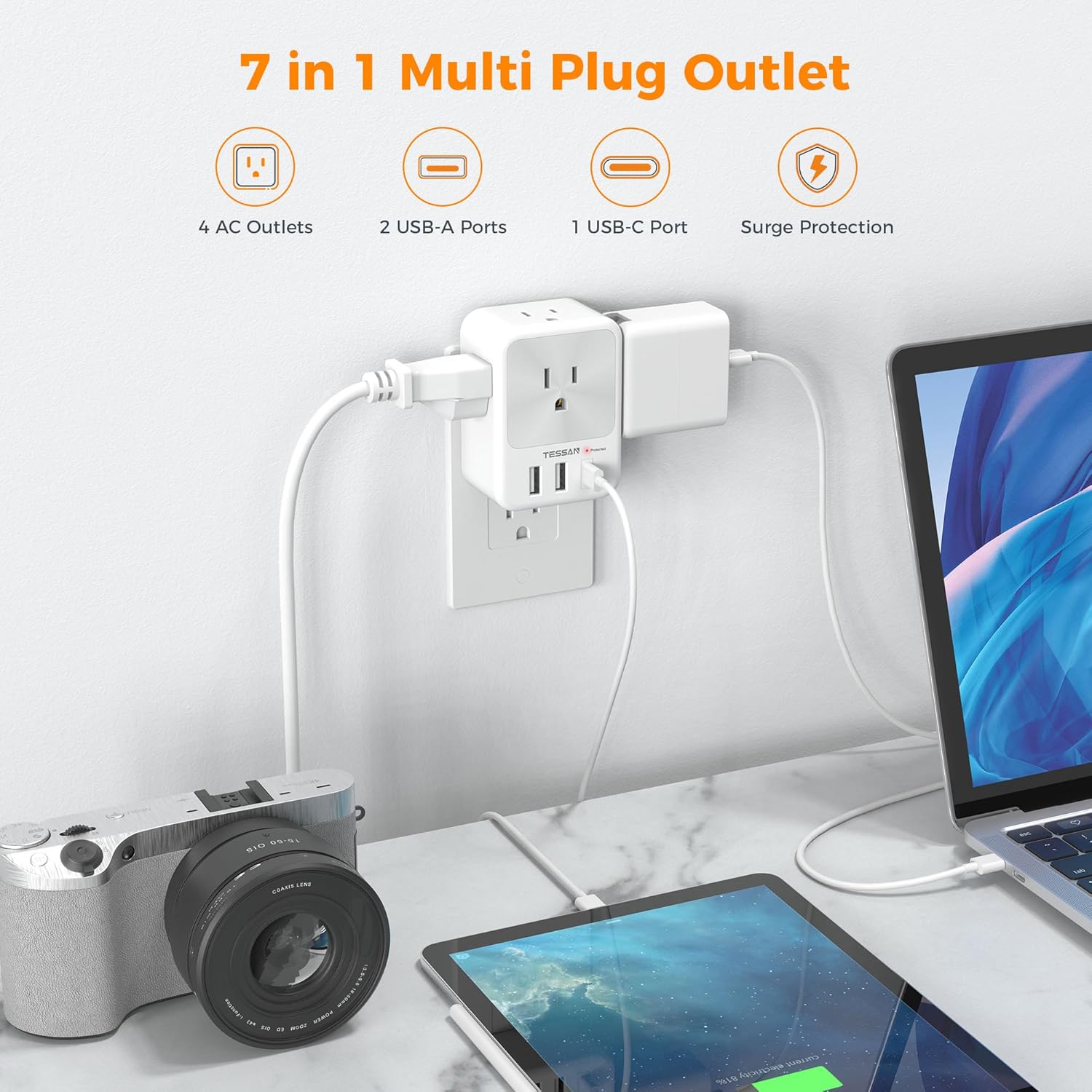
Figure 2: The TESSAN extender providing power to multiple devices.
3. Setup and Installation
- Identify a Suitable Outlet: Locate a standard 3-prong wall outlet (125V, 15A Max) where you need expanded power access.
- Plug In the Extender: Align the 3-prong plug of the TESSAN extender with the wall outlet. Insert firmly until it is flush with the wall.
- Verify Power: Once plugged in, the 'Protected' LED indicator on the extender should illuminate, confirming that the surge protection is active and the unit is receiving power.
- Connect Devices: Plug your AC-powered devices into the 4 AC outlets and your USB-powered devices into the 2 USB-A ports and 1 USB-C port.
The compact design ensures that the extender does not obstruct the lower wall socket when plugged into the top one, maximizing usability.

Figure 3: Dimensions and compatibility with standard, decor, USB, and GFCI outlets.
4. Operating Instructions
- AC Outlets: The 4 AC outlets provide up to 1875W (15A) of power. Ensure that the total power consumption of all connected AC devices does not exceed this limit to prevent overload.
- USB-A Ports: The two USB-A ports deliver up to 2.4A per port. They are suitable for charging smartphones, smartwatches, Bluetooth speakers, and other small electronic devices.
- USB-C Port: The single USB-C port provides up to 15W (3A) output, ideal for faster charging of compatible devices like modern smartphones and tablets.
- LED Indicator: The 'Protected' LED light indicates that the surge protection feature is active. If this light is off, the surge protection may have been compromised, and the unit should be replaced.

Figure 4: USB-C and USB-A ports for optimized charging.
5. Safety Information
- Indoor Use Only: This device is designed for indoor use in dry locations. Do not use in wet or damp environments.
- Avoid Overloading: Do not exceed the maximum power rating of 1875W (15A) for AC outlets. Overloading can cause overheating and potential fire hazards.
- Surge Protection: The built-in surge protector helps protect your devices from power fluctuations. However, in the event of a severe surge, the protection may be consumed. If the 'Protected' indicator light is off, the surge protection is no longer active, and the unit should be replaced.
- Child Safety: Keep out of reach of children.
- Proper Insertion: Ensure the plug is fully inserted into the wall outlet. A loose connection can cause overheating.
- Do Not Disassemble: Do not attempt to open or modify the device. This will void the warranty and may pose a safety risk.

Figure 5: Built-in surge protection for device safety.
6. Specifications
| Feature | Detail |
|---|---|
| Model Number | TS-1611-C |
| Product Dimensions | 2.32 x 2.32 x 3.15 inches |
| Item Weight | 5.3 ounces |
| AC Outlets | 4 (1875W Max, 15A, 125V~) |
| USB-A Output | 5V⎓2.4A Max per port |
| USB-C Output | 5V⎓3A Max (15W Max) |
| Total DC Output | 15W |
| Connectivity Technologies | USB |
| Special Features | Lightweight Design, Surge Protection |
| Manufacturer | Zhuhai Tessan Power Technology Co., Ltd. |
7. Troubleshooting
- No Power to Devices:
- Ensure the extender is firmly plugged into a functioning wall outlet.
- Check if the 'Protected' LED indicator is illuminated. If not, the surge protection may be compromised, or the outlet may not be active.
- Verify that the total power consumption of connected devices does not exceed 1875W. Unplug some devices if overloaded.
- Slow USB Charging:
- Ensure your device is compatible with the USB-A (2.4A) or USB-C (15W) output.
- Use high-quality charging cables.
- Charging multiple devices simultaneously may distribute the available current, potentially slowing down individual charging speeds.
8. Warranty and Support
For warranty information, technical support, or any inquiries regarding your TESSAN Surge Protector Wall Outlet Extender, please refer to the official TESSAN website or contact their customer service directly. Keep your purchase receipt for warranty claims.
You can visit the TESSAN Store for more information: TESSAN Official Store