
Introduction
This manual provides comprehensive instructions for the installation, operation, and maintenance of your Avatto TRV07 Zigbee 3.0 TUYA Smart Radiator Thermostat Valve. Please read this manual carefully before using the device to ensure proper function and safety. Keep this manual for future reference.
Important Safety Information
- Ensure the power supply to the radiator system is off before installation or maintenance.
- Installation should be performed by a qualified professional if you are unsure about any steps.
- Do not expose the device to extreme temperatures, humidity, or direct sunlight.
- Do not attempt to disassemble or repair the device yourself. Contact customer support for assistance.
- Keep out of reach of children.
Package Contents
Please check the package for the following items:
- Avatto TRV07 Smart Radiator Thermostat Valve
- User Manual (this document)
- Adapter set (various sizes for different valves)
Product Overview
The Avatto TRV07 is a smart radiator thermostat valve designed to provide intelligent control over your home heating system. It integrates with Zigbee 3.0 networks and the TUYA smart home platform, allowing for remote control and automation.
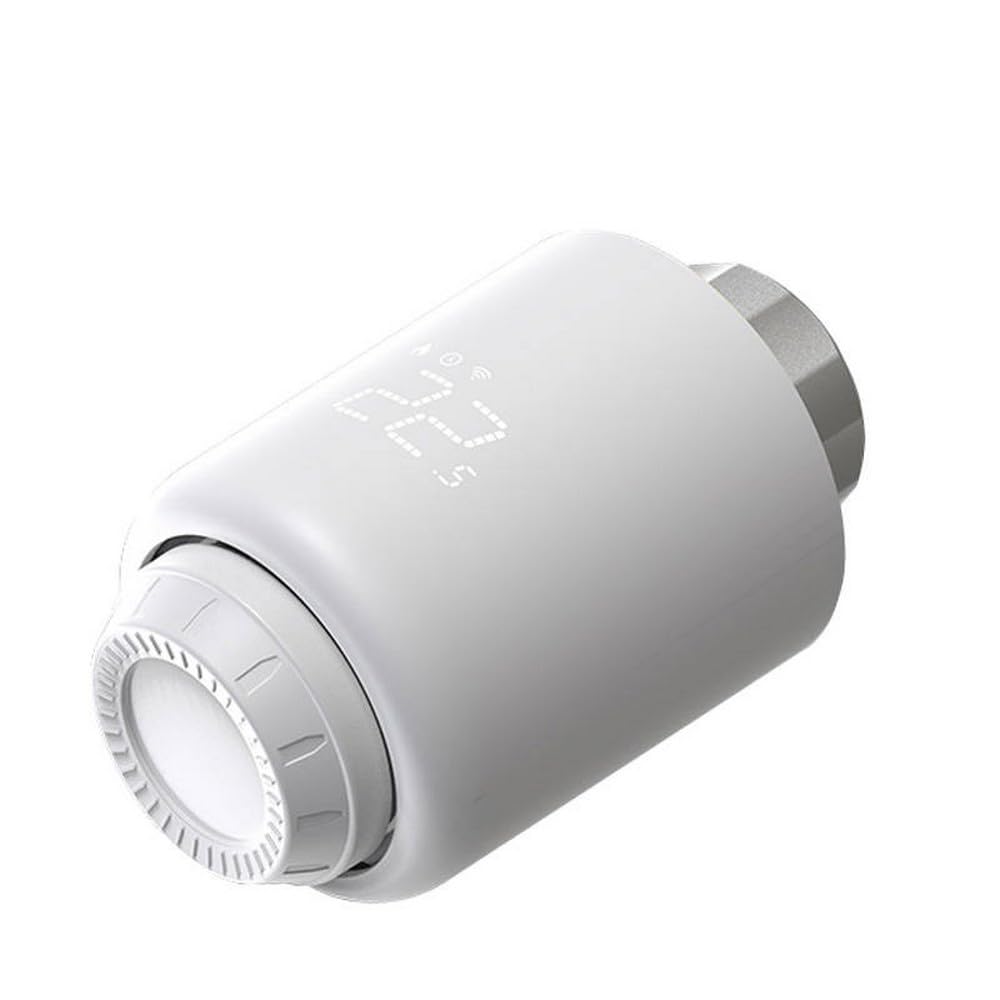
Figure 1: Avatto TRV07 Smart Radiator Thermostat Valve. The image displays the white cylindrical device with a digital screen showing '22.5' degrees Celsius and icons for network connectivity and battery status. The adjustment ring is visible at the bottom.
Key Features:
- Zigbee 3.0 connectivity for stable and reliable communication.
- TUYA Smart Life App integration for remote control and scheduling.
- Digital display for current temperature and settings.
- Manual temperature adjustment.
- Energy saving features.
Setup and Installation
1. Preparing for Installation:
- Turn off Heating System: Before beginning, ensure your heating system is turned off to prevent accidental water leakage or damage.
- Identify Valve Type: Determine the type of radiator valve you have. The TRV07 comes with various adapters to fit most standard radiator valves.
- Remove Old Thermostat Head: Unscrew and remove the existing thermostatic radiator valve head. This usually involves unscrewing a collar or pressing a clip.
2. Installing the TRV07:
- Select Adapter: Choose the appropriate adapter from the provided set that matches your radiator valve. If no adapter is needed, proceed to the next step.
- Attach Adapter (if needed): Securely attach the chosen adapter to your radiator valve.
- Mount TRV07: Carefully screw the Avatto TRV07 onto the adapter or directly onto the valve thread. Ensure it is hand-tightened securely but do not overtighten.
- Power On: The device should power on automatically once installed. The display will light up.
Consult a professional if you encounter difficulties during installation.
Pairing with Zigbee Hub and TUYA App
The Avatto TRV07 requires a Zigbee 3.0 compatible hub (e.g., TUYA Zigbee Gateway) to connect to your smart home network and be controlled via the TUYA Smart Life application.
1. Prepare Your Zigbee Hub:
- Ensure your Zigbee hub is powered on and connected to your home Wi-Fi network.
- Open the TUYA Smart Life app and confirm your hub is online.
2. Enter Pairing Mode on TRV07:
- On the TRV07, press and hold the main button (or follow specific instructions for your model, usually a long press on the central button or a combination) until the Zigbee icon on the display starts flashing. This indicates it is in pairing mode.
3. Add Device in TUYA Smart Life App:
- Open the TUYA Smart Life app on your smartphone.
- Tap the "+" icon in the top right corner to add a new device.
- Select "Add Device" or navigate to the "Gateway" section and choose "Add sub-device".
- The app will search for nearby Zigbee devices. Select the TRV07 when it appears.
- Follow the on-screen prompts to complete the pairing process. Once successfully paired, the Zigbee icon on the TRV07 display will stop flashing and remain solid.
If pairing fails, ensure the TRV07 is close to the Zigbee hub and try again. You may need to reset the TRV07 to factory settings before re-attempting pairing (refer to Troubleshooting section).
Operating Instructions
Manual Control:
- Adjusting Temperature: Rotate the adjustment ring on the TRV07 clockwise to increase the target temperature and counter-clockwise to decrease it. The new target temperature will be displayed temporarily.
- Display Information: The digital display typically shows the current room temperature or the set target temperature. Icons indicate battery status, network connection, and operating mode.
App Control (TUYA Smart Life):
- Remote Temperature Adjustment: Open the TUYA Smart Life app, select your TRV07 device, and adjust the temperature slider or input a specific value.
- Scheduling: Set up daily or weekly heating schedules to automate temperature changes based on your routine.
- Operating Modes: The app allows you to switch between various modes such as Manual, Auto (scheduled), Holiday, or Eco mode, depending on the device's capabilities.
- Child Lock: Activate the child lock feature through the app to prevent unauthorized manual adjustments on the device.
Maintenance
- Cleaning: Wipe the device with a soft, dry cloth. Do not use abrasive cleaners or solvents.
- Firmware Updates: Periodically check the TUYA Smart Life app for available firmware updates for your TRV07 to ensure optimal performance and access to new features.
Troubleshooting
| Problem | Possible Cause | Solution |
|---|---|---|
| Device not powering on. | Improper installation or power issue. | Ensure the device is correctly mounted and secured to the valve. Check the power source (if external) or contact support if internal power is suspected. |
| Cannot pair with Zigbee hub. | Device not in pairing mode, hub too far, or interference. | Ensure the TRV07 is in pairing mode (flashing Zigbee icon). Move the TRV07 closer to the hub. Check for other Zigbee devices causing interference. Try resetting the TRV07 and re-pairing. |
| Temperature not adjusting. | Valve stuck, child lock active, or communication issue. | Manually check if the radiator valve pin moves freely. Deactivate child lock in the TUYA app. Verify Zigbee connection. |
| Inaccurate temperature readings. | Device placement or external factors. | Ensure the TRV07 is not exposed to direct sunlight, drafts, or heat sources that could affect its internal sensor. |
Factory Reset:
To perform a factory reset, typically you would press and hold a specific button combination for several seconds until the display indicates a reset. Refer to the device's specific button layout or the TUYA app for exact instructions if needed. A factory reset will unpair the device and restore default settings.
Specifications
- Model: TRV07
- Brand: AVATTO
- Connectivity: Zigbee 3.0
- App Support: TUYA Smart Life
- Batteries Required: No (as per product specifications)
Warranty and Support
For warranty information, please refer to the documentation provided with your purchase or contact your retailer. For technical support, troubleshooting assistance, or further inquiries, please visit the official AVATTO website or contact their customer service department.
Note: Product specifications and features are subject to change without prior notice.


