
CATLINK CL-08
CATLINK Pro-X Luxury Version Intelligent Self-Cleaning Cat Litter Box User Manual
Model: CL-08
Introduction
Welcome to the user manual for your CATLINK Pro-X Luxury Version Intelligent Self-Cleaning Cat Litter Box. This manual provides essential information for the safe and efficient operation, maintenance, and troubleshooting of your device. Please read this manual thoroughly before first use and keep it for future reference.
The CATLINK Pro-X is designed to provide a clean and hygienic environment for your cat with minimal effort, featuring automatic cleaning cycles and smart monitoring capabilities.
Important Safety Instructions
- Always place the litter box on a firm, level surface.
- Do not immerse the unit in water or other liquids.
- Keep out of reach of small children and pets not intended to use the device.
- Unplug the unit before cleaning or performing any maintenance.
- Use only the provided power adapter.
- Do not attempt to repair or modify the unit yourself. Contact customer support for assistance.
- Ensure the litter box is used with clumping cat litter only.
Package Contents
Please check the package contents upon unboxing to ensure all components are present:
- CATLINK Pro-X Luxury Version Main Unit
- Waste Drawer
- Power Adapter
- User Manual (this document)
Setup Guide
Follow these steps to set up your CATLINK Pro-X litter box:
- Unpack the Unit: Carefully remove all components from the packaging.

Image: Top-down view of the CATLINK Pro-X Luxury Version Intelligent Self-Cleaning Cat Litter Box, showing its sleek design and control panel.
- Place the Unit: Position the litter box on a flat, stable surface near a power outlet. Ensure there is enough space around the unit for proper ventilation and access to the waste drawer.

Image: Side view of the CATLINK Pro-X, illustrating its compact footprint and modern aesthetic suitable for various home environments.
- Insert Waste Drawer: Slide the waste drawer into the designated slot at the front of the unit until it clicks into place.
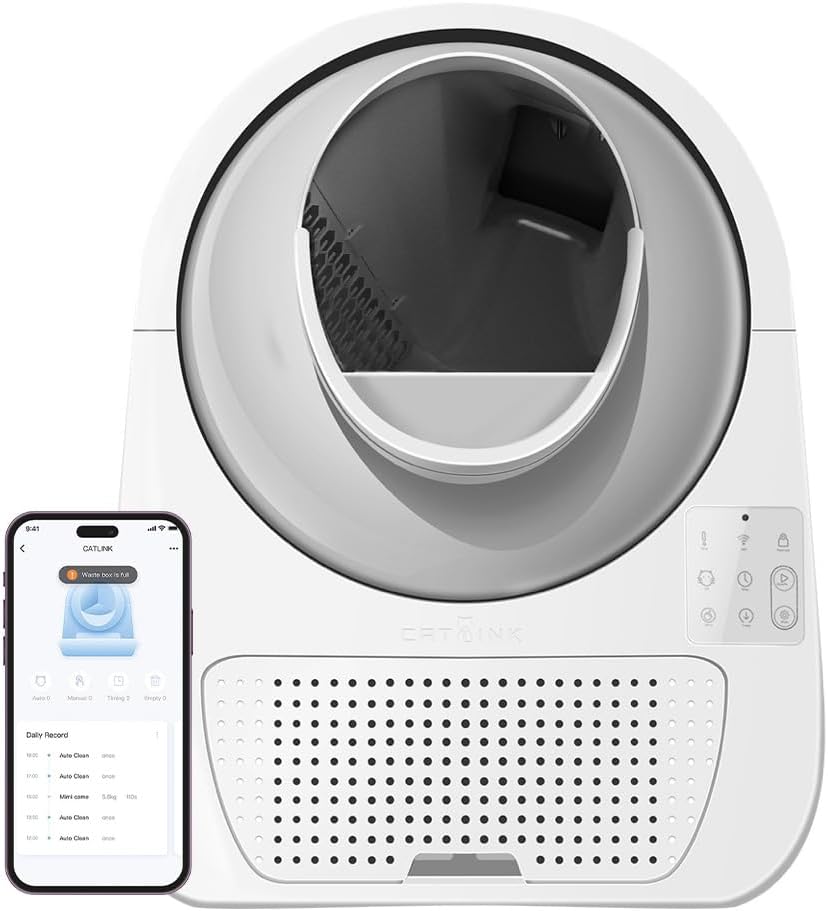
Image: The CATLINK Pro-X with its waste drawer partially extended, demonstrating the easy access for waste disposal.
- Add Cat Litter: Pour clumping cat litter into the globe. Do not exceed the MAX fill line indicated inside the globe.
- Connect Power: Plug the power adapter into the unit and then into a wall outlet. The unit will perform an initial calibration cycle.
- App Connection (Optional): For smart features, download the CATLINK app from your app store. Follow the in-app instructions to connect your device.

Image: A smartphone screen showing the CATLINK app interface, highlighting features like clean cycle activation, cat health monitoring, and waste drawer level indication, positioned next to the litter box.
Operating Instructions
Control Panel Overview

Image: A close-up view of the CATLINK Pro-X control panel, showing the various buttons and indicator lights for manual operation and status checks.
The control panel on the front of the unit allows for manual operation and status monitoring.
- Power Button: Turns the unit on/off.
- Clean Button: Initiates a manual cleaning cycle.
- Empty Button: Initiates a full litter emptying cycle.
- Indicator Lights: Display status such as cleaning in progress, waste drawer full, or error.
Cleaning Modes
The CATLINK Pro-X offers several cleaning modes:
- Auto Mode: The unit automatically cleans after your cat exits the litter box, following a preset delay (adjustable via app).
- Manual Mode: Press the Clean button on the control panel or use the app to initiate a cleaning cycle.
- Timer Mode: Set specific times for cleaning cycles via the app.
- Empty Mode: Use this mode to completely empty the litter from the globe into the waste drawer, useful for full litter changes.
Cat Usage and Monitoring
The litter box is equipped with sensors to detect your cat's presence and weight, allowing for smart operation and health monitoring via the app.

Image: A cat comfortably positioned inside the CATLINK Pro-X litter box, demonstrating the spacious interior designed for feline comfort.

Image: A cat approaching the CATLINK Pro-X, illustrating the easy entry point for pets.

Image: The CATLINK Pro-X with a cat inside, visually representing its 57L capacity and 0.33m² footprint, indicating ample space for the cat and efficient use of floor space.
Video: An official product video demonstrating a cat interacting with the CATLINK Pro-X litter box, showcasing its ease of use and the automatic cleaning process.
Maintenance and Cleaning
Regular maintenance ensures optimal performance and hygiene of your CATLINK Pro-X.
Emptying the Waste Drawer
The waste drawer should be emptied regularly, as indicated by the app notification or the control panel light. To empty:
- Pull out the waste drawer from the front of the unit.
- Dispose of the waste in a trash bag.
- Clean the drawer with a mild detergent and water, if necessary. Dry thoroughly before reinserting.

Image: A detailed view of the CATLINK Pro-X waste drawer, emphasizing its 13L capacity and easy-to-remove design for convenient waste disposal.
Cleaning the Globe and Base
Periodically, a deeper clean of the globe and base may be required.
- Unplug the unit from the power outlet.
- Remove all litter from the globe (use Empty mode first).
- Wipe down the interior of the globe and the exterior of the unit with a damp cloth and mild, pet-safe cleaner.
- Do not use abrasive cleaners or submerge the unit.
- Ensure all parts are completely dry before plugging the unit back in.
Troubleshooting
If you encounter any issues with your CATLINK Pro-X, please refer to the following common problems and solutions:
| Problem | Possible Cause | Solution |
|---|---|---|
| Unit not powering on | Power cable not connected; Power outlet faulty | Check power connections; Try a different outlet. |
| Cleaning cycle not starting automatically | Cat still inside; Sensors obstructed; Incorrect mode selected | Ensure cat has exited; Clean sensors; Check app settings for Auto Mode. |
| Waste drawer full alert persists after emptying | Waste drawer sensor dirty or obstructed | Clean the waste drawer sensor located inside the unit. |
| Unusual noises during operation | Litter stuck; Motor obstruction | Unplug and check for litter clumps or foreign objects obstructing the globe's rotation. |
If the problem persists, please contact CATLINK customer support.
Specifications
| Feature | Detail |
|---|---|
| Model Number | CL-08 |
| Brand | CATLINK |
| Color | Black |
| Size | Large |
| Product Weight | 25 Kilograms |
| Material | Acrylic |
| Litter Box Type | Automated Self-Cleaning Litter Box |
| Lid Included | Yes |
| Special Features | CL-08, 8280 |
Warranty and Support
For warranty information and technical support, please refer to the official CATLINK website or contact their customer service directly. Keep your purchase receipt as proof of purchase for warranty claims.
Manufacturer: Catlink
ASIN: B0BY6YGGS4
Related documentsCL-08


Ask a question about this manual
Ask about setup, troubleshooting, compatibility, parts, safety, or missing instructions. Manuals+ will review the question and use this page’s manual context to help answer it.