
AVATTO ZWT100-WH-3A
AVATTO Smart Water Heating Thermostat ZWT100
User Manual
1. Introduction
Thank you for choosing the AVATTO Smart Water Heating Thermostat ZWT100. This device is designed to provide intelligent control over your water heating system, offering convenience, energy efficiency, and comfort through Zigbee and Tuya smart home integration. Please read this manual carefully before installation and operation to ensure proper use and optimal performance.
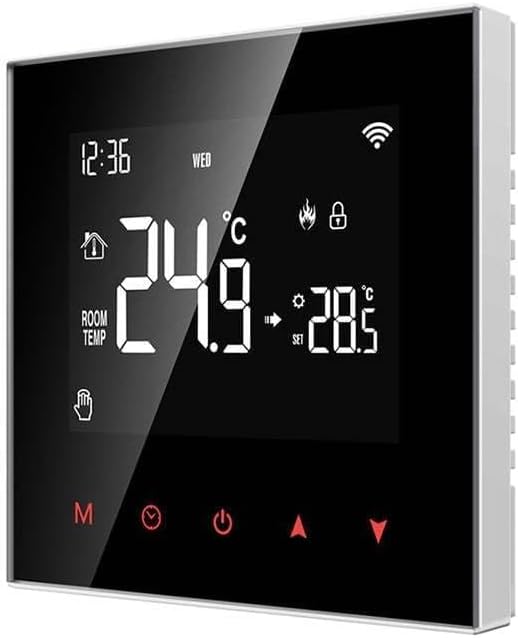
Figure 1.1: Front view of the AVATTO Smart Water Heating Thermostat ZWT100, showing its digital display and touch controls.
2. Safety Information
Please observe the following safety precautions to prevent damage to the device or injury to yourself:
- Installation must be performed by a qualified electrician in accordance with local electrical codes.
- Disconnect power to the heating system at the circuit breaker before installation, maintenance, or removal.
- Do not expose the thermostat to water or excessive humidity.
- Do not attempt to disassemble or repair the device yourself. Refer all servicing to qualified personnel.
- Ensure the voltage and current ratings of your heating system are compatible with the thermostat's specifications.
3. Package Contents
Verify that all items are present in the package:
- AVATTO Smart Water Heating Thermostat ZWT100
- Mounting Screws
- User Manual (this document)
- External Floor Sensor (if applicable to your model variant)
4. Product Features
The AVATTO ZWT100 thermostat offers a range of features for smart heating control:
- Smart Connectivity: Integrates with Zigbee and Tuya smart home platforms for remote control and automation.
- Easy to Use: Features a user-friendly interface with a clear digital display and intuitive touch controls.
- Programmable Schedules: Allows for custom heating schedules to optimize comfort and energy savings.
- Temperature Accuracy: Provides precise temperature sensing and control for consistent heating.
- High Quality Construction: Built with durable materials for reliable long-term performance.
5. Setup and Installation
Follow these steps for proper installation of your thermostat. Ensure power is disconnected before beginning.
5.1 Wiring Diagram
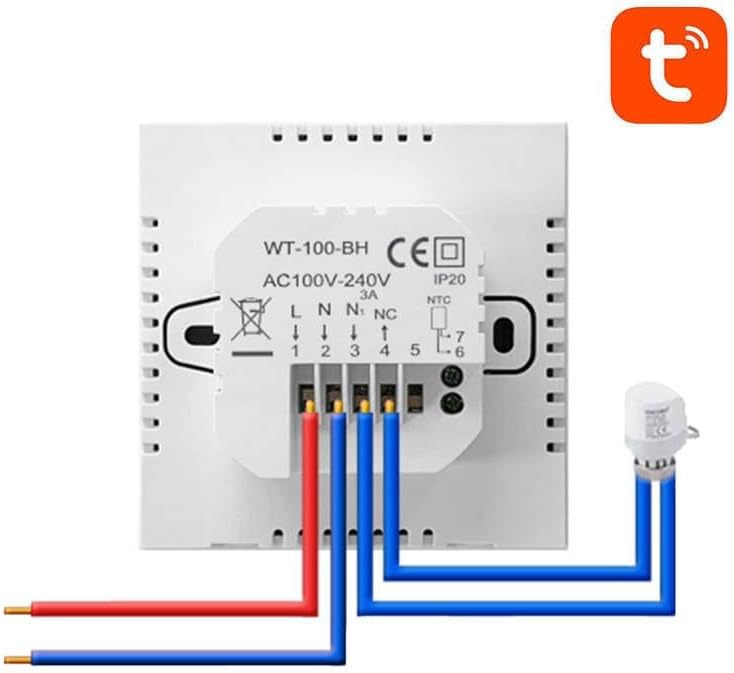
Figure 5.1: Rear view of the AVATTO Smart Water Heating Thermostat ZWT100, showing the wiring terminals for power, load, and external sensor.
5.2 Installation Steps
- Power Disconnection: Turn off the main power supply to your water heating system at the circuit breaker. Verify power is off using a voltage tester.
- Remove Old Thermostat: Carefully remove your existing thermostat from the wall. Note the wiring connections before disconnecting them.
- Wire Connection: Connect the wires from your heating system to the corresponding terminals on the AVATTO ZWT100 thermostat as shown in Figure 5.1. Ensure secure connections.
- Mounting: Mount the thermostat to the wall using the provided screws. Ensure it is level and securely fastened.
- Power Restoration: Once all connections are secure and the thermostat is mounted, restore power at the circuit breaker.
- Initial Setup: The thermostat will power on. Follow the on-screen prompts or refer to the operating instructions for initial setup, including time, date, and network pairing.
6. Operating Instructions
This section details the basic operation of your AVATTO ZWT100 thermostat.
6.1 Display Overview
The thermostat's display shows the current room temperature, set temperature, time, day of the week, and various icons indicating operational status (e.g., heating active, Wi-Fi connection, child lock).
6.2 Basic Controls
- Power Button: Press to turn the thermostat ON/OFF.
- Mode Button (M): Cycles through different operating modes (e.g., Manual, Auto/Program, Holiday).
- Up/Down Arrows (▲/▼): Adjust the set temperature or navigate menu options.
- Clock Button: Used for setting time, date, and programming schedules.
- Lock Icon: Indicates if the child lock function is active.
6.3 Smart Home Integration (Tuya/Zigbee)
To connect your thermostat to the Tuya Smart Life app and your Zigbee gateway:
- Download the Tuya Smart or Smart Life app from your app store.
- Ensure your Zigbee gateway is powered on and connected to your home network.
- In the app, add a new device and select the thermostat category.
- Follow the app's instructions to put the thermostat into pairing mode (usually by pressing and holding a specific button combination until a network icon flashes).
- Once paired, you can control the thermostat remotely, set schedules, and integrate it with other smart devices.
7. Maintenance
The AVATTO ZWT100 thermostat requires minimal maintenance.
- Cleaning: Wipe the display and casing with a soft, dry cloth. Do not use abrasive cleaners, solvents, or spray directly onto the device.
- Dust Removal: Periodically clean any dust accumulation around the thermostat's vents to ensure proper air circulation for temperature sensing.
- Firmware Updates: Check the Tuya Smart Life app periodically for available firmware updates to ensure your thermostat has the latest features and security enhancements.
8. Troubleshooting
If you encounter issues with your thermostat, refer to the following common problems and solutions:
| Problem | Possible Cause | Solution |
|---|---|---|
| Thermostat not powering on | No power supply; incorrect wiring | Check circuit breaker; verify wiring connections (refer to Section 5.1). |
| Heating system not responding | Incorrect mode; wiring issue; system fault | Ensure thermostat is in heating mode; recheck wiring; consult heating system manual. |
| Cannot connect to Wi-Fi/Zigbee | Incorrect pairing mode; weak signal; gateway issue | Ensure thermostat is in pairing mode; move gateway closer; restart gateway. |
| Inaccurate temperature reading | Sensor obstruction; thermostat location | Ensure no drafts or heat sources near thermostat; clean vents. |
If the problem persists after trying these solutions, please contact customer support.
9. Specifications
| Feature | Specification |
|---|---|
| Brand | AVATTO |
| Model Number | ZWT100-WH-3A |
| Item Weight | 185 g |
| Manufacturer | AVATTO |
| ASIN | B0BY6Y4HRT |
| Date First Available | 29 July 2024 |
| Connectivity | Zigbee, Tuya Smart Life App |
| Power Supply | AC100-240V |
| Current Load | 3A |
| IP Rating | IP20 |
10. Warranty and Support
AVATTO products are manufactured to the highest quality standards. This product comes with a standard manufacturer's warranty against defects in materials and workmanship from the date of purchase. Please retain your proof of purchase for warranty claims.
For technical support, troubleshooting assistance, or warranty inquiries, please contact your retailer or visit the official AVATTO support website. Provide your product model number (ZWT100-WH-3A) and a detailed description of the issue when seeking support.
Related documentsZWT100-WH-3A


Ask a question about this manual
Ask about setup, troubleshooting, compatibility, parts, safety, or missing instructions. Manuals+ will review the question and use this page’s manual context to help answer it.