Introduction
Thank you for choosing the SkyRC NC2500 Pro AA/AAA Charger. This intelligent charger is designed for optimal performance and safety when charging various types of rechargeable batteries. Please read this manual thoroughly before use to ensure proper operation and to maximize the lifespan of your batteries and charger.
Key Features
- Overheat Protection
- Plentiful Information Display
- Up to 1.5A Charging Speed
- Reverse-Battery & Short Circuit Protection
- Activate & Repair 0V Battery Automatically
- Select Charging Speed Automatically/Manually
- Automatically Stop Charging When Fully Charged
Product Overview
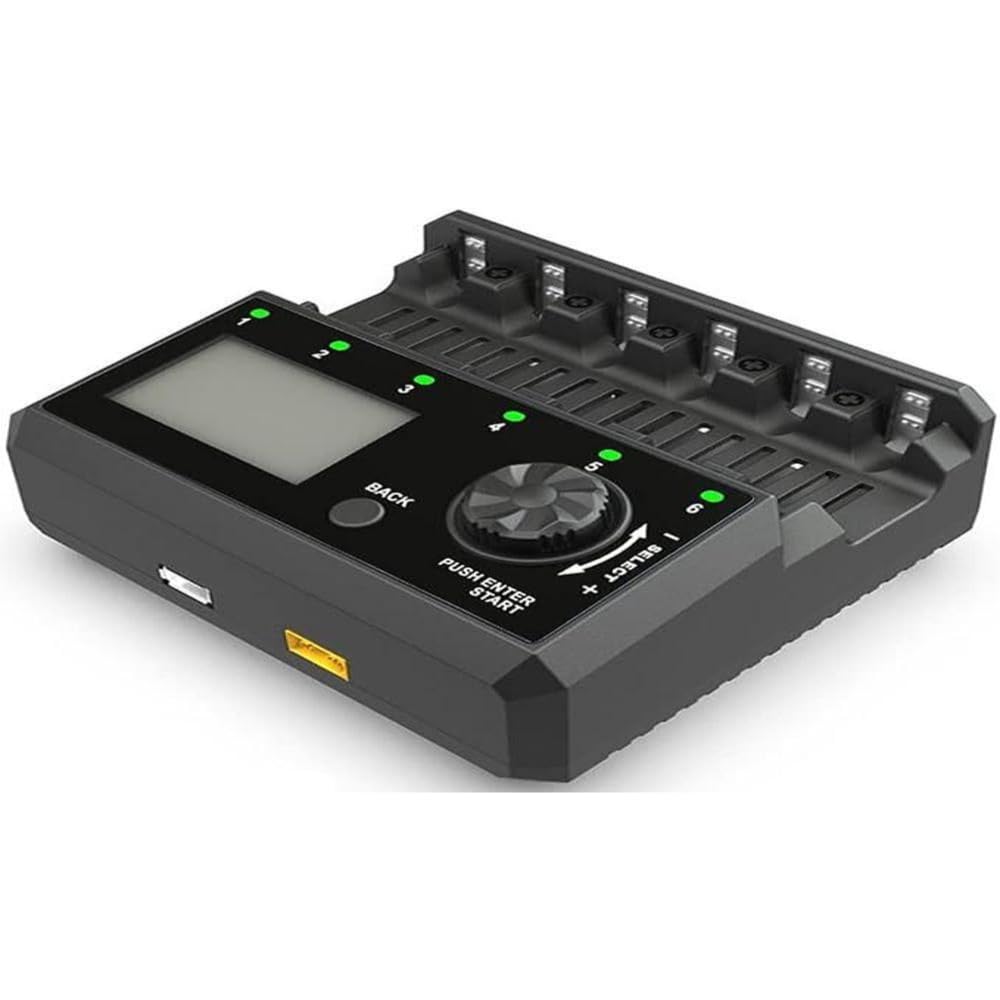
The image above shows the SkyRC NC2500 Pro AA/AAA Charger, featuring multiple charging bays and a digital display for monitoring battery status. The charger is designed for efficient and safe battery management.
Setup
- Unpack the Charger: Carefully remove the SkyRC NC2500 Pro charger and all accessories from its packaging.
- Connect Power: Plug the power adapter into a suitable wall outlet. Connect the other end of the adapter to the power input port on the back of the charger. The display should illuminate, indicating the charger is ready.
- Optional Car Charger Connection: The charger supports a car charger cable (12V output required, not included). Connect the car charger cable to the designated port on the side of the charger for portable use.
Operating Instructions
Inserting Batteries
Insert AA or AAA rechargeable batteries into the charging bays. Ensure correct polarity (+ and - terminals) to prevent damage to the battery or charger. The charger can accommodate up to 12 batteries (6 AA and 6 AAA) simultaneously.
Automatic Battery Detection
The SkyRC NC2500 Pro charger automatically detects the battery type for 4.2V Li-ion, Ni-MH, and Ni-Cd batteries. It also automatically measures battery voltage, internal resistance, and calculates optimal charging current (up to 1.5A per bay).
Important Note: For 4.35V Li-ion and LiFePO4 batteries, you must manually select the battery type. If not manually selected, the charger will charge these batteries as 4.2V Li-ion, which may pose a risk of explosion.
Charging Process
Once batteries are inserted and detected, the charging process will begin automatically. The display will show real-time information such as battery percentage, voltage, charging current, and accumulated charging time.
Discharge Function
The discharge function is available only for Bay No. 4.
- Long press the 'SLOT' and 'MODE' buttons simultaneously until '0000' flashes on the display.
- Short press the 'MODE' button. When the discharge icon (four downward arrows) is displayed, the function to measure battery capacity is activated. If the discharge icon disappears, the discharge function is inactivated.
Maintenance
- Keep the charger clean and dry. Avoid exposure to moisture or extreme temperatures.
- Do not attempt to disassemble or modify the charger. This will void the warranty and could lead to malfunction or injury.
- Store the charger and batteries in a cool, dry place when not in use.
Troubleshooting
- Charger not powering on: Ensure the power adapter is securely connected to both the charger and a working power outlet.
- Battery not charging: Check that the battery is inserted with correct polarity. Ensure the battery is a rechargeable type compatible with the charger. If it's a 0V battery, the charger should attempt to activate and repair it automatically.
- Overheat warning: If the charger displays an overheat warning, remove the batteries and allow the charger to cool down in a well-ventilated area before resuming use.
- Incorrect battery type detected: For 4.35V Li-ion and LiFePO4 batteries, manually select the correct type as described in the operating instructions.
Specifications
| Feature | Specification |
|---|---|
| Brand | SKYRC |
| Model Number | SKY100185-01 |
| Output Voltage | 1.2 Volts |
| Input Voltage | 1.5 Volts |
| Compatible Battery Types | AA/AAA (Ni-MH, Ni-Cd, Li-ion, LiFePO4, IMR, INR, ICR) |
| Color | Black |
| Safety Standard | CE Compliant |
Warranty and Support
If you wish to return a product within 30 days of receipt because you have changed your mind, please consult our help page on Returns. If you have received a defective or damaged product, please consult our help page on Defective or Damaged Products. For specific information on purchases made on the Marketplace, please consult our help page on Marketplace Purchases.
For further technical support or inquiries, please contact SkyRC customer service.


