
Introduction
This manual provides essential instructions for the installation and proper handling of the A-MIND LCD Display Touch Screen Digitizer Assembly Replacement for the ZTE Blade V10. This kit is designed to replace faulty, cracked, or non-functional screens on your device. Please read all instructions carefully before proceeding with the installation.
Package Contents
The replacement kit includes the following components:
- 1x For ZTE Blade V10 LCD Screen + Display Touch Digitizer Assembly Replacement Kit with Frame
- 1x Strong Suction Cup
- 1x Triangle Opening Tool
- 1x Card Pin
- 1x Plastic Spudger
- 1x Adhesive Tape
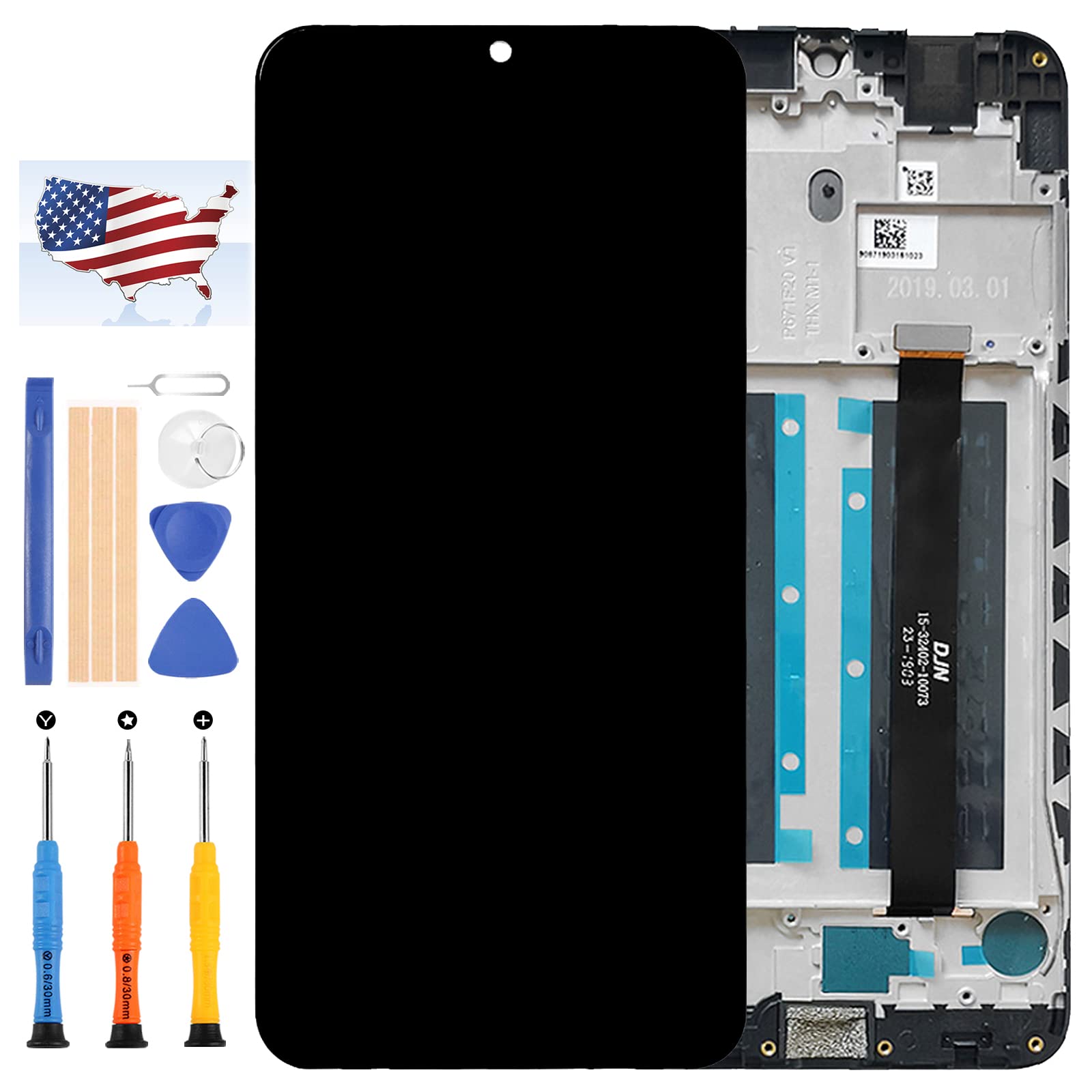
Image: The A-MIND ZTE Blade V10 LCD Display Touch Screen Digitizer Assembly, shown with the integrated frame. The image displays the front of the screen assembly on the left and the rear of the frame with flex cables on the right.
Pre-Installation and Testing Procedures
Proper testing before full installation is crucial to prevent damage and ensure functionality. Follow these steps carefully:
- Grounding Precautions: Before handling any electronic components, ensure you are properly grounded using an ESD (electrostatic discharge) strap. This prevents static electricity from damaging the phone's internal components.
- Eye Protection: Wear appropriate eye protection during the entire process to guard against potential glass splinters.
- Initial Test (Simulated Testing):
- Do not remove any protective films or tags from the new display during this stage.
- Carefully disconnect the old screen from your phone's motherboard.
- Connect the new replacement display to the motherboard. Do not fully install it into the phone's frame yet.
- Power on the mobile phone.
- Test the display for proper functionality: check for dead pixels, touch response, display issues, and correct color reproduction.
- If the test is successful, proceed with the full installation. If any issues arise, contact customer service immediately. Do not force installation if the screen is not functioning correctly.
- Cable Handling: Ensure the LCD flex cable is not over-bent. Bending the cable beyond 90 degrees can cause a black display or other malfunctions.
Note: Installation instructions are not included in this package. It is highly recommended to search for detailed video tutorials on platforms like YouTube or Google by searching "ZTE Blade V10 screen replacement" for visual guidance.
Installation (Operating)
Once pre-installation testing is complete and successful, proceed with the full installation. This kit includes the LCD with a pre-attached frame, simplifying the replacement process by reducing the need to separate the screen from the original frame.
- Disassembly: Carefully disassemble your ZTE Blade V10, following a reliable video guide. This typically involves removing the back cover, battery, and other components to access the screen assembly.
- Remove Old Screen: Disconnect and remove the old, damaged screen assembly from the phone's chassis.
- Clean Frame: Thoroughly clean any adhesive residue or debris from the phone's mid-frame where the new screen assembly will sit.
- Install New Screen: Carefully align and place the new LCD Display Touch Screen Digitizer Assembly (with frame) into the phone's chassis. Ensure all flex cables are properly connected and not pinched.
- Secure Assembly: Use the provided adhesive tape or other securing mechanisms to firmly attach the new screen assembly to the phone's chassis.
- Reassembly: Reassemble the phone by reversing the disassembly steps. Ensure all screws and components are correctly placed.
- Final Test: Power on the phone and perform a final check of all screen functions, including touch, display quality, and any other relevant features.
Maintenance
To ensure the longevity and optimal performance of your new screen, consider the following maintenance tips:
- Protective Cover: Use a screen protector and a protective case for your phone to minimize the risk of future damage from drops or scratches.
- Cleaning: Clean the screen gently with a soft, lint-free cloth. Avoid harsh chemicals or abrasive materials.
- Avoid Pressure: Do not apply excessive pressure to the screen, as this can damage the LCD or digitizer.
Troubleshooting
If you encounter issues after installation, refer to the following common problems and solutions:
| Problem | Possible Cause | Solution |
|---|---|---|
| Black Display / No Image | LCD flex cable is over-bent or not properly connected. | Carefully check the LCD flex cable connection. Ensure it is not bent beyond 90 degrees. Reconnect securely. |
| Touch Not Responding / Ghost Touches | Digitizer flex cable not properly connected or damaged. | Verify the digitizer flex cable connection. If the issue persists, the digitizer may be faulty (refer to warranty). |
| Dead Pixels / Lines on Screen | Faulty LCD panel. | This indicates a manufacturing defect. Contact customer service for a replacement under warranty. |
| Screen Not Fitting Properly | Incorrect model purchased or debris in the frame. | Double-check your phone model against the product description. Ensure the phone's mid-frame is clean of old adhesive or debris. |
If these troubleshooting steps do not resolve your issue, please contact our customer service team for further assistance.
Specifications
- Compatible Model: For ZTE Blade V10
- Screen Size: 6.3 inch
- Resolution: 22080x1080 pixels
- Material: TFT LCD
- Type: LCD Display Touch Screen Digitizer Assembly with Frame
Warranty and Support
A-MIND provides a 3-month warranty for this ZTE Blade V10 LCD screen replacement. All products undergo strict quality control and are tested before shipment to ensure they are in good condition.
Warranty Conditions:
- The warranty covers manufacturing defects and functional issues not caused by user error.
- The screen must be free from any man-made or physical damage (e.g., cracks, liquid damage, improper installation damage) to be eligible for exchange.
- We are not responsible for issues once the screen has been fully installed if it was not tested prior to installation.
Customer Service:
If you have any problems with your order or the product, please do not hesitate to contact our customer service team. We aim to provide assistance within 24 hours.