Introduction
Thank you for choosing the Gigastone 3-in-1 Magnetic Wireless Charger. This device is designed to provide convenient and efficient wireless charging for your compatible iPhone, Apple Watch, and AirPods simultaneously. Please read this manual carefully before use to ensure proper operation and to maximize the lifespan of your product.
What's in the Box
- Gigastone 3-in-1 Magnetic Wireless Charger (Model: GS-WP-5320W-R)
- USB-C Cable (integrated)
- User Manual (this document)

Image: The Gigastone 3-in-1 Magnetic Wireless Charger in its folded and unfolded stand design, showing the integrated Type-C cable.
Setup Instructions
- Connect to Power: Connect the integrated USB-C cable from the wireless charger to a compatible power adapter. For optimal fast charging, a PD 20-watt USB-C charger is recommended.
- Placement: Place the wireless charger on a flat, stable surface.
- Indicator Light: The charger may have an indicator light to show it is powered on and ready for charging. Refer to the device for specific light behavior.
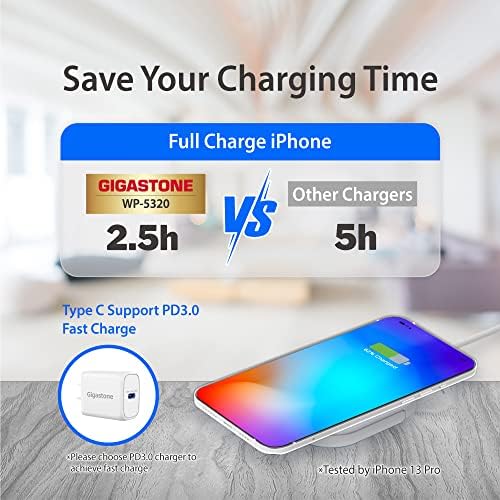
Image: Illustration showing the Gigastone WP-5320 charger connected to a PD 3.0 fast charger for optimal performance.
Operating Instructions
Charging Your Devices:
- For iPhone (Magnetic Charging): Place your compatible iPhone (iPhone 12 series or newer) onto the magnetic charging pad. The phone will magnetically align and begin charging. Ensure the phone is centered for efficient charging.
- For Apple Watch: Place your Apple Watch on the designated charging area. The watch should snap into place magnetically and begin charging.
- For AirPods: Place your AirPods charging case (compatible with wireless charging) on the designated flat charging area.
The charger supports simultaneous charging of an iPhone, Apple Watch, and AirPods. Ensure all devices are properly aligned on their respective charging areas for optimal performance.

Image: The Gigastone magnetic wireless charger simultaneously charging an iPhone, AirPods Pro, and an Apple Watch.

Image: An iPhone displaying a 75% charge notification while wirelessly charging on the Gigastone magnetic pad.
Compatibility
This charger is designed for Apple devices and offers varying charging wattages based on the device type:
- 15W: iPhone 12, 13, 14, 15 Series (and Pro/Pro Max/Mini variants)
- 7.5W: iPhone 8, X, XR, 11 Series (and Pro/Pro Max/Plus variants)
- 5W: AirPods 2, 3, Pro
- 3W: Apple Watch Series 2, 3, 4, 5, 6, 7, 8, SE
For iPhones, ensure your device supports wireless charging. For magnetic attachment, iPhone 12 series and newer are compatible. Older iPhone models (iPhone 8-11 series) can still charge wirelessly but will not magnetically attach.

Image: A visual chart detailing the universal compatibility and corresponding wattage for various iPhone, AirPods, and Apple Watch models with the Gigastone wireless charger.
Safety Information
The Gigastone magnetic wireless charger incorporates advanced safety features to protect your devices and the charger itself. These include:
- Overcharging protection
- Over-current protection
- Over-voltage protection
- Overheating protection
- Short-circuit protection
To ensure safe operation:
- Do not expose the charger to extreme temperatures, humidity, or liquids.
- Avoid dropping or subjecting the charger to strong impacts.
- Do not disassemble or attempt to repair the charger yourself.
- Keep metallic objects away from the charging surface during operation to prevent interference or damage.
- Use only recommended power adapters (PD 20W USB-C recommended).
Product Specifications
| Model Number | GS-WP-5320W-R |
| Input Voltage | 9 Volts |
| Amperage | 2.22 Amps |
| Wattage | 20 watts (Input) |
| Output Power | 15W (iPhone), 5W (AirPods), 3W (Apple Watch) |
| Connector Type | USB-C (integrated cable) |
| Item Weight | 2.39 ounces |
| Package Dimensions | 5.43 x 3.46 x 1.06 inches |
| Special Features | Lightweight, Magnetic, Portable, Travel-friendly, Wireless Charger |
Troubleshooting
- Device not charging:
- Ensure the charger is properly connected to a working power adapter (PD 20W recommended).
- Verify your device is placed correctly on the charging area and is compatible with wireless charging.
- Remove any thick phone cases or metallic objects that might interfere with charging.
- Try restarting your device.
- Slow charging:
- Ensure you are using a PD 20-watt USB-C power adapter. Lower wattage adapters will result in slower charging.
- Check for proper alignment of your device on the charging pad.
- Avoid using your device extensively while it is charging wirelessly, as this can slow down the charging process.
- Charger getting hot:
- It is normal for wireless chargers to generate some heat during operation.
- If the charger becomes excessively hot, remove your device and disconnect the power. Ensure there are no foreign objects on the charging surface.
- Ensure adequate ventilation around the charger.
Maintenance
- Cleaning: Disconnect the charger from power before cleaning. Use a soft, dry, lint-free cloth to wipe the surface. Do not use harsh chemicals or abrasive materials.
- Storage: When not in use, store the charger in a cool, dry place away from direct sunlight and extreme temperatures.
- Cable Care: Avoid bending or twisting the integrated USB-C cable excessively to prevent damage.
Warranty and Support
Gigastone provides a worry-free 12-month warranty for this product. If you encounter any issues or have questions regarding your Gigastone 3-in-1 Magnetic Wireless Charger, please contact Gigastone customer service for friendly support.
For warranty claims or technical assistance, please refer to the contact information provided on the Gigastone official website or your purchase documentation.


