1. Introduction
This manual provides comprehensive instructions for the installation, operation, and maintenance of your Sure-Loc DK201-MD Electronic Single Cylinder Keyless Entry Deadbolt. Please read these instructions carefully before installation and use to ensure proper function and longevity of the product.
2. Product Overview and Features
The Sure-Loc DK201-MD is an electronic deadbolt designed for keyless entry, offering convenience and enhanced security. It features both a keypad for code entry and a traditional key cylinder for manual access, along with an interior thumb-turn.
Key Features:
- Keyless Entry Function: Allows locking and unlocking via a keypad.
- Backlit Keypad: Ensures visibility in low-light conditions.
- Low Battery Warning: Visual and audible indicators for battery status.
- Automatic Locking: Optional feature for enhanced security.
- User Code Storage: Stores up to 10 unique codes, 4-6 digits in length.
- One-Time Use Codes: Provides temporary access for guests or service personnel.
- Single Touch Locking: Simplifies the locking process.
- Power Source: Operates on four AA batteries (not included), eliminating the need for hard wiring.
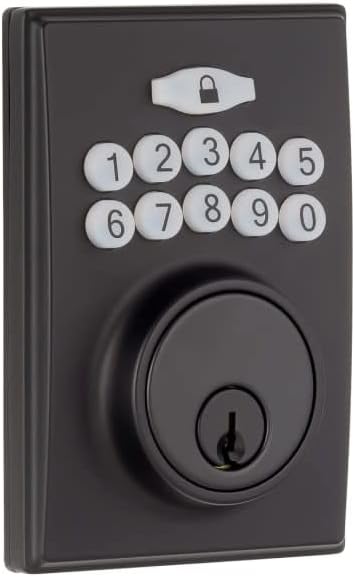
Figure 2.1: Exterior view of the Sure-Loc DK201-MD Electronic Deadbolt, Flat Black finish, showing the keypad and keyhole.
3. Setup and Installation
Proper installation is crucial for the optimal performance of your deadbolt. While detailed step-by-step instructions are typically provided in a separate installation guide, this section outlines key considerations.
Pre-Installation Checks:
- Door Thickness: Compatible with doors from 1-3/8" to 2" thick.
- Cross Bore: Requires a 2-1/8" cross bore.
- Edge Bore: Requires a 1" edge bore.
- Backset: Adjustable for 2-3/8" or 2-3/4" backsets.
- Handing: The deadbolt is reversible, suitable for both left and right-handed doors.
Battery Installation:
The deadbolt requires four AA batteries (not included) for operation. Ensure batteries are inserted with correct polarity.

Figure 3.1: Interior unit with battery cover removed, showing the battery compartment and the 'SET' button for programming.
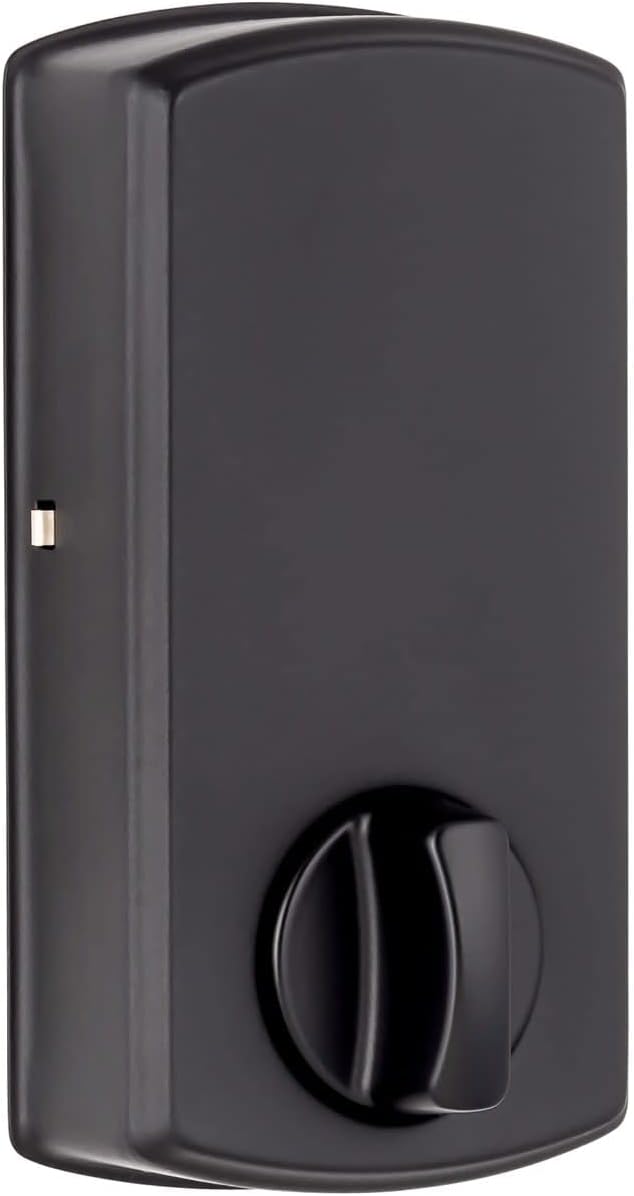
Figure 3.2: Interior unit of the deadbolt, Flat Black finish, featuring the thumb-turn for manual locking and unlocking.
4. Operating Instructions
4.1. Locking the Deadbolt
- From Exterior: Press any key on the keypad or use the single touch locking feature (refer to specific programming instructions for activation).
- From Interior: Rotate the thumb-turn to the locked position.
4.2. Unlocking the Deadbolt
- From Exterior: Enter a valid user code on the keypad. The keypad is backlit for ease of use in low light.
- From Interior: Rotate the thumb-turn to the unlocked position.
- Using Key: Insert the physical key into the key cylinder and turn to unlock.

Figure 4.1: The backlit keypad of the deadbolt, showing illuminated numbers for visibility in dark conditions.
4.3. Programming User Codes
The deadbolt can store up to 10 unique user codes, each 4-6 digits long. Refer to the detailed programming instructions provided with your product for specific steps on how to add, delete, or modify user codes using the 'SET' button on the interior unit.
4.4. One-Time Use Codes
This feature allows you to create temporary access codes that expire after a single use. Consult your product's programming guide for instructions on generating and managing these codes.
4.5. Automatic Locking Function
The deadbolt offers an optional automatic locking feature, which will re-lock the door after a set period once it has been unlocked. This feature can be enabled or disabled through the programming menu.
5. Maintenance
5.1. Battery Replacement
When the deadbolt indicates low battery (via warning light and sound), replace all four AA batteries promptly. Use high-quality alkaline batteries for optimal performance. To replace, remove the interior cover, access the battery compartment, and replace the old batteries with new ones, ensuring correct polarity.
5.2. Cleaning
Clean the exterior of the deadbolt with a soft, damp cloth. Avoid abrasive cleaners or solvents, as these can damage the finish and electronic components.
6. Troubleshooting
- Deadbolt not responding: Check battery levels and replace if necessary. Ensure batteries are inserted correctly.
- Keypad not lighting up: Verify battery power. If batteries are new, check connections.
- Codes not working: Ensure the correct code is being entered. Re-program codes if issues persist.
- Deadbolt not locking/unlocking smoothly: Check for any obstructions in the door frame or strike plate. Ensure the deadbolt is properly aligned.
- Frequent low battery warnings: Ensure high-quality alkaline batteries are used. Extreme temperatures can affect battery life.
For more complex issues, refer to the full troubleshooting guide included with your product or contact Sure-Loc customer support.
7. Specifications
| Specification | Detail |
|---|---|
| Model | DK201-MD |
| Material | Zinc |
| Backset | Adjustable 2-3/8" or 2-3/4" |
| Cross Bore | 2-1/8" |
| Edge Bore | 1" |
| Door Thickness | 1-3/8" to 2" |
| Handing | Reversible |
| Width | 2-11/16" |
| Latch Faceplate | Round Corner |
| Cylinder | 5 Pin KW1 |
| Projection | 7/8" |
| Power Source | 4 AA Batteries (not included) |
| Item Weight | 5 Pounds |
| Product Dimensions | 1 x 1 x 1 inches (approximate) |
| UPC | 802842899756 |
8. Warranty Information
The Sure-Loc DK201-MD Electronic Single Cylinder Keyless Entry Deadbolt is covered under the following warranties:
- Finish: 5-year warranty
- Mechanical Components: Limited warranty
- Electronic Components: 1-year warranty
Please retain your proof of purchase for warranty claims. For full details regarding warranty terms and conditions, refer to the documentation included with your product or visit the official Sure-Loc website.
9. Support
For further assistance, technical support, or to inquire about replacement parts, please contact Sure-Loc customer service. Contact information can typically be found on the Sure-Loc website or in the packaging materials.