Introduction
Thank you for choosing the Kisonli LP-2S Bluetooth Speaker and RGB Music Alarm Clock. This device combines a high-quality Bluetooth speaker with an alarm clock, digital display, FM radio, and customizable RGB lighting. Please read this manual carefully to ensure proper use and to fully enjoy all its features.
Safety Information
- Do not expose the device to extreme temperatures, direct sunlight, or high humidity.
- Avoid dropping or subjecting the device to strong impacts.
- Do not disassemble or attempt to repair the device yourself. This will void the warranty.
- Keep the device away from water and other liquids.
- Use only the provided charging cable or a certified equivalent.
Package Contents
Please check the package for the following items:
- Kisonli LP-2S Bluetooth Speaker
- USB Charging Cable
- AUX Cable
- User Manual
Product Overview
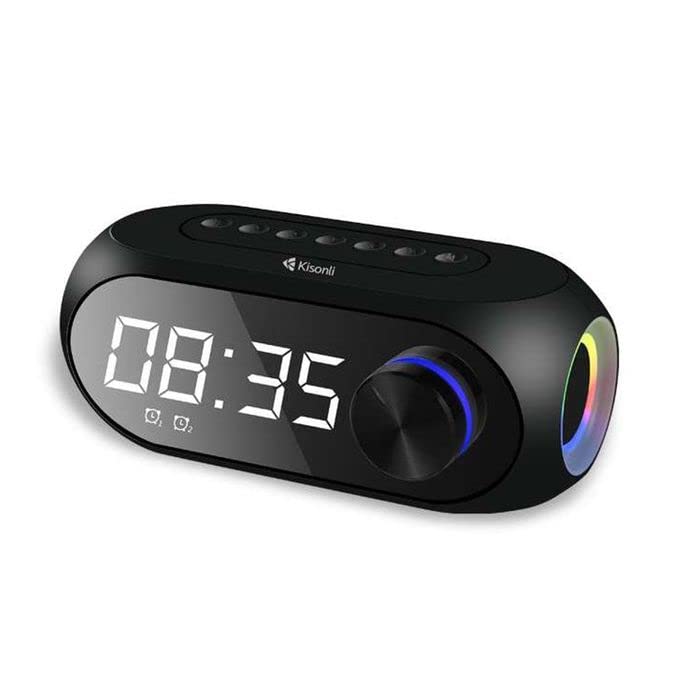
The Kisonli LP-2S features a clear digital clock display, ambient lighting, dual alarm functionality, and a high-endurance battery.
Top panel controls for easy access to power, mode selection, volume adjustment, and track navigation.
Controls and Ports
- Power Button: Press and hold to turn on/off. Short press to play/pause.
- Mode Button (M): Short press to switch between Bluetooth, FM Radio, TF Card, and AUX modes.
- Volume Up (+)/Next Track: Short press for next track, long press for volume up.
- Volume Down (-)/Previous Track: Short press for previous track, long press for volume down.
- RGB Light Button: Short press to change light modes, long press to turn off/on RGB lights.
- Microphone: For hands-free calls.
- TF Card Slot: Insert a MicroSD card for music playback.
- AUX Port: Connect external audio devices via 3.5mm audio cable.
- USB Charging Port: For charging the device.
Setup
1. Charging the Device
Before first use, fully charge the speaker. Connect the USB charging cable to the speaker's charging port and a power adapter (not included). The charging indicator will show the charging status and turn off when fully charged. A full charge provides up to 4 hours of continuous music playback.
2. Powering On/Off
Press and hold the Power Button for approximately 3 seconds to turn the speaker on or off.
3. Bluetooth Pairing
- Turn on the speaker. It will automatically enter Bluetooth pairing mode, indicated by a flashing Bluetooth icon on the display.
- Enable Bluetooth on your mobile device (smartphone, tablet, laptop).
- Search for available devices and select "Kisonli LP-2S" from the list.
- Once paired, the speaker will emit a confirmation sound, and the Bluetooth icon will stop flashing.
4. Setting the Clock
Refer to the specific instructions in your package for detailed clock setting. Generally, a dedicated button (often labeled 'Time' or 'Set') is used to enter time setting mode, then +/- buttons adjust hours and minutes.
5. Setting the Alarm

The LP-2S can be set with up to two alarms to help you wake up.
The LP-2S supports setting multiple alarms. Look for an 'Alarm' button or a long press on the 'Mode' button to enter alarm setting mode. Use the volume buttons to adjust the alarm time and confirm with the power/play button. An alarm icon will appear on the display when an alarm is active.
Operating Instructions
1. Music Playback
- Bluetooth Mode: After successful pairing, play music from your connected device. Use the speaker's +/- buttons for track control and long press for volume.
- TF Card Mode: Insert a MicroSD card with MP3 files into the TF card slot. The speaker will automatically switch to TF card mode and begin playback.
- AUX Mode: Connect an external audio device (e.g., MP3 player) to the AUX port using the 3.5mm audio cable. Press the 'M' button to switch to AUX mode.
2. FM Radio
Press the 'M' button to switch to FM Radio mode. Short press the Power button to auto-scan and save available stations. Use the +/- buttons to navigate between saved stations.
3. Hands-Free Calling
When connected via Bluetooth, if a call comes in, short press the Power button to answer or end the call. Long press to reject a call.
4. RGB Light Control
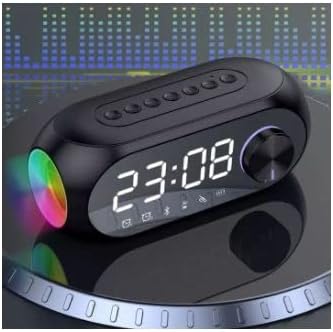
The speaker features colorful lighting that can be customized to your preference.
Press the dedicated RGB Light Button to cycle through different lighting modes and colors. Long press the button to turn the RGB lights off or on.
Maintenance
- Clean the speaker with a soft, dry cloth. Do not use abrasive cleaners or solvents.
- Store the device in a cool, dry place when not in use.
- Avoid blocking the speaker grilles to ensure optimal sound quality.
Troubleshooting
| Problem | Possible Solution |
|---|---|
| Speaker does not turn on. | Ensure the battery is charged. Connect to a power source and try again. |
| Cannot pair via Bluetooth. | Make sure the speaker is in Bluetooth mode. Disable and re-enable Bluetooth on your device. Move closer to the speaker. |
| No sound. | Check volume levels on both the speaker and your connected device. Ensure the correct mode (Bluetooth, AUX, TF) is selected. |
| FM Radio not working/poor reception. | Ensure you are in an area with good signal. Auto-scan for stations again. |
| Alarm does not sound. | Verify the alarm is set correctly and is active (alarm icon visible). Check the speaker's volume. |
Specifications

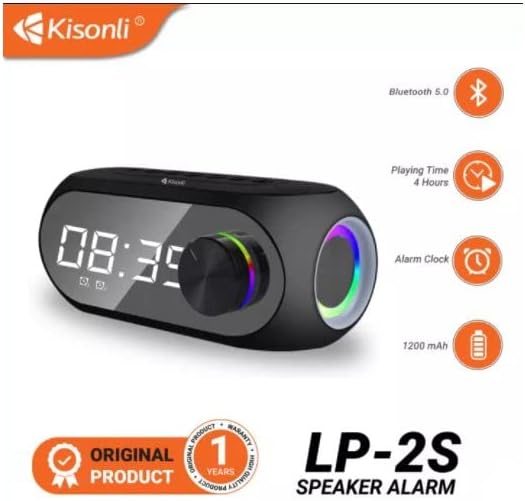
Key features and specifications of the Kisonli LP-2S speaker.

Internal design highlighting the dual speaker setup for rich audio.
- Model: LP-2S
- Brand: Kisonli (Generic)
- Connectivity Technology: Bluetooth 5.2, AUX, TF Card, FM Radio
- Speaker Type: Bookshelf, Stereo
- Speaker Size: 1 Inch (per speaker)
- Audio Output Mode: Stereo
- Power Source: Battery Powered (1200 mAh)
- Battery Life: Up to 4 hours (continuous music playback)
- Special Features: Bluetooth, RGB Lighting, Alarm Clock, Digital Clock, FM Radio, Built-in Microphone
- Item Dimensions (D x W x H): 10D x 15W x 8H centimeters
- Included Components: AUX cable, Memory card slot (TF card slot)
- Compatible Devices: Smartphone, Computer, Laptop, DVD Players, Music Players
Warranty and Support
This product comes with a standard manufacturer's warranty. Please refer to the warranty card included in your package for specific terms and conditions. For technical support or customer service, please contact your retailer or the manufacturer directly.


