
1. Product Overview
The WHDPETS 5L Automatic Pet Feeder with Camera is designed to provide convenient and reliable feeding for your cats and dogs. Featuring a 5-liter food capacity, this feeder includes a 1080P HD camera for monitoring, two-way audio communication, and smart app control via 2.4GHz WiFi. It supports scheduled feeding, portion control, and offers dual power supply options for uninterrupted operation.

Image: The WHDPETS automatic pet feeder in use, demonstrating its camera and app control features.
2. Product Components
Familiarize yourself with the components of your WHDPETS Automatic Pet Feeder:

Image: An exploded diagram illustrating the various parts of the pet feeder, including the food container, lid, base, camera, control panel, and feeding bowl.
- Feeder Lid Switch: Secures the top cover.
- Removable Cover: Top lid for accessing the food container.
- 5L Food Container: Transparent container for dry pet food.
- Desiccant Storage: Compartment to keep food fresh.
- Base: Main unit housing the dispensing mechanism and electronics.
- 1080P Camera: For live monitoring and recording.
- Food Tank Lock Button: Secures the food container to the base.
- Control Panel: Buttons for manual feed and reset.
- Stainless Steel Bowl: Removable feeding bowl.
- Raised Foot Pads: Optional accessories to adjust feeder height.
- Feeding Tray: Holds the stainless steel bowl.
3. Setup Instructions
3.1 Unpacking and Assembly
- Carefully remove all components from the packaging.
- Wash the stainless steel bowl and feeding tray with mild soap and water, then dry thoroughly.
- Assemble the feeding tray and place the stainless steel bowl inside.
- Attach the food container to the base, ensuring it locks securely.
- Insert a desiccant bag into the designated storage area in the lid to maintain food freshness.
3.2 Power Connection
The feeder supports dual power supply for reliability:
- Primary Power: Connect the 5V DC adapter to the feeder and a power outlet.
- Backup Power: For power outage protection, install three (3) D-size alkaline batteries (not included) into the battery compartment located at the bottom of the feeder.

Image: The bottom of the feeder with the battery compartment visible, indicating where to insert backup batteries.
3.3 App Installation and WiFi Connection
The WHDPETS feeder is controlled via the 'TUYA' Smart App. Ensure your smartphone is connected to a 2.4GHz WiFi network during setup.
- Download the 'TUYA' Smart App from your device's app store or scan the QR code below.
- Register or log in to your account.
- Add a new device by selecting 'Small Home Appliances' then 'Pet Feeder (Wi-Fi)'.
- Follow the in-app instructions to connect the feeder to your 2.4GHz WiFi network. You will need to enter your WiFi password.

Image: A QR code for quick download of the 'TUYA' Smart App.

Image: A screenshot from the app showing the WiFi selection and password input screen during setup.
4. Operating Instructions
4.1 App Control and Scheduling
The 'TUYA' Smart App allows comprehensive control over your pet's feeding schedule:
- Set Feeding Plan: Program up to 10 meals per day.
- Portion Control: Adjust portions from 1 to 20 per meal.
- Feeding Log: Review past feeding times and amounts.
- Remote Feeding: Dispense food instantly from anywhere using the app.

Image: The app interface demonstrating how to set feeding schedules and control the feeder remotely.
4.2 Manual Feeding
To dispense food manually, press the 'FEED' button on the feeder's control panel. Each press will dispense one portion.

Image: A close-up of the feeder's control panel, indicating the manual feed button.
4.3 Voice Recording and Two-Way Audio
Record a personalized voice message (up to 10 seconds) that plays during meal times to call your pet. The built-in microphone and speaker also enable two-way audio communication through the app, allowing you to interact with your pet remotely.

Image: A visual representation of the two-way voice interaction feature, showing a user speaking through the app and pets reacting.
5. Camera Features
The integrated 1080P HD camera provides comprehensive monitoring capabilities:
- 1080P High Resolution: Clear video quality with a 110° wide viewing angle.
- Night Vision: Monitor your pet in low-light conditions.
- Motion Detection: Receive alerts for activity.
- Video Playback: Review recorded footage in the app to observe eating habits.

Image: A graphic detailing the camera's capabilities, including 1080P HD, night vision, two-way voice, and motion detection.
6. Adjustable Height Feature
The feeder comes with two sizes of feeder raisers (1 inch & 2 inches) to adjust the bowl height. Elevating the feeding bowl can help reduce stress on your pet's joints and bones, particularly beneficial for pets with arthritis or mobility issues.
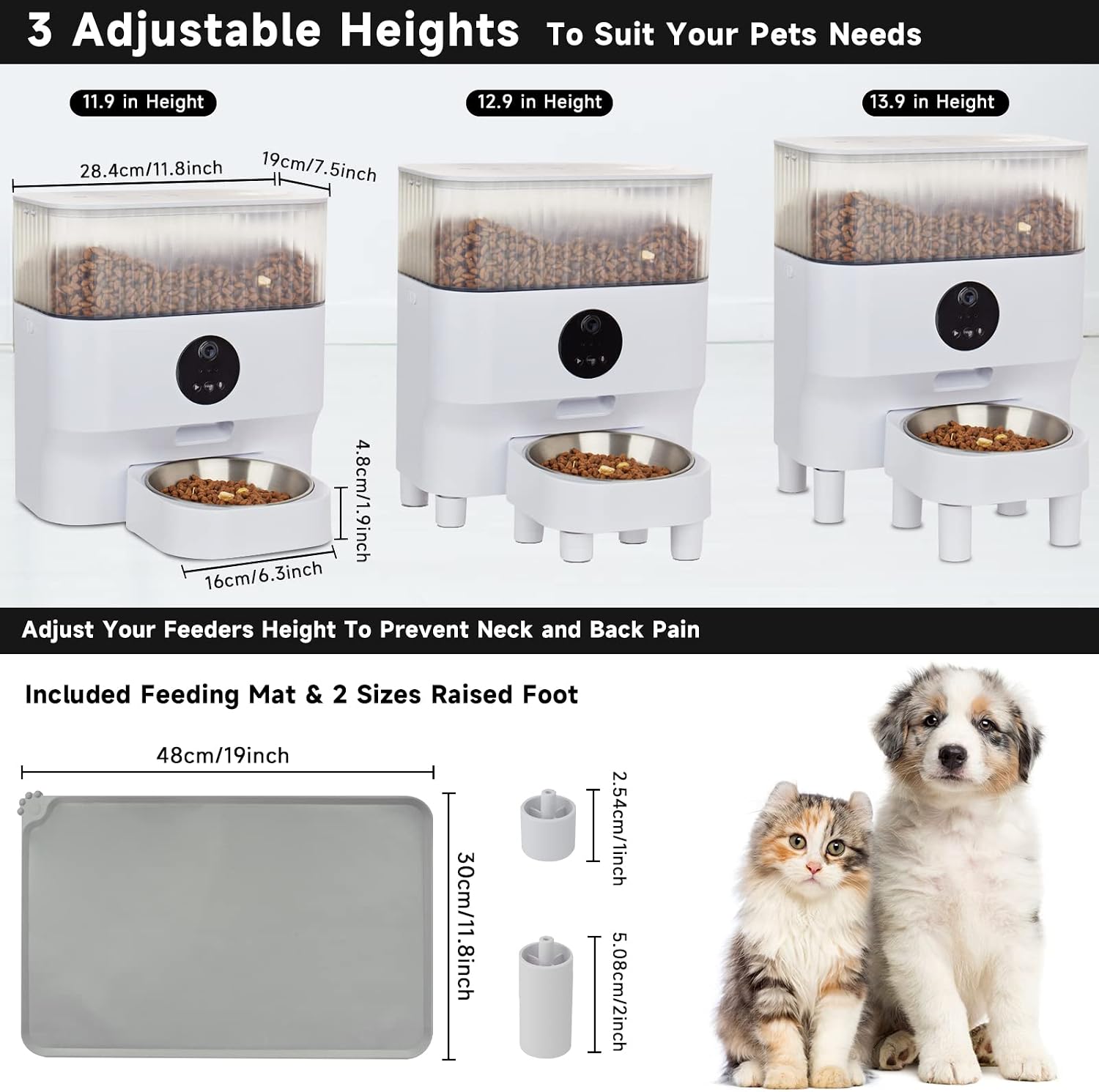
Image: A visual guide demonstrating how the feeder's height can be adjusted using the included raisers, showing three different height configurations.
7. Kibble Compatibility
The feeder is designed for dry pet food. Recommended kibble size is between 2mm and 12mm. It is compatible with single shape dry kibbles, mixed shapes dry kibbles, and freeze-dried food.

Image: A chart detailing the applicable kibble size range and recommended food types for the feeder.
8. Maintenance and Cleaning
Regular cleaning ensures optimal performance and hygiene for your pet. The feeder features a clog-free design and an in-built desiccant bag for food preservation.

Image: A multi-panel image highlighting the feeder's clog-free design, the desiccant bag for freshness, and the ease of cleaning its components.
- Disassembly: The food container, feeding tray, and stainless steel bowl are removable for cleaning.
- Cleaning: Hand wash the removable parts with mild soap and water. Do not wash the main base unit or immerse it in water.
- Drying: Ensure all parts are completely dry before reassembling.
- Desiccant Bag: Replace the desiccant bag periodically (e.g., monthly) to maintain food freshness.
9. Troubleshooting
9.1 WiFi Connection Issues
- Ensure your router is broadcasting a 2.4GHz WiFi signal. The feeder does not support 5GHz networks.
- Verify your WiFi password is correct.
- Move the feeder closer to your WiFi router.
- Reset the feeder to factory settings if connection issues persist.
9.2 How to Reset the Feeder
If you need to reset the feeder to its factory settings, follow these steps:
Video: Instructions on how to reset the WHDPETS automatic pet feeder to its factory settings.
- Press and hold the play button on the feeder's control panel for 10 seconds.
- You will hear a "ding dong" sound, indicating the reset is complete.
- The device will automatically restart after restoring factory settings.
9.3 Food Dispensing Issues (Clogging)
- Ensure the kibble size is within the recommended 2-12mm range.
- Check for any obstructions in the food dispensing chute.
- Clean the food container and dispensing mechanism regularly to prevent buildup.
10. Specifications
| Feature | Detail |
|---|---|
| Brand | WHDPETS |
| Model Number | WH-PF001-01W |
| Model Name | Automatic Cat Feeders CF-02 |
| Capacity | 5 Liters |
| Dimensions (LxWxH) | 11.22 x 6.89 x 13 inches |
| Item Weight | 6.65 pounds |
| Material | Stainless Steel (bowl), Plastic (body) |
| Camera Resolution | 1080P HD |
| Connectivity | 2.4GHz WiFi |
| Power Supply | 5V DC Adapter, 3x D-size Batteries (backup) |
| Feeding Schedule | Up to 10 meals/day, 1-20 portions/meal |
| Voice Recorder | Up to 10 seconds |
| Care Instructions | Hand Wash Only (removable parts) |
11. Warranty and Support
The WHDPETS 5L Automatic Pet Feeder with Camera comes with a 1-year warranty from the date of purchase. For technical support, troubleshooting assistance, or warranty claims, please contact WHDPETS customer service through the contact information provided with your product packaging or on the official WHDPETS website.
For additional product information and tips, you may also refer to the main product video:
Video: An overview video demonstrating the features and benefits of the WHDPETS Automatic Pet Feeder with Camera.

