
1. Introduction
The HARDELL LF04-6inch Digital Caliper is a precision measuring instrument designed for accurate measurements in various applications. Constructed from durable stainless steel, it offers reliability and longevity. This manual provides comprehensive instructions for its proper use, maintenance, and troubleshooting to ensure optimal performance.
2. Product Features
- Durable Stainless Steel Construction: Made from selected stainless steel, offering waterproof and stain-resistant properties, and enhanced durability compared to traditional plastic calipers. Features knurled thumb rollers and locking screws for smooth sliding and precise positioning.
- Accurate Measurement: Measuring range of 0-6 inches / 0-150mm, with an accuracy of ±0.001 inches / 0.03mm and a resolution of 0.0005 inches / 0.01mm. Allows for zero setting at any point on the scale.
- Four Measurement Types: Equipped with two sets of jaws and a probe for measuring outer diameter, inner diameter, depth, and step.
- Millimeter and Inch Conversion: Easily switch between metric (mm) and imperial (inch) units with a single button press.
- Large LCD Screen: Provides clear and easy-to-read measurements, even in bright conditions.
- Auto-Off Feature: Automatically powers off after 5 minutes of inactivity to conserve battery life.
- Wide Application: Suitable for mechanics, woodworkers, jewelers, craftsmen, hobbyists, DIY enthusiasts, and auto mechanics.
3. Package Contents
The HARDELL LF04-6inch Digital Caliper package includes the following items:
- 1 x Digital Caliper
- 1 x Ruler
- 1 x Screwdriver
- 2 x 1.5V LR44 Batteries (included)
- 1 x Portable and sturdy storage case
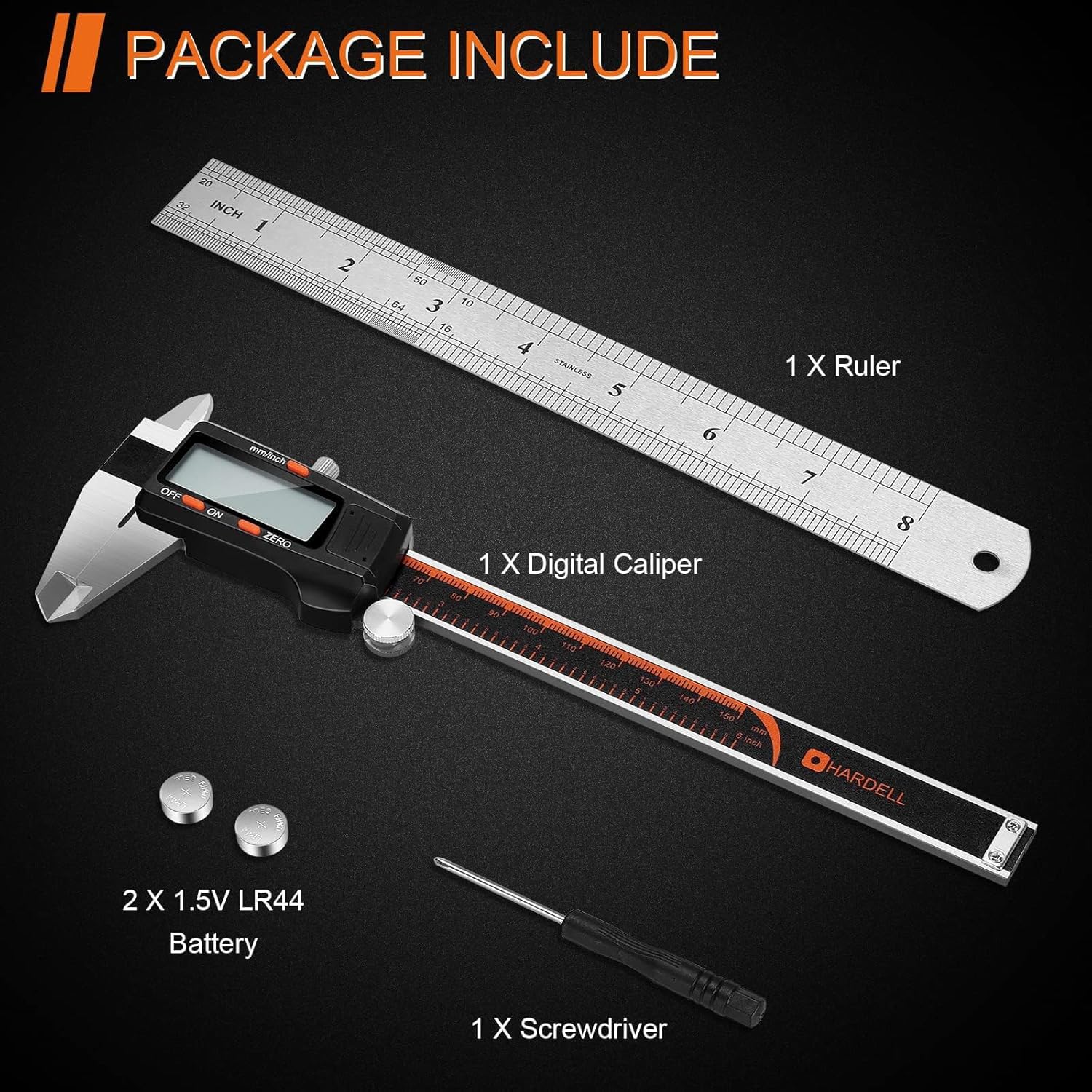
Description: This image displays the complete contents of the HARDELL Digital Caliper package, including the caliper itself, a ruler, two LR44 batteries, and a small screwdriver, all neatly arranged.
4. Product Overview (Components)
Familiarize yourself with the main components of your HARDELL Digital Caliper:
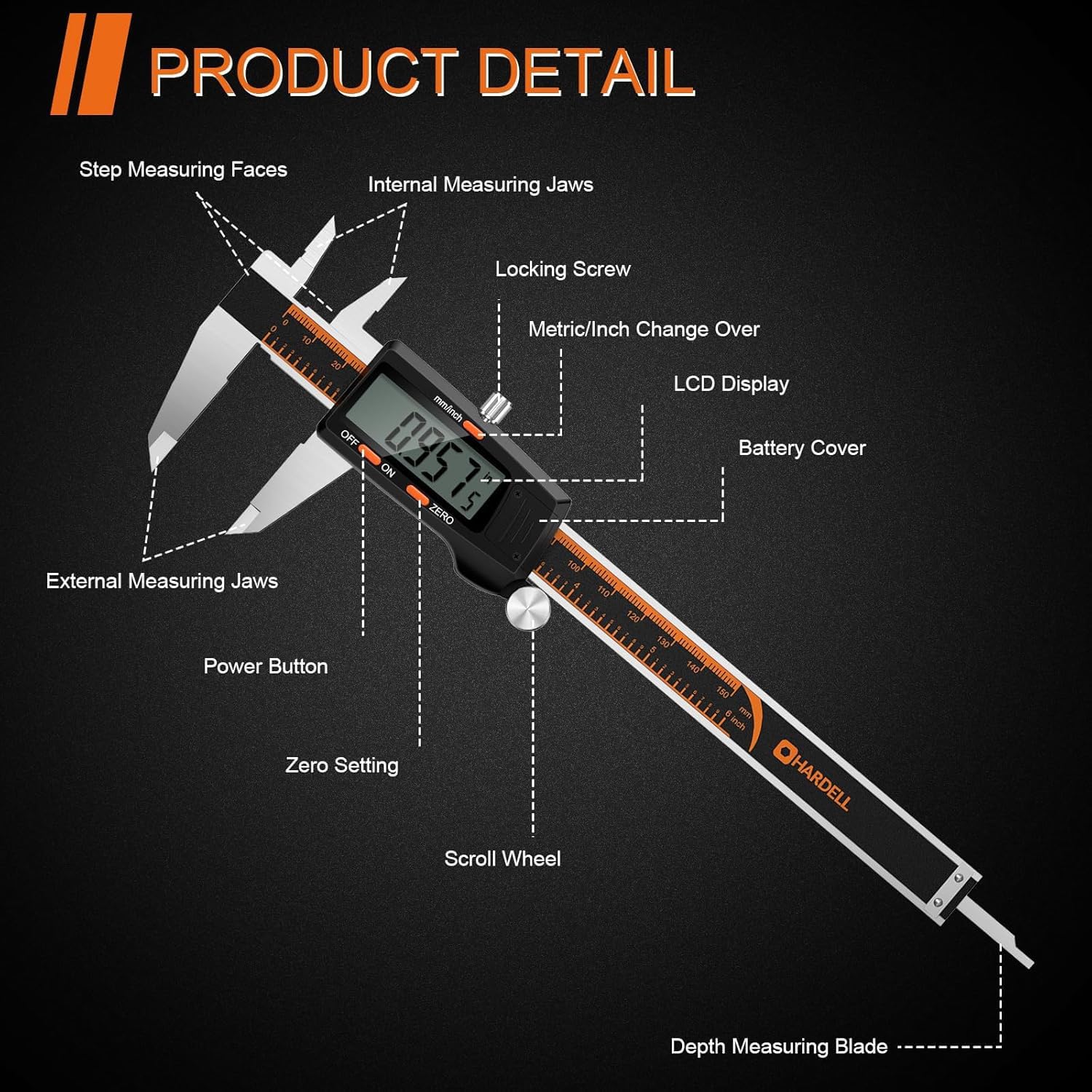
Description: This detailed diagram labels all key components of the HARDELL Digital Caliper, such as the measuring jaws, display, buttons, and other functional parts.
- External Measuring Jaws: Used for measuring external dimensions of objects.
- Internal Measuring Jaws: Used for measuring internal dimensions of holes or grooves.
- Step Measuring Faces: Used for measuring step dimensions or height differences.
- Depth Measuring Blade: Extends from the end of the caliper to measure depth.
- Locking Screw: Secures the caliper jaws in place for stable readings.
- Metric/Inch Change Over Button: Switches between millimeter (mm) and inch (in) units.
- LCD Display: Shows measurement readings clearly.
- Battery Cover: Protects the battery compartment.
- Power Button: Turns the caliper on or off.
- Zero Setting Button: Resets the display to zero at any position.
- Scroll Wheel: Allows for fine adjustment of the caliper jaws for precise positioning.
5. Setup
5.1 Battery Installation
- Locate the battery cover on the back of the LCD display unit.
- Slide the battery cover open.
- Insert two LR44 1.5V batteries, ensuring correct polarity (positive '+' side facing up).
- Close the battery cover securely.
Note: The caliper comes with batteries included, and often pre-installed. If a plastic tab is present, gently pull it out to activate the batteries.
6. Operating Instructions
6.1 Power On/Off
- Press the ON button to turn on the caliper.
- Press the OFF button to turn it off.
- The caliper will automatically turn off after approximately 5 minutes of inactivity to conserve battery life.
6.2 Zero Setting
The zero setting function allows for absolute or relative measurements.
- Close the measuring jaws completely and ensure they are clean.
- Press the ZERO button. The display should show "0.00mm" or "0.000in".
- You can also set the zero point at any desired position to measure relative differences from that point.

Description: This image illustrates the process of setting the zero point on the digital caliper. Step 1 shows the caliper clamped to an object with a reading. Step 2 shows pressing the 'ZERO' button to reset the display to zero. Step 3 shows measuring a second object to determine the difference from the first object.
6.3 Unit Conversion
Easily switch between metric and imperial units:
- Press the mm/inch button to toggle the display between millimeters (mm) and inches (in).

Description: This image displays the digital caliper's LCD screen, showing a measurement first in millimeters (24.32 mm) and then the same measurement instantly converted to inches (0.957 in) by pressing the unit conversion button.
6.4 Measurement Modes
The HARDELL Digital Caliper supports four primary measurement types:

Description: This image collage visually explains the four main measurement capabilities of the digital caliper: external measurement (top left), internal measurement (top right), depth measurement (bottom left), and step measurement (bottom right), each with an example object.
- External Measurement: Use the large jaws to measure the outer dimensions of an object.
- Internal Measurement: Use the small jaws to measure the inner dimensions of a hole or groove.
- Depth Measurement: Extend the depth measuring blade from the end of the caliper into a hole or recess to measure its depth.
- Step Measurement: Use the step measuring faces to measure the height difference between two surfaces.
6.5 Operational Demonstrations
Description: This video demonstrates the basic functions of the HARDELL Digital Caliper, including unit conversions between millimeters and inches, and shows the caliper being used for various measurements.
Description: This video showcases the four primary measurement modes of the HARDELL Digital Caliper: external diameter, internal diameter, depth, and step measurements, providing visual examples of each application.
7. Care and Maintenance
- Keep the caliper clean and dry. Wipe the measuring surfaces with a clean, dry cloth after each use.
- Avoid exposing the caliper to direct sunlight, high humidity, or extreme temperatures.
- Do not disassemble the caliper or attempt to modify it. Unauthorized modifications may void the warranty and affect accuracy.
- Store the caliper in its protective case when not in use to prevent damage from impacts or dust.
- Replace batteries promptly when the display becomes dim or unresponsive to ensure continuous accurate operation.
8. Troubleshooting
- Display Not Working:
- Check if the batteries are correctly installed with the proper polarity.
- Replace the batteries with new LR44 1.5V batteries.
- Inaccurate Readings:
- Ensure the measuring surfaces are clean and free from dust or debris.
- Perform a zero-setting calibration before taking measurements.
- Check for any physical damage to the caliper jaws or blade.
- Jaws Not Moving Smoothly:
- Clean the sliding surfaces thoroughly.
- Ensure the locking screw is not overtightened, which can impede movement.
9. Specifications
| Feature | Detail |
|---|---|
| Model Number | LF04-6inch |
| Material | Stainless Steel |
| Measuring Range | 0-6 inches / 0-150mm |
| Accuracy | ±0.001 inches / 0.03mm |
| Resolution | 0.0005 inches / 0.01mm |
| Power Source | 2 x LR44 1.5V Batteries |
| Auto-Off Feature | Yes (after 5 minutes of inactivity) |
| Unit Conversion | Inch/Millimeter |
| Item Weight | 340 g |
| Product Dimensions | 15 x 15 x 0.1 cm |
10. Warranty and Support
For warranty information, technical support, or any inquiries regarding your HARDELL Digital Caliper, please refer to the contact details provided with your purchase or visit the official HARDELL website for assistance.

