
1. Product Overview
The WOTSTA Gaming Chair Model 5 is designed to provide comfort and support for extended periods of sitting, whether for gaming, office work, or studying. It features an ergonomic design with adjustable components to suit individual preferences.
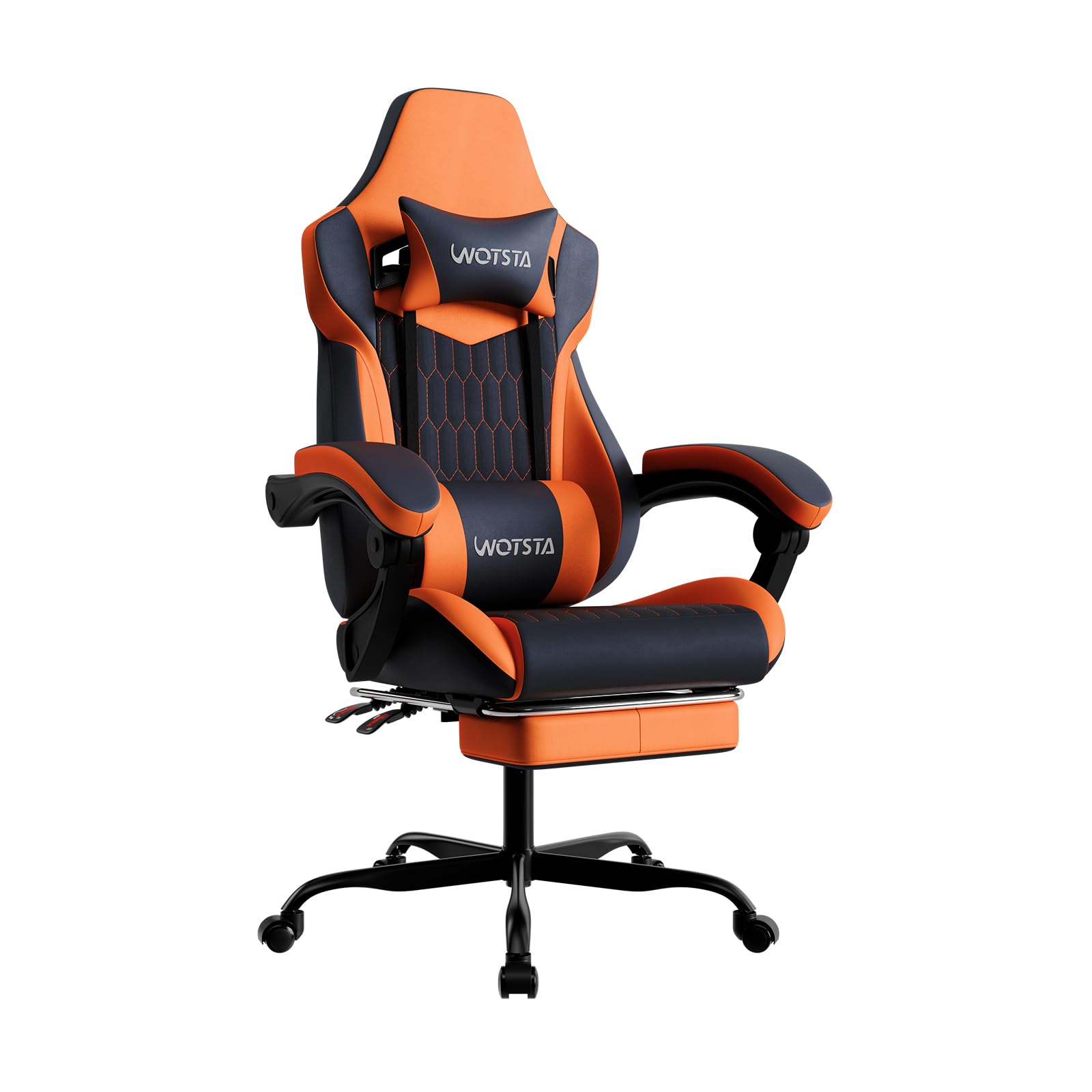
Image 1.1: The WOTSTA Gaming Chair Model 5 in a typical usage environment.
Key Features:
- Ergonomic Design: Features an adjustable headrest and a lumbar massage pillow to support the natural curve of your body, targeting key pressure points for comfort.
- Adjustable Recline: Offers a reclining range from 90° (upright) to 135° (relaxed position), allowing for versatile use from focused work to resting.
- Height Adjustment: Includes a 3.94-inch height adjustment mechanism to customize the chair's height to your desk and preference.
- Sturdy Construction: Built with a robust metal frame, supporting up to 300 lbs, suitable for various users and environments.
- Integrated Footrest: A retractable footrest provides additional comfort and support for your legs.
- Linkage Armrests: Armrests are designed to adjust with the chair's recline, providing continuous arm support.
2. Safety Information
Please read and understand all safety instructions before assembling and using the chair. Failure to follow these instructions may result in injury or damage to the product.
- Weight Limit: Do not exceed the maximum weight recommendation of 300 pounds (136 kg).
- Intended Use: This product is intended for indoor use only.
- Assembly: Ensure all components are securely fastened according to the assembly instructions before use.
- Adjustments: Use adjustable features responsibly. Avoid sudden movements when reclining or adjusting height.
- Stability: Do not stand on the chair. Avoid leaning excessively to one side, especially when reclined, to prevent tipping.
- Children: Keep children away from the chair during assembly. Do not allow children to play on or around the chair unsupervised.
3. Package Contents
Verify that all parts are present and undamaged before beginning assembly. If any parts are missing or damaged, contact customer support.

Image 3.1: Illustration of key chair components and accessories.
Typical Components:
- Backrest
- Seat Cushion with Armrests
- Star Base
- Casters (5x)
- Gas Lift Cylinder (Grade-4)
- Gas Lift Cover
- Mechanism Plate (Lifting Lever, Angle Adjusting Lever)
- Footrest Assembly
- Headrest Pillow
- Lumbar Massage Pillow (USB powered)
- Hardware Pack (screws, washers, Allen wrench)
4. Assembly Instructions
Assembly is designed to be straightforward and typically requires no additional tools beyond what is provided. Follow the detailed instructions included in your package for the most accurate guidance.
General Assembly Steps:
- Attach Casters to Base: Insert the five casters into the holes at the end of each leg of the star base until they click into place.
- Install Gas Lift: Place the gas lift cylinder into the center hole of the star base. Cover it with the gas lift cover.
- Attach Mechanism to Seat: Secure the mechanism plate to the underside of the seat cushion using the provided screws. Ensure the front of the mechanism faces the front of the seat.
- Connect Backrest to Seat: Attach the backrest to the seat cushion using the designated brackets and screws.
- Mount Seat Assembly to Gas Lift: Carefully place the assembled seat and backrest onto the gas lift cylinder, ensuring it is centered and stable.
- Install Footrest: Attach the footrest assembly to the underside of the seat as per the instructions. Ensure it can slide in and out smoothly.
- Attach Pillows: Secure the headrest pillow to the top of the backrest and the lumbar massage pillow to the lower back area using their straps.
Video 4.1: A detailed video guide demonstrating the assembly process and key features of the WOTSTA Gaming Chair. This video is provided by the seller, Pohoo.
5. Operating Instructions
Familiarize yourself with the chair's adjustment mechanisms to optimize your comfort and posture.

Image 5.1: Visual representation of the chair's adjustable backrest, height, and swivel capabilities.
5.1. Height Adjustment
To adjust the chair's height, locate the lifting lever on the right side, beneath the seat. While seated, pull the lever up to lower the chair. To raise the chair, stand up slightly, then pull the lever up. Release the lever at your desired height.
5.2. Backrest Recline
The backrest can be reclined between 90° and 135°. Pull the angle adjusting lever, typically located on the left side, beneath the seat. Lean back to recline or lean forward to bring the backrest upright. Release the lever to lock the backrest in your preferred position.

Image 5.2: Close-up of the angle adjusting lever and height adjustment feature.
5.3. Footrest Operation
To use the footrest, pull it out from underneath the seat. Extend it to your desired length. To retract, push it back under the seat until it is fully stored.
5.4. Lumbar Massage Pillow
The lumbar pillow provides a massage function. Connect the USB cable from the pillow to a compatible USB power source (e.g., computer, power bank, USB wall adapter) to activate the massage feature.

Image 5.3: The lumbar massage pillow and adjustable headrest for enhanced comfort.
5.5. Linkage Armrests
The armrests are designed to move in conjunction with the backrest's recline, ensuring continuous support for your arms regardless of the chair's angle.

Image 5.4: Explanation of the ergonomic linkage armrests.
6. Maintenance
Proper care and maintenance will extend the life of your WOTSTA Gaming Chair.
6.1. Cleaning
- Surface Cleaning: For general cleaning, wipe the chair's PVC leather and other surfaces with a soft, damp cloth.
- Stains: For tougher stains, use a mild soap solution on a cloth and gently wipe the affected area. Avoid harsh chemicals or abrasive cleaners, as these can damage the material.
- Drying: After cleaning, wipe dry with a clean, soft cloth. Do not allow moisture to sit on the chair.
- Product Care Instructions: The manufacturer recommends dry cleaning or wipe cleaning for specific care.
6.2. General Care
- Check Fasteners: Periodically check all screws and bolts to ensure they are tight. Retighten if necessary.
- Caster Maintenance: Keep casters free of hair and debris to ensure smooth rolling.
- Avoid Direct Sunlight: Prolonged exposure to direct sunlight can cause the material to fade or crack.
- Prevent Punctures: Avoid sharp objects that could puncture or tear the chair's upholstery.
7. Troubleshooting
This section addresses common issues you might encounter with your gaming chair.
7.1. Chair Does Not Adjust Height
- Check Gas Lift: Ensure the gas lift cylinder is correctly inserted into the base and the mechanism plate.
- Lever Engagement: Verify that the height adjustment lever is fully engaged when pulled.
7.2. Backrest Does Not Recline or Lock
- Check Recline Lever: Ensure the recline lever is functioning correctly and not obstructed.
- Mechanism Connection: Verify that the backrest is securely attached to the seat mechanism.
7.3. Chair Squeaks
- Tighten Screws: Loose screws are a common cause of squeaking. Retighten all assembly screws.
- Lubrication: Apply a small amount of silicone-based lubricant to moving parts or joints if tightening screws does not resolve the issue.
7.4. Casters Not Rolling Smoothly
- Clear Debris: Remove any hair, dust, or debris that may be caught in the casters.
- Surface Compatibility: Ensure the chair is being used on a suitable surface.
8. Specifications
Detailed technical specifications for the WOTSTA Gaming Chair Model 5.

Image 8.1: Detailed product dimensions for the WOTSTA Gaming Chair.
| Feature | Detail |
|---|---|
| Brand | WOTSTA |
| Model Name | 5 |
| Color | Black Orange |
| Material | Faux Leather (Seat), Leather (Fabric Type), Foam (Fill Material), Metal (Frame) |
| Product Dimensions (D x W x H) | 18.9"D x 20.87"W x 51.97"H |
| Item Weight | 42.42 Pounds |
| Maximum Weight Recommendation | 300 Pounds |
| Reclining Angle | 90° to 135° |
| Height Adjustment Range | 3.94 inches |
| Included Components | Arm Pad, Caster, Cushion, Headrest Pillow, Lumbar Massage Pillow, Footrest |
| Assembly Required | Yes |
| UPC | 702909854455 |
9. Warranty and Support
For warranty information or technical support, please refer to the documentation included with your purchase or contact WOTSTA customer service directly. Keep your purchase receipt for warranty claims.