1. Introduction
Thank you for choosing the PUREROYI U5 Bluetooth Headphones. This manual provides detailed instructions on how to set up, operate, and maintain your new wireless earbuds. Please read this manual thoroughly before use to ensure optimal performance and longevity of your device.
2. What's in the Box

The package for your PUREROYI U5 Bluetooth Headphones includes:
- Wireless Earbuds (L/R)
- Charging Case
- Eartips (various sizes)
- Type-C Charging Cable
- User Manual
Please inspect all items upon unboxing. If any components are missing or damaged, contact customer support.
3. Product Overview

The PUREROYI U5 headphones feature an over-ear hook design for secure fit, a compact charging case with a dual LED digital display, and touch controls for easy operation. Each earbud is equipped with a microphone for clear calls.
Key Components:
- Earbuds: Left (L) and Right (R) earbuds with integrated earhooks.
- Charging Case: Stores and charges the earbuds, features a digital battery display.
- Touch Control Area: Located on the outer surface of each earbud for managing playback, calls, and voice assistant.
- Charging Contacts: On the earbuds and inside the case for power transfer.
- Microphone: Built into each earbud for hands-free calling.
4. Setup
4.1 Initial Charging
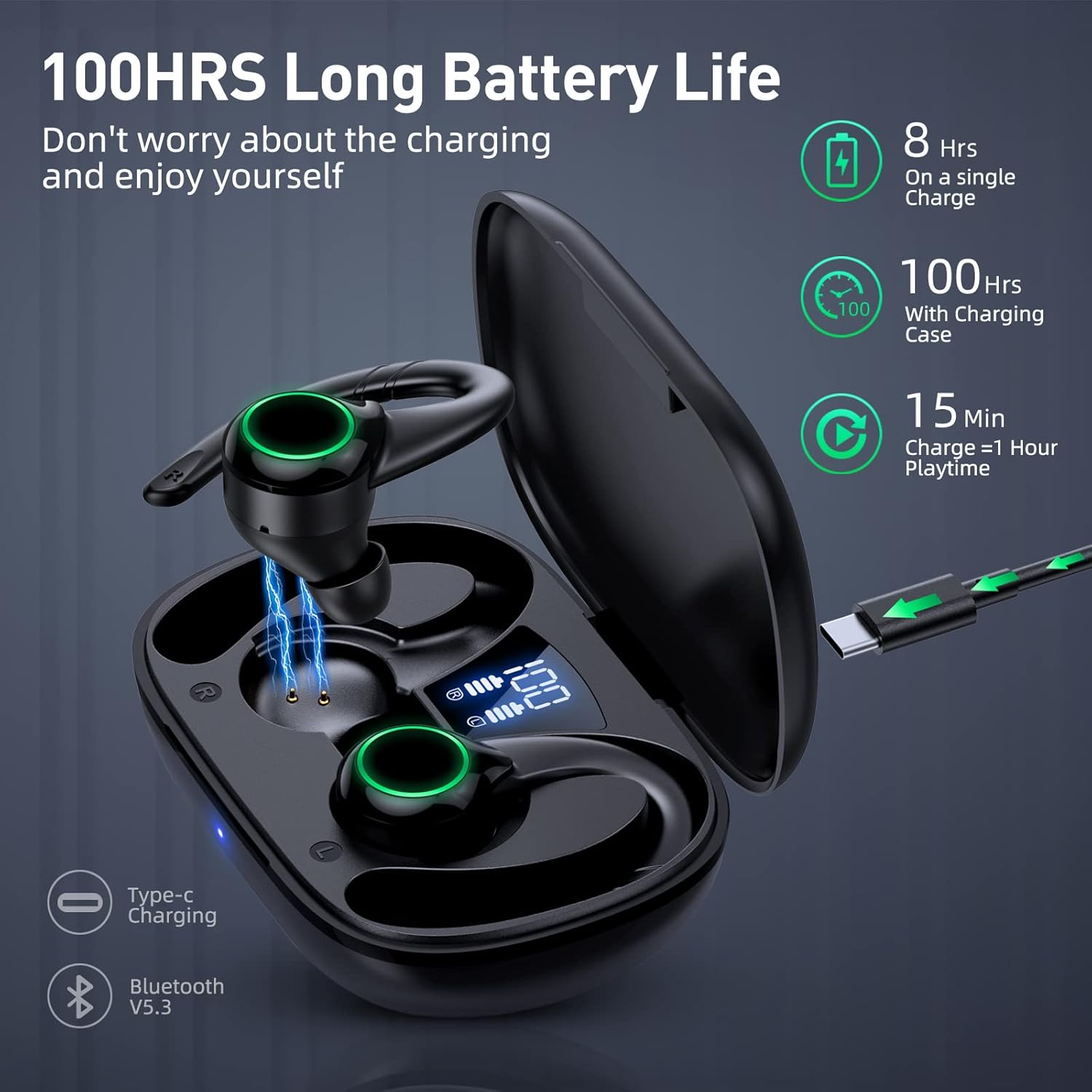
Before first use, fully charge the earbuds and the charging case.
- Place both earbuds into the charging case.
- Connect the Type-C charging cable to the charging port on the case and to a USB power source.
- The dual LED digital display on the case will show the battery percentage of the case and the charging status of each earbud. A full charge is indicated by '100' on the display and full LED bars for the earbuds.
- Charging typically takes approximately 1.5-2 hours for a full charge.
Note: The earbuds provide up to 8 hours of playback on a single charge, and the charging case extends total playtime to approximately 100 hours.
4.2 Pairing with a Device

The earbuds will automatically enter pairing mode when removed from the case.
- Open the charging case. The earbuds will automatically power on, and a green light blinking on the earbuds indicates they are in pairing mode.
- Enable Bluetooth on your smartphone or other device.
- Search for "U5" in the list of available Bluetooth devices and select it to connect.
- Once connected, the green light on the earbuds will stop blinking, and you will hear a confirmation tone.
Automatic Reconnection: After the initial successful connection, the earbuds will automatically pair with the last connected device when removed from the charging case.
5. Operating Instructions
5.1 Wearing the Earbuds

For optimal sound quality and a secure fit, especially during physical activity:
- Identify the Left (L) and Right (R) earbuds.
- Place the earbud into your ear canal.
- Gently hook the earhook over the top of your ear.
- Adjust the earbud and earhook until it feels comfortable and secure. Experiment with different eartip sizes for the best seal and comfort.
The IPX7 waterproof rating protects the earbuds from sweat and rain, making them suitable for sports and outdoor activities.
5.2 Touch Controls

| Action | Function (Left Earbud) | Function (Right Earbud) |
|---|---|---|
| Single Tap (x1) | Play/Pause, Answer/Hang Up Call | Play/Pause, Answer/Hang Up Call |
| Double Tap (x2) | Volume Down | Volume Up |
| Triple Tap (x3) | Voice Assistant | Voice Assistant |
| Press & Hold (2s) | Previous Song | Next Song |
| Press & Hold (3s) | Reject Call | Reject Call |
These touch controls allow for convenient management of music playback, calls, and voice assistant activation without needing to access your connected device.
5.3 Making and Receiving Calls

The PUREROYI U5 headphones are equipped with noise-canceling microphones for clear communication.
- Answer Call: Single tap either earbud.
- End Call: Single tap either earbud during a call.
- Reject Call: Press and hold either earbud for 3 seconds.
- Voice Assistant: Triple tap either earbud to activate your device's voice assistant (e.g., Siri, Google Assistant).
The 10mm composite diaphragm drivers deliver powerful bass and clear vocals for both music and calls.
6. Maintenance
Proper maintenance ensures the longevity and optimal performance of your PUREROYI U5 headphones.
- Cleaning: Regularly clean the earbuds, especially the eartips and charging contacts, with a soft, dry, lint-free cloth. Do not use harsh chemicals or abrasive materials.
- Storage: When not in use, always store the earbuds in their charging case to protect them from dust, damage, and to keep them charged.
- Water Exposure: While IPX7 waterproof, avoid prolonged submersion in water. Dry the earbuds thoroughly before placing them back in the charging case if they get wet.
- Temperature: Avoid exposing the earbuds and charging case to extreme temperatures (hot or cold) or direct sunlight for extended periods.
- Charging Cable: Use the provided Type-C cable or a certified equivalent for charging.
7. Troubleshooting
If you encounter any issues with your PUREROYI U5 headphones, please refer to the following common solutions:
| Problem | Possible Solution |
|---|---|
| Earbuds not pairing/connecting |
|
| Only one earbud working |
|
| Low volume or poor sound quality |
|
| Charging case not charging |
|
If the issue persists after trying these steps, please refer to the official user manual PDF or contact PUREROYI customer support.
8. Specifications
| Model Name | U5 |
| Connectivity Technology | Bluetooth |
| Bluetooth Version | 5.3 |
| Bluetooth Range | Up to 10 meters (33 feet) |
| Battery Life (Earbuds) | Up to 8 hours on a single charge |
| Total Playtime (with Charging Case) | Up to 100 hours |
| Water Resistance Level | IPX7 (Sweatproof, Rainproof) |
| Audio Driver Size | 10 mm |
| Frequency Range | 20 Hz - 20,000 Hz |
| Control Method | Touch Control |
| Ear Placement | Over Ear (with earhooks) |
| Material | Aluminum, Plastic |
| Product Dimensions | 4.91 x 4.13 x 1.38 inches |
| Item Weight | 5.6 ounces |
9. Warranty and Support
PUREROYI products come with a standard manufacturer's warranty. For detailed warranty information, please refer to the documentation included with your purchase or visit the official PUREROYI website.
For further assistance, technical support, or warranty claims, please contact PUREROYI customer service. You can also refer to the comprehensive User Manual (PDF) for more detailed information.


