
Introduction and Overview
The WOTSTA Gaming Chair is designed to provide comfort and ergonomic support for extended periods of use, whether for gaming, office work, or relaxation. This chair features a massage function, adjustable recline, a retractable footrest, and comprehensive body support.
- Easy Height & Recline Control: Adjust your seating position from an upright 90° to a reclined 135° for various activities.
- Pull-Out Footrest for Instant Relaxation: A built-in retractable footrest allows for comfortable lounging.
- Full-Body Ergonomic Support: Designed with three-zone support for the neck, lower back, and spine to relieve pressure and maintain healthy posture.
- Smooth & Floor-Friendly Wheels: Durable, smooth-rolling wheels provide effortless mobility and support up to 300 lbs without damaging hard floors.
- Engineered for All-Day Comfort: The body-curved seat with thick padding ensures evenly distributed support, reducing pressure on hips and thighs.
Safety Information
Please read and follow the safety instructions provided with your chair. Do not exceed the maximum weight capacity of 300 pounds. Be cautious when adjusting the chair's features and follow the assembly instructions carefully to ensure safe use.
Package Contents
Before assembly, ensure all components are present and undamaged. Refer to the included instruction manual for a detailed parts list. Key components include:
- Chair Backrest
- Seat Base with integrated footrest mechanism
- Armrests (2)
- Star Base with 5 casters
- Gas Lift Cylinder and Cover
- Mechanism Plate
- Lumbar Support Pillow (with massage function)
- Headrest Pillow
- Assembly Hardware (screws, washers, Allen wrench)
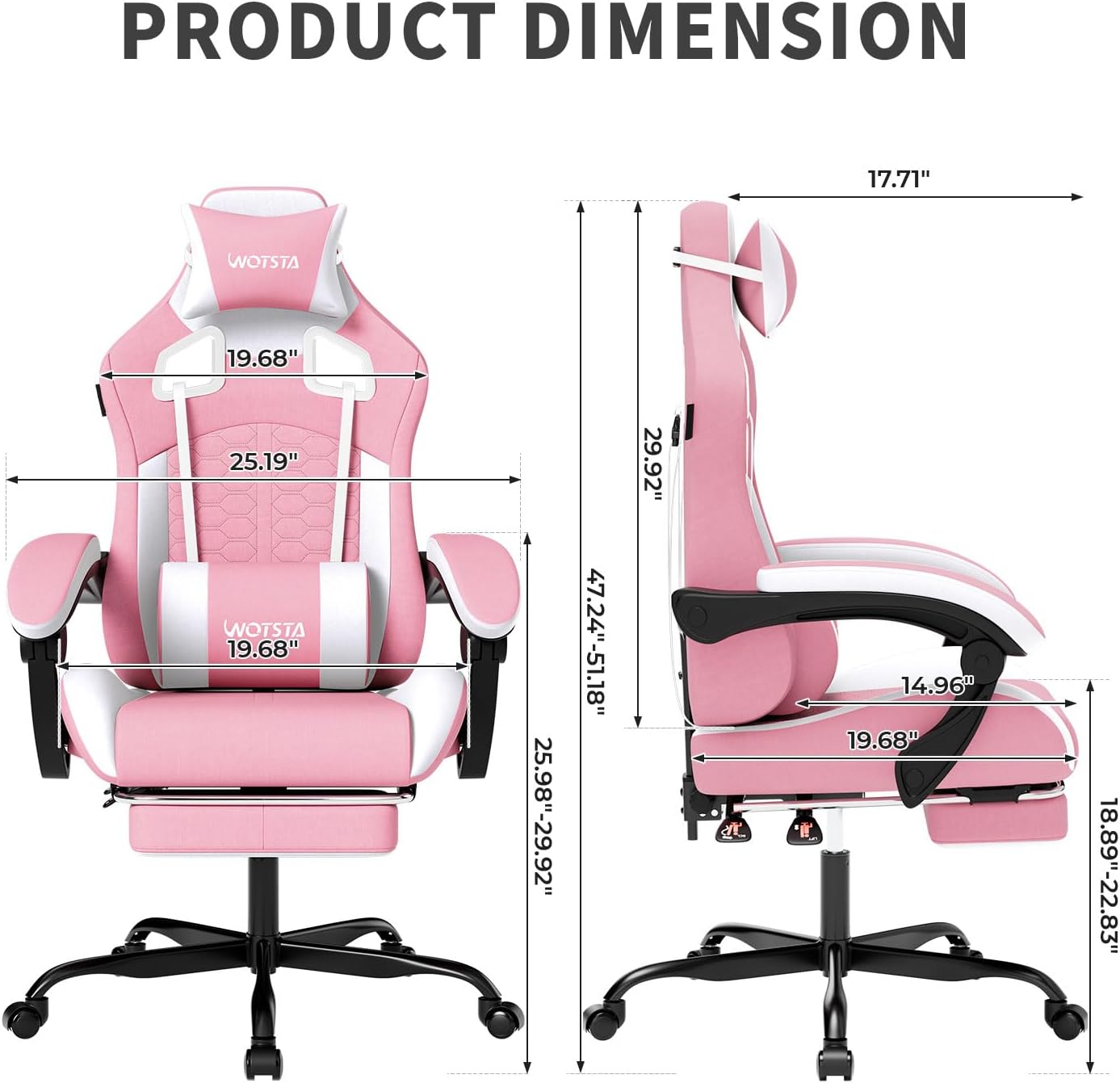
Image: All components of the WOTSTA Gaming Chair laid out on the floor before assembly.
Setup and Assembly
Follow these steps to assemble your WOTSTA Gaming Chair. It is recommended to assemble the chair on a soft, clean surface to prevent damage.
- Assemble the Star Base: Insert the five casters into the holes on the star base. Place the gas lift cylinder into the center hole of the star base, then cover it with the telescopic cover.
- Attach the Mechanism Plate: Secure the mechanism plate to the underside of the seat base using the provided screws. Ensure the front of the mechanism aligns with the front of the seat.
- Connect Seat to Base: Carefully place the assembled seat onto the gas lift cylinder.
- Attach Armrests: Secure the armrests to the sides of the seat base using the designated screws.
- Attach Backrest: Align the backrest with the seat base and secure it using the remaining screws.
- Install Footrest: Slide the retractable footrest into its designated slots under the seat and tighten the screws to secure it.
- Attach Pillows: Attach the lumbar support pillow using its straps, adjusting its height as desired. The headrest pillow attaches to the top of the backrest.

Image: Detailed product dimensions of the WOTSTA Gaming Chair, illustrating height, width, and depth measurements.
Operating Instructions
Your WOTSTA Gaming Chair offers several adjustable features for personalized comfort:
- Height Adjustment: Locate the lever on the right side beneath the seat. Pull the lever up to raise the chair; release it at the desired height. Sit on the chair and pull the lever up to lower it.
- Recline Function: Use the lever on the left side of the seat. Pull the lever up to recline the backrest. Release the lever at your preferred angle (between 90° and 135°) to lock it in place. To return to an upright position, pull the lever up and lean forward.
- Footrest Operation: Pull the footrest out from beneath the seat. Flip the padded section up to support your legs. To retract, push the padded section down and slide the footrest back under the seat.
- Massage Function: The lumbar support pillow contains a massage motor. Connect the USB cable from the pillow to a power source (e.g., a USB port on your computer or a power bank) to activate the massage function.

Image: Visual guide demonstrating the proper lean angles (90° to 135°) and the location of the angle stick and height stick buttons for adjustment.

Image: The retractable footrest extended from the WOTSTA Gaming Chair, highlighting its multi-layered cushioning for comfort during rest, reading, or napping.
Maintenance
Proper maintenance will extend the life of your WOTSTA Gaming Chair:
- Product Care Instructions: Dry Clean.
- Cleaning: For general cleaning, wipe the PVC leather surfaces with a soft, damp cloth. Avoid harsh chemicals or abrasive cleaners.
- Casters: Periodically check the casters for hair or debris and clean them to ensure smooth rolling.
- Fasteners: Occasionally check all screws and bolts to ensure they are tight. Retighten if necessary.
Troubleshooting
If you encounter issues with your chair, refer to the following common solutions:
- Backrest Slipping/Uneven: Ensure all bolts connecting the backrest to the seat mechanism are securely tightened.
- Wheels Not Rolling Smoothly: Check casters for obstructions (e.g., hair, dust) and clean them. Ensure they are properly inserted into the star base.
- Massage Function Not Working: Verify that the USB cable from the lumbar pillow is securely connected to a working power source.
- Chair Squeaks: Check and tighten all assembly bolts. Applying a small amount of lubricant to moving parts may help.
Specifications
| Feature | Detail |
|---|---|
| Brand | WOTSTA |
| Model Name | 4 |
| Color | Pinkwhite(type-b) |
| Product Dimensions | 18.9"D x 20.87"W x 51.97"H |
| Maximum Weight Recommendation | 300 Pounds |
| Material | Leather, Nylon, Sponge |
| Special Features | Adjustable Backrest, Adjustable Headrest, Adjustable Height, Adjustable Lumbar, Foot Rest |
| Reclining Position Count | 3 (up to 135°) |
| Furniture base movement | Glide |
| Item Weight | 34.4 pounds |
Warranty and Support
For warranty claims or technical support, please contact WOTSTA customer service directly. Refer to your purchase documentation for specific warranty terms and contact information. Standard return policy allows for returns/replacements within 30 days of purchase.