
1. Introduction
Thank you for choosing the Haotao 25cm 72LED Motion Sensor Light Bar. This manual provides essential information for the safe and efficient use of your new light bar. Please read it thoroughly before installation and operation, and retain it for future reference.

Image 1.1: Haotao 25cm 72LED Motion Sensor Light Bar (2 Pack) with charging cable.
2. Safety Information
- Do not disassemble, repair, or modify the product. This may cause electric shock, fire, or damage to the product.
- Keep the device away from water and high humidity environments.
- Avoid exposing the light bar to direct sunlight or high temperatures for extended periods.
- Use only the provided or a certified USB cable for charging.
- This product is designed for indoor use only.
- Keep out of reach of children.
3. Package Contents
Please check the package for the following items:
- Haotao 25cm 72LED Motion Sensor Light Bar (2 units)
- USB Charging Cable (2 units)
- Magnetic Mounting Strips with 3M Adhesive (2 units)
- User Manual (this document)
4. Product Overview
Familiarize yourself with the components of your Haotao LED Light Bar.

Image 4.1: Product diagram highlighting key features and controls.
- Human Sensor: Detects motion to activate the light in sensor modes.
- USB C Port: For charging the built-in 2000mAh battery.
- S1 Button (Lighting Colors & Brightness Control): Short press to change color temperature, long press to adjust brightness.
- S2 Button (ON/OFF/AUTO - Light Modes Switch): Short press to cycle through lighting modes (Night Sensor, All-Day Sensor, Constant Light, OFF). Long press to turn off.
- Metal Shell: Durable and sleek design.
- ABS Lantern: Non-glass light diffuser.
5. Setup and Installation
5.1 Charging the Light Bar
Before first use, fully charge the light bar. Connect the provided USB charging cable to the USB C port on the light bar and to a standard USB power adapter (not included). The charging indicator light will show red while charging and turn green when fully charged.
5.2 Installation Methods
The Haotao LED Light Bar offers flexible installation options:

Image 5.1: Three easy ways to install the light bar.
- Direct Magnetic Attachment (Iron Surfaces): The light bar has a built-in magnet. Simply attach it directly to any iron surface (e.g., metal shelves, refrigerators).
- Adhesive Magnetic Strip (Non-Iron Surfaces): For non-iron surfaces, peel off the protective film from the 3M adhesive on the magnetic mounting strip. Stick the strip firmly to a clean, dry surface. Then, attach the light bar magnetically to the strip.
- Screw Mounting (Non-Iron Surfaces): For a more permanent installation on non-iron surfaces, use screws (not included) to fix the plastic fixing shelves to the wall. Then, install the cabinet light onto these fixed shelves.
The magnetic attachment allows for easy removal of the light bar for recharging.
6. Operating Instructions
6.1 Switching Between Lighting Modes (S2 Button)
Short press the S2 button to cycle through the four available lighting modes:
- Night Sensor Mode: The light will only turn on when motion is detected in a dark environment.
- All-Day Sensor Mode: The light will turn on when motion is detected, regardless of ambient light conditions.
- Constant Light Mode: The light remains continuously on. Useful as a flashlight or for camping.
- OFF Mode: The light is turned off.
To quickly turn off the light from any mode, long press the S2 button.

Image 6.1: Overview of the 4 lighting modes.
6.2 Adjusting Color Temperature and Brightness (S1 Button)
Use the S1 button to customize the light output:
- Change Color Temperature: Short press the S1 button to cycle through Cool White (6500K), Warm White (4000K), and Warm Yellow (2800K) color temperatures.
- Adjust Brightness: Long press the S1 button to smoothly adjust the brightness level from 20% to 100%. Release the button when the desired brightness is reached.
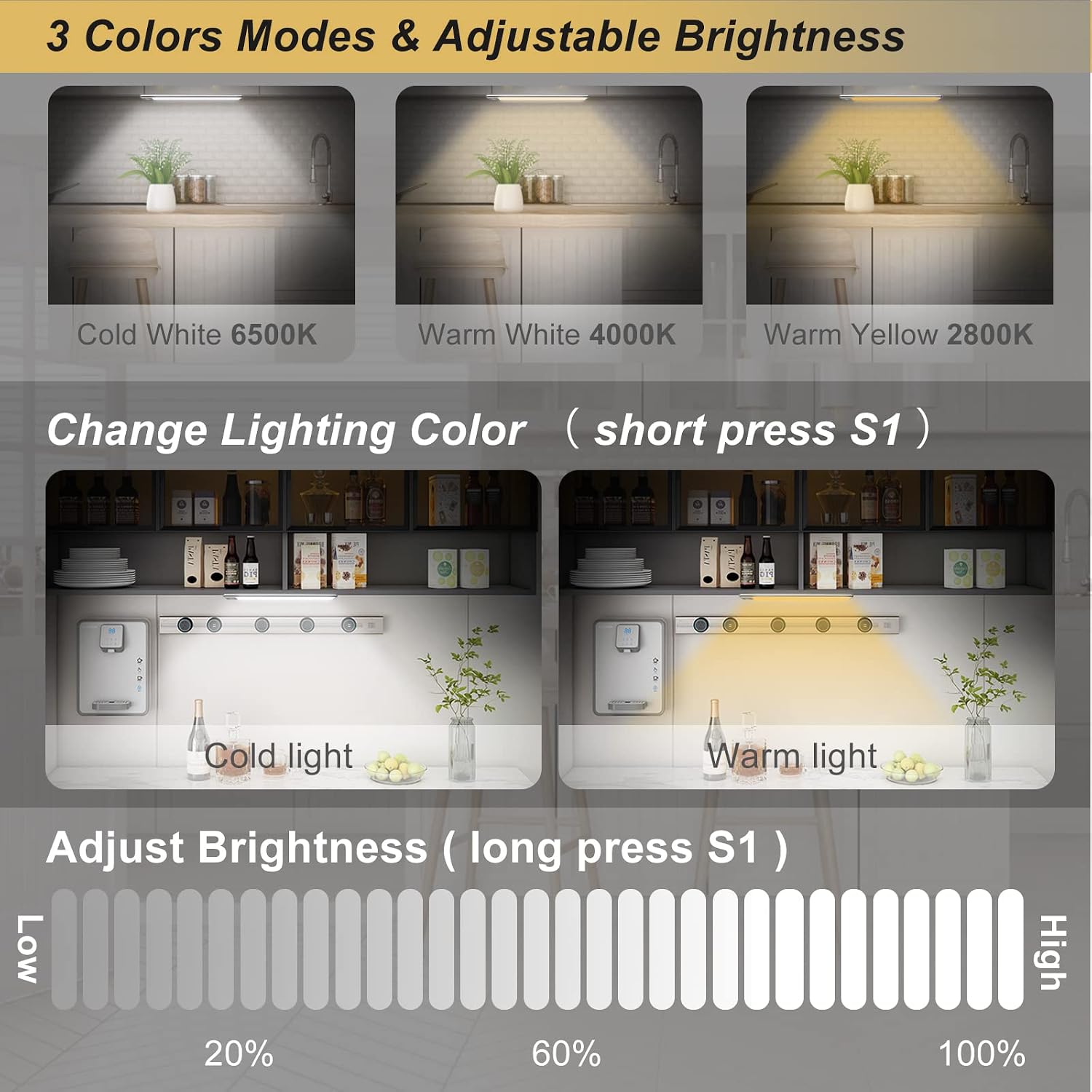
Image 6.2: Adjusting color temperature and brightness.
7. Maintenance
- Cleaning: Wipe the light bar with a soft, dry cloth. Do not use abrasive cleaners or solvents.
- Charging: Recharge the battery when the light output appears dim or the motion sensor becomes less responsive. Regular charging helps maintain battery health. The 2000mAh battery can last 30-60 days in motion sensor mode, depending on usage frequency.
- Storage: If storing the light bar for an extended period, charge it fully every 3-6 months to prevent battery degradation. Store in a cool, dry place.
8. Troubleshooting
| Problem | Possible Cause | Solution |
|---|---|---|
| Light does not turn on. | Battery is depleted. Light is in OFF mode. Sensor is blocked or faulty. |
Charge the light bar. Short press S2 button to cycle modes. Ensure sensor is clear and try different modes. |
| Motion sensor not working. | Incorrect mode selected. Insufficient ambient light (in Night Sensor Mode). Sensor range obstructed. |
Ensure Night Sensor or All-Day Sensor mode is active. Test in a darker environment or switch to All-Day Sensor mode. Clear any obstructions in front of the sensor. |
| Light is dim or flickers. | Low battery. Brightness set too low. |
Recharge the light bar. Long press S1 button to increase brightness. |
| Cannot change color or brightness. | Button not pressed correctly. | Ensure you are short pressing S1 for color and long pressing S1 for brightness. |
9. Specifications
| Feature | Detail |
|---|---|
| Brand | Haotao |
| Model Number | A69 |
| Dimensions (L x W x H) | 25.4 x 4.6 x 2.3 cm (10 x 1.8 x 0.9 inches) |
| Weight | 350 grams (per unit) |
| Battery | 1 x 2000mAh Lithium-polymer (included) |
| Voltage | 3 Volts (DC) |
| Number of LEDs | 72 |
| Luminous Flux | 250 lm |
| Color Temperatures | Cool White (6500K), Warm White (4000K), Warm Yellow (2800K) |
| Special Features | Motion Detector, Dimmable, Rechargeable, Wireless, Magnetic Mount |
| Material | Metal (shell), Plastic (shade) |
| Installation Type | Magnetic, Wall Mount |
| Usage | Indoor |
10. Warranty and Support
Haotao products are designed for reliability and performance. For warranty information or technical support, please refer to the seller's policy on the purchase platform or contact Haotao customer service directly through the contact information provided with your purchase.
Please retain your proof of purchase for any warranty claims.