
BAKON 900M Soldering Iron Tips Instruction Manual
For use with BAKON BK969S Soldering Station
1. Product Overview
Thank you for choosing BAKON 900M Soldering Iron Tips. This set provides five distinct tip types, designed for precision, durability, and optimal thermal performance across various soldering applications. These lead-free alloy tips offer excellent thermal conductivity, anti-oxidation, and anti-corrosion properties, ensuring a long lifespan when properly maintained.

Image 1.1: The BAKON 900M Soldering Iron Tips set, shown alongside a compatible BAKON BK969S Soldering Station.
2. Compatibility
These BAKON 900M series soldering iron tips are specifically designed for perfect compatibility with the BAKON BK969S Soldering Station. They may also be compatible with other soldering irons that utilize the standard 900M tip series. Users should verify compatibility with their specific soldering iron model before use.
3. Specifications
- Model Name: 900M Soldering Tips (5-piece set)
- Material: Lead-free alloy
- Applicable Temperature Range: 200°C - 480°C (approximately 392°F - 896°F)
- Features: Good thermal conductivity, anti-oxidation, anti-corrosion, long lifespan
- Included Tip Types:
- 1 x 900M-T-B (Conical/Pointed)
- 1 x 900M-T-I (Fine Point)
- 1 x 900M-T-K (Knife/Bevel)
- 1 x 900M-T-3C (Chisel/Hoof)
- 1 x 900M-T-2.4D (Screwdriver/Chisel)
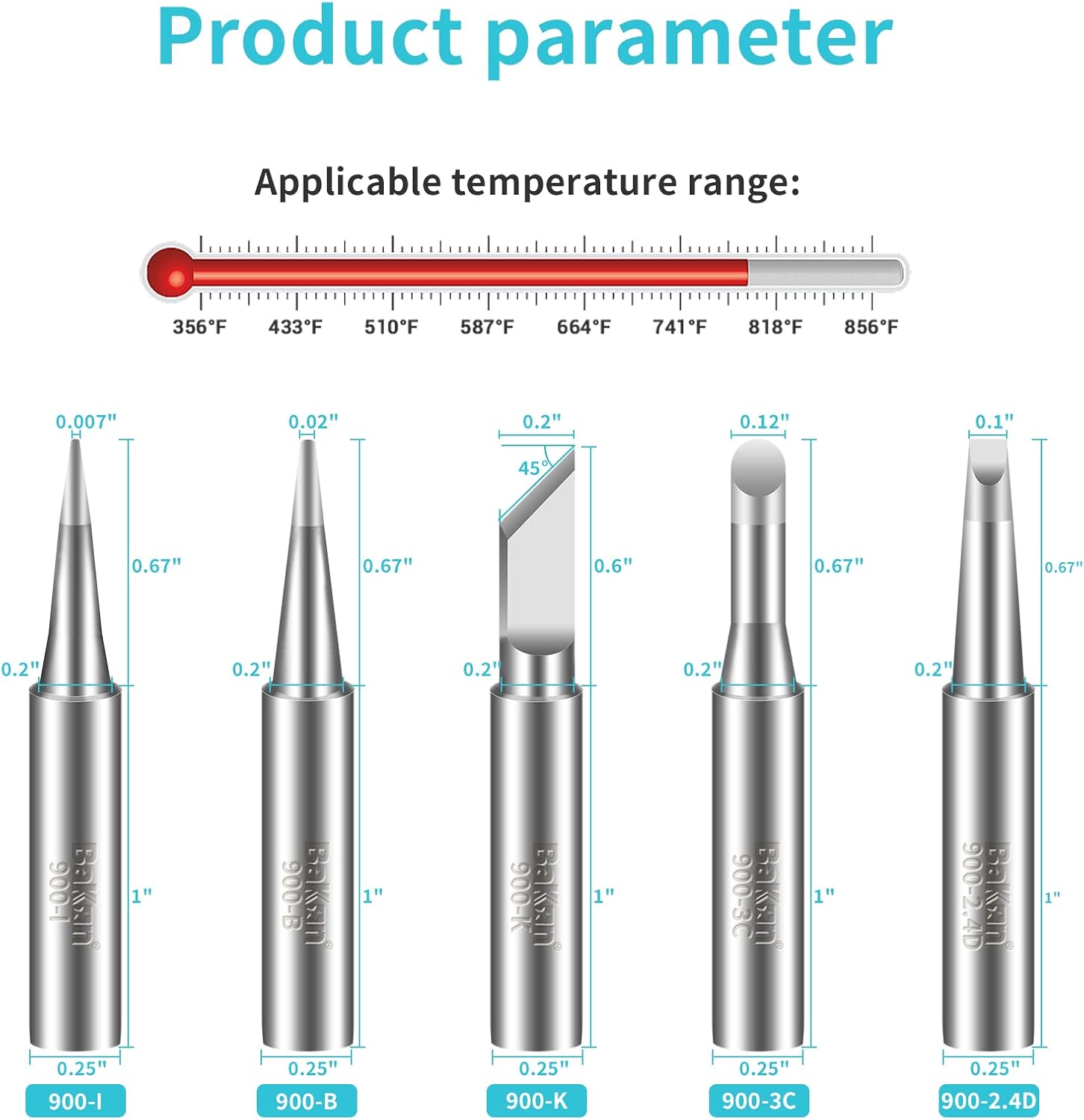
Image 3.1: Visual representation of the different 900M tip types with their dimensions and the applicable temperature range.

Image 3.2: Features of the BAKON 900M soldering tips, emphasizing their material properties.
4. Installation and Setup
- Safety First: Always ensure your soldering station is turned off and the existing soldering iron tip has completely cooled down before attempting to remove or install a new tip.
- Tip Removal: Carefully unscrew the retaining nut or sleeve on the soldering iron handle. Gently pull out the old tip from the heating element.
- Tip Installation: Insert the desired BAKON 900M tip into the heating element. Ensure it is fully seated. Secure the tip by tightening the retaining nut or sleeve. Do not overtighten, as this can damage the heating element or tip.
- Initial Tinning: After installing a new tip and allowing the soldering iron to reach operating temperature, immediately apply a small amount of solder to the tip. This process, known as 'tinning', prevents initial oxidation and ensures optimal heat transfer and solder flow.
5. Operation
Proper operation of your soldering iron tips is crucial for effective soldering and tip longevity.
5.1 Temperature Setting
Set your soldering station to the appropriate temperature for your specific solder type and components. The BAKON 900M tips are designed to operate within 200°C - 480°C. Using the lowest effective temperature will help prolong tip life.
5.2 Tip Tinning and Cleaning
Always keep the tip tinned with a small amount of solder when the iron is hot and not actively being used. This protects the tip from oxidation. Clean the tip frequently using a damp sponge or brass wool before and after each solder joint to remove flux residue and ensure a clean surface for soldering.
5.3 Tip Selection Guide
- 900M-T-B (Conical/Pointed) & 900M-T-I (Fine Point): Ideal for fine pitch components, small pads, and precision soldering work where accuracy is paramount.
- 900M-T-K (Knife/Bevel): Excellent for drag soldering, removing solder bridges, and applying heat to larger pads or components.
- 900M-T-3C (Chisel/Hoof) & 900M-T-2.4D (Screwdriver/Chisel): Versatile tips suitable for general-purpose soldering, through-hole components, and applications requiring efficient heat transfer to larger areas.

Image 5.1: Demonstrating the use of a BAKON soldering tip for internal computer component work.

Image 5.2: A user performing detailed soldering on a PCB with a BAKON tip.
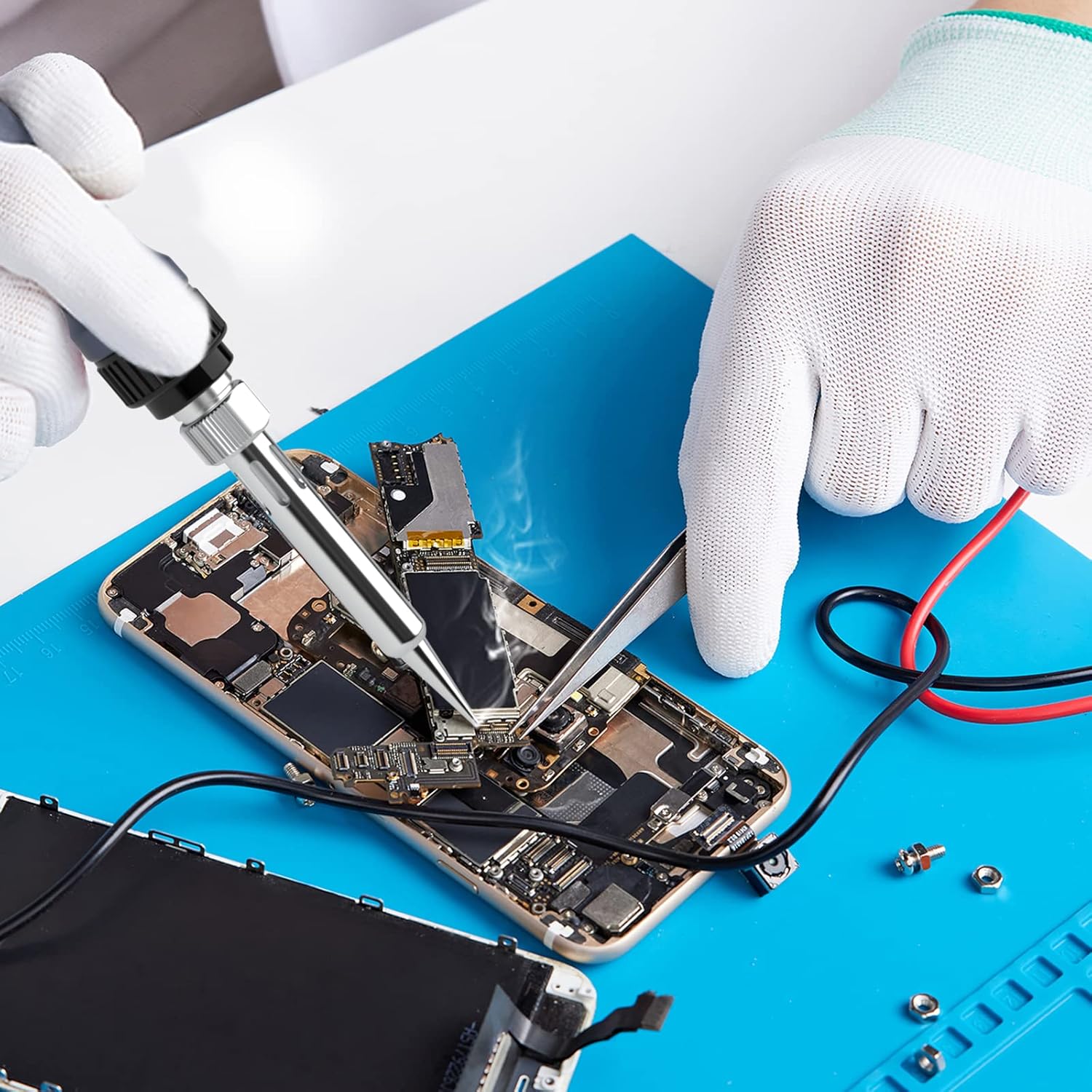
Image 5.3: Precision soldering on a small electronic device using a BAKON tip.
6. Maintenance
Proper maintenance significantly extends the life and performance of your soldering iron tips.
- Regular Cleaning: Clean the tip frequently during use to remove flux residue and oxidation. Use a damp sponge (distilled water recommended) or brass wool. Avoid abrasive materials.
- Proper Storage: When not in use, ensure tips are clean and tinned. Store them in a dry, clean, and non-corrosive environment to prevent oxidation and corrosion.
- Avoid Excessive Force: Do not apply excessive pressure when soldering, as this can deform or damage the tip.
- Optimal Temperature: Using temperatures higher than necessary for your solder and components can accelerate tip wear and oxidation. Adjust temperature settings as needed.
- Tip Tinner: For heavily oxidized tips that are difficult to tin, a specialized tip tinner/cleaner can be used sparingly.
7. Troubleshooting
- Tip Not Heating:
- Ensure the tip is properly seated and secured in the soldering iron.
- Verify the soldering station is powered on and set to a suitable temperature.
- Check if the heating element of the soldering iron is functioning correctly (if other tips also fail to heat).
- Solder Not Sticking to Tip (Oxidation):
- Clean the tip thoroughly with brass wool or a tip tinner.
- Re-tin the tip immediately after cleaning.
- Ensure the tip is always tinned with a small amount of solder when idle.
- Avoid prolonged exposure to high temperatures without soldering.
- Poor Solder Joints:
- Ensure the tip is clean and properly tinned.
- Verify the temperature setting is appropriate for the solder and components being used.
- Use fresh, good quality solder.
8. Safety Information
Always prioritize safety when working with soldering equipment.
- Personal Protective Equipment (PPE): Always wear appropriate PPE, including safety glasses, to protect your eyes from solder splatter and fumes.
- Ventilation: Work in a well-ventilated area or use a fume extractor to avoid inhaling solder fumes, which can be harmful.
- Hot Surfaces: Soldering irons and tips become extremely hot during operation. Avoid direct contact with skin or flammable materials. Use a heat-resistant stand for the soldering iron.
- Power Off: Always turn off and unplug the soldering station when not in use, when changing tips, or when performing maintenance.
- Children and Pets: Keep soldering equipment out of reach of children and pets.
9. Warranty and Support
BAKON is committed to providing high-quality products and excellent customer service. If you have any questions, concerns, or require assistance with your BAKON 900M Soldering Iron Tips, please do not hesitate to contact BAKON customer service.
We strive to provide a satisfactory response within 24 hours to ensure your complete satisfaction.
For further information or support, please visit the official BAKON website or contact your retailer.