
Important Safeguards
When using electrical appliances, basic safety precautions should always be followed, including the following:
- Read all instructions before using the appliance.
- To protect against risk of electrical shock, do not immerse the mixer base, cord, or electrical plug in water or other liquid.
- Close supervision is necessary when any appliance is used by or near children.
- Unplug from outlet when not in use, before putting on or taking off parts, and before cleaning.
- Avoid contact with moving parts. Keep hands, hair, and clothing, as well as spatulas and other utensils, away from beaters during operation to prevent injury and/or damage to the mixer.
- Do not operate any appliance with a damaged cord or plug, or after the appliance malfunctions or has been dropped or damaged in any manner. Return appliance to the nearest authorized service facility for examination, repair, or electrical or mechanical adjustment.
- The use of attachments not recommended or sold by KitchenAid may cause fire, electric shock, or injury.
- Do not use outdoors.
- Do not let cord hang over edge of table or counter.
- Do not let cord contact hot surfaces, including the stove.
- Remove all attachments from the mixer before washing.
- This product is designed for household use only.
Product Overview
KitchenAid 9-Speed Digital Hand Mixer
The KitchenAid 9-Speed Digital Hand Mixer is designed for efficient mixing, kneading, whipping, and blending tasks. It features a powerful motor with precise speed control.

Image: The KitchenAid 9-Speed Digital Hand Mixer shown with its full set of accessories, including Turbo Beater II, dough hooks, pro whisk, and blending rod.
Hand Mixer Components:
- Hand Mixer Base: Contains the motor, digital speed control, and attachment ports.
- Turbo Beater II Accessories (2): Ideal for general mixing tasks like batters and frostings.
- Dough Hooks (2): Designed for kneading yeast doughs.
- Pro Whisk (1): Perfect for whipping egg whites, cream, and light batters.
- Blending Rod (1): Useful for blending smoothies, sauces, and dressings directly in a cup or bowl.
- Storage Bag: For neatly organizing and storing all accessories.

Image: A top-down view of the hand mixer, highlighting the digital speed selector and power button.
KitchenAid 3.5 Cup Food Chopper (KFC3516ER)
The KitchenAid 3.5 Cup Food Chopper provides quick and precise chopping and pureeing for various ingredients.
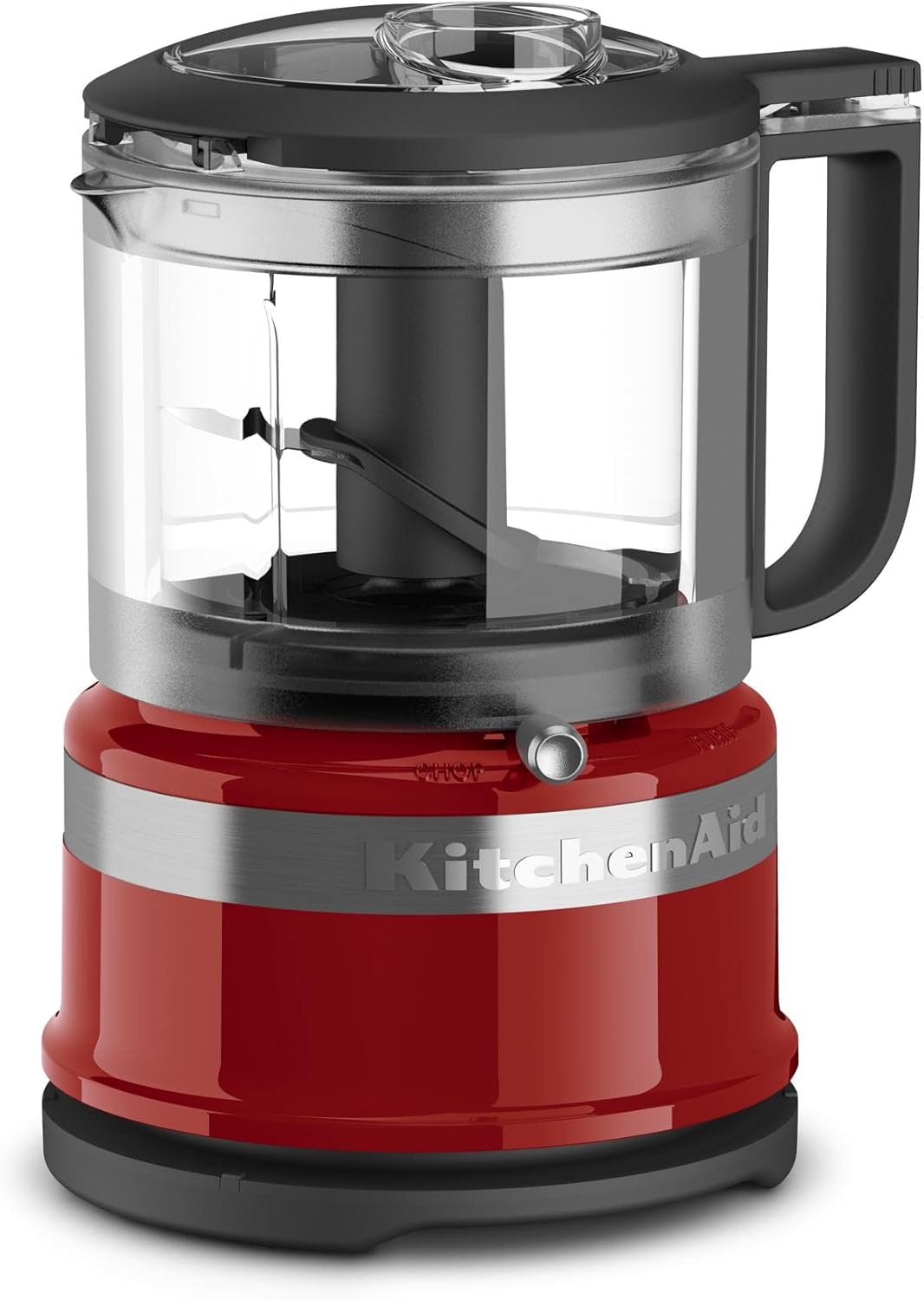
Image: The KitchenAid 3.5 Cup Food Chopper fully assembled, displaying its compact design.
Food Chopper Components:
- Motor Base: The power unit for the chopper.
- 3.5 Cup BPA-Free Work Bowl: Transparent bowl for processing ingredients.
- Stainless Steel Multi-Purpose Blade: For chopping and pureeing.
- Lid with Pour Spout and Handle: Secures the bowl and allows for easy pouring.
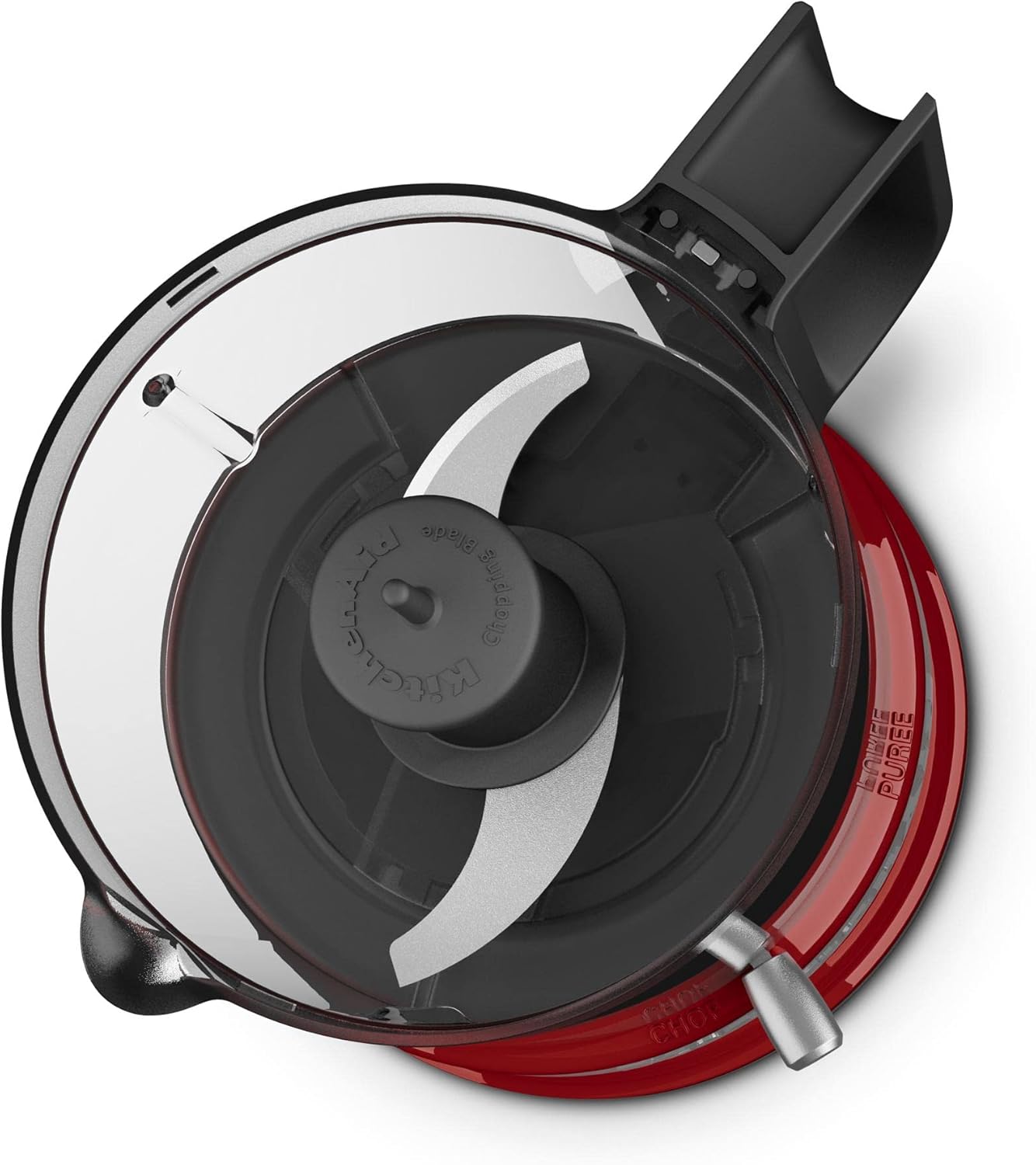
Image: An overhead view into the food chopper's work bowl, illustrating the blade assembly.
Setup
Hand Mixer Setup
- Ensure the hand mixer is unplugged before attaching or removing accessories.
- Select the appropriate accessories for your task (Turbo Beaters, Dough Hooks, Pro Whisk, or Blending Rod).
- Insert the accessory stems into the openings on the bottom of the mixer until they click into place. Ensure they are securely seated.
- Plug the mixer into a standard electrical outlet.
Food Chopper Setup
- Place the motor base on a clean, dry, flat surface.
- Fit the work bowl onto the motor base, aligning the tabs. Turn clockwise until it locks into place.
- Carefully place the multi-purpose blade onto the center post inside the work bowl. Ensure it sits securely.
- Add your ingredients to the work bowl.
- Place the lid onto the work bowl, aligning the tab on the lid with the handle of the work bowl. Turn clockwise until it locks into place. The chopper will not operate unless the lid is properly locked.
- Plug the food chopper into a standard electrical outlet.
Operating Instructions
Using the Hand Mixer
- With the desired attachments securely in place and the mixer plugged in, hold the mixer with a soft grip.
- Press the ON/OFF button to turn the mixer on. The digital display will show the current speed setting.
- Use the UP (+) and DOWN (-) arrow buttons to select one of the 9 available speeds. The soft start feature will gradually bring the attachments to the selected speed to prevent splattering.
- Mix ingredients until desired consistency is achieved.
- When finished, press the ON/OFF button to turn the mixer off, then unplug it from the outlet.
- To release attachments, ensure the mixer is unplugged, then press the Eject button located on the handle.
Recommended Speed Guide:
| Speed | Task |
|---|---|
| 1-2 | Stirring, combining dry ingredients, starting batters. |
| 3-4 | Mixing thin batters, gravies, sauces. |
| 5-6 | Mixing cakes, cookies, mashing potatoes. |
| 7-8 | Whipping cream, egg whites, frosting. |
| 9 | Fast whipping, blending. |
Using the Food Chopper
- With the food chopper properly assembled and plugged in, ensure the lid is securely locked.
- The chopper offers two speeds and a pulse function.
- To chop ingredients, press and hold the 'CHOP' button. For finer results, hold longer.
- To puree ingredients, press and hold the 'PUREE' button.
- For intermittent processing or greater control, use the 'PULSE' function by repeatedly pressing and releasing the desired speed button.
- Do not operate continuously for more than 30 seconds. Allow the motor to rest between cycles.
- When finished, release the button, unplug the chopper, and carefully disassemble for cleaning.
Care and Cleaning
Proper cleaning ensures the longevity and performance of your KitchenAid appliances. Always unplug the appliance before cleaning.
Hand Mixer Cleaning
- Motor Base: Wipe clean with a damp cloth. Do not immerse the motor base in water or other liquids.
- Accessories (Turbo Beater II, Dough Hooks, Pro Whisk, Blending Rod): These accessories are dishwasher safe. Alternatively, wash in warm, soapy water, rinse thoroughly, and dry.
Food Chopper Cleaning
- Motor Base: Wipe clean with a damp cloth. Do not immerse the motor base in water or other liquids.
- Work Bowl, Lid, and Blade: These parts are dishwasher safe (top rack recommended). For best results, wash immediately after use. Handle the blade with extreme care as it is sharp.
Troubleshooting
If you experience issues with your KitchenAid appliance, please refer to the following common problems and solutions:
- Appliance does not turn on:
- Ensure the power cord is securely plugged into a working electrical outlet.
- For the food chopper, ensure the lid is properly locked onto the work bowl and the work bowl is locked onto the base.
- Attachments are difficult to insert or eject (Hand Mixer):
- Ensure the mixer is unplugged.
- Check for any food residue or obstruction in the attachment ports.
- Ensure you are pressing the Eject button firmly when removing attachments.
- Food Chopper blade does not spin:
- Verify that the work bowl and lid are correctly assembled and locked into place.
- Check if ingredients are overloaded or too large, preventing the blade from moving. Remove some ingredients or cut them into smaller pieces.
- Excessive noise or vibration:
- Ensure all parts are correctly assembled and securely locked.
- Reduce the amount of ingredients if overloading is suspected.
If the problem persists, please contact KitchenAid Customer Service for assistance.
Specifications
| Feature | Description |
|---|---|
| Brand | KitchenAid |
| Hand Mixer Speeds | 9 Digital Speeds |
| Hand Mixer Special Features | Adjustable Speed Control, Soft Start, Lockable Cord, Soft Grip Handle |
| Food Chopper Capacity | 3.5 Cups |
| Food Chopper Controls | Push Button (Chop, Puree, Pulse) |
| Blade Material | Stainless Steel |
| Dishwasher Safe Parts | Yes (Accessories, Work Bowl, Lid, Blade) |
| Material | Stainless Steel (attachments/blade), Plastic (housing/bowl) |
Warranty and Support
KitchenAid products are manufactured to high-quality standards and are warranted against defects in materials and workmanship. For detailed warranty information, including terms, conditions, and how to register your product, please refer to the warranty card included with your purchase or visit the official KitchenAid website.
For customer service, product registration, or to order replacement parts, please visit www.kitchenaid.com or contact KitchenAid Customer Service directly. Contact information can typically be found on the KitchenAid website or in your product packaging.


