
1. Introduction
Thank you for choosing the WHIRLPOOL OMR58RR1B Built-in Pyrolytic Oven. This manual provides essential information for the safe and efficient use of your appliance. Please read these instructions carefully before installation and operation, and keep them for future reference.
The WHIRLPOOL OMR58RR1B is a 71-liter multifunction oven designed for modern kitchens, featuring advanced cooking technologies and convenient cleaning options.
2. Safety Information
Your safety and the safety of others are paramount. This manual contains important safety messages. Always read and obey all safety messages.
General Safety
- This appliance is intended for household use only.
- Do not allow children or persons with reduced physical, sensory, or mental capabilities to operate the oven without supervision.
- Keep packaging materials away from children.
- Ensure the oven is switched off and disconnected from the power supply before performing any maintenance or cleaning.
- Do not use abrasive cleaners or sharp metal scrapers to clean the oven door glass, as they can scratch the surface, which may result in shattering.
Electrical Safety
- The oven must be installed by a qualified electrician in accordance with local regulations.
- Ensure the voltage and frequency indicated on the rating plate match your household power supply.
- Do not use extension cords or multiple adapters.
- If the power cord is damaged, it must be replaced by the manufacturer, its service agent, or similarly qualified persons to avoid a hazard.
3. Product Overview
The WHIRLPOOL OMR58RR1B oven combines functionality with a sleek design, featuring intuitive controls and a spacious interior.

Figure 3.1: Front view of the WHIRLPOOL OMR58RR1B built-in oven, showcasing its black finish and digital display.
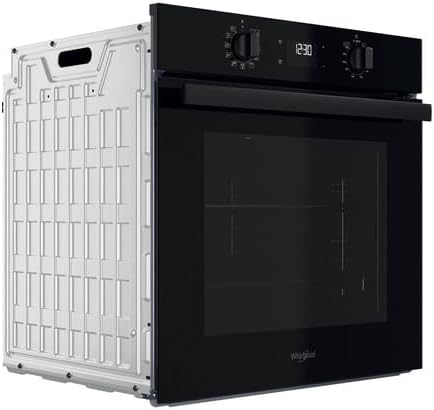
Figure 3.2: Detailed view of the control panel, featuring two rotary knobs for function and temperature selection, and a central digital display for time and settings.

Figure 3.3: The oven interior with the door open, illustrating the spacious 71-liter capacity and various rack positions for flexible cooking.

Figure 3.4: View of the oven interior demonstrating the telescopic rail fully extended, providing easy and safe access to dishes.
Key Features:
- 71 Liter Capacity: Generous interior suitable for various cooking needs.
- 10 Cooking Modes: Versatile options for different recipes and food types.
- Pulsed Heat: Ensures even heat distribution, allowing simultaneous cooking on up to three levels without flavor transfer.
- FlexiClean Pack: Includes Pyrolytic and Hydrolytic cleaning functions for convenient maintenance.
- Telescopic Rails: Facilitate safe and easy handling of hot dishes and baking trays.
- Temperature Range: Adjustable from 40°C to 250°C.
4. Installation
The WHIRLPOOL OMR58RR1B is designed for built-in installation. Proper installation is crucial for the oven's performance and safety. It is recommended that installation be performed by a qualified professional.
Installation Steps (General Guidelines):
- Preparation: Ensure the cabinet opening dimensions match the oven's specifications. The cabinet material should be heat-resistant.
- Electrical Connection: Connect the oven to a suitable power supply, ensuring proper grounding. Refer to the electrical safety section and local wiring regulations.
- Mounting: Carefully slide the oven into the cabinet opening. Secure the oven to the cabinet using the provided screws and mounting brackets.
- Ventilation: Ensure adequate ventilation around the oven as specified in the installation diagram to prevent overheating.
- Final Check: Verify that the oven is level and securely installed. Test basic functions before first use.

Figure 4.1: Side view of the oven, illustrating its design for seamless integration into kitchen cabinetry.

Figure 4.2: Rear view of the oven, highlighting the electrical connection point and design for proper airflow.
5. Operating Instructions
Familiarize yourself with the control panel and various cooking functions to optimize your cooking experience.
Control Panel
The control panel consists of two rotary knobs and a digital display. The left knob typically selects the cooking function, while the right knob adjusts temperature or time.
Setting the Time
Upon first connection or after a power outage, the display will flash. Use the appropriate knob (refer to specific model instructions for exact knob) to set the current time. Confirm the setting to stop flashing.
Cooking Functions
Your oven offers 10 distinct cooking modes. Rotate the function selection knob to choose your desired cooking mode. Common modes include:
- Conventional: For traditional baking and roasting.
- Convection (Pulsed Heat): Ideal for cooking on multiple levels, ensuring even results without flavor mixing.
- Grill: For browning and toasting.
- Defrost: Gentle thawing of frozen foods.
- Consult the full manual for a complete list and description of all 10 cooking modes.
Temperature Setting
After selecting a cooking function, use the temperature knob to set the desired temperature between 40°C and 250°C. The oven will begin preheating once the temperature is set.
Timer Function
The oven includes a timer function for setting cooking duration or a delayed start. Refer to the detailed instructions in the complete manual for programming the timer.
Using Telescopic Rails
The telescopic rails allow you to pull out baking trays and grids smoothly and safely, making it easier to check or season food without reaching into the hot oven.
- To use, simply pull the rail forward.
- Place your baking tray or grid onto the extended rail.
- Gently push the rail back into the oven.
6. Cleaning and Maintenance
Regular cleaning and maintenance ensure the longevity and optimal performance of your oven. The WHIRLPOOL OMR58RR1B features the FlexiClean Pack, offering two convenient cleaning options.
Pyrolytic Cleaning
Pyrolytic cleaning is an automatic self-cleaning cycle that uses very high temperatures (up to 500°C) to burn off food residues, turning them into fine ash. This ash can then be easily wiped away once the oven has cooled.
- Remove all accessories (racks, trays, telescopic rails) from the oven cavity before starting a pyrolytic cycle.
- Wipe away any large spills or loose debris.
- Close the oven door securely. The door will lock automatically during the cycle.
- Select the pyrolytic cleaning function on the control panel.
- Allow the cycle to complete and the oven to cool down completely before wiping out the ash with a damp cloth.
Hydrolytic Cleaning
Hydrolytic cleaning uses steam to loosen light soil and grease, making it easier to wipe clean. This function is suitable for ovens with light to moderate dirt.
- Pour approximately 200ml of water into the bottom of the oven cavity.
- Select the hydrolytic cleaning function.
- After the cycle, allow the oven to cool slightly, then wipe the interior with a soft cloth or sponge.
General Cleaning
- Clean the exterior surfaces with a soft cloth and mild detergent. Avoid abrasive cleaners.
- The oven door glass can be cleaned with a glass cleaner, ensuring no residue enters the oven cavity.
- Removable parts like racks and trays can be washed in warm soapy water.
7. Troubleshooting
Before contacting customer service, please refer to the following common issues and their potential solutions.
| Problem | Possible Cause | Solution |
|---|---|---|
| Oven does not heat | No power supply; incorrect settings; door not closed properly. | Check power connection and circuit breaker; ensure function and temperature are set; close door firmly. |
| Food not cooking evenly | Incorrect rack position; overloaded oven; unevenly distributed food. | Use recommended rack positions; avoid overcrowding; arrange food for optimal airflow. |
| Smoke or odor during first use | Residues from manufacturing process. | This is normal. Run the oven empty at high temperature for 30-60 minutes to burn off residues. Ensure good ventilation. |
| Pyrolytic cleaning not starting | Oven door not fully closed; accessories still inside. | Ensure door is latched; remove all racks and trays. |
8. Specifications
Detailed technical specifications for the WHIRLPOOL OMR58RR1B oven.

Figure 8.1: Energy efficiency label for the WHIRLPOOL OMR58RR1B, indicating an A+ rating and 71-liter capacity.
| Specification | Detail |
|---|---|
| Manufacturer | WHIRLPOOL |
| Model Reference | OMR58RR1B |
| ASIN | B0BXT4CRWV |
| First Available | March 8, 2023 |
| Brand | Whirlpool |
| Color | Red (Product images show black finish) |
| Heating Method | Convection |
| Finish Type | Stainless steel (rvs) |
| Fuel Type | Electric |
| Installation Type | Built-in |
| Special Features | Pulsed heat |
| Timer Function | Available |
| Door Direction | Reversible |
9. Warranty and Support
For warranty information, technical support, or to schedule service, please refer to the warranty card included with your product or visit the official WHIRLPOOL website. Ensure you have your model number (OMR58RR1B) and serial number ready when contacting support.
Online Resources: For additional support, FAQs, and product registration, please visit the official Whirlpool website.


