
Cayin N7
Cayin N7 Digital Audio Player User Manual
Model: N7 (SPK-A003)
Brand: Cayin
1. Introduction
This user manual provides comprehensive instructions for the operation and maintenance of your Cayin N7 Digital Audio Player. The Cayin N7 is a high-fidelity portable audio player designed to deliver exceptional sound quality. Please read this manual thoroughly before using the device to ensure proper functionality and to maximize your listening experience.

Image: Front view of the Cayin N7 Digital Audio Player, displaying its screen with music playback interface.
2. Product Overview
2.1. Components and Controls
Familiarize yourself with the various components and controls of the Cayin N7.
- Display: 5-inch TFT multi-point touchscreen (1080 x 1920 resolution).
- Volume Knob: Located at the top right, for adjusting audio output level.
- Side Buttons: Power, Play/Pause, Next/Previous Track.
- Ports: USB-C, 3.5mm single-ended output, 4.4mm balanced output, microSD card slot.

Image: Front view of the Cayin N7, showing the full screen and physical buttons on the side.

Image: Back view of the Cayin N7, displaying the model number and manufacturer information.

Image: Close-up view of the golden volume knob on the top of the Cayin N7.
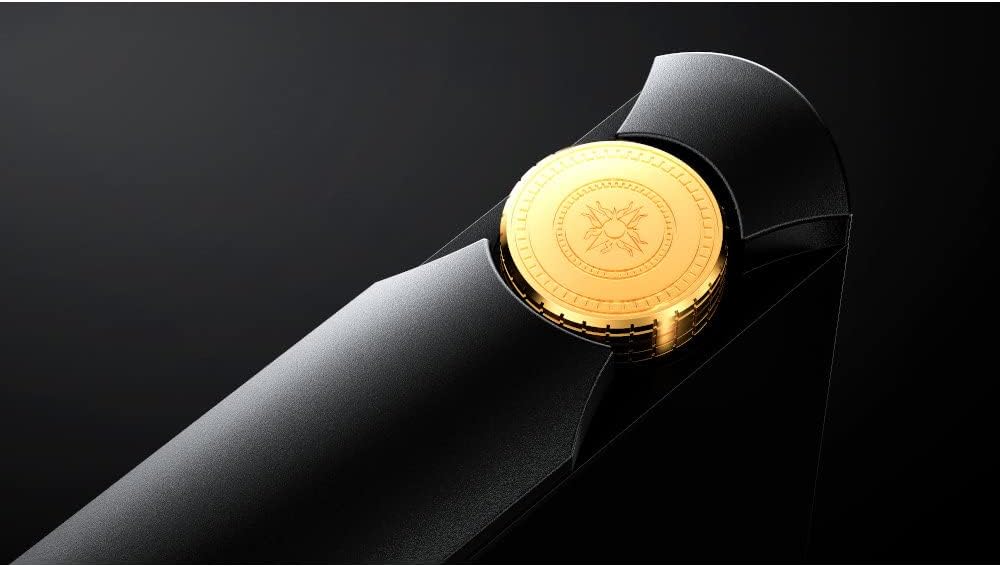
Image: Bottom view of the Cayin N7, showing various audio output and data ports.
3. Setup
3.1. Initial Power On and Charging
Upon first use, ensure the Cayin N7 is fully charged. Connect the provided USB-C cable to the device and a compatible USB power adapter. The multi-color smart LED will indicate charging status.
3.2. Inserting a MicroSD Card
The Cayin N7 supports microSD cards up to 1TB for expanded storage. Locate the microSD card slot on the device and gently insert the card until it clicks into place.
3.3. Network Connection (Wi-Fi)
To access online features, streaming services, or firmware updates, connect the N7 to a Wi-Fi network.
- Swipe down from the top of the screen to access the quick settings panel.
- Tap the Wi-Fi icon to enable Wi-Fi.
- Go to Settings > Network & Internet > Wi-Fi.
- Select your desired network and enter the password if prompted.
4. Operating Instructions
4.1. Basic Navigation
The Cayin N7 runs on a customized Android 12 system with Google Play pre-installed. Navigate the interface using the 5-inch touchscreen.
- Home Button: The circle icon at the bottom of the screen returns you to the home screen.
- Back Gesture: Swipe from the left or right edge of the screen to go back.
- App Drawer: Swipe up from the home screen to access all installed applications.
4.2. Music Playback
The default music players are Cayin Music and HiByMusic (with HiByCast support).
- Open the Cayin Music or HiByMusic application.
- Browse your music library by Title, Folder, Album, or Artist.
- Tap on a song to begin playback.
- Use the on-screen controls or physical side buttons for Play/Pause, Next/Previous track.
- Adjust volume using the golden volume knob.

Image: The Cayin N7 screen displaying the music playback interface with album art and track information.

Image: The Cayin N7 screen showing the music library list, categorized by title.
4.3. Multi-Color Smart LED Indicator
The LED indicator changes color to display the sampling rate of the currently playing music, as well as home screen and charging indicators.
5. Connectivity
5.1. Bluetooth Connection
The N7 supports Bluetooth v5.0 with LDAC, UAT, AAC, and SBC codecs. aptX and aptX HD support are planned via future updates.
- Go to Settings > Connected devices > Bluetooth.
- Toggle Bluetooth ON.
- Select "Pair new device" and choose your Bluetooth headphones or speaker from the list.

Image: Screenshot of the Cayin N7's Bluetooth settings interface.
5.2. USB-C Functionality
The USB-C port supports various functions:
- Charging: For powering the device.
- Data Transfer: Connect to a computer to transfer music files.
- USB Audio Output: Use the N7 as a digital audio source for an external DAC.
- USB DAC Input: Use the N7 as a DAC for a computer or other digital source.
5.3. Line Out and Pre-Out
The N7 offers both 3.5mm single-ended and 4.4mm balanced outputs, which can be configured as either a fixed-level line out or a variable-level pre-out.

Image: Diagram showing the N7's interface for selecting between line out and pre-out modes.

Image: Table detailing the output specifications for both line out (fixed) and pre-out (variable) modes.
6. Advanced Audio Features
6.1. Pure 1-Bit DSD DAC
The N7 features a fully balanced discrete resistor network pure 1-bit DSD DAC, designed for high-resolution audio playback.

Image: Internal board layout of the Cayin N7, highlighting the discrete 1-Bit DAC, LPF, and headphone amp sections.

Image: Detailed diagram of the Pure 1-Bit DSD DAC, showing its discrete resistor network.
6.2. Dual Amp Operation Mode (Class A | Class AB)
The N7 allows users to switch between Class A and Class AB amplifier modes via a pull-down menu, enabling customization of the sound signature to match preferences, music genres, IEMs, or headphones.

Image: Visual representation of the dual amplifier operation modes (Class A and Class AB) and their selectable interface.

Image: Close-up of the discrete amplifier section on the N7's circuit board, highlighting adjustable resistors.
6.3. MQA Support
The Cayin N7 supports MQA (Master Quality Authenticated) technology, allowing for the playback of original master recording quality audio files. It supports 16x MQA decode, enabling playback up to 705.6kHz and 768kHz studio quality.

Image: Diagram illustrating the MQA decoding process on the Cayin N7, from studio mastering to playback.
7. Maintenance
7.1. Cleaning
To clean the device, use a soft, dry, lint-free cloth. Do not use abrasive cleaners, solvents, or aerosol sprays directly on the device.
7.2. Battery Care
The Cayin N7 is equipped with a 9000mAh battery. To prolong battery life:
- Avoid extreme temperatures.
- Do not fully discharge the battery frequently.
- If storing for a long period, charge the battery to around 50-60%.

Image: Internal view of the Cayin N7, highlighting the large 9000mAh battery.
7.3. Firmware Updates
Periodically check for firmware updates to ensure optimal performance and access to new features. Updates can typically be found in the device's settings menu or on the official Cayin website.
8. Troubleshooting
| Problem | Possible Cause | Solution |
|---|---|---|
| Device does not power on. | Low battery; System crash. | Charge the device for at least 30 minutes. Press and hold the power button for 10-15 seconds to force restart. |
| No sound output. | Volume too low; Incorrect output selected; Headphone connection issue. | Increase volume. Check if headphones are properly connected. Verify output settings (e.g., line out vs. headphone out). |
| Cannot connect to Wi-Fi. | Incorrect password; Out of range; Router issue. | Double-check password. Move closer to the Wi-Fi router. Restart the router. |
| Device freezes or lags. | Too many apps running; Low storage; Software glitch. | Close background applications. Clear cache. Restart the device. Consider a factory reset if issues persist (backup data first). |
9. Specifications
| Feature | Detail |
|---|---|
| Model Name | Cayin N7 |
| Model Number | SPK-A003 |
| MCU | Snapdragon 665 |
| Operating System | Customized Android 12 (Google Play pre-installed) |
| Display | 5" (1080 x 1920) TFT Multi-point Touchscreen |
| DAC | Full-balanced Discrete Resistor Network Pure 1-bit DSD DAC |
| RAM | 4GB LPDDR4 |
| Internal Storage | 64GB |
| Expandable Storage | MicroSD 1 slot (up to 1TB) |
| Wi-Fi | 2.4G/5G IEEE 802.11a/b/g/n/ac |
| Bluetooth | BTv5.0 with LDAC, UAT, AAC, SBC (aptX/aptX HD via update) |
| Default Players | Cayin Music; HiByMusic (HiByCast supported) |
| Dimensions | 142 x 77.8 x 22.2 mm |
| Weight | 380 g |
| Battery | 9000mAh |
| Included Accessories | USB Cable, User Manual |
10. Warranty and Support
For warranty information and technical support, please refer to the official Cayin website or contact your local distributor. Keep your proof of purchase for warranty claims.
Official Cayin Website: www.cayin.cn
Related documentsN7


Ask a question about this manual
Ask about setup, troubleshooting, compatibility, parts, safety, or missing instructions. Manuals+ will review the question and use this page’s manual context to help answer it.