
BCXY CS-GRK615SL
Contents
BCXY Battery Replacement User Manual
For GE Druck DPI 615, DPI610, and DPI 610 Pressure Calibrators
1. Introduction
This manual provides essential information for the safe and effective use of your BCXY CS-GRK615SL NiMH battery replacement. This battery is designed to meet the exact specifications of the original battery for GE Druck DPI 615, DPI610, and DPI 610 Pressure Calibrators, ensuring reliable performance and durability.
2. Safety Information
Please read and understand all safety warnings before handling or installing the battery. Failure to follow these instructions may result in fire, electric shock, injury, or damage to the product or property.
- WARRANTY VOID IF LABEL IS REMOVED.
- DO NOT ATTEMPT TO DISASSEMBLE, OPEN OR SERVICE THE BATTERY PACK. Servicing should only be performed by qualified personnel.
- REPLACE ONLY WITH THE BATTERY PACK DESIGNATED FOR THIS PRODUCT. Using an incompatible battery may cause damage or safety hazards.
- DO NOT CRUSH, PUNCTURE, SHORT EXTERNAL CONTACTS OR DISPOSE OF IN FIRE OR WATER. This can lead to explosion, fire, or leakage.
- DO NOT STORE ABOVE 60°C (140°F). High temperatures can degrade battery performance and pose a safety risk.
- Keep the battery away from children.
- Dispose of used batteries according to local regulations.
3. Product Overview
The BCXY CS-GRK615SL is a high-quality Nickel Metal Hydride (NiMH) battery pack designed as a direct replacement for specific GE Druck pressure calibrators. It features built-in protection against overcharge, over-discharge, over-voltage, and short circuits to ensure safe and extended battery life.
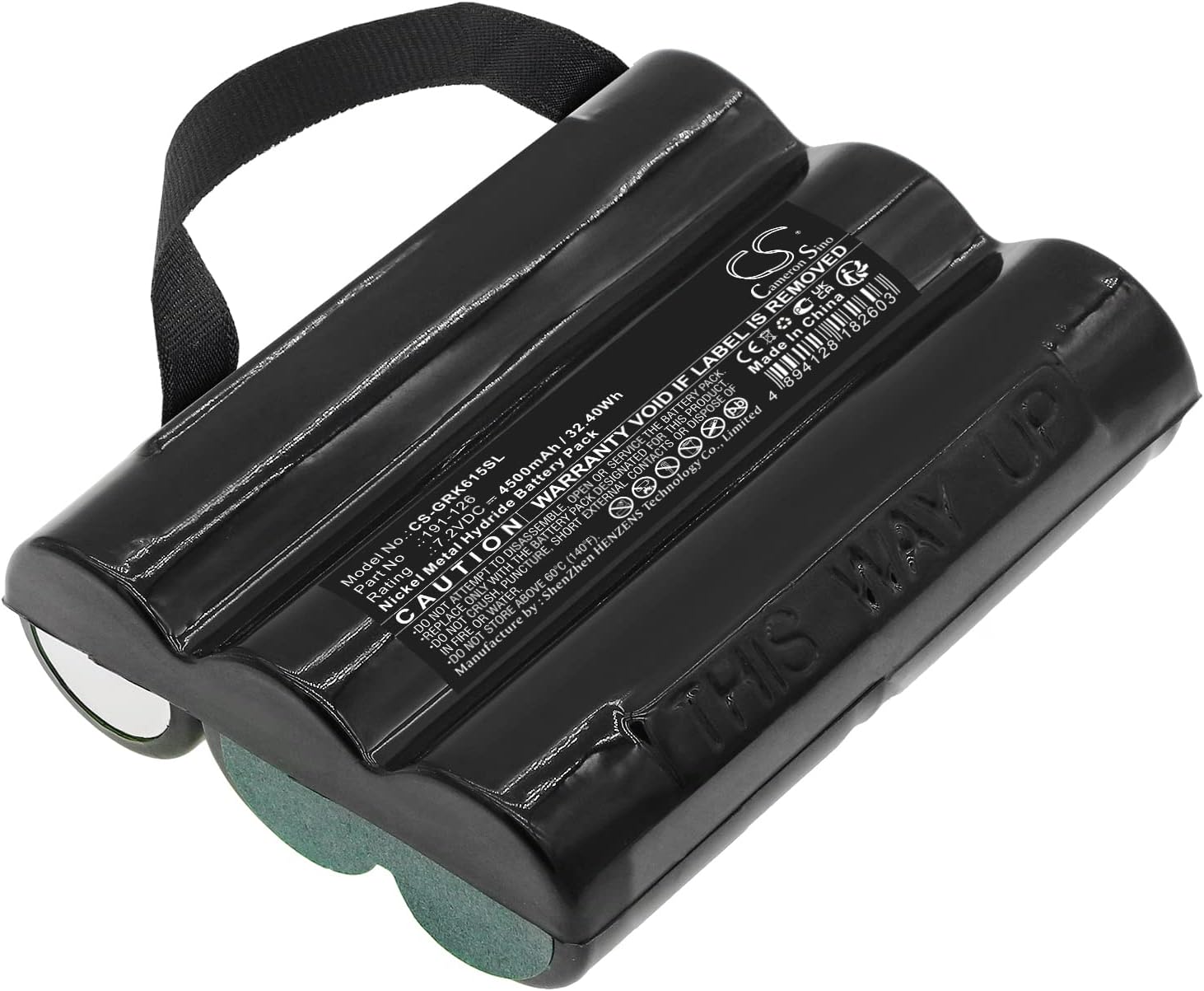
Figure 3.1: BCXY CS-GRK615SL NiMH Battery Pack. This image shows the black battery pack with three cylindrical cells, a black strap for handling, and a label displaying model number CS-GRK615SL, part number 191-126, rating 7.2VDC 4500mAh / 32.40Wh, and safety warnings. The text "THIS WAY UP" is visible on the side.
3.1 Compatible Models
This battery is compatible with the following GE Druck Pressure Calibrator models:
- Druck DPI 615
- DPI610 Pressure Calibrators
- DPI615 Pressure Calibrators
- Druck DPI 610
3.2 Compatible Battery Part Number
- 191-126
4. Setup and Installation
Before proceeding with installation, ensure your calibrator is powered off and disconnected from any power source. Refer to your calibrator's original user manual for specific battery compartment access instructions.
- Power Off: Ensure the GE Druck Pressure Calibrator is completely turned off.
- Locate Battery Compartment: Identify and open the battery compartment on your calibrator. This typically involves unscrewing a cover or releasing a latch.
- Remove Old Battery: Carefully disconnect and remove the old battery pack. Note its orientation for correct installation of the new battery.
- Insert New Battery: Insert the BCXY CS-GRK615SL battery pack into the compartment, ensuring the connectors align correctly. The "THIS WAY UP" marking on the battery (as seen in Figure 3.1) indicates the correct orientation.
- Secure Battery: Gently push the battery into place until it is seated firmly.
- Close Compartment: Close and secure the battery compartment cover.
- Initial Charge: It is recommended to fully charge the new battery before its first use. Connect your calibrator to its charger and allow it to charge until the charging indicator shows full.
5. Operating Guidelines
Once installed, the battery operates seamlessly with your GE Druck Pressure Calibrator. Follow the calibrator's instructions for normal operation.
- Charging: Always use the original or a compatible charger provided with your GE Druck calibrator.
- Discharge: Avoid completely draining the battery frequently, as this can reduce its overall lifespan.
- Temperature: Operate the calibrator within its recommended temperature range to optimize battery performance and longevity.
6. Maintenance
Proper maintenance can extend the life of your battery.
- Storage: If storing the battery for an extended period, ensure it is partially charged (around 50%) and stored in a cool, dry place, away from direct sunlight and extreme temperatures.
- Cleaning: Keep battery contacts clean and free of dust or debris. Use a dry, soft cloth for cleaning.
- Regular Use: For optimal performance, use and recharge the battery regularly.
7. Troubleshooting
| Problem | Possible Cause | Solution |
|---|---|---|
| Battery not charging | Incorrect installation; Faulty charger; Dirty contacts; Battery fault | Re-install battery correctly; Check charger functionality; Clean battery contacts; Contact support if problem persists. |
| Short battery life | Partial charging; Frequent deep discharge; Old battery; Extreme temperatures | Ensure full charges; Avoid complete discharge; Store and operate within recommended temperatures. |
| Calibrator not powering on | Battery not installed; Battery discharged; Battery fault; Calibrator fault | Verify battery installation; Charge battery; Test with another known good battery if possible; Consult calibrator manual. |
If you encounter issues not listed here or if solutions do not resolve the problem, please contact customer support.
8. Specifications
| Feature | Detail |
|---|---|
| Model Number | CS-GRK615SL |
| Part Number | 191-126 |
| Battery Type | Nickel Metal Hydride (NiMH) |
| Voltage | 7.2V |
| Capacity | 4500mAh |
| Watt-Hours (Wh) | 32.4Wh |
| Product Dimensions | 98.6 x 78.2 x 29.3mm (3.88 x 3.08 x 1.15 inches) |
| Item Weight | 572.0g (1.26 pounds) |
| Certifications | ISO9001, RoHS, CE, UN38.3, MSDS |
9. Warranty and Support
Our batteries are manufactured to strict quality standards. For warranty information or technical support, please refer to the contact details provided by your retailer or the manufacturer, BCXY. Ensure you retain your proof of purchase for warranty claims.
Note: The warranty is void if the product label is removed, or if the battery is disassembled, opened, serviced, crushed, punctured, shorted, or disposed of in fire or water, or stored above 60°C (140°F).
Ask a question about this manual
Ask about setup, troubleshooting, compatibility, parts, safety, or missing instructions. Manuals+ will review the question and use this page’s manual context to help answer it.