
1. Product Overview
The Ensenior AQ1-SOL-WH is a solar-powered security light designed for outdoor use. It features three adjustable LED heads, a motion sensor with a wide detection angle, and multiple operating modes for versatile lighting. The separate solar panel allows for flexible placement to maximize sun exposure.
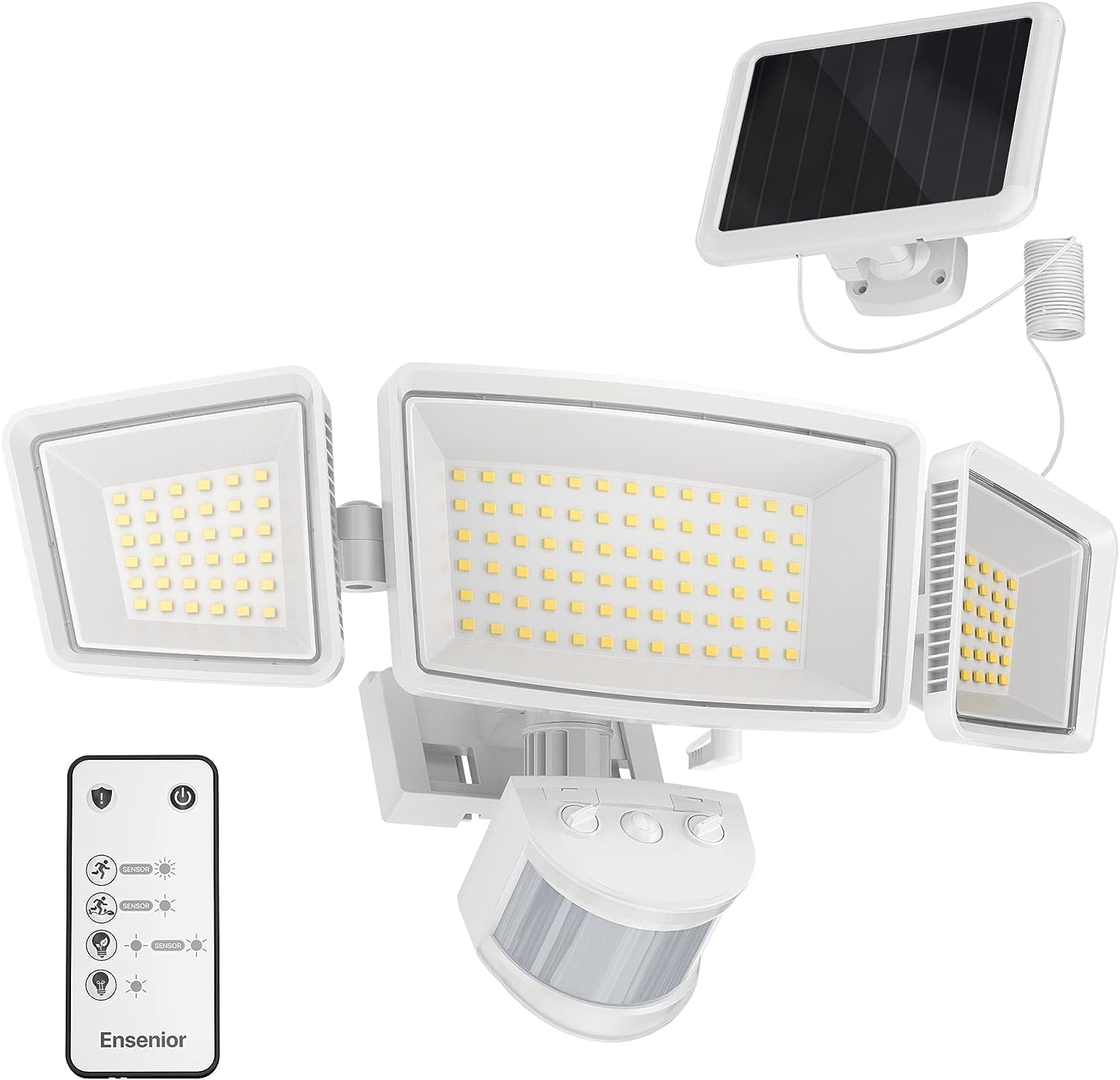
Image 1: Ensenior AQ1-SOL-WH Solar Security Light components.
2. Package Contents
Verify that all components are present in the package:
- 1 x Ensenior Solar Security Light unit
- 1 x Separate Solar Panel
- 1 x Remote Control
- Mounting Screws and Wall Plugs
- Instruction Manual (this document)
3. Setup and Installation
3.1 Initial Charging
Before first use, ensure the solar panel is connected to the light unit and placed in direct sunlight for at least 6-8 hours to fully charge the internal battery.
3.2 Choosing a Location
Select a mounting location that provides:
- Maximum direct sunlight exposure for the solar panel throughout the day.
- Optimal coverage for the light and motion sensor detection area.
- A stable surface for mounting the light and solar panel.

Image 2: Solar panel placement for optimal sun exposure. The cable length is approximately 14.8 ft (4.5m).
3.3 Mounting the Light Unit
The light unit can be mounted in two primary ways:
- Wall Mounted: Attach the light directly to a flat wall surface using the provided screws and wall plugs.
- Right-Angle Mounted: Use the included corner mount bracket to install the light on an external corner, allowing for wider light distribution.

Image 3: Wall-mounted and right-angle mounted installation methods.
3.4 Mounting the Solar Panel
Mount the solar panel in a location that receives maximum direct sunlight. The long cable (approximately 14.8 ft / 4.5m) allows for flexible placement away from the light unit if necessary. Secure it using the provided screws and wall plugs.
3.5 Adjusting Light Heads and Sensor
The three LED light heads are adjustable, allowing you to direct the light output to specific areas. The motion sensor can also be adjusted to optimize its detection angle and range.

Image 4: Adjustable light heads and motion sensor for customized coverage.
4. Operating Instructions
The Ensenior Solar Security Light offers 5 distinct operating modes, selectable via the included remote control or buttons on the light unit.
4.1 Operating Modes
- Security Mode: High brightness (1800 LM) flashes for 15 seconds when motion is detected, then stays on at high brightness for 15 seconds before turning off.
- Sensor Mode: Turns on at high brightness (1800 LM) for 30/60/120 seconds when motion is detected, then turns off after motion ceases.
- Sensor Mode (ECO): Turns on at medium brightness (240 LM) for 30/60/120 seconds when motion is detected, then turns off after motion ceases.
- On Mode: Keeps the light on at medium brightness (240 LM) for 4 hours continuously.
- Dim to Sensor Mode (ECO): Stays on at low brightness (12 LM) constantly. When motion is detected, it turns to medium brightness (240 LM) for 30/60/120 seconds, then returns to 12 LM after motion ceases.

Image 5: Overview of the 5 operating modes.
4.2 Remote Control Usage
Use the provided remote control to easily switch between the 5 operating modes and adjust settings like duration for sensor modes. Ensure the remote is pointed towards the light unit for effective communication.
4.3 Motion Sensor Adjustment
The motion sensor has a 180° detection angle and can detect movement up to 75 feet. Adjust the sensitivity dial on the sensor to fine-tune its detection range:
- Low: Approximately 30 feet detection.
- Medium: Approximately 53 feet detection.
- High: Approximately 75 feet detection.

Image 6: Motion sensor detection range and sensitivity dial.
5. Maintenance
Regular maintenance ensures optimal performance and longevity of your solar security light.
- Solar Panel Cleaning: Periodically wipe the solar panel with a soft, damp cloth to remove dust, dirt, or debris that may obstruct sunlight absorption. A clean panel ensures efficient battery charging.
- Light Unit Cleaning: Clean the LED light heads and motion sensor lens with a soft, dry cloth to maintain clear light output and sensor functionality.
- Battery: The unit contains a 2200mAh Lithium Ion battery. While designed for long life, if replacement is ever needed, consult professional service.
6. Troubleshooting
If you encounter issues with your Ensenior Solar Security Light, refer to the following common problems and solutions:
| Problem | Possible Cause | Solution |
|---|---|---|
| Light does not turn on at night. | Insufficient solar panel charging. | Ensure the solar panel is in direct sunlight for 6-8 hours daily. Clean the solar panel surface. |
| Light stays on during the day. | Sensor malfunction or incorrect mode. | Check the selected operating mode. Ensure the sensor is not obstructed or exposed to direct light sources that might confuse it. |
| Motion sensor not detecting movement. | Sensor obstructed or sensitivity too low. | Clear any obstructions from the sensor lens. Adjust the sensor sensitivity dial to a higher setting. Ensure the sensor is aimed correctly. |
| Light output is dim or inconsistent. | Low battery charge or dirty solar panel. | Allow the solar panel to charge fully. Clean the solar panel. |
| Remote control not working. | Battery depleted or obstruction. | Replace the remote control battery. Ensure no obstructions between the remote and the light unit. |
7. Specifications
| Feature | Specification |
|---|---|
| Brand | Ensenior |
| Model Number | AQ1-SOL-WH |
| Color | White |
| Material | Metal |
| Light Fixture Form | Wall |
| Product Dimensions | 13.7"L x 6.5"W x 4.72"H |
| Power Source | Solar Powered |
| Special Features | Motion Sensor, Solar Powered, Waterproof (IP65) |
| Control Method | Remote Control |
| Light Source Type | LED |
| Brightness | 1800 Lumens |
| Color Temperature | 6500 Kelvin (Cool White) |
| Voltage | 3.7 Volts |
| Wattage | 15 Watts |
| Battery | 1 Lithium Ion battery (2200mAh, included) |
| Motion Sensor Angle | 180° |
| Motion Sensor Distance | Up to 75 feet |
| Solar Panel Cable Length | 14.8 feet (4.5 meters) |
| Certification | FCC |

Image 7: Product dimensions of the light unit and solar panel.
8. Warranty and Support
The Ensenior AQ1-SOL-WH Solar Security Light comes with a three-year warranty. For any quality issues or technical support, please contact Ensenior customer service. Refer to the product packaging or the official Ensenior website for contact details.
