
1. Product Overview
The FOCHEW HX160Q2 is a high-capacity 30,800mAh wireless portable charger designed to provide reliable power for your mobile devices. It supports various charging technologies, including 15W wireless charging, 25W Power Delivery (PD), and Quick Charge 4.0 (QC4.0), ensuring fast and efficient power delivery. The integrated smart LED display provides real-time battery status.

Figure 1: FOCHEW HX160Q2 Wireless Portable Charger (Red)
2. What's in the Box
Upon unboxing your FOCHEW HX160Q2 Wireless Portable Charger, please verify that all the following items are included:
- 1 x FOCHEW 30,800mAh USB-C Power Bank Battery Pack
- 1 x Micro USB Charging Cable
- 1 x User Manual (this document)
3. Setup and Initial Use
3.1 Initial Charging of the Power Bank
Before using your FOCHEW HX160Q2 for the first time, it is recommended to fully charge the power bank. This ensures optimal battery performance and longevity.
- Connect the provided Micro USB charging cable to the Micro USB input port on the power bank.
- Alternatively, use a USB-C cable and connect it to the USB-C PD input/output port.
- Plug the other end of the cable into a compatible USB wall adapter (not included).
- The LED display will show the charging progress, indicating 100% when fully charged.

Figure 2: Power Bank Ports and Dimensions
3.2 Understanding the Smart LED Display
The smart LED display on the power bank indicates the remaining battery level as a percentage. This allows you to monitor the power bank's charge status and know when it needs to be recharged.
4. Operating Instructions
4.1 Wired Charging
The FOCHEW HX160Q2 offers multiple wired output options for various devices:
- USB-C PD Port: Supports 25W Power Delivery for fast charging compatible devices.
- Dual QC 4.0 USB-A Ports: Provide Quick Charge 4.0 speeds for compatible devices.
- Standard USB-A Output: Offers 2.1A output for general device charging.
- Connect your device's charging cable to the appropriate output port on the power bank.
- Connect the other end of the cable to your device.
- The power bank will automatically begin charging your device.
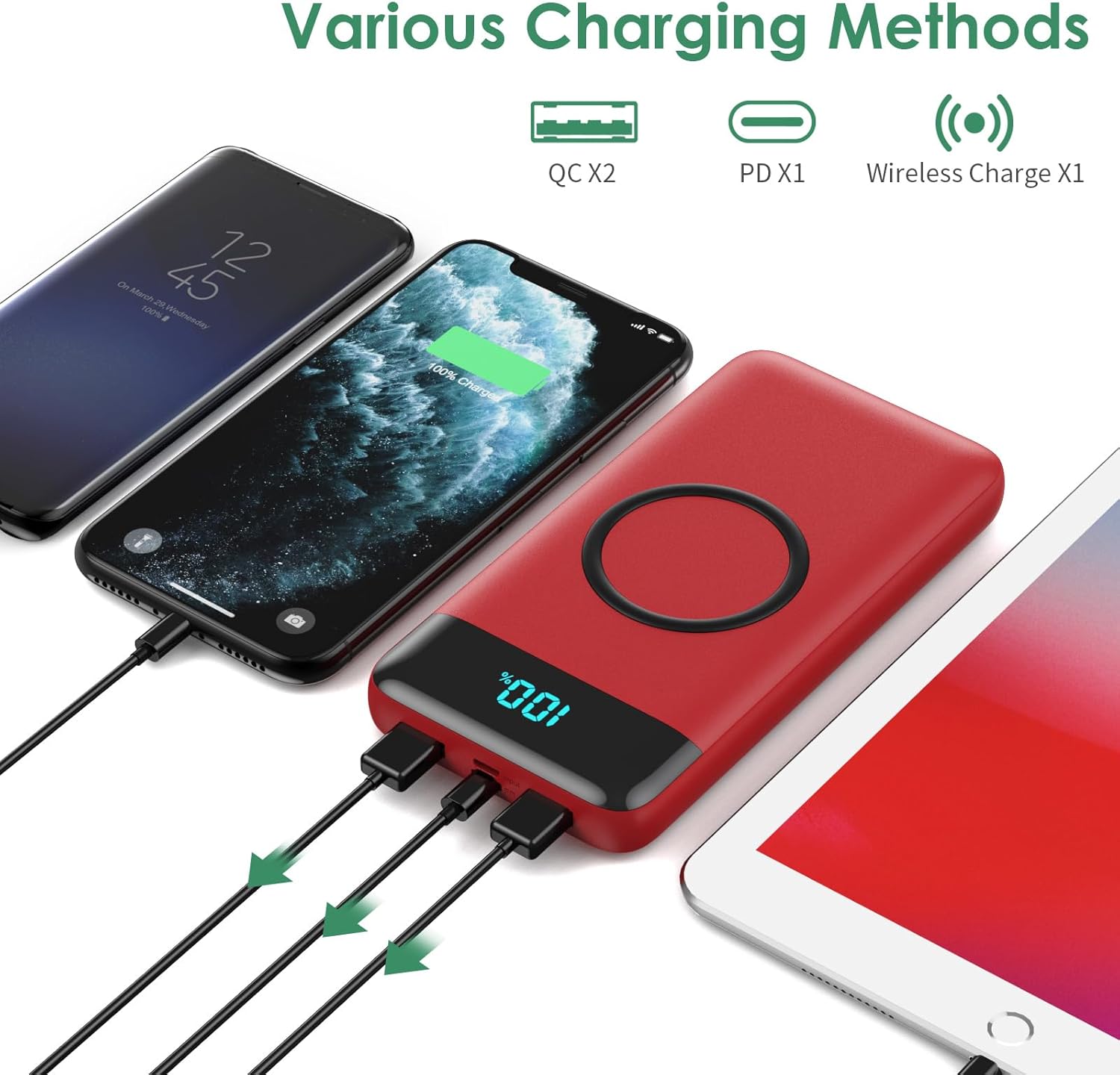
Figure 3: Fast Charging via USB-C PD Port
4.2 Wireless Charging
The power bank features a 15W Max wireless charging pad for compatible devices.
- Place your wireless charging-compatible device directly onto the wireless charging pad area of the power bank.
- Ensure the device is centered on the pad for optimal charging.
- The power bank will automatically detect and begin wireless charging.
Important Note:
- For effective wireless charging, please remove your phone case if its thickness exceeds 5mm.
- This portable charger is not suitable for wireless charging of Bluetooth headphones.

Figure 4: Wireless Charging Functionality
4.3 Simultaneous Charging
The FOCHEW HX160Q2 allows for simultaneous charging of multiple devices:
- You can wirelessly charge one device while simultaneously charging other devices via the USB-C PD port and/or the dual QC 4.0 USB-A ports.
- The power bank's intelligent chip protects your devices against overcharge, overdischarge, excessive currents, short circuits, or overheating during multi-device charging.

Figure 5: Multiple Charging Methods
5. Maintenance
To ensure the longevity and optimal performance of your FOCHEW HX160Q2 Wireless Portable Charger, follow these maintenance guidelines:
- Storage: Store the power bank in a cool, dry place away from direct sunlight and extreme temperatures.
- Cleaning: Use a soft, dry cloth to clean the surface of the power bank. Avoid using harsh chemicals or abrasive materials.
- Charging Cycles: To maintain battery health, it is advisable to fully discharge and recharge the power bank at least once every three months if not in regular use.
- Avoid Physical Damage: Do not drop, crush, or expose the power bank to excessive force.
6. Troubleshooting
If you encounter any issues with your FOCHEW HX160Q2, please refer to the following common troubleshooting tips:
- Device not charging:
- Ensure the power bank is sufficiently charged. Check the LED display.
- Verify that the charging cable is securely connected to both the power bank and your device.
- Try a different charging cable or port to rule out cable or port issues.
- Wireless charging not working:
- Confirm your device is compatible with wireless charging.
- Remove any phone cases thicker than 5mm, as they can interfere with wireless charging.
- Ensure your device is properly aligned and centered on the wireless charging pad.
- Slow charging:
- Ensure you are using a fast-charging compatible cable and your device supports fast charging.
- Check if multiple devices are being charged simultaneously, which may distribute the power.
- Power bank not recharging:
- Ensure the input cable is correctly connected to the power bank's input port and the wall adapter.
- Try a different wall adapter or power source.
If the issue persists after trying these steps, please contact FOCHEW customer support for further assistance.
7. Specifications
| Feature | Specification |
|---|---|
| Model Number | HX160Q2 |
| Battery Capacity | 30,800mAh (Lithium Polymer) |
| USB Input (Type-C PD 3.0) | 5V/3A |
| USB Input (Micro USB) | 5V/2.1A |
| USB Output (Type-C PD 3.0) | 5V/3A |
| USB Output (Dual QC 4.0) | 5V/3A |
| Wireless Output | 5W, 7.5W, 10W, 15W Max |
| Max Power Output | 25W |
| Product Dimensions | 6 x 2 x 1 inches (5.9 x 2.9 x 0.6 inches) |
| Item Weight | 12.7 ounces (360 g) |
| Special Features | Wireless Charging, LCD Display, Ultra-large capacity |
| Connector Type | Micro USB, USB Type C |
| Manufacturer | Dongguan Haoxun Electronic Technology Co.,Ltd |
8. Warranty and Support
FOCHEW stands behind the quality of its products. Your HX160Q2 Wireless Portable Charger comes with the following:
- 24-Month Warranty: Covers manufacturing defects and ensures product reliability.
- 60-Day Money Back Guarantee: For your peace of mind.
- Lifetime Technical Support: Our dedicated support team is available to assist you with any questions or issues you may encounter.
For any inquiries or support needs, please feel free to contact us. We are committed to providing friendly and easy-to-reach assistance.
