
ACPOTEL PF2L
ACPOTEL PF2L Golf Rangefinder User Manual
Model: PF2L | Brand: ACPOTEL
Introduction
This manual provides detailed instructions for the safe and effective use of your ACPOTEL PF2L Golf Rangefinder. Please read this manual thoroughly before operating the device and retain it for future reference.
Safety Information
- Do not look directly into the laser aperture.
- Do not aim the device at the sun or other strong light sources.
- Keep out of reach of children.
- Do not disassemble or modify the device.
- Use only the specified charging cable.
- Avoid extreme temperatures and humidity.
The ACPOTEL PF2L is an eye-safe Class 1 laser product.
Package Contents
Verify that all items are present in your package:
- ACPOTEL PF2L Rangefinder
- Storage Case
- USB-C Charging Cable
- Lens Cleaning Cloth
- User Manual (this document)

Image: The ACPOTEL PF2L rangefinder, its grey storage case, a black USB-C charging cable, and a white lens cleaning cloth, illustrating the complete package contents.
Product Overview
The ACPOTEL PF2L is a compact and lightweight laser rangefinder designed for golf and disc golf, featuring a 6x magnification and an external LCD screen.

Image: The ACPOTEL PF2L rangefinder in black and white, shown alongside its grey protective case and a black USB-C charging cable.
Key Features
- 6x Magnification
- External LCD Screen
- Slope Compensation with On/Off Switch
- Flag-Lock with Vibration
- Continuous Scan Mode
- AH Mode for Disc Golf (measures distance and vertical height in feet)
- Magnetic Mount (on some models, check your specific unit)
- USB-C Rechargeable Battery

Image: A graphic illustrating the 6.5x24MM magnification and objective lens specifications of the rangefinder.
Setup
Charging the Battery
The ACPOTEL PF2L features a built-in rechargeable lithium battery.
- Connect the supplied USB-C charging cable to the rangefinder's charging port.
- Connect the other end of the cable to a USB power source (e.g., computer, wall adapter).
- The charging indicator will show the charging status. A full charge typically takes a few hours.
- Disconnect the cable once fully charged.
First Use
Before first use, ensure the device is fully charged.
Operating Instructions
Power On/Off
To power on the device, press the Power/Measurement button. The display will activate. The device will automatically power off after a period of inactivity to conserve battery.
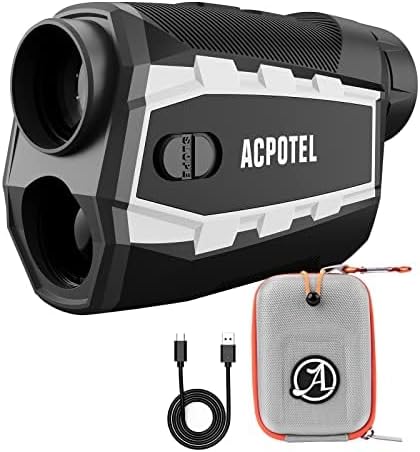
Image: A golfer using the ACPOTEL PF2L rangefinder on a course, with an overlay indicating measurement capabilities up to 730m, 2400ft, or 800yd.
Measurement Modes
The PF2L offers several measurement modes for various applications. Press the Mode button to cycle through the available modes.
Standard Measurement / Scan Mode
Press and hold the Power/Measurement button to activate continuous scanning. This allows you to scan across multiple targets and get real-time distance readings. Release the button to lock onto a specific target.
Flag-Lock with Vibration
In this mode, the rangefinder will prioritize the closest target, typically the flagstick, and vibrate to confirm a successful lock. This helps to avoid ranging background objects.
Slope Compensation Mode
The slope compensation feature calculates the "plays like" distance, adjusting for uphill or downhill terrain.

Image: Diagrams illustrating how slope compensation works for both uphill and downhill measurements, showing linear distance, ballistic distance, and angle.
The PF2L features a physical slope switch. Slide the switch to enable or disable slope compensation as required by golf rules or personal preference.
AH Mode (Auto High Mode) for Disc Golf
This mode is specifically designed for disc golf, providing both distance and vertical height measurements in feet.

Image: A graphic detailing the AH Mode, an Auto High Mode, specifically for disc golf, which measures distance and vertical height in feet, showing an example of a disc golf basket and a tree.
Unit Switching (Feet/Yard/Meter)
The ACPOTEL PF2L supports measurements in feet, yards, and meters. To switch between units, short press the 'M' (Mode) button while the device is on. The external LCD screen will display the current unit.

Image: Three circular diagrams showing the rangefinder's internal display for measurements in meters (m), yards (Yd), and feet (ft), highlighting distance, aiming reticle, vertical height, and angle.
External LCD Screen
The external LCD screen provides clear, real-time display of measurements, including distance, angle, and unit of measure, without needing to look through the eyepiece.
Maintenance
Cleaning
Use the provided lens cleaning cloth to gently wipe the lenses. For stubborn dirt, a small amount of lens cleaning solution can be applied to the cloth, not directly to the lens.
Clean the body of the rangefinder with a soft, damp cloth. Do not use abrasive cleaners or solvents.
Storage
When not in use, store the rangefinder in its protective case in a cool, dry place, away from direct sunlight and extreme temperatures.
Ensure the device is fully charged before long-term storage to maintain battery health.
Troubleshooting
Device does not power on:
- Ensure the battery is charged. Connect to a power source and try again.
- If the device has been stored for a long time, it may require a longer charging period.
Inaccurate measurements:
- Ensure the target is within the measuring range (9 feet to 1200 feet / 3-1000 yards).
- Check for obstructions between the rangefinder and the target.
- Ensure the lens is clean.
- Environmental factors like fog or heavy rain can affect accuracy.
Cannot switch units (feet/yard/meter):
- Ensure the device is powered on.
- Press the 'M' (Mode) button firmly and briefly.
No vibration on Flag-Lock:
- Ensure you are in Flag-Lock mode.
- The target may not be clearly isolated from the background. Try re-aiming.
Specifications
| Feature | Detail |
|---|---|
| Model Name | PF2L |
| Magnification | 6x |
| Measuring Range | 9 feet to 1200 feet (3-1000 yards) |
| Color | Black (ft+yd+m) |
| Material | Plastic |
| Battery Type | Lithium (Rechargeable) |
| Water Resistance Level | Water Resistant (IPX4) |
| Product Dimensions | 4.6"L x 3.1"W x 1.6"H |
| Item Weight | Approximately 7.4 ounces |
Warranty and Support
Warranty Information
The ACPOTEL PF2L Rangefinder comes with a 1-year warranty from the date of purchase. This warranty covers manufacturing defects and malfunctions under normal use. It does not cover damage caused by misuse, accidents, unauthorized repairs, or normal wear and tear.
Customer Support
For technical assistance, warranty claims, or any questions regarding your ACPOTEL PF2L Rangefinder, please contact ACPOTEL customer support. Refer to the contact information provided on the product packaging or the official ACPOTEL website.
You can also visit the official ACPOTEL store on Amazon for more information: ACPOTEL Amazon Store.
Important Notes
This device is designed for measuring distances in outdoor environments. Performance may vary in adverse weather conditions or when targeting non-reflective surfaces.
While the product description mentions "Magnetic Golf Rangefinder", the specific color variant in the product data is "Black(ft+yd+m)(Not magnet)". Please verify if your specific unit includes a magnetic mount.

Image: A composite image highlighting key features: Magnetic Mount, Continuous Remote Measurement (1000 yards, 0.3s scan), Easy Confirm (vibration), Unit Switch (FT/YD/M), Ergonomics and Lightweight (7.4 ounces), and suitability for various occasions (golf, hunting, bird watching, engineering).
Video Resources
No official seller videos were found with specific URLs and creator type information in the provided data to embed directly. Please refer to the product page on Amazon for any available video demonstrations.
Related documentsPF2L

Ask a question about this manual
Ask about setup, troubleshooting, compatibility, parts, safety, or missing instructions. Manuals+ will review the question and use this page’s manual context to help answer it.