
Sigma Rox 12.1 Evo
Sigma Rox 12.1 Evo GPS Bike Computer User Manual
Model: Rox 12.1 Evo
Introduction
The Sigma Rox 12.1 Evo is an advanced GPS bike computer designed for cyclists seeking comprehensive navigation, training, and performance tracking. This device offers a full-color display, intuitive interface, and robust connectivity options to enhance your cycling experience. It comes equipped with various sensors to provide accurate data for speed, cadence, and heart rate.

Figure 1: Front view of the Sigma Rox 12.1 Evo GPS Bike Computer, highlighting its display and sleek design. The device is white with a black screen, showing a navigation map with altitude and distance information.
Setup
1. Unboxing and Package Contents
Carefully unbox your Sigma Rox 12.1 Evo. Verify that all components are present as listed below:
- Sigma Rox 12.1 Evo Bike Computer
- Long Butler Mount
- GPS Mount
- Magnetless Speed Sensor
- Magnetless Cadence Duo Sensor
- R1 Duo Transmitter + Chest Strap (for heart rate)
- Mounting Hardware
- USB-C Cable
- Lanyard
- Quick Start Guide

Figure 2: All items included in the Sigma Rox 12.1 Evo Sensor Set package, laid out clearly. This includes the bike computer, various sensors, mounts, and cables.
2. Charging the Device
Before first use, fully charge the device. Connect the supplied USB-C cable to the charging port on the Rox 12.1 Evo and to a USB power source (e.g., computer or wall adapter). A full charge provides approximately 14 hours of battery life.
3. Mounting the Bike Computer
The Rox 12.1 Evo can be mounted on your handlebars using the provided Long Butler or standard GPS mount. Choose the mount that best suits your riding style and visibility preference.
- Securely attach the chosen mount to your bicycle's handlebars using the provided mounting hardware.
- Ensure the mount is stable and does not obstruct your view or control of the bike.
- Slide the Rox 12.1 Evo onto the mount until it clicks securely into place.

Figure 3: The Sigma Rox 12.1 Evo bike computer securely mounted on a bicycle's handlebars, ready for use. This demonstrates the typical mounting position for optimal viewing during rides.
4. Sensor Pairing
The Rox 12.1 Evo automatically detects and pairs with compatible sensors. Ensure your sensors (speed, cadence, heart rate) are active and within range during the initial setup.
- Speed Sensor: Attach the magnetless speed sensor to your wheel hub.
- Cadence Sensor: Attach the magnetless cadence duo sensor to your crank arm.
- Heart Rate Sensor: Wear the R1 Duo Transmitter with the chest strap around your chest.
- Navigate to the sensor settings on your Rox 12.1 Evo and initiate a search for new sensors. Follow the on-screen prompts to complete pairing.
5. Initial Setup and App Connection
Upon first power-on, the device will guide you through basic setup steps, including language, time, and user profiles. For advanced features and data analysis, download the official Sigma Ride app on your smartphone and connect your Rox 12.1 Evo via Bluetooth. This allows for easy data transfer, route planning, and firmware updates.
Operating Instructions
1. Basic Navigation and Display
The Rox 12.1 Evo features a vibrant 3-inch LCD display, providing clear visibility of your route and data. The device offers innovative map navigation with full-color, turn-by-turn routing.

Figure 4: The Sigma Rox 12.1 Evo displaying its navigation capabilities, including various options for route planning such as Address, Draw My Route, Coordinates, Favorite, Point of Interest, Point on Map, and Recent destinations. It emphasizes full-color, turn-by-turn routing.
You can navigate through menus using the physical buttons on the side of the device or via the touchscreen interface. The main screen typically displays key metrics like speed, distance, altitude, and a map view.

Figure 5: An illustration of the Sigma Rox 12.1 Evo's 3.0-inch screen and its physical dimensions (Depth: 21mm, Height: 95mm, Width: 57mm), providing a clear understanding of its compact size.
2. Key Functions and Features
The Rox 12.1 Evo boasts over 150 functions, offering a comprehensive suite for cyclists:
- Innovative Map Navigation: Detailed maps and precise turn-by-turn directions.
- Professional Training System: Track and analyze your performance with various metrics.
- E-bike Ready: Compatible with e-bike systems for integrated data display.
- Smart Connectivity: Seamless connection to sensors, smartphones, and third-party platforms.
- Intuitive Interface: User-friendly design for easy operation.
- Powerful Hardware: Ensures reliable performance and data processing.

Figure 6: A visual representation of the Sigma Rox 12.1 Evo's key highlights, emphasizing its "150+ Functions" including innovative map navigation, professional training system, e-bike readiness, smart connectivity, intuitive interface, and powerful hardware.
3. Individual Sport Profiles
Customize your riding experience by setting up individual sport profiles. This allows you to tailor data fields, navigation settings, and sensor configurations for different types of cycling, such as Road Bike (RDB), Mountain Bike (MTB), E-Bike (EBI), Gravel (GRV), and Indoor Cycling (ICY).

Figure 7: The Sigma Rox 12.1 Evo displaying its customizable individual sport profiles, such as Road Bike, Mountain Bike, E-Bike, Gravel, and Indoor Cycling, allowing users to personalize settings for various activities.
4. Special Functions
The device includes advanced safety and convenience features:
- Crash Detection: In the event of a fall, the device can detect a crash and prompt you to confirm your safety. If no response, it can alert pre-set emergency contacts.
- Food/Drink Alarm: Set reminders to ensure you stay hydrated and fueled during long rides.
- Smart Notifications: Receive notifications from your smartphone directly on the device display.
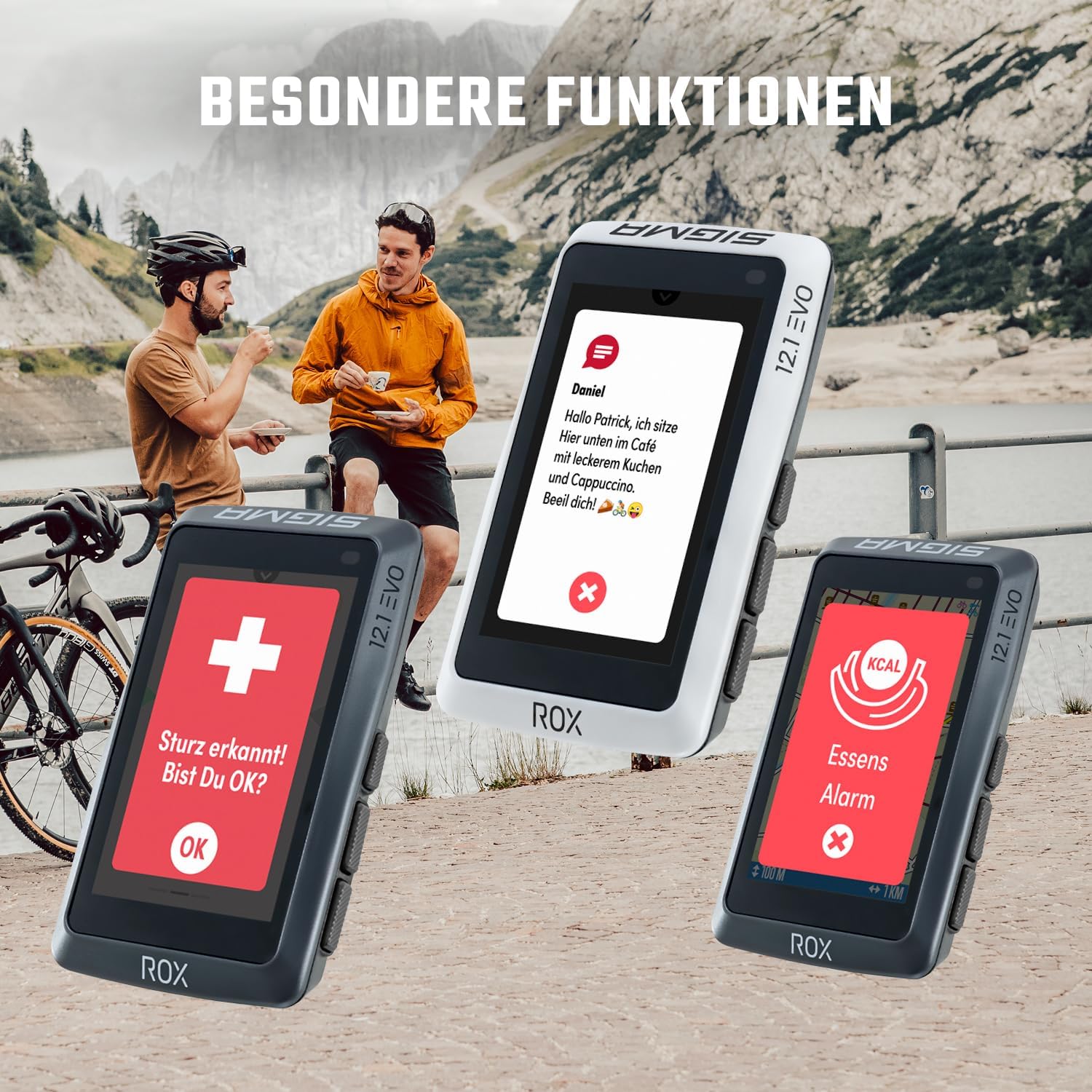
Figure 8: The Sigma Rox 12.1 Evo showcasing its special functions, including a crash detection alert ("Sturz erkannt! Bist Du OK?") and a food alarm ("Essens Alarm"), designed to enhance rider safety and well-being.
Maintenance
1. Cleaning
Regularly clean your Rox 12.1 Evo with a soft, damp cloth. Avoid using harsh chemicals or abrasive materials, which can damage the screen or casing. Ensure the USB-C port cover is securely closed to prevent water ingress.
2. Battery Care
To maximize the lifespan of the Lithium-ion battery, avoid fully discharging it frequently. Store the device in a cool, dry place when not in use, and charge it periodically if stored for extended periods.
3. Software Updates
Periodically check for firmware updates via the Sigma Ride app or Sigma's official website. Updates often include performance improvements, bug fixes, and new features.
Troubleshooting
Common Issues and Solutions
- Device does not turn on:
Ensure the device is fully charged. Connect it to a power source and wait a few minutes before attempting to power on again. If the issue persists, perform a soft reset by holding down the power button for 10-15 seconds.
- Sensors not connecting:
Check that the sensors are active and have working batteries. Ensure they are correctly installed on your bike. Go to the sensor settings on your Rox 12.1 Evo and try re-pairing them. Make sure no other devices are interfering with the signal.
- GPS signal loss:
Ensure you are in an open area with a clear view of the sky. Avoid areas with tall buildings or dense tree cover. Allow the device sufficient time to acquire a GPS signal upon startup.
- Inaccurate data readings:
Verify that your sensors are correctly calibrated and securely mounted. Check for any physical obstructions or damage to the sensors. Ensure the device firmware is up to date.
- Screen unresponsive:
Try restarting the device. If the screen remains unresponsive, perform a hard reset (refer to the full manual for specific instructions, as this may erase data).
For more detailed troubleshooting or issues not listed here, please refer to the comprehensive online manual available on the Sigma Sport website or contact Sigma customer support.
Specifications
| Feature | Detail |
|---|---|
| Brand | Sigma |
| Color | White/Opulent Garden |
| Item Weight | 109 Grams |
| Screen Size | 3 Inches |
| Display Type | LCD |
| Battery Life | 14 hours |
| Battery Composition | Lithium-ion |
| Connectivity Technology | USB |
| Mounting Type | Handlebar Mount |
| Included Components | Bike computer, Long Butler, GPS mount, Magnetless Speed Sensor, Magnetless Cadence Duo Sensor, R1 Duo Transmitter + Chest Strap, Mounting hardware, USB-C cable, Lanyard, Quick Start Guide |
Warranty and Support
The Sigma Rox 12.1 Evo comes with a standard manufacturer's warranty. Please refer to the warranty card included in your product packaging or visit the official Sigma Sport website for detailed warranty terms and conditions specific to your region.
For technical support, product inquiries, or service requests, please contact Sigma Sport customer service through their official website. They can provide assistance with setup, operation, troubleshooting, and warranty claims.
Official Website: www.sigmasport.com
Related documentsRox 12.1 Evo


Ask a question about this manual
Ask about setup, troubleshooting, compatibility, parts, safety, or missing instructions. Manuals+ will review the question and use this page’s manual context to help answer it.