
1. Introduction
This manual provides essential information for the safe and efficient operation of your DATOUBOSS 2000W 48V Pure Sine Wave Power Inverter. Please read these instructions carefully before installation and use. Keep this manual for future reference.
2. Safety Instructions
Always observe the following safety precautions to prevent injury or damage to the inverter and connected devices:
- Ensure the inverter is connected to a 48V DC power source only. Connecting to an incorrect voltage will cause damage.
- Do not expose the inverter to rain, moisture, or extreme temperatures.
- Ensure adequate ventilation around the inverter to prevent overheating. Do not block the cooling fans.
- Do not open the inverter casing. There are no user-serviceable parts inside. Refer all servicing to qualified personnel.
- Keep flammable materials away from the inverter.
- Always connect the ground wire properly before operation.
- Disconnect the power source before making any connections or disconnections.
Protection Functions
The inverter is equipped with multiple protection features to ensure safe operation:

Image 2.1: Six Protection Circuit Functions. This image displays the various safety mechanisms integrated into the inverter, including protection against low voltage, high voltage, short circuits, overheating, overload, and reverse polarity connections.
- Low Voltage Alarm: The buzzer sounds twice at 1 Hz intervals.
- Low Voltage Protection: The buzzer sounds continuously three times at 1 Hz intervals, and output is shut off.
- Low Voltage Recovery: Output automatically restores when voltage returns to safe levels, and the buzzer stops.
- Overvoltage Protection: The buzzer sounds four times at 1 Hz intervals, and output is shut off.
- Overvoltage Recovery: Output automatically restores when voltage returns to safe levels, and the buzzer stops.
- Overheat Protection: At 80°C ±5°C, the buzzer sounds five times at 1 Hz intervals, and output is shut off.
- Overload Protection: Automatic shutdown for 10 seconds, followed by automatic recovery for 5 seconds. If overload persists, it locks after three consecutive attempts.
- Short Circuit Protection: Immediate shutdown for 1 second, then locks.
3. Package Contents
Verify that all items are present in the package:
- 1 x DATOUBOSS 2000W 48V Pure Sine Wave Power Inverter
- 2 x Connection Cables (for DC input)
- 1 x User Manual (this document)
- 1 x Remote Control
4. Product Overview
Familiarize yourself with the components of your inverter:

Image 4.1: Inverter Front Panel and Connections. This image highlights the various input/output ports, the digital display, power switch, ground wire connection, and the internal heat dissipation fans.
Key Features:
- Pure Sine Wave Output: Provides clean and stable power suitable for sensitive electronics.
- High Power Output: 2000W continuous power, 4000W peak power.
- Multiple Output Ports: Two EU standard AC outlets, two 5V 2.1A USB ports, one QC3.0 fast charging port, and one Type-C port.
- Efficient Cooling: Equipped with two intelligent cooling fans that activate based on temperature and load.
- Remote Control: For convenient operation from a distance.
- Digital Display: Shows input voltage, output voltage, and other operational status.
5. Specifications
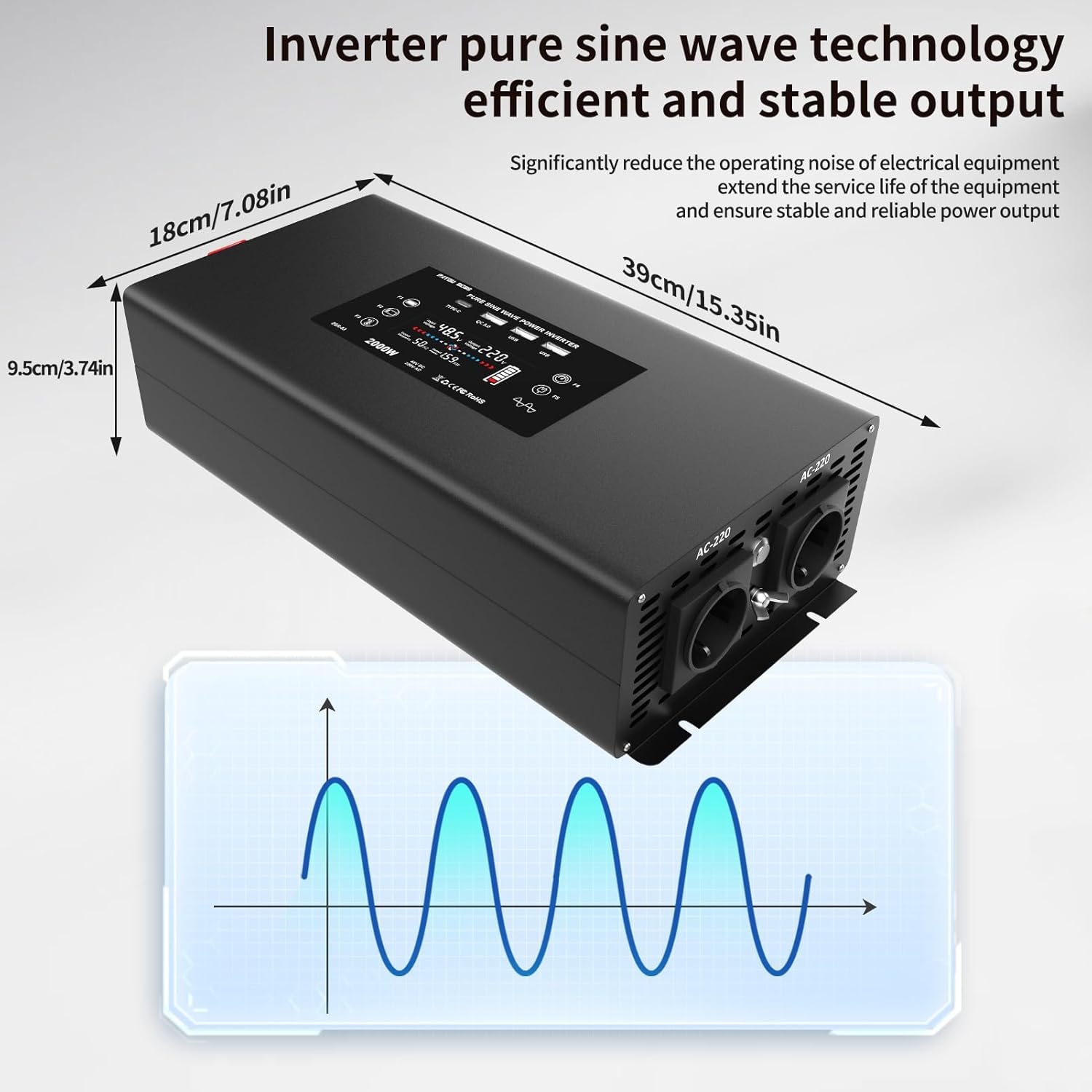
Image 5.1: Inverter Dimensions and Pure Sine Wave Output. This image provides the physical measurements of the inverter and visually represents its pure sine wave technology for stable power delivery.
| Parameter | Value |
|---|---|
| Model Number | DN03-48V-2000W |
| Nominal Input Voltage | 48V DC (40-60V DC) |
| Nominal Output Voltage | 220-240V AC |
| Continuous Power | 2000 Watts |
| Peak Power | 4000 Watts |
| Output Waveform | Pure Sine Wave |
| Waveform THD | ≤3% |
| No-Load Current | 0.8A |
| Conversion Efficiency | ≥90% |
| Input Overvoltage Protection | 60V ±0.3V DC |
| Input Undervoltage Protection | 40V ±0.3V DC |
| Overheat Protection | 80°C ±5°C |
| Cooling Method | Fan Cooling |
| Product Dimensions (L x W x H) | 39 cm x 18 cm x 9.5 cm |
| Product Certification | CE, FCC, RoHS |
| Color | Black |
6. Installation and Setup
Follow these steps for proper installation:
- Choose a Location: Select a dry, well-ventilated area away from direct sunlight, heat sources, and flammable materials. Ensure sufficient space around the inverter for airflow.
- Mounting: Securely mount the inverter on a stable surface using appropriate fasteners.
- DC Input Connection:
- Ensure the inverter's power switch is OFF.
- Connect the supplied DC cables to the inverter's DC input terminals. Ensure correct polarity: red cable to positive (+), black cable to negative (-).
- Connect the other ends of the DC cables to your 48V battery bank. Again, ensure correct polarity. Tighten all connections securely to prevent loose contacts and arcing.
- Grounding: Connect the inverter's ground terminal to a reliable earth ground using a suitable ground wire. This is crucial for safety.
- Initial Power-Up: After all connections are secure, switch on the 48V DC power source (e.g., battery switch). Then, press the power button on the inverter or use the remote control to turn it ON. The display should illuminate, indicating operational status.
7. Operating Instructions
Turning On/Off:
- To Turn On: Press the power button on the inverter or the ON button on the remote control. The display will show input/output voltage.
- To Turn Off: Press the power button on the inverter or the OFF button on the remote control. The display will turn off.
Connecting AC Devices:
The inverter provides two EU standard AC outlets. Ensure the total power consumption of your devices does not exceed 2000W.
- Plug your AC appliances into the AC outlets on the inverter.
- Turn on your appliances.
Using USB Charging Ports:
The inverter features two standard USB ports (5V 2.1A), one QC3.0 fast charging port, and one Type-C port.
- Connect your USB-compatible devices (e.g., smartphones, tablets) to the appropriate USB or Type-C port.
- The inverter will automatically provide power for charging.

Image 7.1: Wide Compatibility. This image illustrates the diverse range of appliances and devices that can be powered by the inverter, including laptops, coffee machines, and various household electronics.
Remote Control Operation:
The included remote control allows you to power the inverter on and off from a distance, offering convenience, especially if the inverter is installed in a less accessible location.
- Point the remote control towards the inverter.
- Press the ON button to activate the inverter.
- Press the OFF button to deactivate the inverter.
8. Maintenance
Regular maintenance ensures optimal performance and longevity of your inverter:
- Cleaning: Periodically clean the exterior of the inverter with a dry, soft cloth. Do not use liquid cleaners or solvents.
- Ventilation: Ensure the cooling vents and fans are free from dust and obstructions. The intelligent cooling fans help dissipate heat efficiently.
- Connections: Regularly check all DC input and ground connections to ensure they are tight and free from corrosion.
- Storage: If storing the inverter for an extended period, ensure it is clean, dry, and stored in a cool, well-ventilated area. Disconnect it from the power source.
9. Troubleshooting
Refer to the following table for common issues and their solutions:
| Problem | Possible Cause | Solution |
|---|---|---|
| Inverter does not turn on | No DC input power; Loose connections; Blown fuse (external) | Check battery connections and voltage; Ensure cables are securely fastened; Check external fuses. |
| Low Voltage Alarm/Protection (Buzzer sounds 2-3 times) | Battery voltage too low (below 40V DC) | Recharge or replace the battery. Reduce load. |
| Overvoltage Protection (Buzzer sounds 4 times) | Input voltage too high (above 60V DC) | Check charging system or battery voltage. Disconnect from source if voltage is unstable. |
| Overheat Protection (Buzzer sounds 5 times) | Inverter is too hot (above 80°C) | Reduce load; Ensure proper ventilation; Clean cooling vents/fans. Allow to cool down. |
| Overload Protection | Connected load exceeds 2000W continuous power | Reduce the total load by disconnecting some appliances. The inverter will attempt to restart. |
| Short Circuit Protection | Short circuit in connected appliance or wiring | Disconnect all AC loads. Check appliances and wiring for short circuits. Restart the inverter. |
| No AC output, but inverter is ON | Appliance fault; Internal protection triggered | Check if the appliance is working correctly. Refer to protection functions above. |
If the problem persists after following these troubleshooting steps, please contact customer support.
10. Warranty and Support
Manufacturer Warranty:
This DATOUBOSS inverter comes with a 1-year manufacturer's warranty from the date of purchase. This warranty covers defects in materials and workmanship under normal use. It does not cover damage caused by misuse, accident, unauthorized modification, or improper installation.
Customer Support:
For technical assistance, warranty claims, or any questions regarding your DATOUBOSS inverter, please contact the seller or manufacturer directly. Please have your product model number (DN03-48V-2000W) and proof of purchase available when contacting support.


