
1. Safety Information
Please observe the following safety guidelines to ensure safe installation and use of your cabinet:
- Proper Installation: Ensure the cabinet is securely mounted to a sturdy wall surface to prevent falling. Use appropriate wall anchors for your wall type.
- Weight Capacity: Do not exceed the maximum weight capacity of 33 pounds (15 kg) for the entire cabinet. Distribute weight evenly.
- Pinch Points: Be cautious of pinch points when opening and closing the cabinet doors. Keep fingers clear.
- Children and Pets: Keep small children and pets away from the assembly area. Small parts can be a choking hazard.
- Ventilation: Ensure adequate ventilation in the installation area, especially if storing items that require it.
Failure to follow these instructions may result in injury or damage to the product.
2. Package Contents
Before beginning assembly, verify that all parts and hardware are present. Refer to the parts list included in your product packaging for specific component identification.
- Cabinet Panels (Top, Bottom, Sides, Back)
- Mirror Doors (x2)
- Adjustable Shelf (x1)
- Door Knobs (x2)
- Hinges and Mounting Hardware
- Wall Mounting Hardware (Screws, Anchors)
- Instruction Manual
3. Setup and Assembly
Assembly is designed to be straightforward with numbered parts and detailed instructions. It is recommended to have two people for assembly and installation.
- Prepare the Area: Clear a spacious, clean, and flat surface for assembly. Lay out all components and hardware.
- Assemble the Cabinet Frame: Follow the step-by-step diagrams in the included instruction booklet to connect the side panels, top, and bottom panels using the provided fasteners.
- Install the Back Panel: Secure the back panel to the assembled frame. Ensure it is properly aligned.
- Attach Hinges and Doors: Mount the hinges to the cabinet frame and then attach the mirror doors. Adjust hinges as needed for proper door alignment.
- Install Door Knobs: Secure the door knobs to the mirror doors.
- Insert Adjustable Shelf: Place the adjustable shelf into the desired position within the enclosed compartment.
- Wall Mounting:
- Determine the desired mounting location on a sturdy wall.
- Mark the positions for the mounting holes on the backboard of the cabinet.
- Drill pilot holes in the wall at the marked locations. Insert appropriate wall anchors if necessary.
- Align the cabinet with the drilled holes and secure it to the wall using the provided screws. Ensure the cabinet is level and firmly attached.
Product Dimensions:
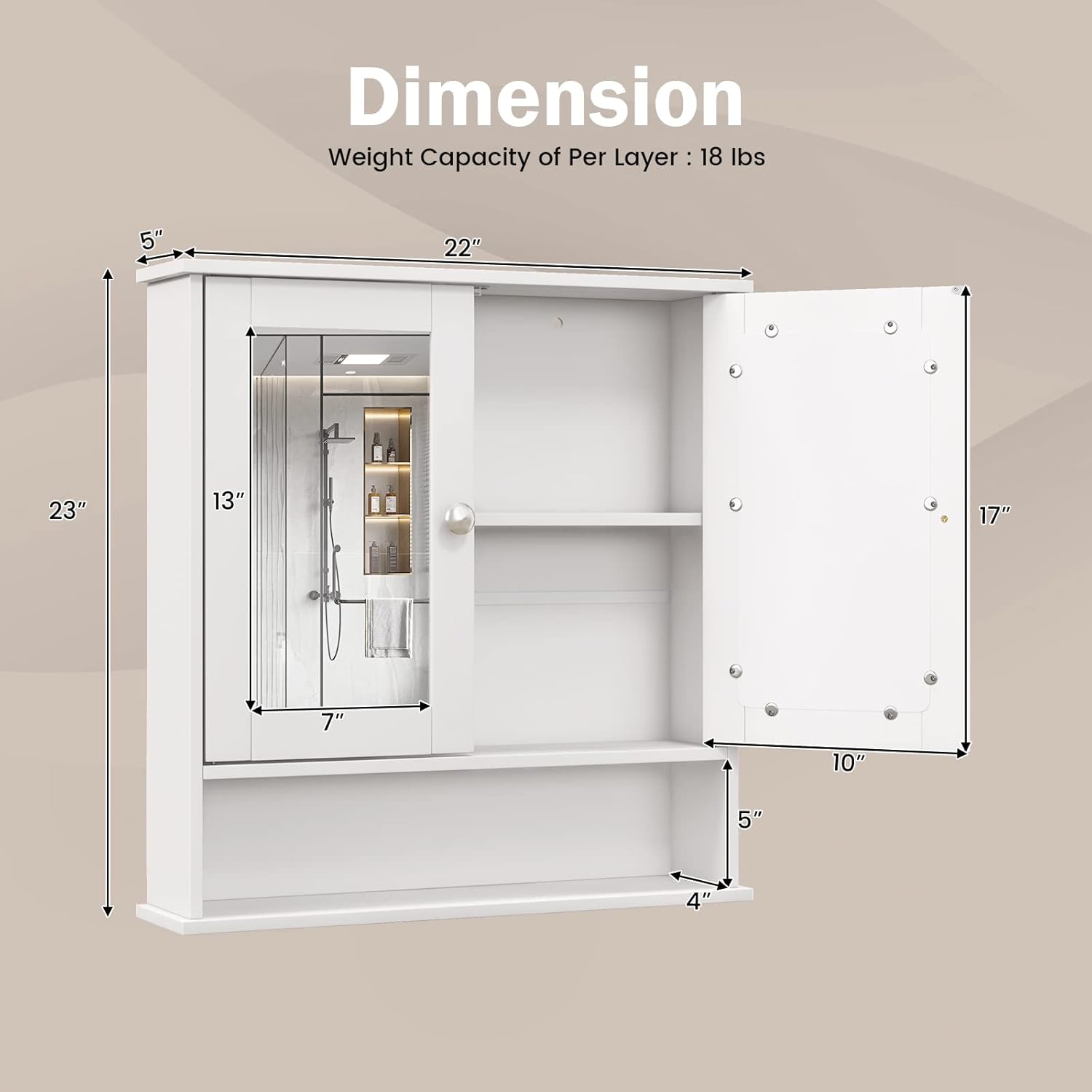
Image Description: A diagram illustrating the overall dimensions of the cabinet, including its width (22"), height (23"), and depth (5"). It also details the dimensions of the mirror doors and the open shelf.
Wall Mounting Details:

Image Description: This image highlights the two pre-drilled holes on the cabinet's backboard and demonstrates the use of mounting hardware, including a wall anchor, for secure installation.
Assembly and Usage Overview:
Video Description: This video provides a brief overview of the COSTWAY Wall Mount Bathroom Cabinet, demonstrating its appearance when installed and showcasing the interior storage space behind the mirrored doors. It illustrates the cabinet's functionality and capacity for various bathroom items.
4. Operating Instructions
Your COSTWAY Wall Mount Bathroom Cabinet is designed for convenient storage and organization.
- Opening/Closing Doors: Gently pull the metal knobs to open the mirrored doors. Push them firmly to close. The magnetic catches will hold the doors securely.
- Adjusting the Shelf: The internal shelf can be adjusted to three different height positions to accommodate items of various sizes. To adjust, carefully remove the shelf, reposition the shelf pins to the desired height, and then reinsert the shelf.
- Using the Open Compartment: The open shelf below the main cabinet provides easy access storage for frequently used items or decorative elements.
Adjustable Shelf Feature:
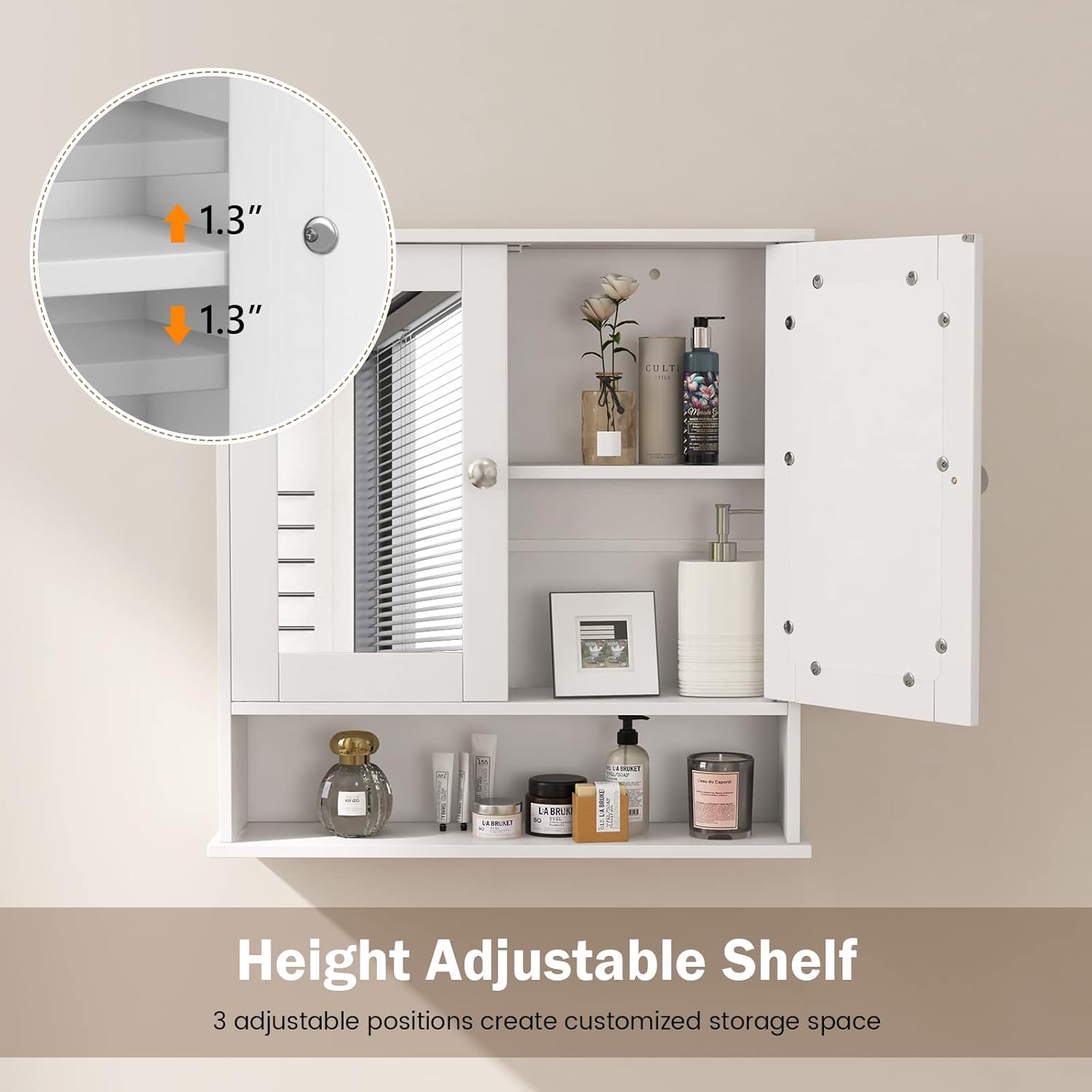
Image Description: This image focuses on the adjustable shelf feature, showing how the shelf can be moved up or down in 1.3-inch increments to customize storage space for different item heights.
Spacious Storage Capacity:

Image Description: An interior view of the cabinet with its doors open, demonstrating its capacity to store a variety of items such as skincare products, rolled towels, toiletries, and small ornaments on both the adjustable internal shelf and the open bottom compartment.
5. Maintenance
Regular maintenance will help preserve the appearance and functionality of your cabinet.
- Cleaning the Cabinet: The cabinet features a waterproof surface for easy cleaning. Wipe surfaces with a soft, damp cloth. Avoid abrasive cleaners or harsh chemicals that could damage the finish.
- Cleaning Mirrors: Use a standard glass cleaner and a soft, lint-free cloth to clean the mirror surfaces. Spray cleaner onto the cloth, not directly onto the mirror, to prevent liquid from seeping into edges.
- Hardware Check: Periodically check all screws and fasteners to ensure they remain tight. Tighten if necessary to maintain stability.
- Avoid Excessive Moisture: While the surface is water-resistant, avoid prolonged exposure to excessive moisture to prevent damage to the engineered wood.
Durable and Easy to Clean Features:

Image Description: This image displays two key features: a close-up of the durable P2 MDF board construction and a visual representation of the waterproof surface being easily wiped clean, emphasizing the cabinet's low maintenance.
6. Troubleshooting
If you encounter any issues with your cabinet, refer to the following common solutions:
- Doors Not Aligning: Check the hinge adjustments. Most hinges allow for minor adjustments to align doors horizontally, vertically, and for depth. Refer to the hinge manufacturer's instructions if specific adjustments are needed.
- Cabinet Feels Unstable: Ensure all wall mounting screws are securely tightened. Verify that the wall anchors are appropriate for your wall type and installed correctly. If possible, add additional mounting points for increased stability.
- Shelf Wobbles: Ensure the shelf pins are fully inserted into the pre-drilled holes and that the shelf rests evenly on all four pins.
- Difficulty Closing Doors: Check for any obstructions inside the cabinet. Ensure the magnetic catches are properly aligned and functioning.
If problems persist, contact COSTWAY customer support for further assistance.
7. Specifications
| Feature | Detail |
|---|---|
| Brand | COSTWAY |
| Model Name | Bathroom Cabinet Wall Mounted |
| Model Number | 7396-CYBA |
| Color | White |
| Material | Engineered Wood (P2 MDF Board) |
| Product Dimensions | 22"W x 5"D x 23"H (55.9 cm W x 12.7 cm D x 58.4 cm H) |
| Item Weight | 13.5 Pounds (6.1 kg) |
| Maximum Weight Capacity | 33 Pounds (15 kg) |
| Mounting Type | Wall Mount |
| Number of Doors | 2 (Mirrored) |
| Number of Shelves | 1 (Adjustable) |
| Special Features | Adjustable Shelf, Easy Assembly, Waterproof Surface, Sleek Metal Knobs, Magnetic Catch |
8. Warranty and Support
For warranty information, please refer to the specific warranty card or documentation included with your product at the time of purchase. Warranty terms and conditions may vary.
If you require assistance with assembly, parts replacement, or have any questions regarding your COSTWAY Wall Mount Bathroom Cabinet, please contact COSTWAY customer support through the retailer where the product was purchased or visit the official COSTWAY website for contact details.
Please have your model number (7396-CYBA) and purchase details ready when contacting support.


