
1. Introduction
Thank you for choosing the Yeelight Smart Ceiling Light YLXDD-0030. This smart ceiling light offers a sleek design, versatile lighting options, and smart control capabilities. Please read this manual thoroughly before installation and use to ensure proper operation and safety.

Image 1.1: The Yeelight Smart Ceiling Light YLXDD-0030, showcasing its minimalist, ultra-slim design.

Image 1.2: Overview of the Yeelight Ultra Slim Smart Ceiling Light, highlighting its 25mm slim body, IP54 water resistance, 16 million colors, quick change installation, smart control, and high CRI. It is compatible with Google Home, Apple Home, Alexa, and SmartThings.
2. Safety Information
- Always turn off the power supply at the main circuit breaker before installation or maintenance.
- Installation should be performed by a qualified electrician or in accordance with local electrical codes.
- Do not install the product in damp environments or near heat sources.
- Ensure the mounting surface is sturdy enough to support the weight of the fixture.
- Do not disassemble or modify the light fixture.
- Keep out of reach of children.
3. Package Contents
Please check the package contents upon opening. If any items are missing or damaged, contact your retailer.
- Yeelight Smart Ceiling Light YLXDD-0030
- Mounting Bracket
- Screws and Wall Plugs
- User Manual
4. Setup and Installation
Follow these steps for safe and proper installation of your Yeelight Smart Ceiling Light.
- Power Off: Ensure the main power supply to the installation area is turned off at the circuit breaker.
- Prepare Mounting Surface: Mark the drilling positions on the ceiling using the mounting bracket as a template.
- Drill Holes: Drill holes at the marked positions and insert the wall plugs.
- Attach Mounting Bracket: Secure the mounting bracket to the ceiling using the provided screws.
- Connect Wiring: Connect the live (L), neutral (N), and ground wires from your ceiling to the corresponding terminals on the light fixture. Ensure connections are secure.
- Mount Light Fixture: Align the light fixture with the mounting bracket and twist or slide it into place until it clicks securely. The quick-change mechanism allows for easy attachment.
- Power On: Restore power at the circuit breaker.

Image 4.1: A view of the Yeelight Smart Ceiling Light, illustrating its design when mounted on a ceiling.
5. Operating Instructions
The Yeelight Smart Ceiling Light offers various lighting modes and control options.
5.1 Basic Operation
- On/Off: Use a standard wall switch to turn the light on or off.
- Brightness Adjustment: Adjust brightness via the Yeelight app or compatible smart home platforms.
- Color Temperature Adjustment: Adjust the color temperature from warm white (2700K) to cool white (6500K) using the app or smart controls.
5.2 Special Lighting Modes

Image 5.1: The Yeelight Smart Ceiling Light showcasing its 16-million color mood light capabilities, creating different ambient environments in a bedroom setting.
- Color Mood Light: Access 16 million colors through the Yeelight app to create various atmospheres. The main light and mood light can be used together or separately.
- Moonlight Mode: This mode provides ultra-low brightness, emitting a soft, comfortable glow ideal for nighttime use, reducing glare and eye strain.

Image 5.2: The adjustable ceiling light providing a warm, inviting ambiance in a bedroom, demonstrating its suitability for various scenes and moods.
6. Smart Features and App Control
Unlock the full potential of your Yeelight Smart Ceiling Light through its smart features.
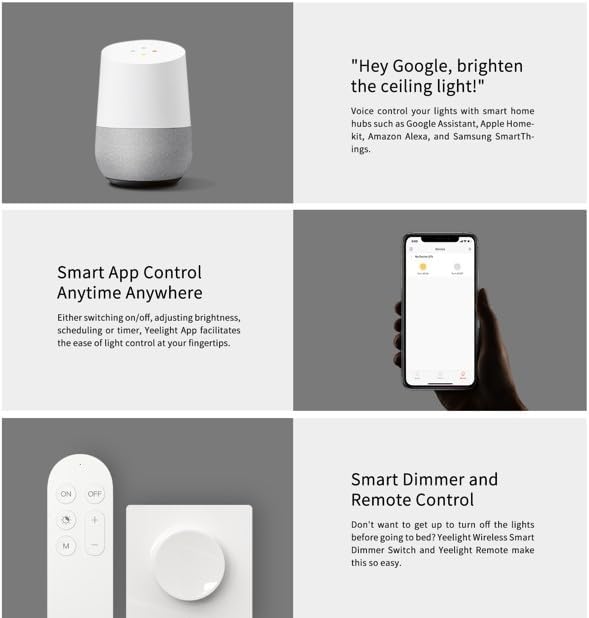
Image 6.1: Demonstrates various control methods for the Yeelight Smart Ceiling Light, including voice control via smart assistants like Google Assistant, smart app control via a mobile device, and optional physical smart dimmer and remote control accessories.
- Voice Control: Integrate with smart home hubs such as Google Assistant, Apple HomeKit, Amazon Alexa, and Samsung SmartThings for hands-free control. Simply use voice commands like "Hey Google, brighten the ceiling light!"
- Smart App Control: Download the Yeelight app to your smartphone. The app allows you to switch the light on/off, adjust brightness, change color temperature, set schedules, and control the light from anywhere.
- Smart Dimmer and Remote Control: For convenient physical control, the Yeelight Wireless Smart Dimmer Switch and Yeelight Remote (sold separately) can be paired with the light.
7. Maintenance
To ensure the longevity and optimal performance of your Yeelight Smart Ceiling Light, follow these maintenance guidelines:
- Cleaning: Disconnect power before cleaning. Use a soft, dry cloth to wipe the surface of the light. Do not use abrasive cleaners, solvents, or harsh chemicals, as these can damage the finish.
- Inspection: Periodically check for any loose connections or damage to the fixture. If any issues are found, consult a qualified electrician.
- No User-Serviceable Parts: The light source is not replaceable. Do not attempt to disassemble the fixture.
8. Troubleshooting
If you encounter issues with your Yeelight Smart Ceiling Light, refer to the following common solutions:
- Light does not turn on:
- Check if the power supply is connected and the circuit breaker is on.
- Ensure the light fixture is securely mounted and wired correctly.
- Test the wall switch to confirm it is functioning.
- Light flickers or dims unexpectedly:
- Verify stable power supply.
- Check for loose wiring connections.
- Ensure the light is not exposed to extreme temperatures.
- Cannot connect to Yeelight app or smart home system:
- Ensure your Wi-Fi network is 2.4GHz (5GHz networks are often not supported by smart lights).
- Check if the light is within range of your Wi-Fi router.
- Reset the light (refer to the app for specific reset instructions, usually by cycling power multiple times).
- Ensure your phone's Bluetooth is enabled during the pairing process.
- Color or brightness control is unresponsive:
- Check app connectivity and ensure the light is online.
- Restart the Yeelight app.
- If using a physical remote, ensure its battery is not depleted.
If the problem persists, please contact Yeelight customer support.
9. Specifications
Detailed technical specifications for the Yeelight Smart Ceiling Light YLXDD-0030.

Image 9.1: Official specifications table for Yeelight Ultra Slim Smart Ceiling Light models, including YLXDD-0030, YLXDD-0033, and YLXDD-0034.
| Feature | Specification |
|---|---|
| Product Name | Yeelight Ultra Slim Smart Ceiling Light |
| Model | YLXDD-0030 (C2201C235 variant) |
| Dimensions (L x W x H) | 25.4 x 5.08 x 6.86 cm |
| Weight | 1 Kilogram |
| Rated Input | 220-240V~50/60Hz |
| Rated Power (C235) | 18 Watts |
| Color Temperature Range | 2700K-6500K |
| Luminous Flux (C235) | 1200lm@4000K |
| Operating Temperature | -20°C to +40°C |
| Operating Humidity | 0-85% RH |
| Material | Acrylic |
| Special Features | Water Resistant (IP54), Smart Control, Dimmable, Color Changing |
| Compatibility | Android 4.4 & iOS 9.0 or above |
10. Warranty and Support
Yeelight products are manufactured to high-quality standards. This product comes with a standard manufacturer's warranty. Please refer to the warranty card included in your product packaging or visit the official Yeelight website for detailed warranty terms and conditions.
For technical support, troubleshooting assistance, or warranty claims, please contact Yeelight customer service through their official website or the contact information provided in your product documentation.
Online Resources: For the latest information, FAQs, and software updates, please visit the official Yeelight website: www.yeelight.com