
YEELIGHT YLTD08YL
Contents
Yeelight V1 Pro YLTD08YL Desk Lamp User Manual
Model: YLTD08YL | Brand: YEELIGHT
1. Introduction
Thank you for purchasing the Yeelight V1 Pro YLTD08YL Desk Lamp. This manual provides detailed instructions for setting up, operating, and maintaining your new desk lamp. Please read this manual thoroughly before use to ensure proper functionality and safety.
2. Safety Information
To prevent injury or damage, please observe the following safety precautions:
- Ensure the power supply voltage matches the lamp's requirements (120 Volts).
- Do not disassemble or modify the lamp. Unauthorized modifications may void the warranty and pose safety risks.
- Keep the lamp away from water and humid environments. This product is Not Water Resistant.
- Do not expose the lamp to direct sunlight or high temperatures.
- Use only the provided power adapter.
- Clean the lamp with a soft, dry cloth. Avoid abrasive cleaners or solvents.
- If any abnormal operation occurs, immediately unplug the lamp and contact customer support.
3. Product Overview
The Yeelight V1 Pro YLTD08YL is a modern desk lamp designed for optimal illumination and user convenience. It features eye-friendly Sunlike LEDs, voice control compatibility, and remote access capabilities.

Figure 3.1: The Yeelight V1 Pro YLTD08YL Desk Lamp, showcasing its sleek design, adjustable arm, and stable round base.
Components:
- Lamp Head: Contains the LED light source and control panel.
- Adjustable Arm: Allows for flexible positioning of the lamp head.
- Main Pole: Connects the arm to the base.
- Base: Provides stability for the lamp.
- Power Adapter: For connecting the lamp to an electrical outlet.

Figure 3.2: Detailed view of the lamp's adjustable joint, highlighting its robust construction for precise light positioning.
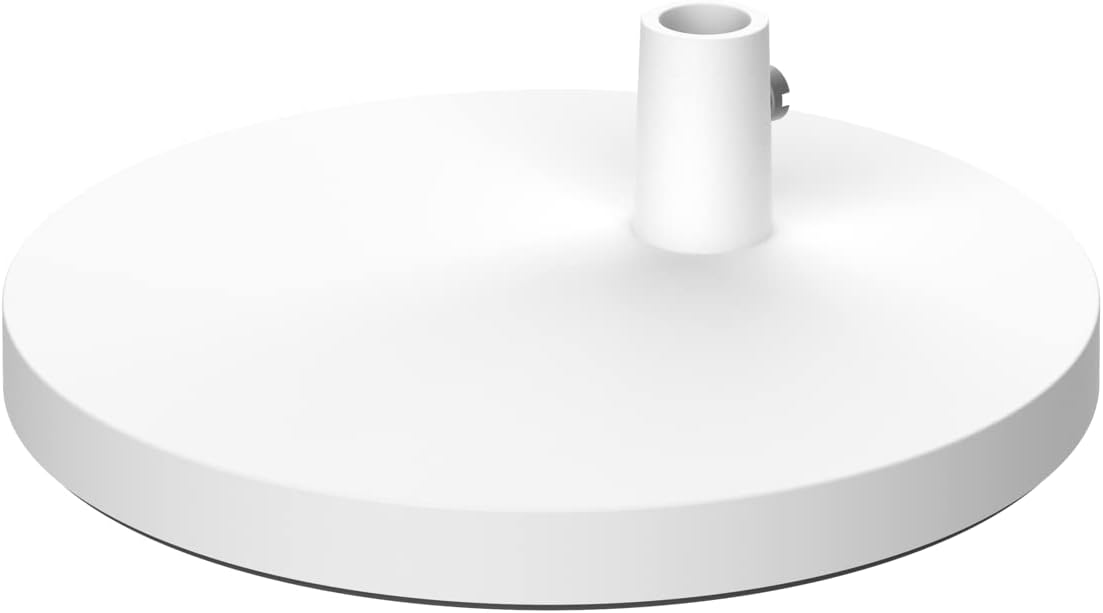
Figure 3.3: The stable, circular base of the Yeelight V1 Pro Desk Lamp, designed to provide firm support.
4. Setup
Follow these steps to set up your Yeelight V1 Pro Desk Lamp:
- Unpack: Carefully remove all components from the packaging. Ensure all parts listed in Section 3 are present.
- Assemble Base: If the lamp is not pre-assembled, attach the main pole to the base. Ensure it is securely fastened.
- Position Lamp: Place the lamp on a stable, flat surface.
- Connect Power: Insert the power adapter cable into the lamp's power port, then plug the adapter into a standard 120V electrical outlet.
- Adjust Arm: Gently adjust the lamp arm and head to your desired position.
5. Operating Instructions
The Yeelight V1 Pro offers various ways to control its functions:
5.1. On-Lamp Controls
The lamp head features a touch-sensitive control panel:
- Power Button: Tap to turn the lamp on/off.
- Brightness Adjustment: Slide your finger along the brightness bar to increase or decrease light intensity.
- Color Temperature Adjustment: Tap or slide to change the color temperature (e.g., warm white to cool white).
- Mode Button: Cycle through preset lighting modes (e.g., reading mode, focus mode).
5.2. Smart Home Integration (Wi-Fi Connectivity)
The lamp supports Wi-Fi connectivity for smart home control. Refer to the Yeelight app or your smart home platform's instructions for pairing.
- Yeelight App: Download the official Yeelight app to control the lamp remotely, set schedules, and customize lighting scenes.
- Voice Control: Compatible with popular voice assistants (e.g., Google Assistant, Apple HomeKit, Amazon Alexa, SmartThings). Enable the Yeelight skill/integration in your smart home app.
- Remote Access: Control your lamp from anywhere via the Yeelight app once connected to Wi-Fi.

Figure 5.1: The Yeelight V1 Pro Desk Lamp packaging highlighting its compatibility with Google Assistant, Apple HomeKit, SmartThings, and Amazon Alexa for smart home integration.
6. Maintenance
Proper maintenance ensures the longevity and performance of your lamp:
- Cleaning: Unplug the lamp before cleaning. Use a soft, dry, lint-free cloth to wipe the surface. Do not use liquid cleaners, sprays, or abrasive materials.
- Storage: If storing the lamp for an extended period, unplug it and store it in a cool, dry place.
- LEDs: The LEDs are integrated and not user-replaceable. Do not attempt to replace them.
7. Troubleshooting
If you encounter issues with your Yeelight V1 Pro Desk Lamp, refer to the following common problems and solutions:
| Problem | Possible Cause | Solution |
|---|---|---|
| Lamp does not turn on. | No power, loose connection, faulty outlet. | Check if the power adapter is securely plugged into both the lamp and the wall outlet. Test the outlet with another device. |
| Cannot connect to Wi-Fi. | Incorrect Wi-Fi password, lamp too far from router, router issues. | Ensure correct Wi-Fi password. Move lamp closer to router. Restart your Wi-Fi router. Follow the Yeelight app's pairing instructions carefully. |
| Light flickers or is unstable. | Unstable power supply, internal issue. | Ensure the power supply is stable. Try plugging into a different outlet. If the problem persists, contact customer support. |
| Voice control not working. | Incorrect setup, internet connectivity issues, voice assistant not linked. | Verify the lamp is connected to Wi-Fi. Ensure the Yeelight skill/integration is correctly linked in your voice assistant app. Check internet connection. |
If the problem persists after trying these solutions, please contact Yeelight customer support.
8. Specifications
| Feature | Detail |
|---|---|
| Model Number | YLTD08YL |
| Brand | YEELIGHT |
| Lamp Type | Desk Lamp |
| Item Weight | 1 Kilogram (2.2 pounds) |
| Product Dimensions | 10 x 2 x 2.7 inches |
| Voltage | 120 Volts |
| Connectivity Technology | USB |
| Connectivity Protocol | Wi-Fi |
| Mounting Type | Tabletop |
| Number of Light Sources | 1 |
| Shade Color | MULTICOLOURED |
| Water Resistance Level | Not Water Resistant |
| Style | Modern |
9. Warranty and Support
Warranty Information: For specific warranty terms and conditions, please refer to the warranty card included with your product or visit the official YEELIGHT website. Keep your purchase receipt as proof of purchase for warranty claims.
Customer Support: If you have any questions, require technical assistance, or need to report an issue, please contact YEELIGHT customer support. Contact information can typically be found on the official YEELIGHT website or within the Yeelight mobile application.
For more information, visit the Official YEELIGHT Store on Amazon.
Ask a question about this manual
Ask about setup, troubleshooting, compatibility, parts, safety, or missing instructions. Manuals+ will review the question and use this page’s manual context to help answer it.