
KXZM 01
KXZM 24V 32.8ft RGB LED Strip Light Instruction Manual
Model: 01
Product Overview
The KXZM 24V 32.8ft/10M RGB LED Strip Light is a high-brightness, flexible lighting solution designed for indoor decoration. Featuring 1200 SMD3535 LEDs, this strip provides vibrant RGB illumination with a high density of 120 LEDs per meter, ensuring even and natural light distribution. It is ideal for various applications including living rooms, bedrooms, stairways, and festive decorations.

Image: The KXZM RGB LED strip light coiled on a reel, accompanied by examples of the strip emitting various colors like red, green, blue, and purple.
Setup and Installation
Follow these steps for proper installation of your LED strip light. Please note that an RGB controller and a 24V 5A power supply are required and sold separately.
1. Preparing the Strip
- Cutting the Strip: The LED strip can be cut every 6 LEDs along the designated cutting marks. This allows for customization to fit your specific installation needs.
- Adhesion: The strip features a strong 3M adhesive backing for easy and secure application to clean, dry surfaces.
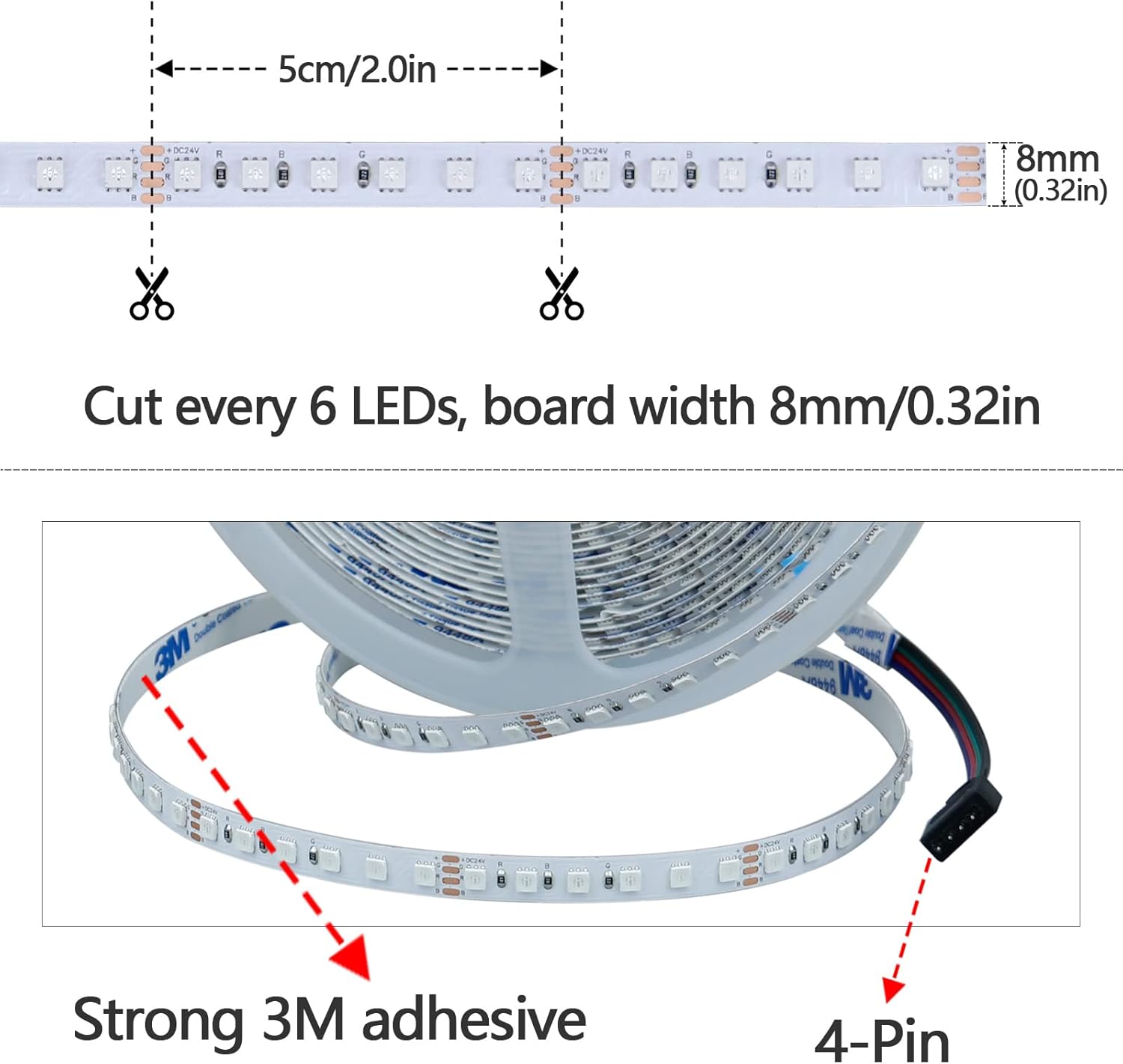
Image: A detailed diagram illustrating where the LED strip can be safely cut, marked every 6 LEDs, along with its width and segment length.
2. Connecting Components
The LED strip requires an RGB controller and a 24V 5A power supply to function. Connect the components in the following sequence:
- Connect the LED Strip Light to an RGB Controller.
- Connect the RGB Controller to a 24V 5A power supply.
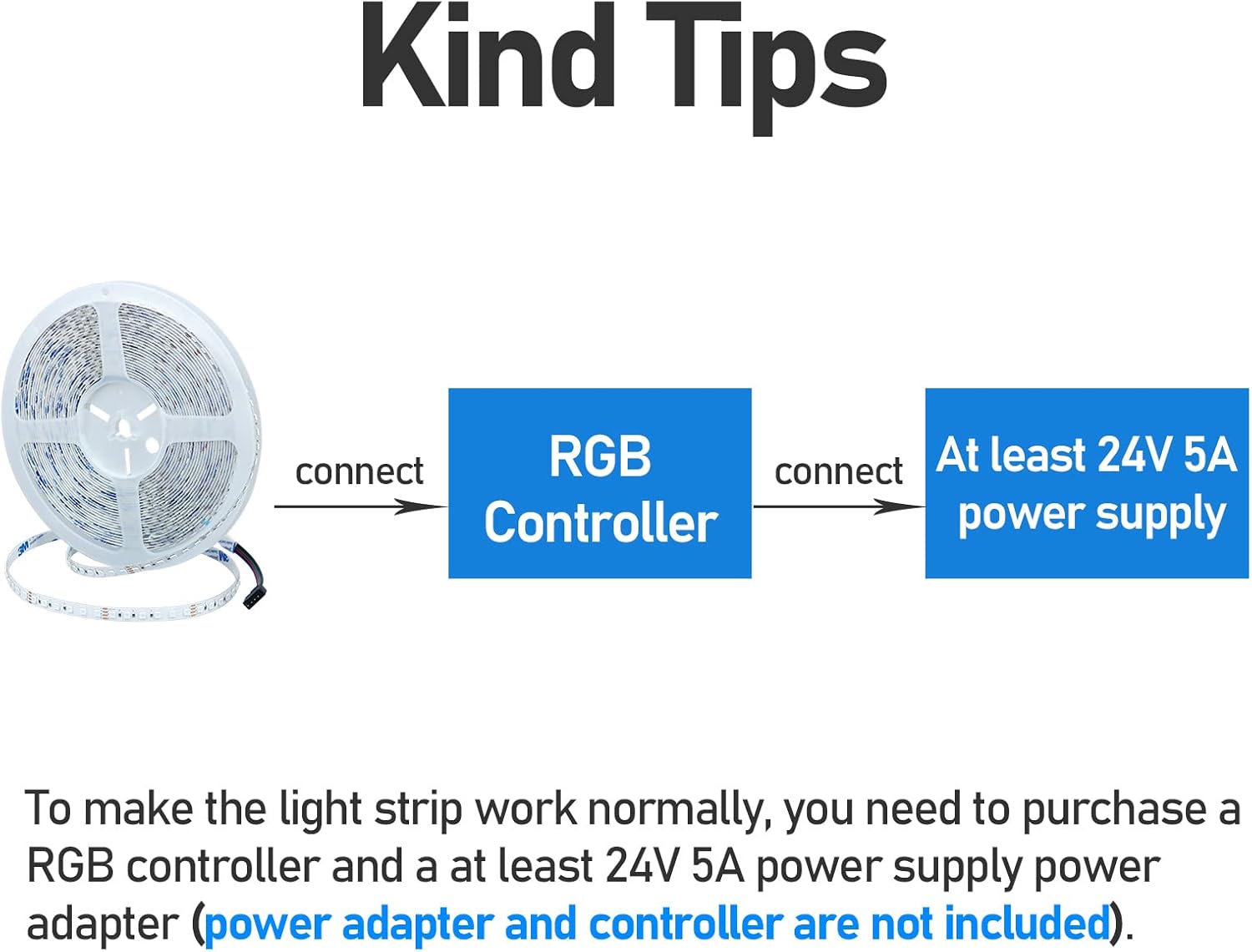
Image: A visual guide demonstrating the correct connection order for the LED strip, RGB controller, and power supply.
Important: The RGB controller and power adapter are not included with the LED strip light and must be purchased separately.
Operating Instructions
Once properly installed and connected to a compatible RGB controller and power supply, your KXZM LED strip light is ready for operation.
- Power On/Off: Use your RGB controller to turn the lights on or off.
- Color Selection: The RGB controller allows you to select various colors and color-changing modes.
- Dimming: The LED strip is dimmable. Adjust brightness levels via your RGB controller or associated app/voice control system.
- Control Methods: Depending on your RGB controller, the lights can be controlled via a dedicated app or voice commands.

Image: Examples of the LED strip light used in various decorative settings, including living rooms, stairways, and outdoor areas.
Maintenance
To ensure the longevity and optimal performance of your LED strip light, consider the following maintenance tips:
- Cleaning: Gently wipe the surface of the LED strip with a dry, soft cloth to remove dust. Avoid using harsh chemicals or abrasive materials.
- Environment: As this product has an IP20 waterproof rating, it is designed for indoor use only. Avoid exposure to water or high humidity.
- Heat Dissipation: Ensure the strip is installed on a surface that allows for proper heat dissipation. Do not operate the strip while it is still coiled on the reel, as this can lead to overheating and damage.

Image: A visual warning illustrating the danger of operating the LED strip while it is still coiled, compared to the correct method of uncoiling it to allow heat dissipation.
Troubleshooting
If you encounter issues with your KXZM LED strip light, refer to the following common troubleshooting steps:
- Lights Not Turning On:
- Verify that the 24V 5A power supply is correctly connected and receiving power.
- Ensure the RGB controller is properly connected to both the power supply and the LED strip.
- Check for any loose connections or damaged wires.
- Inconsistent Brightness or Color:
- Confirm that the power supply meets the minimum 24V 5A requirement for the full 32.8ft length.
- Ensure the strip is fully uncoiled and not overheating.
- Check the settings on your RGB controller or associated app.
- Strip is Hot:
- Immediately turn off the power.
- Ensure the strip is completely uncoiled and laid flat to allow for proper heat dissipation. Operating the strip while coiled will cause it to overheat.
- Adhesive Not Sticking:
- Ensure the installation surface is clean, dry, and smooth before applying the adhesive.
- Apply firm pressure along the strip during installation.
Specifications
| Feature | Detail |
|---|---|
| Model Number | 01 |
| Color | RGB (Red, Green, Blue) |
| LED Type | SMD3535 |
| LED Quantity | 1200 LEDs (120 LEDs/meter) |
| Length | 32.8 ft (10 meters) |
| Voltage | 24V DC |
| Max Power | 120W |
| Waterproof Rate | IP20 (Non-Waterproof, Indoor Use Only) |
| View Angle | 120° |
| Cuttable | Every 6 LEDs |
| Adhesive | Strong 3M adhesive backing |
| Control Method | App, Voice Control (with compatible controller) |
| Bulb Features | Dimmable |
| Average Life | 50,000 Hours |
| Included Components | 1 x 32.8ft/10m RGB LED Strip Light (Controller and Power Supply Not Included) |

Image: A visual comparison demonstrating the superior brightness and uniformity of light from a 120 LEDs/m strip compared to a 30 LEDs/m strip.
Warranty and Support
For any questions, technical assistance, or warranty inquiries regarding your KXZM LED Strip Light, please contact the manufacturer or refer to the official brand store.
KXZM is a brand specializing in LED home lighting, dedicated to enhancing your living spaces. For more information and support, visit the official GOMING store on Amazon:
Ask a question about this manual
Ask about setup, troubleshooting, compatibility, parts, safety, or missing instructions. Manuals+ will review the question and use this page’s manual context to help answer it.